
Templated Generator


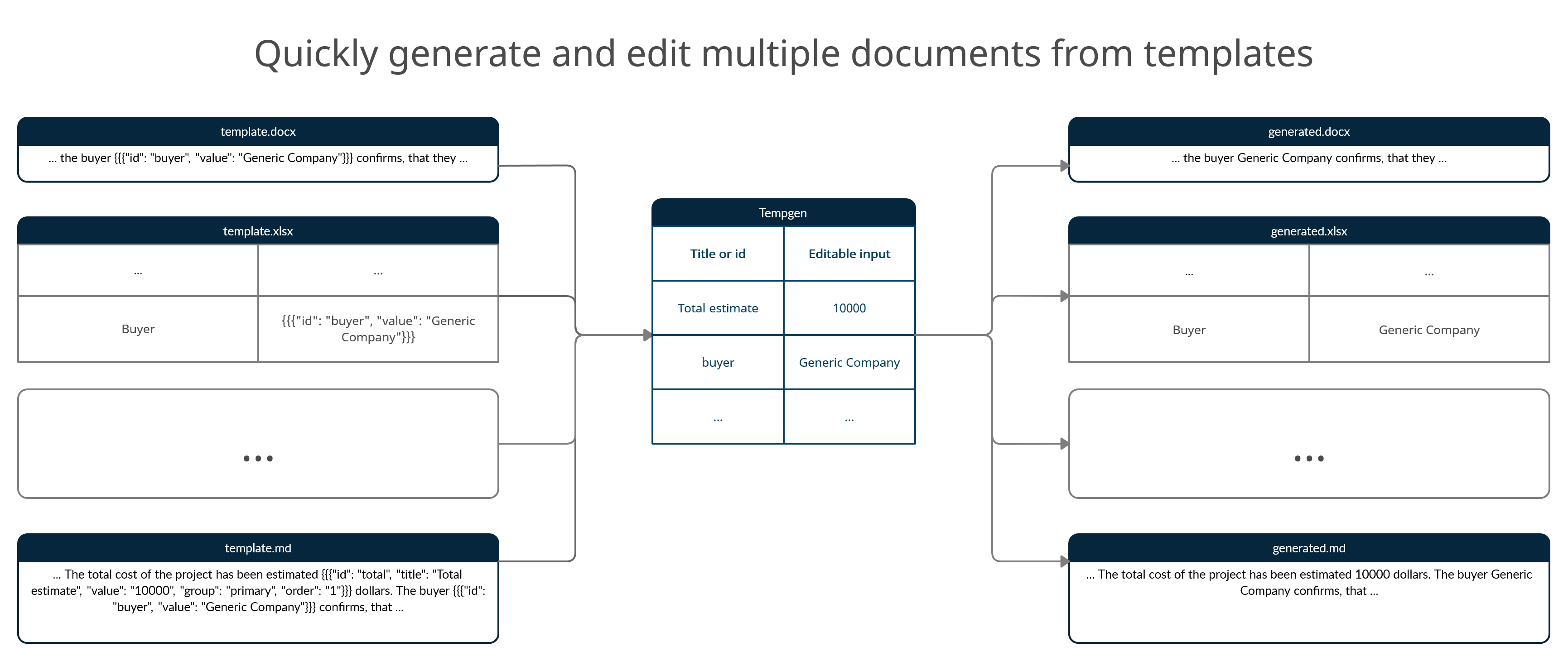
Templated generator is a utility, that allows users generate files from templates with embedded template entries that could be edited and automatically transformed, saving time that would be otherwise spend on manually editing generic documents.
The project includes python module, available on pypi, for use inside python scripts, cli and gui applications to edit template entries and quickly generate documents.
Template entries
Generally, template entries are stringified and enclosed in double curly brackets valid JSON objects. Here is an example:
{{{"id": "total", "title": "Total cost", "value": "2500", "post": [{"fn": "append", "args": [" U.S. Dollars"]}], "group": "primary", "order": "1"}}}
Minimal template entry contains id and value properties. Entry ids can be not unique and for each entry, the value specified once as replacement will be substituted and transforms (for respective entry) will be applied. This allows to edit value associated with id encountered multiple times over multiple templates only once. For instance loaded templates can contain:
{{{"id": "total", "value": "2500", "post": [{"fn": "append", "args": [" U.S. Dollars"]}]}}}
{{{"id": "total", "value": "2500", "post": [{"fn": "append", "args": ["$"]}]}}}
{{{"id": "total", "value": "2500"}}}
In GUI application all three will be represented by one input with default value of "2500". Given replacements dictionary (for cli and using as module) of { "total": "42" }, or if input in this field equals "42" (for gui application), these will be represented in generated documents as
42 U.S. Dollars
42$
42
Entry object properties
| property name | type | required | description |
|---|---|---|---|
| id | string | yes | id used to reference entry in replacements |
| title | string | no | human-readable title that will be used to represent entry field in tempgen gui |
| value | string | yes | default value that will be used as replacement if no changes are made |
| pre | array of objects | no | array of transform objects that will be applied to value property before it becomes available for editing |
| post | array of objects | no | array of transform objects that will be applied to value property on generated document save |
| group | string | no | group tag name, entries with equal group property value will be grouped together in tempgen gui |
| order | string | no | order number, used to determine entry position among other group entries in tempgen gui, entries with lower order value will appear earlier |
| autocomplete | object | no | specifies which suggestions should be displayed on user input in entry representation in tempgen_gui |
Transform object properties
Transforms available by default are listed here . These are functions, that are applied on "value" property sequentially either
- when template is loaded, if transform is in "pre" list
- when generated document is being saved, if transform is in "post" list
Transforms are provided with value (from entry) automatically, additional arguments could be provided via "args" array. Note: When using as a module, one can easily modify the dictionary by changing tempgen instance 'transforms' attribute
| property name | type | required | description |
|---|---|---|---|
| fn | string | yes | name of transform function |
| args | array of strings | no | human-readable title that will be used to represent entry field in tempgen gui |
Autocomplete object properties
| property name | type | required | description |
|---|---|---|---|
| external | string | no | full name of json file (must be in the same directory as the template it is referenced from) containing array of autocomplete suggestion strings, used to fill data property |
| data | array of strings | no | list of values that will be used in as suggestions for entry value in tempgen gui |
Getting Started
Tempgen GUI/CLI standalone executables
- Download latest tempgen_gui/tempgen_cli release
- Unpack archive to any directory
- Run tempgen_gui/tempgen_cli binary
Installation as module
To install from pypi:
pip install tempgen
Usage as module
from tempgen.module import Tempgen

t = Tempgen() # create new independent tempgen instance

t.transforms.keys() # get list of supported transforms, you can add new on the fly, by setting t.transforms dictionary key to desired function name and value to this function
# dict_keys(['append', 'inverted_date', 'ru_date_month_as_string_year', 'ru_monetary_string_replace', 'ru_monetary_as_string', 'ru_monetary_ending_append'])

t.parsers.keys() # get list of supported file extensions, refer to documentation on how to add new extensions support
# dict_keys(['.docx', '.xlsx', '.md', '.txt', '.odt', '.ods'])

t.load_template(absolute_path_to_template) # parse template

t.get_templates() # get list of loaded templates

t.get_fields() # get reference to parsed entries

t.save_result(absolute_path_to_template, target_name_without_extension, { "id_from_template_text": "desired value" })
Supported extensions
- docx
- xlsx
- md
- txt
- odt
- ods
Development
Environment setup
- Install Python 3.7+
- Install
virtualenvpip install virtualenv
- Clone this project
- From project directory, run
virtualenv .envNote: This will create a virtual environment using the Python version thatvirtualenvwas run with (which will be the version it was installed with). To use a specific Python version, run:virtualenv --python=<path_to_other_python_version> .env # For example, this might look like virtualenv --python=/usr/bin/python3.6 .env
- Assuming you are using the
bashshell, run:source .env/bin/activate
For other shells, see the otheractivate.*scripts in the.env/bin/directory. If you are on Windows, run:.env\Scripts\activate.bat
- Install all of the required packages using
pip install -r requirements.txt
Module/cli/gui code running
With virtual environment active, execute one of the following commands from src project directory:
python -m tempgen
python -m tempgen_cli
python -m tempgen_gui
Testing
This project uses pytest and mostly relies on snapshot testing. To trigger tests run
pytest
optionally with -vv and -s flags for verbosity and prints. Note: After each code modification that presumes expected generated output file changes, update snapshots by running
pytest --snapshot-update
Creating portable executables
This project employs pyinstaller to create binaries. To generate executables from sources on your PC:
- Enter the virtual environment (run
source .env/bin/activateor OS/shell equivalent). - Run the following command to create bundles with binaries for tempgen_cli and tempgen_gui in project's dist directory
python package.py
Generated archives will be placed in artifacts directory
Packaging module
Run the following command to package tempgen module:
python -m pip install --upgrade build
python -m build
Generated archive and .whl package will be placed in dist directory.
Generating documentation
Run the following command to generate updated documentation from collected docstrings and place it in docs directory:
pdoc src\tempgen --output-dir docs -d numpy
Contributions
PR are always welcome!
1 maintainer

Metadata
1 maintainer
Release files for tempgen 1.1.2
For a detailed explanation of source distributions (sdists) and built distributions (wheels), please see the package formats documentation.
Source distribution (sdist)
| File | Size | Uploaded | |
|---|---|---|---|
| tempgen-1.1.2.tar.gz | 18.9 kB | Details |
Built distribution (wheel)
| File | Interpreter | ABI | Platform | Reset |
|---|---|---|---|---|
| tempgen-1.1.2-py3-none-any.whl | Python 3 | none | any | Details |
Total release size: 39.7 kB
Release files / tempgen-1.1.2.tar.gz
| Download URL | tempgen-1.1.2.tar.gz |
|---|---|
| Size | 18.9 kB |
| Tags | Source |
|
SHA-256 checksum How to use checksums |
1a804a3499b5797ee99925dbfd311d42f26d99cdd266e1c16efadde84937d53d
|
|
BLAKE2b-256 checksum How to use checksums |
14ec87d6d3875da1152b3f8be6a19268af32c06bd9db68b985f5dcbbde82706f
|
| Upload date | |
|
Uploaded using Trusted Publishing? What is trusted publishing? |
No |
| Uploaded via |
twine/3.4.2 importlib_metadata/4.7.1 pkginfo/1.7.1 requests/2.26.0 requests-toolbelt/0.9.1 tqdm/4.62.2 CPython/3.7.9
|
Release files / tempgen-1.1.2-py3-none-any.whl
| Download URL | tempgen-1.1.2-py3-none-any.whl |
|---|---|
| Size | 20.8 kB |
| Tags | Python 3 |
|
SHA-256 checksum How to use checksums |
eb4626a2f6abb1ff8a96ad5b4ca1c7aece0a5befac563278db32c442aa94ddb8
|
|
BLAKE2b-256 checksum How to use checksums |
d2c616131e0667be60cc8b2aab8fff3069d159da7e68d42419876f8563745f67
|
| Upload date | |
|
Uploaded using Trusted Publishing? What is trusted publishing? |
No |
| Uploaded via |
twine/3.4.2 importlib_metadata/4.7.1 pkginfo/1.7.1 requests/2.26.0 requests-toolbelt/0.9.1 tqdm/4.62.2 CPython/3.7.9
|













