
This package integrates with Selenium or Playwright to solve any Temu captcha in one line of code.

Project description
Overview
This project is not affiliated with SadCaptcha, but it leverages their API to solve the various puzzles. Instructions for integrating with Selenium, Playwright, and Async Playwright are described below in their respective sections.
Currently it solves the arced slide, puzzle slide, shapes, items, three-by-three, two image, and swap two challenges:
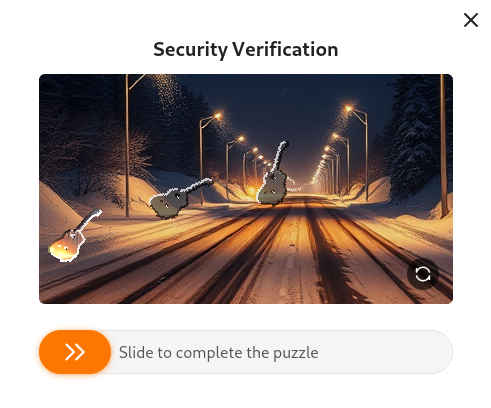
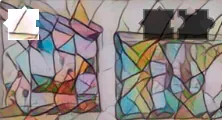
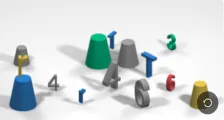



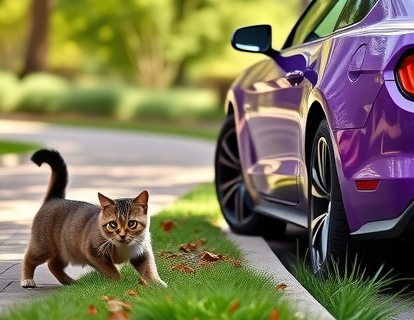
- Arced Slide challenge is the one where there is a puzzle piece that travels in an unpredictable trajectory, and there are two possible locations where the solution may be.
- Puzzle slide is unique in that the pieces relocate after you drag the slider.
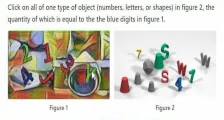
- Shapes (English only) challenge shows a picture of various objects and has an associated text challenge.
- Items (English only) challenge shows a picture of various objects and has an associated text challenge.
- Three-by-three challenge shows a 3x3 grid of images, and asks you to select images according to a text challenge.
- Swap Two has two tiles in the wrong order, and asks you to swap two to fix the image.
- Cats and Cars (English only) is an adorable challenge but it will wreck your bot.
- Two image (English only) is a notorious challenge which presents a text challenge and two side-by-side images.
Requirements
- Python >= 3.10
- If using Nodriver - Google chrome installed on system. This is the recommended method.
- If using Selenium - Selenium properly installed and in
PATH - If using Playwright - Playwright must be properly installed with
playwright install - Stealth plugin - You must use the appropriate
stealthplugin for whichever browser automation framework you are using.- For Selenium, you can use undetected-chromedriver
- For Playwright, you can use playwright-stealth
Installation
This project can be installed with pip. Just run the following command:
pip install temu-captcha-solver
Nodriver Client (Recommended)
Nodriver is the latest advancement in undetected automation technology, and is the recommended method.
Import the function make_nodriver_solver
This function will create an noddriver instance patched with the temu Captcha Solver chrome extension.
The extension will automatically detect and solve the captcha in the background, and there is nothing further you need to do.
from temu_captcha_solver.launcher import make_nodriver_solver

async def main():
    launch_args = ["--headless=chrome"] # If running headless, use this option, or headless=new
    api_key = "YOUR_API_KEY_HERE"
    # NOTE: Keyword arguments passed to make_nodriver_solver() are directly passed to nodriver.start()!
    driver = await make_nodriver_solver(api_key, browser_args=launch_args) # Returns nodriver browser
    # ... [The rest of your code goes here]
All keyword arguments passed to make_nodriver_solver() are passed directly to nodriver.start().
Selenium Client
Import the function make_undetected_chromedriver_solver
This function will create an undetected chromedriver instance patched with the temu Captcha Solver chrome extension.
The extension will automatically detect and solve the captcha in the background, and there is nothing further you need to do.
from temu_captcha_solver import make_undetected_chromedriver_solver
from selenium_stealth import stealth
import undetected_chromedriver as uc

api_key = "YOUR_API_KEY_HERE"
driver = make_undetected_chromedriver_solver(api_key) # Returns uc.Chrome instance
stealth(driver) # Add stealth if needed
# ... [The rest of your code goes here]

# Now temu captchas will be automatically solved!
You may also pass ChromeOptions to make_undetected_chromedriver_solver(), as well as keyword arguments for uc.Chrome().
Playwright Client
Import the function make_playwright_solver_context
This function will create a playwright BrowserContext instance patched with the temu Captcha Solver chrome extension.
The extension will automatically detect and solve the captcha in the background, and there is nothing further you need to do.
from temu_captcha_solver import make_playwright_solver_context
from playwright.sync_api import sync_playwright

api_key = "YOUR_API_KEY_HERE"
with sync_playwright() as p:
    context = make_playwright_solver_context(p, api_key) # Returns playwright BrowserContext instance
    # ... [The rest of your code goes here]
You may also pass keyword args to this function, which will be passed directly to playwright's call to playwright.chromium.launch_persistent_context().
By default, the user data directory is a tempory directory that is deleted at the end of runtime.
Async Playwright Client
Import the function make_async_playwright_solver_context
This function will create an async playwright BrowserContext instance patched with the temu Captcha Solver chrome extension.
The extension will automatically detect and solve the captcha in the background, and there is nothing further you need to do.
import asyncio
from playwright.async_api import async_playwright
from temu_captcha_solver import make_async_playwright_solver_context

async def main():
    api_key = "YOUR_API_KEY_HERE"
    async with async_playwright() as p:
        context = await make_async_playwright_solver_context(p, api_key) # Returns playwright BrowserContext instance
        # ... [The rest of your code goes here]

asyncio.run(main())
You may also pass keyword args to this function, which will be passed directly to playwright's call to playwright.chromium.launch_persistent_context().
By default, the user data directory is a tempory directory that is deleted at the end of runtime.
Release history Release notifications | RSS feed


Download files
Download the file for your platform. If you're not sure which to choose, learn more about installing packages.
Source Distribution
Built Distribution
Filter files by name, interpreter, ABI, and platform.
If you're not sure about the file name format, learn more about wheel file names.
Copy a direct link to the current filters
File details
Details for the file temu_captcha_solver-0.6.8.tar.gz.
File metadata
- Download URL: temu_captcha_solver-0.6.8.tar.gz
- Upload date:
- Size: 34.6 kB
- Tags: Source
- Uploaded using Trusted Publishing? No
- Uploaded via: twine/6.1.0 CPython/3.12.10
File hashes
| Algorithm | Hash digest | |
|---|---|---|
| SHA256 |
b042d0bcc1555dc64fd56bb4d3297c1782c1a9427b85a6719b2b8019b30cc7da
|
|
| MD5 |
47427351bcffe779968cb2fa682ce3b0
|
|
| BLAKE2b-256 |
d4370e62ff66f4d227de303f6b5c7cce733793215628944a6aa91927d878fcfd
|
File details
Details for the file temu_captcha_solver-0.6.8-py3-none-any.whl.
File metadata
- Download URL: temu_captcha_solver-0.6.8-py3-none-any.whl
- Upload date:
- Size: 42.5 kB
- Tags: Python 3
- Uploaded using Trusted Publishing? No
- Uploaded via: twine/6.1.0 CPython/3.12.10
File hashes
| Algorithm | Hash digest | |
|---|---|---|
| SHA256 |
06d24f3c03b47a5bbd7690c944b5641513390d57905188ae74c7943a06166666
|
|
| MD5 |
6fa0fb004020bf9dc9214e0d016435c0
|
|
| BLAKE2b-256 |
cd35dc4158d66619c66734ee7ed868e187501a21f06e9e5afdf485cca37cbfaa
|






