
SSH Connection Manager with TUI interface
Verified details
These details have been verified by PyPIProject links
GitHub Statistics
Maintainers

Project description
Tengingarstjóri - SSH Connection Manager
Tengingarstjóri, Icelandic for "Connection Manager", is a Python TUI based SSH connection manager that integrates seamlessly with your existing SSH configuration.
Installation
From PyPI (Recommended)
pip install tengingarstjori
From Source
git clone https://github.com/greyhoundforty/tengingarstjori.git
cd tengingarstjori
pip install -e .
Features
- 🔧 Full SSH Connection Management: Add, update, clone, and remove connections
- 📋 Flexible List Views: Table, compact, and JSON formats with tag/search/sort filtering
- ⚡ Quick Connect:
tg connect <name>launches SSH and tracks usage stats - 🚀 ProxyJump Support: Seamless bastion host and jump server configuration
- 🔀 Port Forwarding: Local and remote port forwarding with auto-corrected syntax
- 🔑 Smart SSH Key Management: Automatic key discovery and defaults
- 🔗 Non-invasive SSH Config Integration: Preserves your existing setup
- 📤 Export / Import: Backup and restore connections as JSON or SSH config format
- 🕓 History & Health Checks:
tg historyandtg testfor usage tracking and connectivity - 🎯 Fast CLI Commands: Intuitive
tgprefix with rich output formatting
Demo
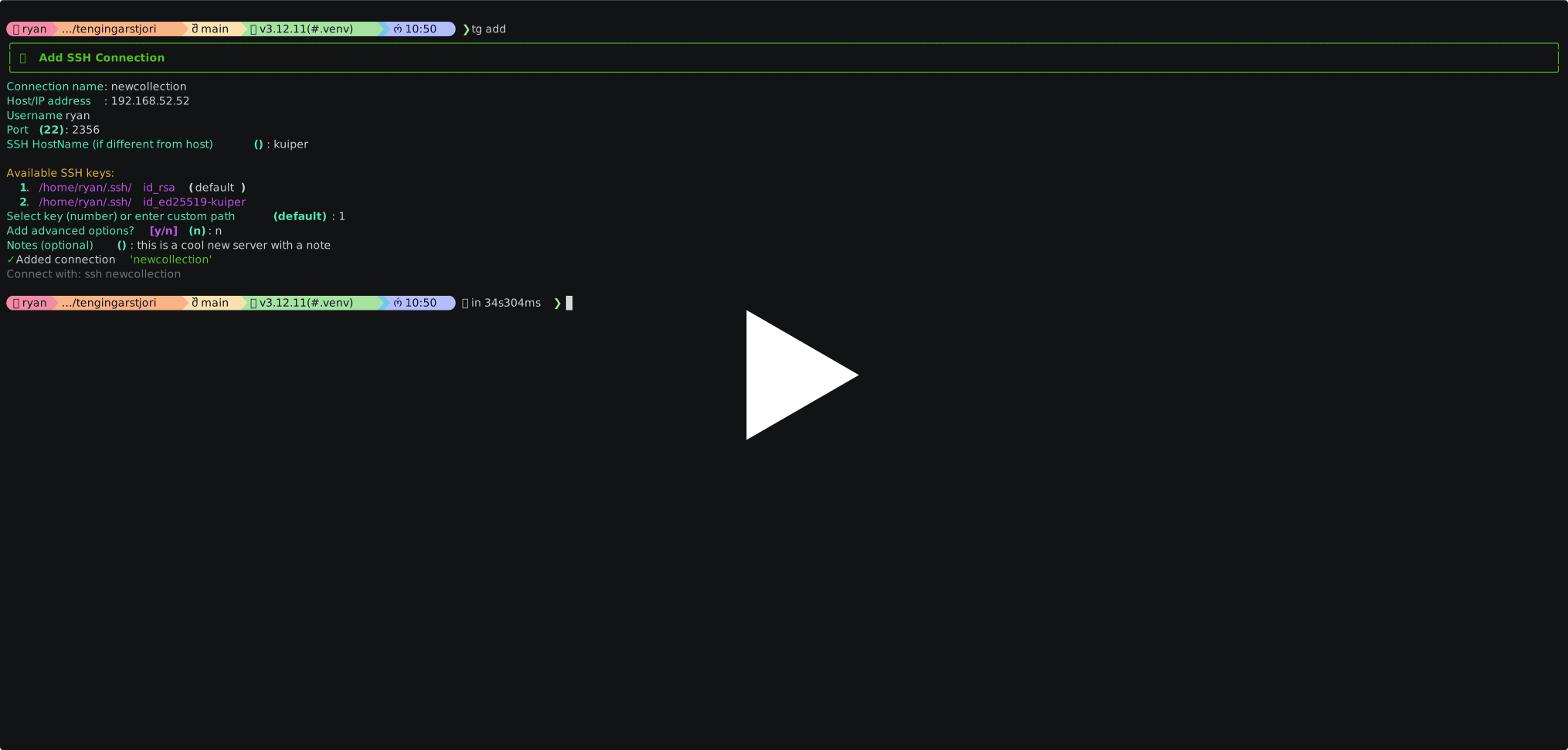
Quick Start
# Initialize Tengingarstjóri
tg init

# Add your first connection
tg add -n web-server -h 192.168.1.100 -u admin

# List connections
tg list

# Connect
tg connect web-server

# Or use SSH directly (tg manages the config)
ssh web-server
Architecture
Rather than modifying your main SSH config directly, Tengingarstjóri will:
- Create a managed config file:
~/.ssh/config.tengingarstjori - Add a single line to main config to include our new file:
Include ~/.ssh/config.tengingarstjori - Manage connections separately: All additions/changes go to the managed file
- Preserve your existing SSH setup: Your existing SSH config remains untouched
Security
Tengingarstjóri is designed to handle sensitive SSH configuration safely:
- Restricted file permissions:
connections.json,~/.ssh/config.tengingarstjori, and the~/.tengingarstjori/config directory are created with0600/0700permissions atomically — there is no window where files are world-readable. - SSH config injection prevention: All user-supplied fields (
name,host,user,identity_file,proxy_jump,extra_options) are validated to reject newline characters before being written into the SSH config. Notes have newlines stripped. This prevents crafted values from injecting arbitrary SSH config directives. - Non-destructive config management: Only a single
Includeline is added to your main~/.ssh/config. All managed connections live in a separate file that can be inspected, backed up, or removed independently. - Backup before changes: A backup of your main SSH config is created at
~/.ssh/config.backupbefore any modification.
Usage Examples
Basic Connection Management
# Add a simple connection
tg add -n web-server -h 192.168.1.100 -u admin

# Add with custom port and SSH key
tg add -n database -h db.company.com -u dbuser -p 2222 -k ~/.ssh/db_key

# Interactive mode (prompts for all options)
tg add

# Clone an existing connection with a new name
tg clone prod-web staging-web

# Connect (updates last_used / use_count, then execs ssh)
tg connect prod-web

# Preview the SSH command without connecting
tg connect prod-web --dry-run
Listing and Filtering
# Standard table view
tg list

# Detailed view showing notes, proxy, and port forwarding
tg list --detailed

# Compact and JSON formats
tg list --format compact
tg list --format json

# Filter by tag
tg list --tag production

# Full-text search across name, host, user, and notes
tg list --search bastion

# Only connections never used
tg list --unused

# Sort by last used (most recent first)
tg list --sort last-used

# Combine filters
tg list --tag production --search web --sort use-count
ProxyJump (Bastion/Jump Servers)
# Simple bastion host access
tg add -n internal-server -h 10.0.1.100 -u admin \
    --proxy-jump bastion.company.com

# Bastion with specific user and port
tg add -n secure-db -h 192.168.10.50 -u dbadmin \
    --proxy-jump "jumpuser@bastion.company.com:2222"

# Multi-hop through multiple servers
tg add -n deep-internal -h 172.16.5.10 -u root \
    --proxy-jump "jump1.company.com,user@jump2.internal.com"
Port Forwarding
# Local port forwarding (tunnel remote service to local port)
tg add -n mysql-tunnel -h db-server.company.com -u dbuser \
    --local-forward "3306:localhost:3306"

# Multiple port forwards
tg add -n dev-services -h dev-server.company.com -u developer \
    --local-forward "8080:localhost:80,3306:db-internal:3306,5432:pg-db:5432"

# Remote port forwarding (expose local service to remote)
tg add -n demo-server -h demo.company.com -u demo \
    --remote-forward "8080:localhost:3000"
Export, Import, and Backup
# Export all connections to JSON (stdout)
tg export

# Save to a file
tg export -o backup.json

# Export as raw SSH config blocks
tg export --format ssh-config

# Export without key paths (safe to share)
tg export --strip-keys -o safe-backup.json

# Import from a backup (skip existing by default)
tg import backup.json

# Import and overwrite conflicts
tg import backup.json --strategy overwrite

# Import and auto-rename conflicts (prod-web → prod-web-2)
tg import backup.json --strategy rename
History, Health Checks, and Snippets
# Show recently used connections
tg history

# Show full history
tg history --all

# Test SSH connectivity for a single connection
tg test prod-web

# Test all connections
tg test --all

# Custom timeout
tg test prod-web --timeout 10

# Print the full SSH command for a connection
tg snippet staging-db

# Print the SSH config block
tg snippet staging-db --config

# Copy to clipboard (macOS)
tg snippet staging-db | pbcopy
Complex Real-World Examples
# Production database with full security
tg add -n prod-db \
    --host prod-db-01.internal \
    --user produser \
    --key ~/.ssh/production_key \
    --proxy-jump prod-bastion.company.com \
    --local-forward "5432:prod-db-01.internal:5432" \
    --notes "Production PostgreSQL via bastion"

# Development full-stack environment
tg add -n dev-full-stack \
    --host dev.company.com \
    --user developer \
    --proxy-jump dev-bastion.company.com \
    --local-forward "3000:localhost:3000,8080:localhost:8080,5432:localhost:5432" \
    --notes "React (3000), API (8080), PostgreSQL (5432)"

# Clone prod config to staging and update the host
tg clone prod-db staging-db
tg update staging-db --host staging-db-01.internal --non-interactive
Connection Management
# Show detailed connection information
tg show prod-db
tg show 1  # By number from list

# Update a connection (non-interactive)
tg update prod-db --host 10.0.1.20 --non-interactive

# Add or replace tags
tg update prod-db --tags "production,database" --non-interactive

# Remove a connection
tg remove prod-db
tg remove prod-db --force  # Skip confirmation

# View generated SSH configuration
cat ~/.ssh/config.tengingarstjori
CLI Commands
Connection Commands
| Command | Description |
|---|---|
tg add |
Add a new SSH connection (interactive or via flags) |
tg update <name> |
Update fields on an existing connection |
tg clone <src> <name> |
Duplicate a connection with a new name |
tg remove <name> |
Remove a connection (--force skips confirmation) |
tg show <name> |
Show all fields and the generated SSH config block |
tg list |
List connections (--tag, --search, --sort, --unused, --format) |
Workflow Commands
| Command | Description |
|---|---|
tg connect <name> |
Connect via SSH; updates usage stats (--dry-run to preview) |
tg snippet <name> |
Print the SSH command or config block (--config) |
tg history |
Show recently used connections (--all, -n <limit>) |
tg test <name> |
Check SSH connectivity (--all, --timeout) |
tg export |
Export connections to JSON or SSH config (-o, -f, --strip-keys) |
tg import <file> |
Import connections from JSON (--strategy skip|overwrite|rename) |
Setup & Maintenance Commands
| Command | Description |
|---|---|
tg init |
Initialize and integrate with SSH config |
tg config |
Manage default settings (e.g. default SSH key) |
tg validate |
Check all connections for config issues |
tg refresh |
Regenerate ~/.ssh/config.tengingarstjori |
tg fix-config |
Repair corrupted Include lines |
tg fix-forwards |
Auto-correct old-style port forwarding syntax |
tg reset |
Restore original SSH config from backup |
File Locations
- Main SSH config:
~/.ssh/config - Managed config:
~/.ssh/config.tengingarstjori - Backup:
~/.ssh/config.backup - Tengingarstjóri data:
~/.tengingarstjori/ - Connection database:
~/.tengingarstjori/connections.json
Additional Resources
- docs/demo.md - Live executable demo document (all commands with captured output)
Development Commands
mise run test- Run tests with coveragemise run lint- Check code qualitymise run format- Format codemise run validate- Full validation suitemise run validate:quick- Quick validation
Development Workflow
# Daily development workflow
mise run validate:quick    # Quick checks before starting
# ... make changes ...
mise run test             # Run tests with coverage
mise run lint             # Check code quality
mise run validate         # Full validation before commit
Contributing
- See the implementation phases in PHASES.md
- Ensure all tests pass:
mise run test - Check code quality:
mise run lint - Run full validation:
mise run validate - Update documentation as needed
License
This project is licensed under the MIT License - see the LICENSE file for details.
Development Environment
Created with Claude Project CLI and designed for seamless SSH workflow integration. Enhanced with comprehensive testing, code quality checks, and automated validation.
For detailed development setup, see DEVELOPMENT.md.
Project details
Verified details
These details have been verified by PyPIProject links
GitHub Statistics
Maintainers
Release history Release notifications | RSS feed


Download files
Download the file for your platform. If you're not sure which to choose, learn more about installing packages.
Source Distribution
Built Distribution
Filter files by name, interpreter, ABI, and platform.
If you're not sure about the file name format, learn more about wheel file names.
Copy a direct link to the current filters
File details
Details for the file tengingarstjori-0.2.5.tar.gz.
File metadata
- Download URL: tengingarstjori-0.2.5.tar.gz
- Upload date:
- Size: 74.8 kB
- Tags: Source
- Uploaded using Trusted Publishing? Yes
- Uploaded via: twine/6.1.0 CPython/3.13.12
File hashes
| Algorithm | Hash digest | |
|---|---|---|
| SHA256 |
93a1110f0c4ac99224e92cafc459d4546a0ed994983a94b90da84bd29f453c98
|
|
| MD5 |
a01a978181d136f11e085640c68ff231
|
|
| BLAKE2b-256 |
e1939dec065535a8fb0165076d195d2152cd2ecf663538eb41560d2c35f53e6b
|
Provenance
The following attestation bundles were made for tengingarstjori-0.2.5.tar.gz:
Publisher:
publish.yml on greyhoundforty/tengingarstjori
-
Statement:
-
Statement type:
https://in-toto.io/Statement/v1 -
Predicate type:
https://docs.pypi.org/attestations/publish/v1 -
Subject name:
tengingarstjori-0.2.5.tar.gz -
Subject digest:
93a1110f0c4ac99224e92cafc459d4546a0ed994983a94b90da84bd29f453c98 - Sigstore transparency entry: 1403076779
- Sigstore integration time:
-
Permalink:
greyhoundforty/tengingarstjori@2454b959f2a3bbd6103e8366d438229aae36b433 -
Branch / Tag:
refs/tags/v0.2.6 - Owner: https://github.com/greyhoundforty
-
Access:
public
-
Token Issuer:
https://token.actions.githubusercontent.com -
Runner Environment:
github-hosted -
Publication workflow:
publish.yml@2454b959f2a3bbd6103e8366d438229aae36b433 -
Trigger Event:
release
-
Statement type:
File details
Details for the file tengingarstjori-0.2.5-py3-none-any.whl.
File metadata
- Download URL: tengingarstjori-0.2.5-py3-none-any.whl
- Upload date:
- Size: 32.9 kB
- Tags: Python 3
- Uploaded using Trusted Publishing? Yes
- Uploaded via: twine/6.1.0 CPython/3.13.12
File hashes
| Algorithm | Hash digest | |
|---|---|---|
| SHA256 |
7ae72ac7651733627c20acc7dc6a538d1e77bab4396e4d91ecb86e53b917bbb3
|
|
| MD5 |
3268d833555e763c3ed21ddc08dd3c08
|
|
| BLAKE2b-256 |
2e7633fec939237d4cf9b043b570dbdea5c209d91449cdec37a6dcdb00ac9e95
|
Provenance
The following attestation bundles were made for tengingarstjori-0.2.5-py3-none-any.whl:
Publisher:
publish.yml on greyhoundforty/tengingarstjori
-
Statement:
-
Statement type:
https://in-toto.io/Statement/v1 -
Predicate type:
https://docs.pypi.org/attestations/publish/v1 -
Subject name:
tengingarstjori-0.2.5-py3-none-any.whl -
Subject digest:
7ae72ac7651733627c20acc7dc6a538d1e77bab4396e4d91ecb86e53b917bbb3 - Sigstore transparency entry: 1403076944
- Sigstore integration time:
-
Permalink:
greyhoundforty/tengingarstjori@2454b959f2a3bbd6103e8366d438229aae36b433 -
Branch / Tag:
refs/tags/v0.2.6 - Owner: https://github.com/greyhoundforty
-
Access:
public
-
Token Issuer:
https://token.actions.githubusercontent.com -
Runner Environment:
github-hosted -
Publication workflow:
publish.yml@2454b959f2a3bbd6103e8366d438229aae36b433 -
Trigger Event:
release
-
Statement type:






