
Tensor Canvas 🎨

A 2D graphics library for drawing directly onto tensors.
Uses eagerpy to support a uniform API for pytorch, tensorflow, jax, and numpy backends.
Tensor Canvas uses SDF representations for easy implementation in gpu-accelerated frameworks.
Highly inefficient compared to standard gpu rendering, but much better than matplotlib. Integration with ML frameworks also means it is fully-differentiable.
Installation
pip install tensor-canvas
Example
import tensorcanvas as tc
import torch
import tensorflow as tf
import jax.numpy as jnp
import numpy as np

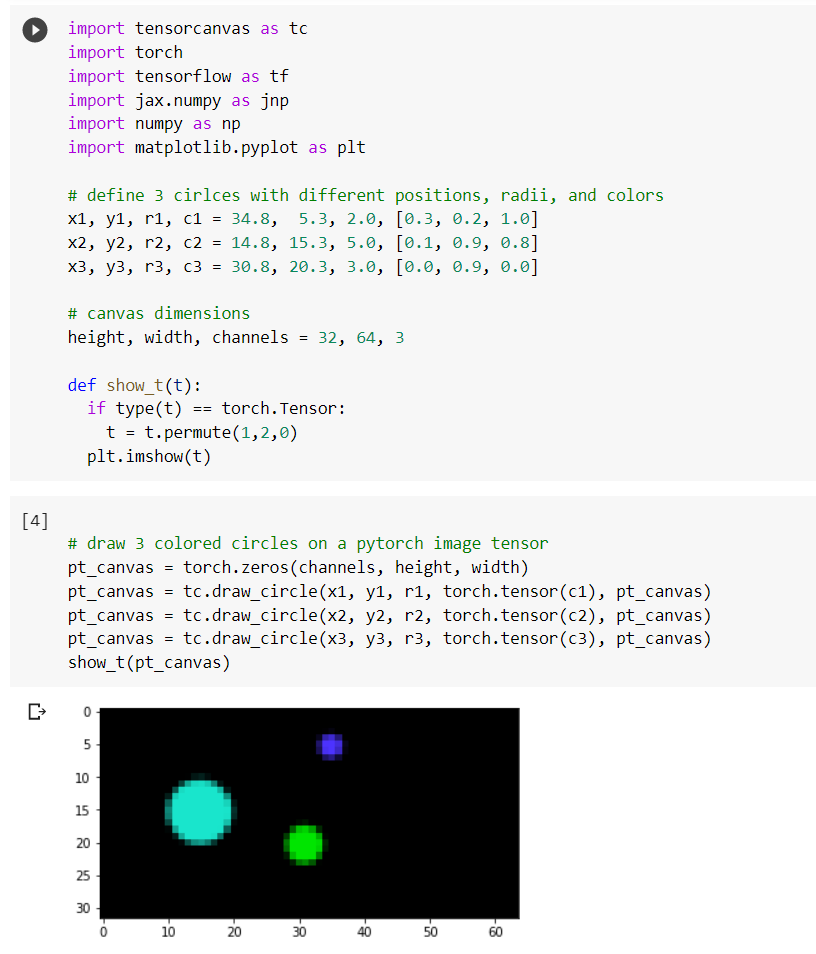
# define 3 cirlces with different positions, radii, and colors
x1, y1, r1, c1 = 34.8,  5.3, 2.0, [0.3, 0.2, 1.0]
x2, y2, r2, c2 = 14.8, 15.3, 5.0, [0.1, 0.9, 0.8]
x3, y3, r3, c3 = 30.8, 20.3, 3.0, [0.0, 0.9, 0.0]

# canvas dimensions
height, width, channels = 32, 64, 3

# draw 3 colored circles on a pytorch image tensor
pt_canvas = torch.zeros(channels, height, width)
pt_canvas = tc.draw_circle(x1, y1, r1, torch.tensor(c1), pt_canvas)
pt_canvas = tc.draw_circle(x2, y2, r2, torch.tensor(c2), pt_canvas)
pt_canvas = tc.draw_circle(x3, y3, r3, torch.tensor(c3), pt_canvas)

# draw 3 colored cirlces on a tensorflow image tensor
tf_canvas = tf.zeros([height, width, channels])
tf_canvas = tc.draw_circle(x1, y1, r1, tf.convert_to_tensor(c1), tf_canvas)
tf_canvas = tc.draw_circle(x2, y2, r2, tf.convert_to_tensor(c2), tf_canvas)
tf_canvas = tc.draw_circle(x3, y3, r3, tf.convert_to_tensor(c3), tf_canvas)

# draw 3 colored cirlces on a jax image tensor
jx_canvas = jnp.zeros([height, width, channels])
jx_canvas = tc.draw_circle(x1, y1, r1, jnp.array(c1), jx_canvas)
jx_canvas = tc.draw_circle(x2, y2, r2, jnp.array(c2), jx_canvas)
jx_canvas = tc.draw_circle(x3, y3, r3, jnp.array(c3), jx_canvas)

# draw 3 colored cirlces on a numpy image tensor
np_canvas = np.zeros([height, width, channels])
np_canvas = tc.draw_circle(x1, y1, r1, np.array(c1), np_canvas)
np_canvas = tc.draw_circle(x2, y2, r2, np.array(c2), np_canvas)
np_canvas = tc.draw_circle(x3, y3, r3, np.array(c3), np_canvas)

# check results are indentical
assert(np.allclose(np_canvas, pt_canvas.permute(1,2,0), atol=1e-6))
assert(np.allclose(np_canvas, tf_canvas, atol=1e-6))
assert(np.allclose(np_canvas, jx_canvas, atol=1e-6))
Notebook Example

1 maintainer

Metadata
1 maintainer
Release files for tensor-canvas 0.1.7
For a detailed explanation of source distributions (sdists) and built distributions (wheels), please see the package formats documentation.
Source distribution (sdist)
| File | Size | Uploaded | Provenance | Actions |
|---|---|---|---|---|
| tensor-canvas-0.1.7.tar.gz | 3.0 kB | Without provenance | Details for tensor-canvas-0.1.7.tar.gz |
Built distribution (wheel)
| File | Interpreter | ABI | Platform | Actions Reset |
|---|---|---|---|---|
| tensor_canvas-0.1.7-py3-none-any.whl | Python 3 | none | any | Details for tensor_canvas-0.1.7-py3-none-any.whl |
Total release size: 8.0 kB
Release files / tensor-canvas-0.1.7.tar.gz
| Download URL | tensor-canvas-0.1.7.tar.gz |
|---|---|
| Size | 3.0 kB |
| Tags | Source |
|
SHA-256 checksum How to use checksums |
c96b471cf8bc9122641326c5b61f5407a7852eb48e5a5eccc9b469b189a6faa0
|
|
BLAKE2b-256 checksum How to use checksums |
ac2470eb277b438879402b24e856b0d4801d96b8c3900c7976ab0d70f1425001
|
| Upload date | |
|
Uploaded using Trusted Publishing? What is trusted publishing? |
No |
| Uploaded via |
twine/3.2.0 pkginfo/1.5.0.1 requests/2.22.0 setuptools/49.2.0 requests-toolbelt/0.9.1 tqdm/4.41.0 CPython/3.7.3
|
Release files / tensor_canvas-0.1.7-py3-none-any.whl
| Download URL | tensor_canvas-0.1.7-py3-none-any.whl |
|---|---|
| Size | 5.0 kB |
| Tags | Python 3 |
|
SHA-256 checksum How to use checksums |
8d57c57b56a27a13d47972b4a509c04d5965a572cd6e70bf3db062e3bce3e555
|
|
BLAKE2b-256 checksum How to use checksums |
a72a6c08c4bc9ef97b419c8e158b0c89116835f8404eab61fc1984fe205676b2
|
| Upload date | |
|
Uploaded using Trusted Publishing? What is trusted publishing? |
No |
| Uploaded via |
twine/3.2.0 pkginfo/1.5.0.1 requests/2.22.0 setuptools/49.2.0 requests-toolbelt/0.9.1 tqdm/4.41.0 CPython/3.7.3
|
Security for tensor-canvas 0.1.7
Provenance
Provenance describes where a file came from. On PyPI, provenance is shared via attestations, which provide a verifiable record of the build or publishing details. View details, limitations and caveats.
No provenance found
None of the files in this release were uploaded with provenance metadata.
A note on package security
PyPI is a repository for distributing packages, not a service for auditing them. While third-party security researchers and our staff do their best to detect and remove malicious packages, PyPI cannot guarantee the quality, security or suitability of any given package.
To learn more about protecting yourself from malicious actors, visit our package security documentation.














