TensorEE

Run supported PyTorch models inside Google Earth Engine, without deploying a model-serving endpoint. TensorEE expresses neural-network inference as Earth Engine image and array operations. Larger models can run in stages, saving intermediate features as Earth Engine assets.
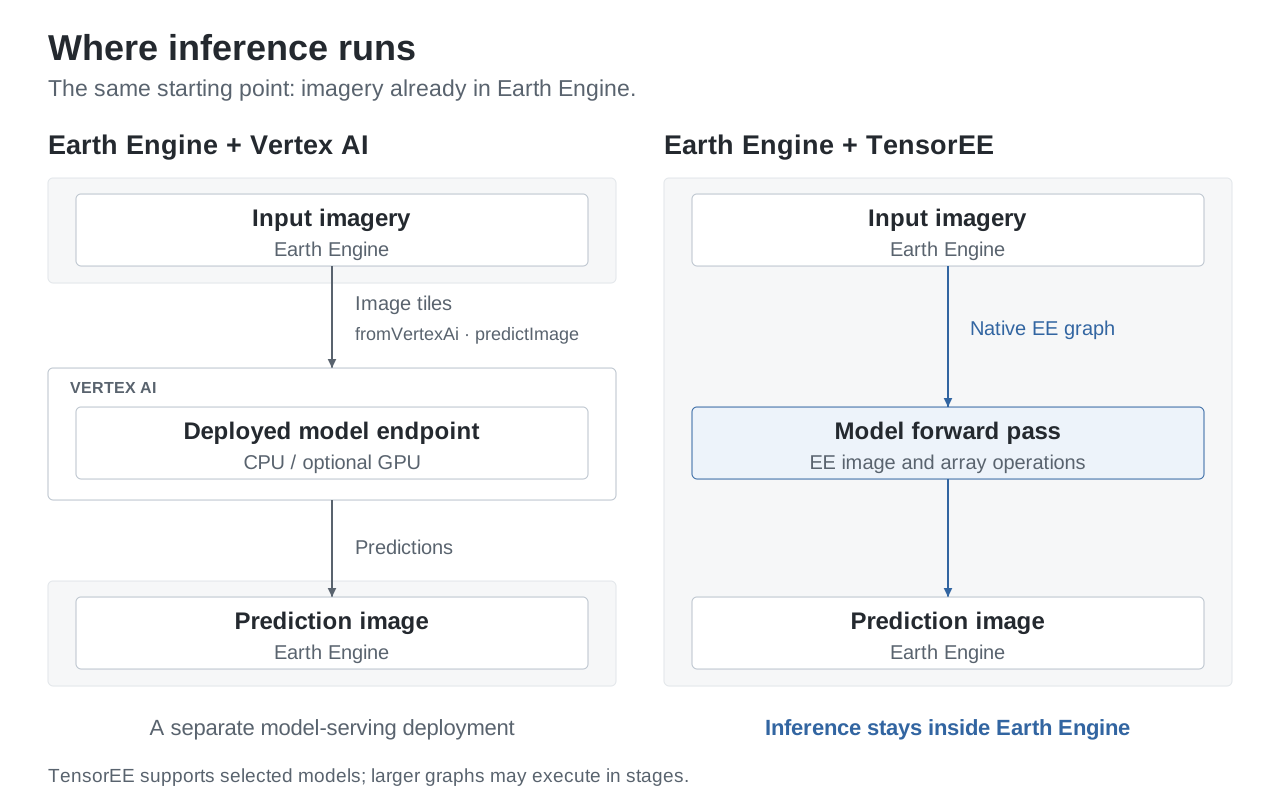
Python builds the computation graph; Earth Engine evaluates the forward pass. Weights are embedded constants or reads from EE table assets. Unsupported operations are refused, not approximated. The Vertex AI integration shown alongside it uses a separately deployed model endpoint.
A real example
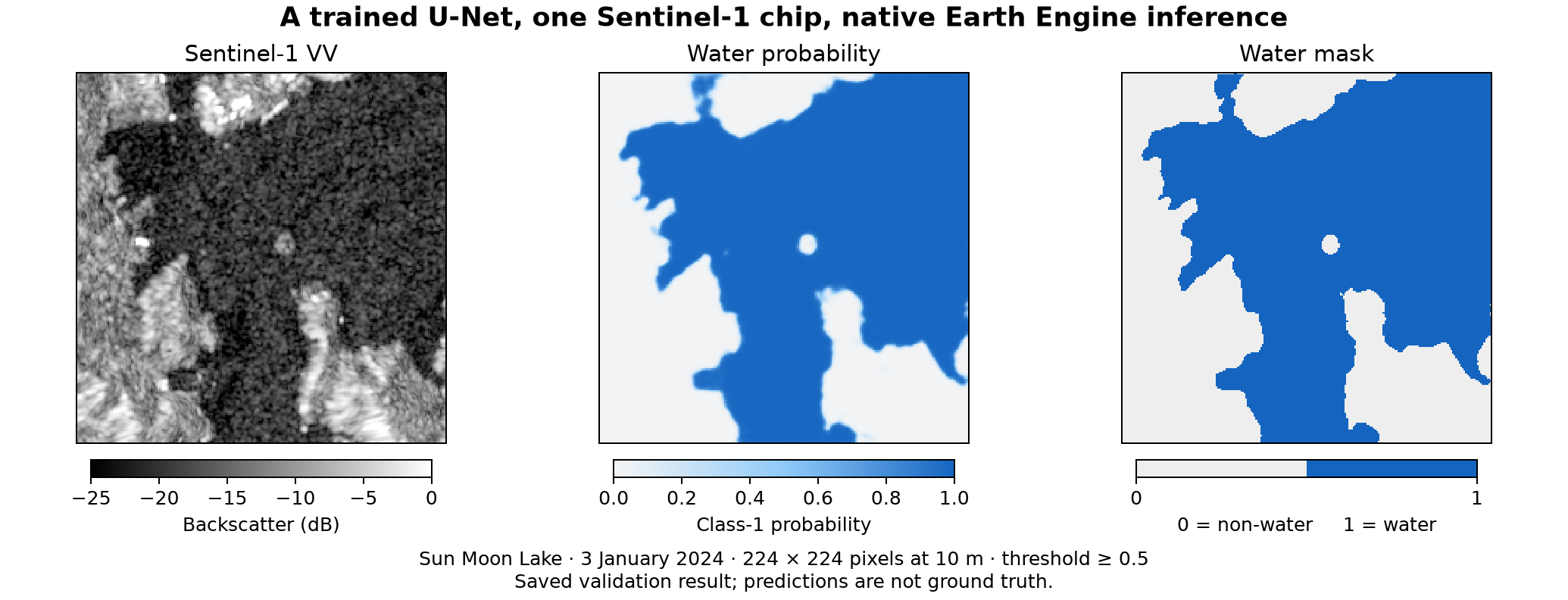
A trained ResNet18 U-Net on one 224 × 224 Sentinel-1 chip: Sun Moon Lake, Taiwan, 3 January 2024. Prediction, not ground truth. Validation · Walkthrough. Contains modified Copernicus Sentinel data (2024).
Get started
- Run the Code Editor demo. No install or checkpoint. The trained U-Net reads public weights; you need an Earth Engine account and a registered Cloud project where you can create an image asset. The demo exports one chip, billed to your project.
- Try the offline example. Build a small CNN's graph locally, with no credentials or cloud calls.
- Convert an attention model. Start with random weights, inspect the conversion report, then plan the stages.
What you can run
| Model or approach | Entry point | Availability |
|---|---|---|
| SegWater ResNet18 U-Net, 224 × 224 | Code Editor demo; compile_model for CNNs |
Trained EE weights are public; the Code Editor demo needs no checkpoint |
| Fixed Swin-T/UPerNet, 224 × 224 | Three-stage workflow | Trained EE weights are public; this workflow also needs a local checkpoint, not yet public |
| SMP SegFormer-B0 or UPerNet with timm's Swin encoder | Attention converter | Conversion examples use random weights; the report identifies settings outside the validated records |
You can also compose a model from the block catalogue.
It has 78 blocks: 16 in tensor_ee/blocks/raster and 62 in tensor_ee/blocks/window.
The browser demo runs either trained model with a local checkpoint;
its --offline mode previews the interface without one.
Staged inference
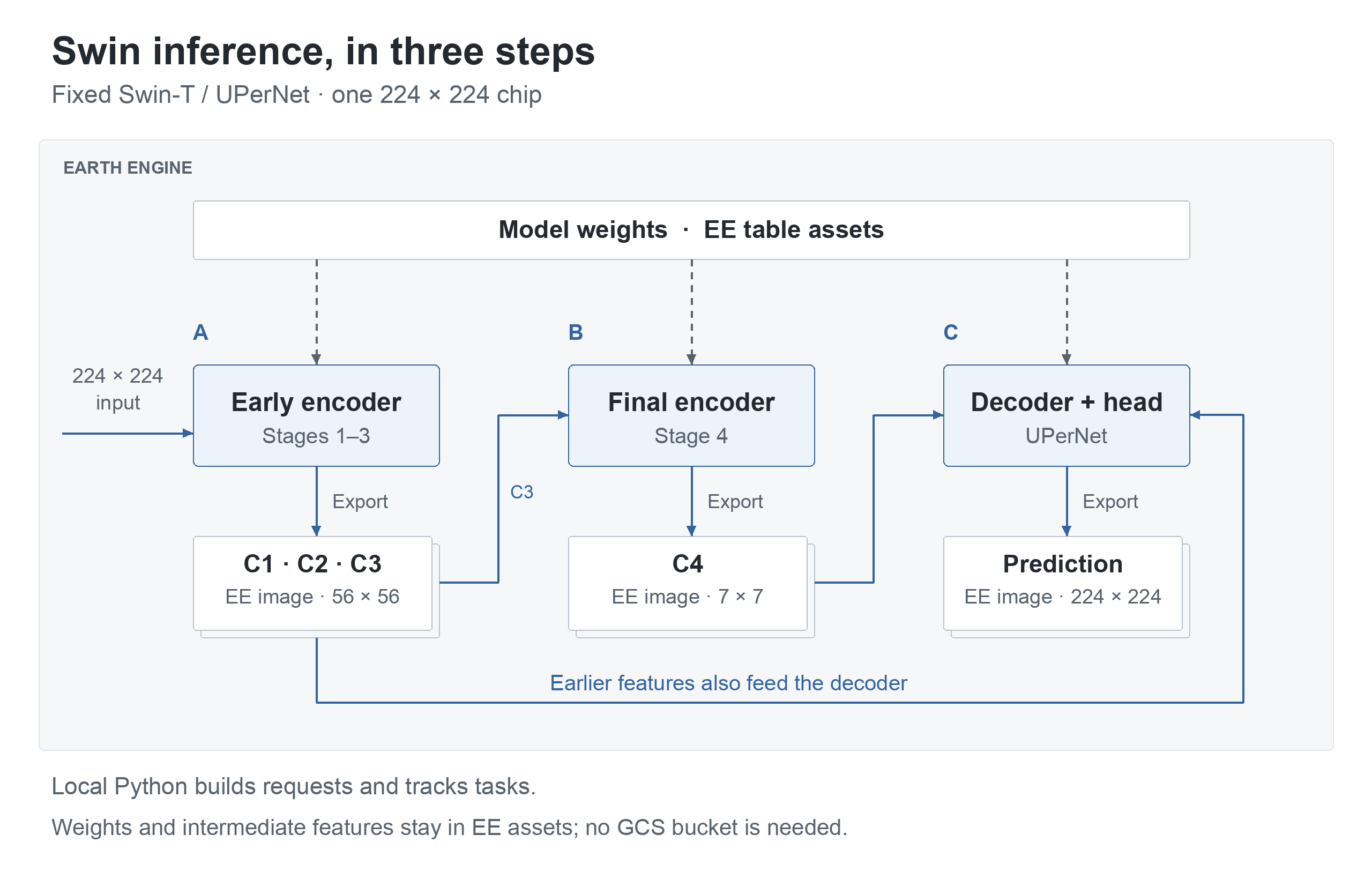
Saving intermediate features lets a model run as several bounded EE graphs and avoids recomputing earlier stages. In the fixed Swin workflow below, each step waits for its predecessor's export to complete. The decoder reads both C4 and the earlier features.
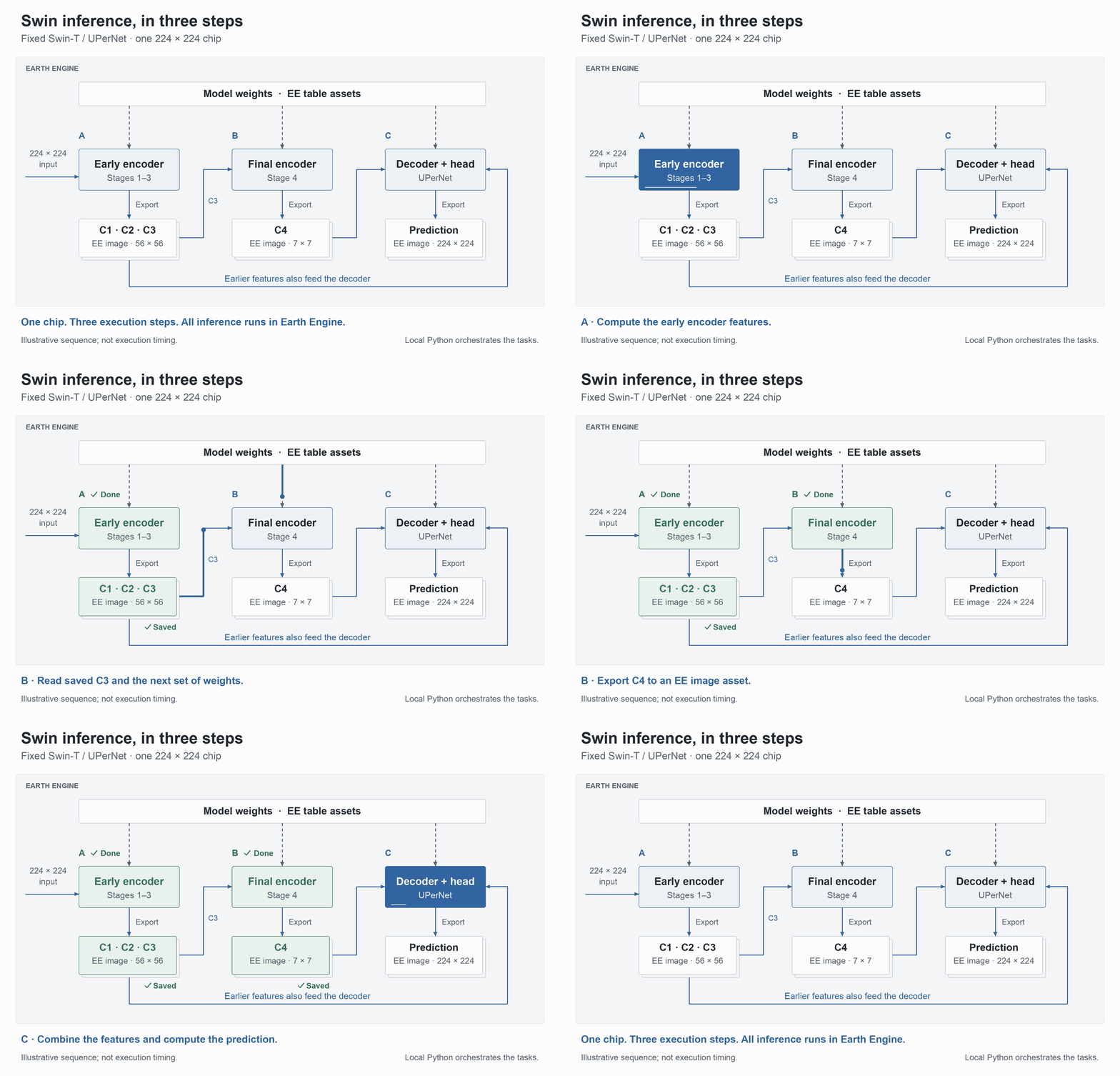
Illustrative sequence, not execution timing. Static diagram.
Weights live in EE table assets; saved features and predictions live in EE image assets. The checkpoint, manifest and task state are local files. This workflow needs no GCS bucket. The Swin guide details the three steps, including the validity summary saved with C1–C3. Other models can use different cuts: the converter planner chooses stages under explicit limits.
Install
Python 3.11 or newer.
python -m pip install tensor-ee
Build a small CNN's graph offline, with no credentials or cloud calls:
python -m tensor_ee.examples.nonwater --prepare
Expect "status": "offline_graph_only" in the report.
Getting started
covers optional extras, PyTorch's download size and CPU-only installation, and the
steps for running in Earth Engine.
For the tests, tools, demos and checkout examples, install from source:
git clone https://github.com/noelEOS/tensor-ee.git
cd tensor-ee
python -m venv .venv && source .venv/bin/activate
python -m pip install '.[test]'
python -m pytest -q tests/test_nonwater_example.py
Expect 2 passed from the example's tests.
Evidence and limits
- Experimental, with restricted support. Only the settings in the block catalogue have validation evidence. A conversion can report settings outside those records; converting them does not validate them.
- Numerical agreement is not model accuracy. The model evidence records live comparisons with PyTorch and ONNX Runtime, offline graph identity, and the inputs each result covers. The absolute logit target is 1e-4; segmentation accuracy is not measured.
- Known exception. The U-Net's synthetic upper-left impulse chip has a largest absolute logit difference of 1.6510487e-4, above the target; probabilities and the water mask agree (record).
- EE limits still apply. Inference uses EE computation and storage, with their costs and quotas. The figures make no speed or cost comparison with Vertex AI.
- Weights and training data. Both trained models' EE weights are public under CC BY 4.0; their manifests list the assets. Checkpoint files are not yet public. Training used Sentinel-1 chips with water labels derived from Sentinel-2; a fuller dataset description is not yet published (provenance).
Documentation
Getting started · API guide · Converter guide · Block catalogue · All guides and evidence · Changelog
Licence, citation and attribution
Code and documentation: MIT. Trained weights: CC BY 4.0, including the checkpoints when published. Satellite data and third-party libraries keep their own terms. The Sentinel-1 examples contain modified Copernicus Sentinel data (2024). To cite TensorEE, use CITATION.cff and record the commit used.
See CONTRIBUTING for contributions and SECURITY.md for private vulnerability reports.
1 maintainer

Metadata
1 maintainer
Release files for tensor-ee 0.1.0
For a detailed explanation of source distributions (sdists) and built distributions (wheels), please see the package formats documentation.
Source distribution (sdist)
| File | Size | Uploaded | Provenance | |
|---|---|---|---|---|
| tensor_ee-0.1.0.tar.gz | 286.4 kB | With provenance | Details |
Built distribution (wheel)
| File | Interpreter | ABI | Platform | Reset |
|---|---|---|---|---|
| tensor_ee-0.1.0-py3-none-any.whl | Python 3 | none | any | Details |
Total release size: 616.9 kB
Release files / tensor_ee-0.1.0.tar.gz
| Download URL | tensor_ee-0.1.0.tar.gz |
|---|---|
| Size | 286.4 kB |
| Tags | Source |
|
SHA-256 checksum How to use checksums |
9ea2ee51f726e3f42a26d16c6184568e624cd906db1d83ee63e7927dc5a15687
|
|
BLAKE2b-256 checksum How to use checksums |
0610f2c734fe78139f65227f11dd5a5c055a9fc3b847843348c650b33e4f1af2
|
| Upload date | |
|
Uploaded using Trusted Publishing? What is trusted publishing? |
Yes |
| Uploaded via |
twine/6.1.0 CPython/3.13.7
|
Provenance
Provenance describes where a file came from. On PyPI, provenance is shared via attestations, which provide a verifiable record of the build or publishing details. View details, limitations and caveats.


PyPI Publish Attestation
PyPI verified that this artifact, at this checksum, originated from the publisher listed below.
Signed by GitHub Actions, verified by PyPI on Oct 21, 2026.
Transparency logRelease files / tensor_ee-0.1.0-py3-none-any.whl
| Download URL | tensor_ee-0.1.0-py3-none-any.whl |
|---|---|
| Size | 330.5 kB |
| Tags | Python 3 |
|
SHA-256 checksum How to use checksums |
12928055faa58a1431b57a54cf801299728e6842b0da2960753ed85abe123e08
|
|
BLAKE2b-256 checksum How to use checksums |
609502fc47caadbb54228514386aeabadd96613deaf3e329b53aa030bd664d20
|
| Upload date | |
|
Uploaded using Trusted Publishing? What is trusted publishing? |
Yes |
| Uploaded via |
twine/6.1.0 CPython/3.13.7
|
Provenance
Provenance describes where a file came from. On PyPI, provenance is shared via attestations, which provide a verifiable record of the build or publishing details. View details, limitations and caveats.
PyPI Publish Attestation
PyPI verified that this artifact, at this checksum, originated from the publisher listed below.
Signed by GitHub Actions, verified by PyPI on Oct 21, 2026.
Transparency logSecurity for tensor-ee 0.1.0
Provenance
Provenance describes where a file came from. On PyPI, provenance is shared via attestations, which provide a verifiable record of the build or publishing details. View details, limitations and caveats.
Full provenance
All 2 files in this release have been uploaded with provenance metadata.
Attestation for tensor_ee-0.1.0.tar.gz
PyPI Publish Attestation
PyPI verified that this artifact, at this checksum, originated from the publisher listed below.
Signed by GitHub Actions, verified by PyPI on Oct 21, 2026.
Transparency logA note on package security
PyPI is a repository for distributing packages, not a service for auditing them. While third-party security researchers and our staff do their best to detect and remove malicious packages, PyPI cannot guarantee the quality, security or suitability of any given package.
To learn more about protecting yourself from malicious actors, visit our package security documentation.