
Visualize torch, jax, tensorflow, etc. tensors for understanding and debugging.
Verified details
These details have been verified by PyPIProject links
GitHub Statistics
Maintainers

Project description
tensordiagram
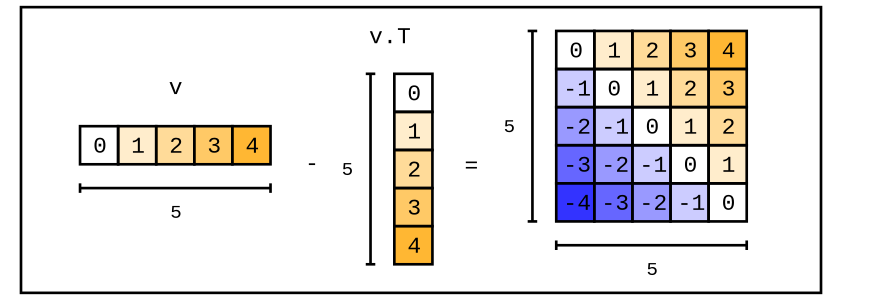
A python library for visualizing tensors from torch, jax, tensorflow, numpy, etc. Helps with learning and debugging in notebooks and other contexts. It's built on top of the graphics backend, chalk.
If you want to practice your tensor skills, try Tensor Puzzles 2. It's a notebook with a collection of hands-on pytorch puzzles. And yes, it uses tensordiagram 😃. If you're interested in learning modern ML engineering, check out qaggle.
why
Debugging deep learning code is hard—especially when it's foreign, because it's hard to imagine tensor manipulations, e.g. F.conv2d(x.unsqueeze(1), w.transpose(-1, -2)).squeeze().view(B, L, -1) in your head. Printing shapes and tensor values only gets you so far. tensordiagram lets me easily represent tensors visually, inside python code, notebooks, and interpreter sessions.
Other python libraries for creating tensor diagrams are either too physics and math focused, not notebook-friendly, limited to visualizing single tensors, and/or serve a wider purpose (so have a steep learning curve).
install
pip install tensordiagram
Separately, you'll need to install cairo for png images:
# might need to install the base library first on debian
sudo apt-get install libcairo2-dev

# cairo python bindings
pip install ".[cairo]"
Or, for svg images:
pip install ".[svg]"
intro
For an in-depth guide, refer to this notebook.
import numpy as np
import tensordiagram as td

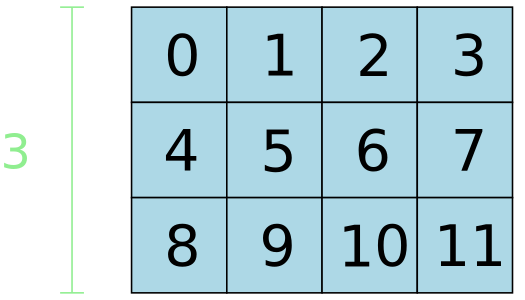
tensor = np.arange(12).reshape(3, 4)
diagram = td.to_diagram(tensor)

The diagram can be saved using render_png or render_svg:
diagram.render_png("output.png", height=300)
Style and annotate diagrams:
diagram \
  .fill_values() \
  .fill_color("lightblue") \
  .annotate_dim_size(dim="row", color="lightgreen")
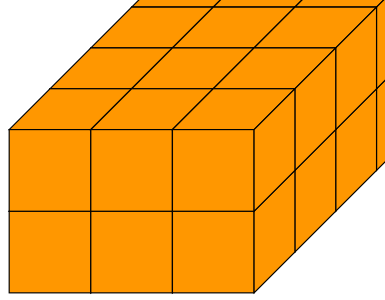
3d tensor:
papaya = "#ff9700"

tensor = np.arange(24).reshape((2, 3, 4))
diagram = td.to_diagram(tensor).fill_color(papaya)
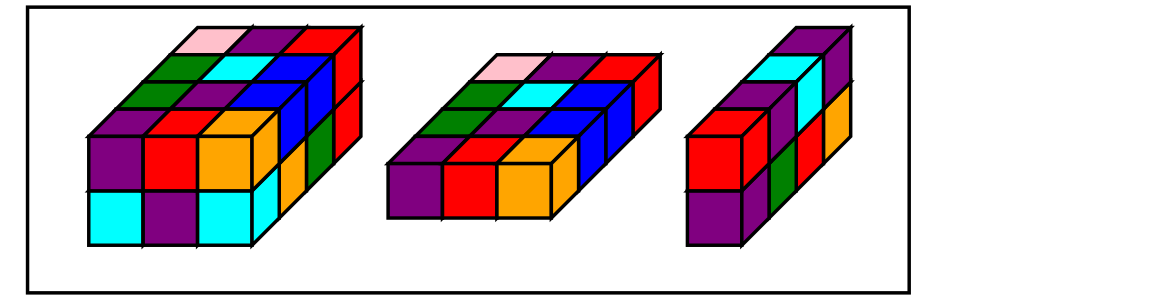
Combine tensor and chalk diagrams for intricate outputs:
import random
import torch

color_names = [ "red", "blue", "green", "purple", "orange", "pink", "cyan"]

def random_colors_tensor(shape):
  colors_array = np.empty(shape, dtype=object)
  for index, _ in np.ndenumerate(colors_array):
    colors_array[index] = random.choice(color_names)
  return colors_array

color_tensor = random_colors_tensor(shape=(2, 3, 4))

# tensors
t = torch.arange(24).reshape((2, 3, 4))
slice_1 = t[0, :, :].unsqueeze(0)
slice_2 = t[:, 1, :].unsqueeze(1)

# tensor diagrams
t_d = td.to_diagram(t).fill_color(lambda idx, v: color_tensor[idx])
slice_1_d = td.to_diagram(slice_1).fill_color(lambda idx, v: color_tensor[idx])
slice_2_d = td.to_diagram(slice_2).fill_color(lambda idx, v: color_tensor[idx[0], 1, idx[2]])

# chalk diagrams
diagrams = []
for d in [t_d, slice_1_d, slice_2_d]:
  diagrams.append(d.to_chalk_diagram().center_xy())

# composite diagram
composite = chalk.hcat(diagrams, 1.0)

# add background + display
composite = composite.pad(1.5).center_xy()
env = composite.get_envelope()
chalk.set_svg_height(300)
chalk.rectangle(env.width * 0.8, env.height).fill_color(Color("white")) + composite.translate(dx=env.width * 0.1, dy=0)
For more examples and documentation, refer to this guide.
dev
pip install -e ".[dev]"
test
setup
Visual regression tests compare rendered output against reference images stored in fixtures/.
To generate or update reference images:
# all reference images
python tests/generate_references.py --all

# list reference images
python tests/generate_references.py --list

# select reference images
python tests/generate_references.py 3d_tensor styled_gradient
run
All tests:
pytest
deploy
- update version in pyproject.toml and commit
git tag vX.X.Xgit push origin vX.X.X(auto-triggers gh action for publishing a new library)- create a new gh release with the tag
license
MIT
Project details
Verified details
These details have been verified by PyPIProject links
GitHub Statistics
Maintainers


Download files
Download the file for your platform. If you're not sure which to choose, learn more about installing packages.
Source Distribution
Built Distribution
Filter files by name, interpreter, ABI, and platform.
If you're not sure about the file name format, learn more about wheel file names.
Copy a direct link to the current filters
File details
Details for the file tensordiagram-0.2.0.tar.gz.
File metadata
- Download URL: tensordiagram-0.2.0.tar.gz
- Upload date:
- Size: 28.0 kB
- Tags: Source
- Uploaded using Trusted Publishing? Yes
- Uploaded via: twine/6.1.0 CPython/3.13.7
File hashes
| Algorithm | Hash digest | |
|---|---|---|
| SHA256 |
543c79a44b9d9e374f5d8f08822e5c39395f2d40e3b9e8756fe388db90da521a
|
|
| MD5 |
520c58a023d92e7f926903f90a928d92
|
|
| BLAKE2b-256 |
f07cb95e9409dc897842079a44f1cf20e9985bd3dc0186f9cbed7a53b24ed6e1
|
Provenance
The following attestation bundles were made for tensordiagram-0.2.0.tar.gz:
Publisher:
publish.yml on hardik-vala/tensordiagram
-
Statement:
-
Statement type:
https://in-toto.io/Statement/v1 -
Predicate type:
https://docs.pypi.org/attestations/publish/v1 -
Subject name:
tensordiagram-0.2.0.tar.gz -
Subject digest:
543c79a44b9d9e374f5d8f08822e5c39395f2d40e3b9e8756fe388db90da521a - Sigstore transparency entry: 716033149
- Sigstore integration time:
-
Permalink:
hardik-vala/tensordiagram@76c30dd2fadd023b205b2165fc68334878c4a610 -
Branch / Tag:
refs/tags/v0.2.0 - Owner: https://github.com/hardik-vala
-
Access:
public
-
Token Issuer:
https://token.actions.githubusercontent.com -
Runner Environment:
github-hosted -
Publication workflow:
publish.yml@76c30dd2fadd023b205b2165fc68334878c4a610 -
Trigger Event:
push
-
Statement type:
File details
Details for the file tensordiagram-0.2.0-py3-none-any.whl.
File metadata
- Download URL: tensordiagram-0.2.0-py3-none-any.whl
- Upload date:
- Size: 15.2 kB
- Tags: Python 3
- Uploaded using Trusted Publishing? Yes
- Uploaded via: twine/6.1.0 CPython/3.13.7
File hashes
| Algorithm | Hash digest | |
|---|---|---|
| SHA256 |
65b00affd2a1d03ed55024bdfc2f55e32058b222abfe59ed713ca8a1378a3828
|
|
| MD5 |
dd83602dee804c5f0b201c6522913cfb
|
|
| BLAKE2b-256 |
097bcf8c491485fd230ef574e81e3430f66a49fb7bd60ceba30877f29f50965a
|
Provenance
The following attestation bundles were made for tensordiagram-0.2.0-py3-none-any.whl:
Publisher:
publish.yml on hardik-vala/tensordiagram
-
Statement:
-
Statement type:
https://in-toto.io/Statement/v1 -
Predicate type:
https://docs.pypi.org/attestations/publish/v1 -
Subject name:
tensordiagram-0.2.0-py3-none-any.whl -
Subject digest:
65b00affd2a1d03ed55024bdfc2f55e32058b222abfe59ed713ca8a1378a3828 - Sigstore transparency entry: 716033178
- Sigstore integration time:
-
Permalink:
hardik-vala/tensordiagram@76c30dd2fadd023b205b2165fc68334878c4a610 -
Branch / Tag:
refs/tags/v0.2.0 - Owner: https://github.com/hardik-vala
-
Access:
public
-
Token Issuer:
https://token.actions.githubusercontent.com -
Runner Environment:
github-hosted -
Publication workflow:
publish.yml@76c30dd2fadd023b205b2165fc68334878c4a610 -
Trigger Event:
push
-
Statement type:






