


TensorFlores: An Enhanced Python-based TinyML Framework
The TensorFlores framework is a Python-based solution designed for optimizing machine learning deployment in resource-constrained environments. It introduces an evolving clustering-based quantization, enabling quantization-aware training (QAT) and post-training quantization (PTQ) while preserving model accuracy. TensorFlores seamlessly converts TensorFlow models into optimized formats and generates platform-agnostic C++ code for embedded systems. Its modular architecture minimizes memory usage and computational overhead, ensuring efficient real-time inference. By integrating clustering-based quantization and automated code generation, TensorFlores enhances the feasibility of TinyML applications, particularly in low-power and edge AI scenarios. This framework provides a robust and scalable solution for deploying machine learning models in embedded and IoT systems.

Dependencies
Python v3.9.6
pip install -r requirements.txt
Software description
The TensorFlores framework is a Python-based solution designed for optimizing machine learning deployment in resource-constrained environments
Software architecture
The architecture of TensorFlores can be divided into four primary layers:
-
Model Training: A high-level API for the streamlined creation and training of MLP, supporting evolutionary vector quantization during training;
-
Json Handle: Responsible for interpreting TensorFlow models and generating structured JSON files, serving as an intermediary representation for both TensorFlow and TensorFlores models;
-
Quantization: Dedicated to processing the structured JSON model representation and applying PTQ techniques;
-
Code Generation: Responsible to processing the structured representation of the JSON model and generating the machine learning model in C++ format to be embedded in the microcontroller, whether quantised or not.
Software structure
The project directory is divided into key components, as illustrated in Figure:
tensorflores/
├── models/
│   ├── __init__.py
│   └── multilayer_perceptron.py
├── utils/
│   ├── __init__.py
│   ├── autocloud/
│   │   ├── __init__.py
│   │   ├── auto_cloud_bias.py
│   │   ├── auto_cloud_weight.py
│   │   ├── data_cloud_bias.py
│   │   └── data_cloud_weight.py
│   ├── array_manipulation.py
│   ├── clustering.py
│   ├── cpp_generation.py
│   ├── json_handle.py
│   └── quantization.py
└── __init__.py
Software functionalities
The pipeline illustrated in Figure outlines a workflow for optimizing and deploying machine learning models, specifically designed for resource-constrained environments such as microcontrollers. The software structure is divided into four main blocks: model training (with or without quantization-aware training), post-training quantization, TensorFlow model conversion, and code generation, which translates the optimized model into platform-agnostic C++ code.
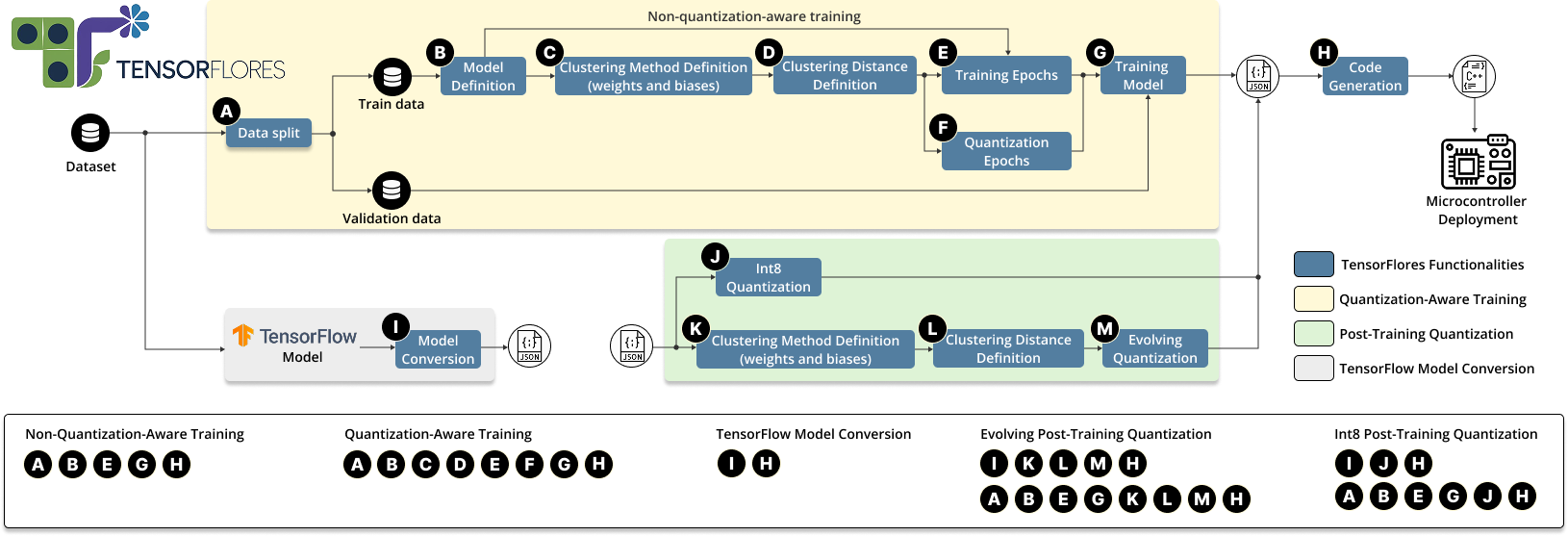
The parameters are highly customizable, as shown in Table 1, which lists the class parameters and their corresponding default input values
| Class Parameters | Type | Input Values |
|---|---|---|
input_size |
int | 5 |
hidden_layer_sizes |
list | [64, 32] |
output_size |
int | 1 |
activation_functions |
list | 'sigmoid', 'relu', 'leaky_relu', 'tanh', 'elu', 'softmax', 'softplus', 'swish', 'linear' |
weight_bias_init |
str | 'RandomNormal', 'RandomUniform', 'GlorotUniform', 'HeNormal' |
training_with_quantization |
bool | True or False |
Table 1 - MLP Initialization Parameters.
The "train" method has the following main parameters:
| Parameter | Type | Input Values |
|---|---|---|
X |
list | List of input data for training |
y |
list | List of corresponding labels |
epochs |
int | Default: 100 |
learning_rate |
float | Default: 0.001 |
loss_function |
str | 'mean_squared_error', 'cross_entropy', 'mean_absolute_error', 'binary_cross_entropy' |
optimizer |
str | 'sgd', 'adam', 'adamax' |
batch_size |
int | Default: 36 |
beta1 |
float | Default: 0.9 (Adam first moment) |
beta2 |
float | Default: 0.999 (Adam second moment) |
epsilon |
float | Default: 1e-7 (Avoid division by zero in Adam) |
epochs_quantization |
int | Default: 50 |
distance_metric |
str | 'euclidean', 'manhattan', 'minkowski', 'chebyshev', 'cosine', 'hamming', 'bray_curtis', 'jaccard', 'wasserstein', 'dtw' and 'mahalanobis' |
bias_clustering_method |
Clustering method for biases | |
weight_clustering_method |
Clustering method for weights | |
validation_split |
float | Default: 0.2 (Validation data percentage) |
Table 2 - Configurable Train Method Parameters.
Table 3 presents a summary of the clustering algorithms and their respective configuration parameters.
| Algorithm | Parameter | Value |
|---|---|---|
| AutoCloud | Threshold ($m$) | 1.414 |
| MeanShift | Bandwidth ($b$) | 0.005 |
| Maximum iterations | 300 | |
| Bin seeding | True | |
| Affinity Propagation | Damping ($d$) | 0.7 |
| Maximum iterations | 500 | |
| Convergence iterations | 20 | |
| DBStream | Clustering threshold ($\tau$) | 0.1 |
| Fading factor ($\lambda$) | 0.05 | |
| Cleanup interval | 4 | |
| Intersection factor | 0.5 | |
| Minimum weight | 1 |
Table 3- Clustering Algorithms and Their Respective Parameters.
Installation
You can download our package from the PyPi repository using the following command:
pip install tensorflores
If you want to install it locally you download the Wheel distribution from Build Distribution.
First navigate to the folder where you downloaded the file and run the following command:
pip install tensorflores-0.1.11-py3-none-any.whl
Usage Example
The following four examples will be considered:
Example 01
Implementation and Training of a Neural Network Using TensorFlores:

Example 02
Implementation and Training of a Neural Network with quantization-aware training (QAT) Using TensorFlores:
Example 03
Post-Training Quantization with TensorFlores:
Example 04
Converting a TensorFlow Model using TensorFlores:
Auxiliary
This section provides an example of code that transforms an input matrix (X_test) and (y_test) into a C++ array format.
The Arduino code to deployment are avaliable here:
Other Models
Please check the informations for more information about the other models been implemented in this package.
Literature reference
-
T. K. S. Flores, M. Medeiros, M. Silva, D. G. Costa, I. Silva, Enhanced Vector Quantization for Embedded Machine Learning: A Post-Training Approach With Incremental Clustering, IEEE Access 13 (2025) 17440 17456. doi:10.1109/ACCESS.2025.3532849.
-
T. K. S. Flores, I. Silva, M. B. Azevedo, T. d. A. de Medeiros, M. d. A. Medeiros, D. G. Costa, P. Ferrari, E. Sisinni, Advancing TinyMLOps: Robust model updates in the internet of intelligent vehicles, IEEE Micro (2024) doi:10.1109/MM.2024.3354323.
License
This package is licensed under the MIT License - © 2023 Conect2ai.
1 maintainer

Metadata
1 maintainer
Release files for tensorflores 0.1.11
For a detailed explanation of source distributions (sdists) and built distributions (wheels), please see the package formats documentation.
Source distribution (sdist)
| File | Size | Uploaded | Provenance | |
|---|---|---|---|---|
| tensorflores-0.1.11.tar.gz | 1.4 MB | Without provenance | Details |
Built distribution (wheel)
| File | Interpreter | ABI | Platform | Reset |
|---|---|---|---|---|
| tensorflores-0.1.11-py3-none-any.whl | Python 3 | none | any | Details |
Total release size: 1.4 MB
Release files / tensorflores-0.1.11.tar.gz
| Download URL | tensorflores-0.1.11.tar.gz |
|---|---|
| Size | 1.4 MB |
| Tags | Source |
|
SHA-256 checksum How to use checksums |
588fff297aa78bfd0209a6b5ac2c52afbdf5b649604f6e683ce427f06cece47f
|
|
BLAKE2b-256 checksum How to use checksums |
2f5145eb632e4306321ddc375d1feaae8aa2cafeae60904800dbe4781addba6f
|
| Upload date | |
|
Uploaded using Trusted Publishing? What is trusted publishing? |
No |
| Uploaded via |
twine/6.1.0 CPython/3.9.6
|
Release files / tensorflores-0.1.11-py3-none-any.whl
| Download URL | tensorflores-0.1.11-py3-none-any.whl |
|---|---|
| Size | 35.6 kB |
| Tags | Python 3 |
|
SHA-256 checksum How to use checksums |
7b4d127daed0a580f5e35146d399e8c2e8e5ecb7bd61ac734d1dbadfa7d0dc92
|
|
BLAKE2b-256 checksum How to use checksums |
15eff26378975eae2c3f96a73969cbf3ee0126efce36448992e48ac52967b78e
|
| Upload date | |
|
Uploaded using Trusted Publishing? What is trusted publishing? |
No |
| Uploaded via |
twine/6.1.0 CPython/3.9.6
|
Security for tensorflores 0.1.11
Provenance
Provenance describes where a file came from. On PyPI, provenance is shared via attestations, which provide a verifiable record of the build or publishing details. View details, limitations and caveats.
No provenance found
None of the files in this release were uploaded with provenance metadata.
A note on package security
PyPI is a repository for distributing packages, not a service for auditing them. While third-party security researchers and our staff do their best to detect and remove malicious packages, PyPI cannot guarantee the quality, security or suitability of any given package.
To learn more about protecting yourself from malicious actors, visit our package security documentation.














