







TensorFlow time-series Dataset
About The Project
This python package should help you to create TensorFlow datasets for time-series data.
Installation
This package is available on PyPI. You install it and all of its dependencies using pip:
pip install tensorflow_time_series_dataset
Usage
Example Data
Suppose you have a dataset in the following form:
import numpy as np
import pandas as pd

# make things determeinisteic
np.random.seed(1)

columns=['x1', 'x2', 'x3']
periods=48 * 14
test_df=pd.DataFrame(
    index=pd.date_range(
        start='1/1/1992',
        periods=periods,
        freq='30min'
    ),
    data=np.stack(
        [
            np.random.normal(0,0.5,periods),
            np.random.normal(1,0.5,periods),
            np.random.normal(2,0.5,periods)
        ],
        axis=1
    ),
    columns=columns
)
test_df.head()

                           x1        x2        x3
1992-01-01 00:00:00  0.812173  1.205133  1.578044
1992-01-01 00:30:00 -0.305878  1.429935  1.413295
1992-01-01 01:00:00 -0.264086  0.550658  1.602187
1992-01-01 01:30:00 -0.536484  1.159828  1.644974
1992-01-01 02:00:00  0.432704  1.159077  2.005718
Single-Step Prediction
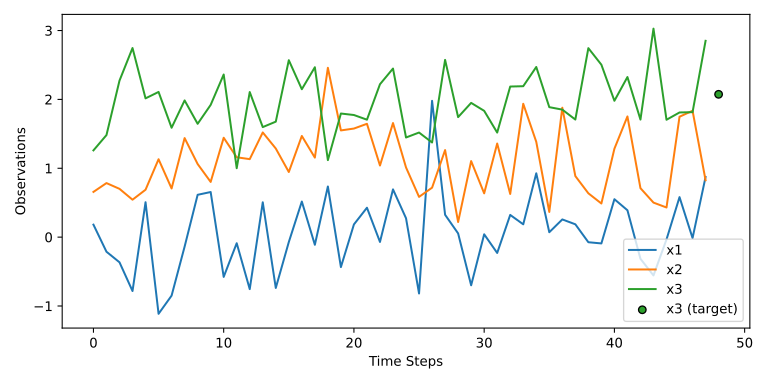
The factory class WindowedTimeSeriesDatasetFactory is used to create a TensorFlow dataset from pandas dataframes, or other data sources as we will see later.
We will use it now to create a dataset with 48 historic time-steps as the input to predict a single time-step in the future.
from tensorflow_time_series_dataset.factory import WindowedTimeSeriesDatasetFactory as Factory

factory_kwargs=dict(
    history_size=48,
    prediction_size=1,
    history_columns=['x1', 'x2', 'x3'],
    prediction_columns=['x3'],
    batch_size=4,
    drop_remainder=True,
)
factory=Factory(**factory_kwargs)
ds1=factory(test_df)
ds1
This returns the following TensorFlow Dataset:
<_PrefetchDataset element_spec=(TensorSpec(shape=(4, 48, 3), dtype=tf.float32, name=None), TensorSpec(shape=(4, 1, 1), dtype=tf.float32, name=None))>
We can plot the result with the utility function plot_path:
from tensorflow_time_series_dataset.utils.visualisation import plot_patch

githubusercontent="https://raw.githubusercontent.com/MArpogaus/tensorflow_time_series_dataset/master/"

fig=plot_patch(
    ds1,
    figsize=(8,4),
    **factory_kwargs
)

fname='.images/example1.svg'
fig.savefig(fname)

f"[[{githubusercontent}{fname}]]"
Multi-Step Prediction
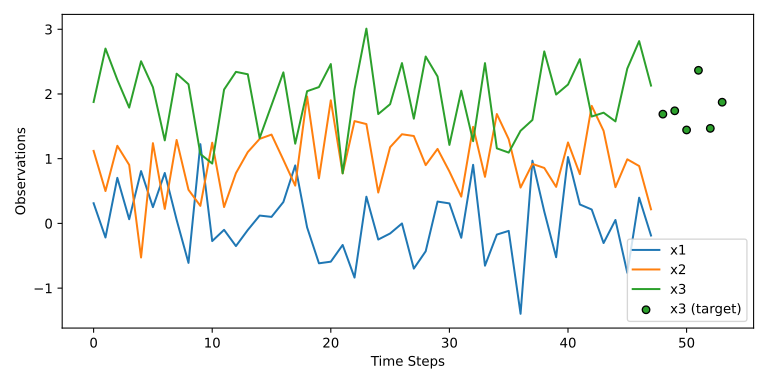
Lets now increase the prediction size to 6 half-hour time-steps.
factory_kwargs.update(dict(
    prediction_size=6
))
factory=Factory(**factory_kwargs)
ds2=factory(test_df)
ds2
This returns the following TensorFlow Dataset:
<_PrefetchDataset element_spec=(TensorSpec(shape=(4, 48, 3), dtype=tf.float32, name=None), TensorSpec(shape=(4, 6, 1), dtype=tf.float32, name=None))>
Again, lets plot the results to see what changed:
fig=plot_patch(
    ds2,
    figsize=(8,4),
    **factory_kwargs
)

fname='.images/example2.svg'
fig.savefig(fname)

f"[[{githubusercontent}{fname}]]"
Preprocessing: Add Metadata features
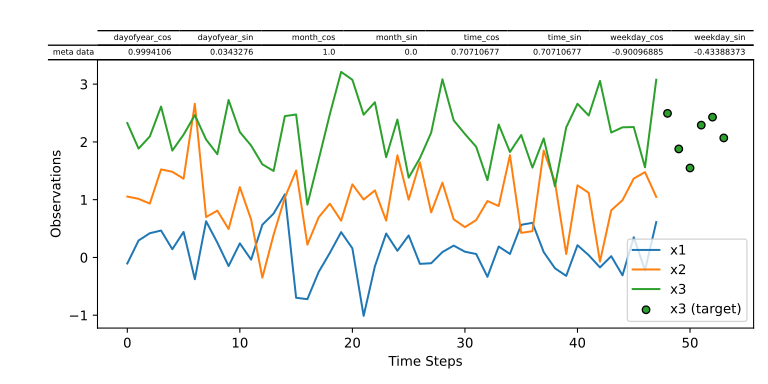
Preprocessors can be used to transform the data before it is fed into the model.
A Preprocessor can be any python callable.
In this case we will be using the a class called CyclicalFeatureEncoder to encode our one-dimensional cyclical features like the time or weekday to two-dimensional coordinates using a sine and cosine transformation as suggested in this blogpost.
import itertools
from tensorflow_time_series_dataset.preprocessors import CyclicalFeatureEncoder
encs = {
    "weekday": dict(cycl_max=6),
    "dayofyear": dict(cycl_max=366, cycl_min=1),
    "month": dict(cycl_max=12, cycl_min=1),
    "time": dict(
        cycl_max=24 * 60 - 1,
        cycl_getter=lambda df, k: df.index.hour * 60 + df.index.minute,
    ),
}
factory_kwargs.update(dict(
    meta_columns=list(itertools.chain(*[[c+'_sin', c+'_cos'] for c in encs.keys()]))
))
factory=Factory(**factory_kwargs)
for name, kwargs in encs.items():
    factory.add_preprocessor(CyclicalFeatureEncoder(name, **kwargs))

ds3=factory(test_df)
ds3
This returns the following TensorFlow Dataset:
<_PrefetchDataset element_spec=((TensorSpec(shape=(4, 48, 3), dtype=tf.float32, name=None), TensorSpec(shape=(4, 1, 8), dtype=tf.float32, name=None)), TensorSpec(shape=(4, 6, 1), dtype=tf.float32, name=None))>
Again, lets plot the results to see what changed:
fig=plot_patch(
    ds3,
    figsize=(8,4),
    **factory_kwargs
)

fname='.images/example3.svg'
fig.savefig(fname)

f"[[{githubusercontent}{fname}]]"
Contributing
Any Contributions are greatly appreciated! If you have a question, an issue or would like to contribute, please read our contributing guidelines.
License
Distributed under the Apache License 2.0
Contact
Marcel Arpogaus - marcel.arpogaus@gmail.com
Project Link: https://github.com/MArpogaus/tensorflow_time_series_dataset
Acknowledgments
Parts of this work have been funded by the Federal Ministry for the Environment, Nature Conservation and Nuclear Safety due to a decision of the German Federal Parliament (AI4Grids: 67KI2012A).
1 maintainer

Metadata
1 maintainer
Release files for tensorflow-time-series-dataset 0.2.1
For a detailed explanation of source distributions (sdists) and built distributions (wheels), please see the package formats documentation.
Source distribution (sdist)
| File | Size | Uploaded | |
|---|---|---|---|
| tensorflow_time_series_dataset-0.2.1.tar.gz | 49.0 kB | Details |
Built distribution (wheel)
| File | Interpreter | ABI | Platform | Reset |
|---|---|---|---|---|
| tensorflow_time_series_dataset-0.2.1-py3-none-any.whl | Python 3 | none | any | Details |
Total release size: 80.3 kB
Release files / tensorflow_time_series_dataset-0.2.1.tar.gz
| Download URL | tensorflow_time_series_dataset-0.2.1.tar.gz |
|---|---|
| Size | 49.0 kB |
| Tags | Source |
|
SHA-256 checksum How to use checksums |
146520aa29378c1ce9b518738bf0929bcd2ade01de26f1713dcd2df2cb7b9181
|
|
BLAKE2b-256 checksum How to use checksums |
363e67bae6f8d876e7bc1f31909814e21e1df88293c4bdf71e2d78a53ca49042
|
| Upload date | |
|
Uploaded using Trusted Publishing? What is trusted publishing? |
Yes |
| Uploaded via |
twine/5.1.1 CPython/3.12.6
|
Release files / tensorflow_time_series_dataset-0.2.1-py3-none-any.whl
| Download URL | tensorflow_time_series_dataset-0.2.1-py3-none-any.whl |
|---|---|
| Size | 31.3 kB |
| Tags | Python 3 |
|
SHA-256 checksum How to use checksums |
dd600888cfecf3c02e17a563882d8b47e3bbc6cd77cbc385a18ea0980b13d1f2
|
|
BLAKE2b-256 checksum How to use checksums |
53572c80ff0144ed7074d2fc54de9c3cfa11da9cf1bc5850bb0066e59bcd3722
|
| Upload date | |
|
Uploaded using Trusted Publishing? What is trusted publishing? |
Yes |
| Uploaded via |
twine/5.1.1 CPython/3.12.6
|














