

Read the whole stack.
A learner-first, DIY-ready framework for tensors, kernels, and custom hardware.
Tutorials • Docs • Quick Start • Installation






Build matrix & community signals














TensorPlay is a learner-first deep learning framework. It combines NumPy-style tensor computation with GPU acceleration and neural networks trained by an explicit computation-graph autograd engine. The entire stack — Python API, C++ core, CUDA kernels, compiler — is written to be read end to end: no black box between your model and the hardware.
- About TensorPlay
- Installation
- Getting Started
- Benchmarks
- Testing
- Resources
- Communication
- Releases and Contributing
- License
- The Organization: TensorPlay
About TensorPlay
A Transparent Tensor Library
At a granular level, TensorPlay consists of the following components:
| Component | Description |
|---|---|
| tensorplay | The Python API: tensors, autograd, nn, optim, data loading, serialization — the public surface |
| p10 | C++ core engine: tensor storage and memory management, foundational CPU and CUDA kernels |
| tpx | Autograd layer: explicit computation-graph construction and backward execution, fully decoupled from the core |
| stax | JIT compiler playground: static graph capture and operator fusion experiments, including native lowering of custom ops |
| tensorplay.nn | Neural network building blocks: Module, Linear, Conv2d, activations, losses, containers — plus the modern LLM stack: rotary embeddings, grouped-query / latent / compressed-sparse attention, delta-rule linear attention, KV caches, autoregressive generation |
| tensorplay.optim | Optimizers (SGD, Adam, AdamW) with learning-rate scheduling and weight decay |
| tensorplay.utils.data | Dataset / DataLoader with multi-worker batching, prefetching and shuffling |
| tensorplay.library | First-class custom operators: register ops, attach fake/meta and autograd formulas, bring your own Triton kernels |
The four pillars — P10, TPX, Stax and NN — are deliberately decoupled libraries that can work together or independently. Domain subpackages such as linalg, fft, sparse, special, amp, distributed and serialization round out the API surface.
Every call is one short, visible path — no black box between your model and the hardware:
flowchart TB
    py["Python API — tensorplay / nn / optim / data"] --> ag["TPX autograd — explicit DAG"]
    py --> disp["P10 dispatcher — 33 dispatch keys"]
    ag --> disp
    disp --> cpu["CPU kernels"]
    disp --> cuda["CUDA kernels"]
    disp --> vulkan["Vulkan kernels"]
    disp --> stax["Stax — graph capture & fusion"]
Why TensorPlay
TensorPlay is built on a philosophy of transparency: you can trace every operation from Python into the C++ core without getting lost in abstraction layers.
- Pure and readable implementations. Dive into the logic of every operator — from autograd to memory management. No black boxes.
- DIY acceleration. Simplified CPU and CUDA backends are a playground for experimenting with custom hardware kernels and learning parallel computing.
- Modular autograd. The decoupled TPX engine builds computation graphs explicitly, making backpropagation easy to understand and extend.
- Research ready. Prototype new layer types, optimizers, custom operators and storage formats with minimal boilerplate.
- Instantly familiar API. If you have worked with mainstream deep learning frameworks, the mental model carries over — spend your time on internals, not syntax.
Familiar and Python-First
TensorPlay is not a thin binding over an opaque engine. The public surface — tensorplay, nn, optim, data — is pure Python you can read end to end, and every call crosses a small, explicit boundary into the C++ core. Stack traces, error messages and the debugger show your code, not framework plumbing.
DIY Hardware Acceleration
The CPU and CUDA backends are deliberately simplified: one kernel family per file, one registration macro per unit, no hidden scheduling. That makes them a playground for learning parallel computing and prototyping kernels — bring your own device backend and wire it into the dispatcher without touching the framework itself.
An Explicit Autograd Engine
The autograd engine (TPX) is a standalone library, fully decoupled from the core. Computation graphs are built and executed explicitly — no hidden state — so backpropagation is something you can read, trace and extend in an afternoon.
Extensions Without Pain
First-class custom operators: register an op with tensorplay.library, attach fake/meta formulas for shape inference and an autograd formula for backward, and it composes with the whole stack — including native lowering into the Stax compiler or your own Triton kernels.
Installation
Binaries
# CPU wheels from PyPI
pip install tensorplay --upgrade

# CUDA wheels from the TensorPlay CUDA index — pick the variant matching
# your toolkit: cu124, cu126 or cu130.
# Keep PyPI as an extra index for runtime dependencies.
pip install tensorplay \
  --index-url https://download.tensorplay.cn/whl/cu130/ \
  --extra-index-url https://pypi.org/simple
Nightly (preview) builds
Try tomorrow's features today: every change that passes our build-and-smoke pipeline lands on the rolling nightly channel automatically, following the nightly version format (X.Y.0.dev<date>+cuXXX / +cpu). Only the latest build per variant is kept.
# CUDA nightly — same variants as the stable channel: cu124, cu126, cu130
pip install --pre tensorplay \
  --index-url https://download.tensorplay.cn/whl/nightly/cu130/ \
  --extra-index-url https://pypi.org/simple

# CPU nightly
pip install --pre tensorplay \
  --index-url https://download.tensorplay.cn/whl/nightly/cpu/ \
  --extra-index-url https://pypi.org/simple
From Source
Building from source gives you a hackable, debuggable install — the recommended setup for contributors and anyone working on kernels.
Prerequisites
- Python >= 3.10, < 3.14
- CMake >= 3.18 (< 4.0)
- A C++20-capable compiler (MSVC 2022 on Windows, GCC/Clang on Linux)
- CUDA Toolkit (optional, for GPU support); set
CMAKE_CUDA_ARCHITECTURESto target specific GPU architectures - ROCm 7.2.x (optional, for AMD GPU support); the HIP backend is currently built from source
- Ninja (installed automatically with the build dependencies)
Get the TensorPlay Source
git clone https://github.com/lexing-2026/TensorPlay.git
cd TensorPlay
# if you are updating an existing checkout
git submodule sync
git submodule update --init --recursive
The third-party sources ride the submodules, pinned to specific revisions. A checkout that skips them still builds, but the missing pieces degrade: no BLAS vector math, no distributed transports, and the Vulkan backend falls back to CPU unless a system install provides what it needs.
Install Build Dependencies
Isolated PEP 517 builds fetch everything automatically. For faster iterative development, install the toolchain once and build without isolation:
pip install -r requirements-build.txt
Install TensorPlay
TensorPlay is built with scikit-build-core through the standard PEP 517 interface declared in pyproject.toml:
# Full build and install (add -v for verbose output)
pip install .

# Editable install for development
pip install -e . --no-build-isolation

# Or produce a wheel without installing
python -m build --wheel
On success, import tensorplay picks up the compiled _C extension from the installed package. A quick check:
python -c "import tensorplay as tp; print(tp.__version__); print('vulkan:', tp.is_vulkan_available())"
Run the Test Suite
pytest test/ -q          # everything
pytest test/test_vulkan.py -q   # a single backend suite, e.g. Vulkan
Adjusting Build Options (Optional)
Environment variables drive the build — no -D flags needed:
Examples and the full variable table
# CPU-only build
USE_CUDA=OFF pip install .

# AMD GPU build with ROCm 7.2 / HIP
USE_CUDA=OFF USE_ROCM=ON pip install .

# Target specific GPU architectures
CMAKE_CUDA_ARCHITECTURES="70;75;86" pip install .
| Variable | Default | Description |
|---|---|---|
USE_CUDA |
auto-detect | Enable/disable the CUDA build |
USE_ROCM |
OFF |
Enable the AMD GPU / HIP build (mutually exclusive with USE_CUDA) |
USE_VULKAN |
auto-detect | Enable the Vulkan GPU build; needs a Vulkan loader on the machine plus the vendored headers and GLSL compiler from the submodules |
BUILD_TESTS |
OFF |
Build the C++ test suite |
USE_BLAS / USE_ONEDNN |
ON |
BLAS acceleration / oneDNN primitives |
MAX_JOBS |
machine default | Cap compile parallelism |
DEBUG |
unset | Build with -O0 -g |
CMAKE_CUDA_ARCHITECTURES |
native | Semicolon-separated GPU architectures |
TENSORPLAY_BUILD_VERSION / TENSORPLAY_BUILD_NUMBER |
unset | Override the package version (used by release CI) |
All USE_*, BUILD_* and CMAKE_* environment variables are forwarded to CMake automatically — no extra flags required.
Getting Started
Automatic Differentiation
import tensorplay as tp

x = tp.Tensor([[1.0, 2.0], [3.0, 4.0]], requires_grad=True)
y = tp.Tensor([[5.0, 6.0], [7.0, 8.0]], requires_grad=True)

z = x.matmul(y) + tp.ones_like(x)
loss = z.sum()
loss.backward()

# x.grad is [[11., 15.], [11., 15.]] — the row sums of y, since dL/dz is all ones
print(x.grad)
Under the hood, TPX records each operation into an explicit DAG and replays the chain rule node by node: $\dfrac{\partial \mathcal{L}}{\partial x} = \dfrac{\partial \mathcal{L}}{\partial z} \cdot \dfrac{\partial z}{\partial x}$ — every edge of that graph is code you can step through.
Defining a Language Model
tensorplay.nn ships the building blocks modern decoder-only LLMs are made of — rotary embeddings, grouped-query attention, SwiGLU feed-forward, RMSNorm — as composable modules. A TransformerBlock wraps any token mixer (attention, linear attention, …) in the pre-norm residual wiring, so the mixer is the only thing you choose per layer:
import tensorplay as tp
from tensorplay import nn
from tensorplay.nn.cache import DynamicCache


class DecoderLayer(nn.Module):
    def __init__(self, hidden_size: int, num_heads: int, num_kv_heads: int, layer_idx: int):
        super().__init__()
        mixer = nn.GroupedQueryAttention(
            hidden_size, num_heads, num_kv_heads=num_kv_heads,
            qk_norm=True, layer_idx=layer_idx,
        )
        self.block = nn.TransformerBlock(hidden_size, mixer)

    def forward(self, x, position_ids=None, past_key_values=None):
        return self.block(x, position_ids=position_ids, past_key_values=past_key_values)


class TinyLM(nn.Module):
    def __init__(self, vocab_size=256, hidden_size=128, num_layers=4, num_heads=8, num_kv_heads=2):
        super().__init__()
        self.vocab_size = vocab_size
        self.embed = nn.Embedding(vocab_size, hidden_size)
        self.layers = nn.ModuleList(
            [DecoderLayer(hidden_size, num_heads, num_kv_heads, i) for i in range(num_layers)]
        )
        self.norm = nn.RMSNorm(hidden_size)
        self.lm_head = nn.Linear(hidden_size, vocab_size, bias=False)

    def forward(self, input_ids, position_ids=None, past_key_values=None):
        x = self.embed(input_ids)
        for layer in self.layers:
            x = layer(x, position_ids=position_ids, past_key_values=past_key_values)
        return self.lm_head(self.norm(x))

    def create_empty_cache(self):
        return DynamicCache()


model = TinyLM()
print(model)  # auto-generated architecture visualization
Rotary embeddings and per-head query/key RMS normalization live inside each mixer, and each layer files its key/value pairs into its own slot of the shared cache — the model itself never touches cache internals.
Training Loop
Training a causal LM is ordinary next-token prediction: shift the inputs by one position and apply cross-entropy over the vocabulary.
from tensorplay.nn import CrossEntropyLoss
from tensorplay.optim import AdamW

criterion = CrossEntropyLoss()
optimizer = AdamW(model.parameters(), lr=3e-4)

for step in range(200):
    tokens = (tp.arange(65).unsqueeze(0) + 3 * step) % model.vocab_size  # toy corpus
    logits = model(tokens[:, :-1])          # predict the next token at every position
    loss = criterion(logits.reshape(-1, model.vocab_size), tokens[:, 1:].reshape(-1))

    optimizer.zero_grad()
    loss.backward()
    optimizer.step()
    if step % 50 == 0:
        print(f"step {step}: loss {loss.item():.3f}")
Generating Text
generate drives the decode loop: one prefill pass over the prompt, then single-token steps against the cache. Sampling controls — temperature, top-k, nucleus (top-p), repetition penalty, early stop on EOS — are keyword arguments.
from tensorplay.nn.generation import generate

prompt = (tp.arange(8) % model.vocab_size).unsqueeze(0)   # [batch, seq]
out = generate(
    model, prompt,
    max_new_tokens=16, do_sample=True, temperature=0.8, top_k=50,
)
print(out[0].tolist())   # the prompt, continued
Because GroupedQueryAttention shares two KV heads across eight query heads, the cache holds a quarter of the key/value pairs a full multi-head model would. The cache itself is swappable: DynamicCache grows token by token, while StaticCache, SlidingWindowCache, PagedCache, QuantizedCache and the linear-attention LinearStateCache cover static allocation, windowed context, paged serving, quantized storage and recurrent state. Pick one in create_empty_cache() or pass it to generate explicitly.
Beyond GQA, you can swap in MultiheadLatentAttention (low-rank latent KV compression), GatedDeltaNet / KimiDeltaAttention (delta-rule linear attention holding a fixed-size recurrent state per head) or CompressedSparseAttention (sliding window plus compressed KV entries selected by a lightning indexer); CausalEncoderDecoder stacks a decoder over an encoder for encoder–decoder models. For multi-process launching, tprun starts --nproc-per-node copies of your training script wired for distributed runs.
Structured tutorials — linear regression from scratch, MNIST CNN classification, custom datasets, model saving/loading with .mega + state_dict — live at tensorplay.cn. Deep dives, one pillar per post — dispatch, autograd engine, tensor storage, compiler — live in the blog series.
Benchmarks
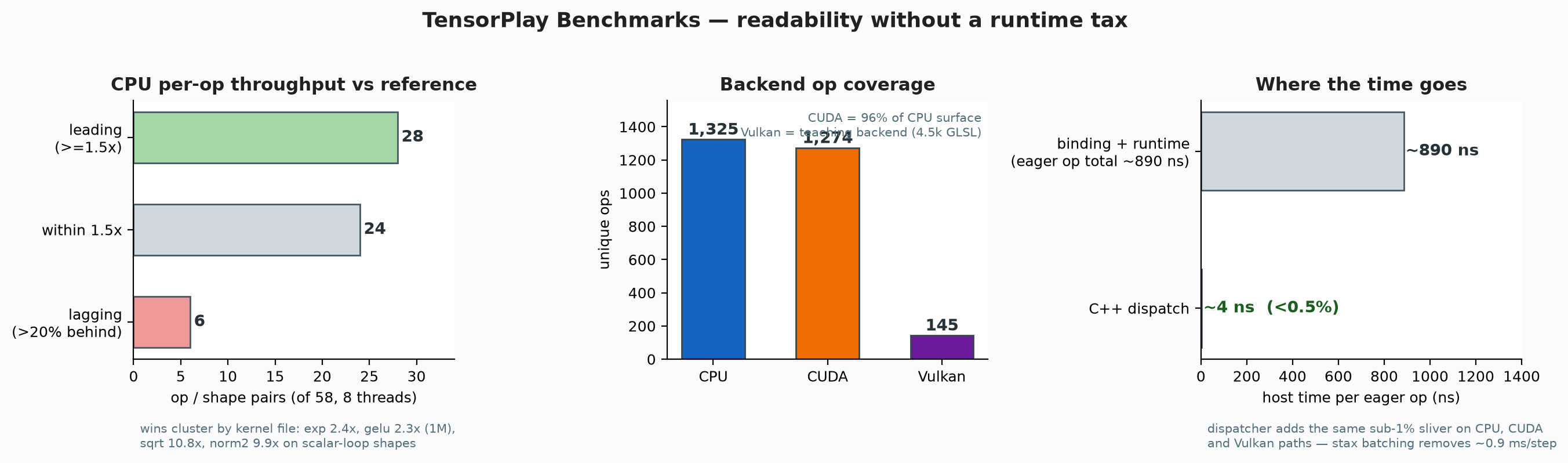
The benchmark/ suite measures what a readable framework costs — and proves correctness at the same time. Every comparison runs both runtimes from identical initial weights, deterministic data order, and the same optimizer and batch settings; the gate is strict: logits must match within allclose tolerance and Top-1 predictions must be identical before any timing is reported.
- End-to-end training: ResNet-18 image classification on CPU and CUDA, eager and compiled (
stax, native lowering), reporting train/eval/test accuracy and throughput - Micro and subsystem: GEMM, optimizer steps, dataloader, serialization, autograd Function overhead, custom-op call overhead, LLaMA end-to-end
- Reports: every script emits a JSON report (
--json-out) — throughput, latency percentiles, compile cost — ready for plotting and for the white paper evaluation
Measured highlights from the white paper, §9 — a snapshot of current main: the dispatcher adds the same sub-1% sliver on CPU, CUDA and Vulkan paths; the CUDA backend covers 1,262 unique ops (97% of the CPU surface, 1,233 ops); the Vulkan teaching backend ships 224 ops backed by 6.8k lines of GLSL shaders across 102 files. The pytest suite defines 3,660 test functions.
Scripts and methodology: benchmark/README.md.
Testing
The Python test suite runs with pytest against an installed (or built in-place) package:
pytest test/
CI builds the full wheel matrix (Python 3.10–3.13; CPU on Linux x86_64/aarch64, macOS arm64, and Windows x86_64; CUDA on Linux and Windows x86_64) and validates every wheel on every pull request and push to main; see .github/workflows/ (pull, trunk, publish, lint). Lint rules live under [tool.ruff] in pyproject.toml.
Resources
- Documentation: tensorplay.cn
- Tutorials: tensorplay.cn/en/guide/tutorials
- White Paper: docs/whitepaper/main.pdf — the whole stack with
path:linecitations - Blog: docs/blogs — one pillar per post
- Benchmarks: benchmark/
- Community: Discord
Communication
- Discord: discord.gg/u6T5e2kGJm — questions, ideas, showcase
- GitHub Issues: bug reports, feature requests, RFCs
- Email: feedback@tensorplay.cn
Releases and Contributing
The package version lives in version.txt (single source of truth; development installs carry a +git<sha> suffix). Releases are cut by pushing a vMAJOR.MINOR.0 tag; patch tags such as v1.2.1 do not publish binaries. CI then builds and validates the full wheel matrix, publishes CPU wheels to PyPI, and uploads CUDA wheels to a GitHub Release with a PEP 503 index on Cloudflare Pages. Wheel-matrix infrastructure (platform runners, CUDA variants, the optional ROCm channel) is documented in RELEASE.md.
We welcome contributions of all kinds — bug fixes, documentation, new features. See CONTRIBUTING.md for the development workflow and coding standards.

License
TensorPlay is licensed under the Apache 2.0 License.
The Organization: TensorPlay

|
ohtensorplay Open tools and infrastructure for people who want to understand, experiment with, and build AI systems. Organization mission · Make Everyone a Great AI-Builder |
Projects
- megatensors — the MEGA model-hub SDK powering
.megaserialization, themega://storage backend, and hub model loading (pip install megatensors)
Other dependencies
| Dependency |
|---|
| NumPy |
| SymPy |
| TensorBoard |
| Pillow |
| pybind11 |
Explore all ohtensorplay projects — give it a ⭐ and follow along.
1 maintainer

Metadata
1 maintainer
Release files for tensorplay 1.1.0
For a detailed explanation of source distributions (sdists) and built distributions (wheels), please see the package formats documentation.
Built distributions (wheels)
| File | Interpreter | ABI | Platform | Reset |
|---|---|---|---|---|
| tensorplay-1.1.0-cp310-cp310-manylinux_2_39_aarch64.whl | CPython 3.10 | CPython 3.10 | Linux glibc 2.39+ ARM64 | Details |
| tensorplay-1.1.0-cp310-cp310-manylinux_2_35_x86_64.whl | CPython 3.10 | CPython 3.10 | Linux glibc 2.35+ x86-64 | Details |
| tensorplay-1.1.0-cp310-cp310-macosx_14_0_arm64.whl | CPython 3.10 | CPython 3.10 | macOS 14.0+ ARM64 | Details |
Total release size: 194.8 MB
Release files / tensorplay-1.1.0-cp310-cp310-manylinux_2_39_aarch64.whl
| Download URL | tensorplay-1.1.0-cp310-cp310-manylinux_2_39_aarch64.whl |
|---|---|
| Size | 71.3 MB |
| Tags | CPython 3.10 Linux glibc 2.39+ ARM64 |
|
SHA-256 checksum How to use checksums |
0a79720654bc44383de12e17a1afb39aa022ed8ea8059fc164c32a11c4b2c828
|
|
BLAKE2b-256 checksum How to use checksums |
8b1df9adc01021f85b0e936be6a9a73166136dd34a7e14e7346a085988be2814
|
| Upload date | |
|
Uploaded using Trusted Publishing? What is trusted publishing? |
Yes |
| Uploaded via |
twine/7.0.0 CPython/3.13.14
|
Provenance
Provenance describes where a file came from. On PyPI, provenance is shared via attestations, which provide a verifiable record of the build or publishing details. View details, limitations and caveats.


PyPI Publish Attestation
PyPI verified that this artifact, at this checksum, originated from the publisher listed below.
Signed by GitHub Actions, verified by PyPI on Oct 8, 2026.
Transparency logRelease files / tensorplay-1.1.0-cp310-cp310-manylinux_2_35_x86_64.whl
| Download URL | tensorplay-1.1.0-cp310-cp310-manylinux_2_35_x86_64.whl |
|---|---|
| Size | 97.1 MB |
| Tags | CPython 3.10 Linux glibc 2.35+ x86-64 |
|
SHA-256 checksum How to use checksums |
cdda19a0c3b9d79fecbd08e732303c55ea80a0869712b981db2edc694eb9691a
|
|
BLAKE2b-256 checksum How to use checksums |
f4034b98bd80710094d21c8ba4bc18aef7710ae485c603a395bdcd37e423c5b2
|
| Upload date | |
|
Uploaded using Trusted Publishing? What is trusted publishing? |
Yes |
| Uploaded via |
twine/7.0.0 CPython/3.13.14
|
Provenance
Provenance describes where a file came from. On PyPI, provenance is shared via attestations, which provide a verifiable record of the build or publishing details. View details, limitations and caveats.
PyPI Publish Attestation
PyPI verified that this artifact, at this checksum, originated from the publisher listed below.
Signed by GitHub Actions, verified by PyPI on Oct 8, 2026.
Transparency logRelease files / tensorplay-1.1.0-cp310-cp310-macosx_14_0_arm64.whl
| Download URL | tensorplay-1.1.0-cp310-cp310-macosx_14_0_arm64.whl |
|---|---|
| Size | 26.4 MB |
| Tags | CPython 3.10 macOS 14.0+ ARM64 |
|
SHA-256 checksum How to use checksums |
33cd3b2a8958070f8074a2582c72d116acf24a7d726b9406d78d60b933810754
|
|
BLAKE2b-256 checksum How to use checksums |
325c997a2273249434b8fd83a11dc16d4d95663d8a08f4a001d12c98de01262e
|
| Upload date | |
|
Uploaded using Trusted Publishing? What is trusted publishing? |
Yes |
| Uploaded via |
twine/7.0.0 CPython/3.13.14
|
Provenance
Provenance describes where a file came from. On PyPI, provenance is shared via attestations, which provide a verifiable record of the build or publishing details. View details, limitations and caveats.
PyPI Publish Attestation
PyPI verified that this artifact, at this checksum, originated from the publisher listed below.
Signed by GitHub Actions, verified by PyPI on Oct 8, 2026.
Transparency log













