
TeraboxDL 🚀
TeraboxDL is a Python package for interacting with Terabox, enabling you to fetch file details such as name, download link, thumbnail, and size, and download files with support for custom progress tracking via a callback function.
🌟 Features
- 🔗 Get direct download links from Terabox.
- 📝 View file name, size, and thumbnail.
- 📥 Download files to any folder.
- 📊 Built-in or custom progress bar support.
- ❌ Handles errors with helpful messages.
- 🐍 Works with Python 3.7 and above.
⚙️ Installation
Install using pip:
pip install terabox-downloader
🍪 How to Get the Cookie
Click here for the tutorial
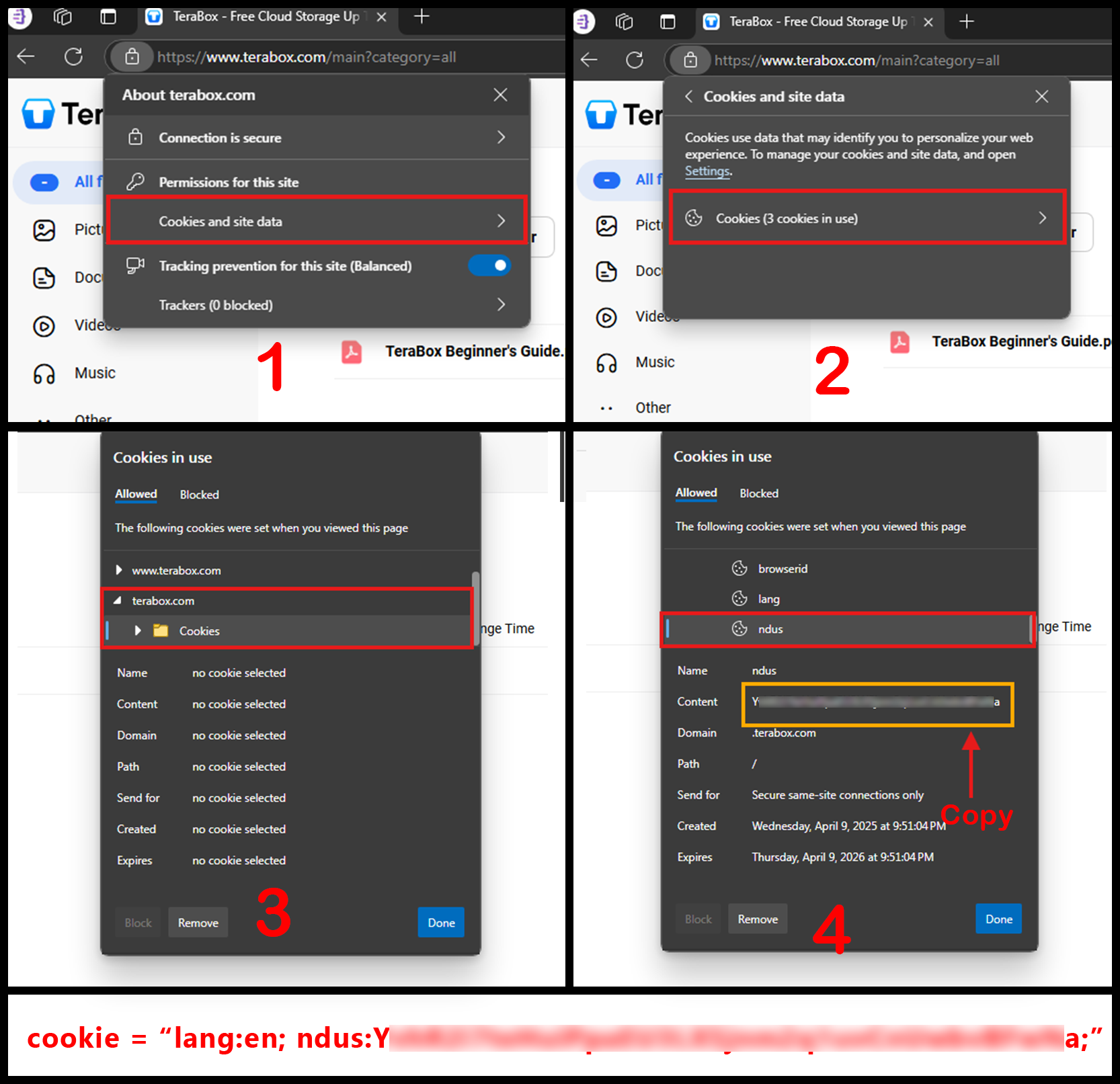
To use TeraboxDL, you need to provide your Terabox cookie. Here's how you can get it:
- Open your
Edge browserand log in to your Terabox account. - Click the padlock icon next to the URL in the address bar and Click
Permissions for this site. - In the pop-up, click
Cookies and site data. 4 Then clickCookies (X cookies in use)to open the cookies viewer. - Under the
terabox.com domain, expand the Cookies section. - Look for the
langandnduscookies. Copy their values and combine them in the format:
lang=your_lang_value; ndus=your_ndus_value;
Example:
cookie = "lang=en; ndus=Y**********a;"
📝 You can now use this cookie string in tools or scripts that require authentication with TeraBox.
For a visual guide, refer to the image below:
🚀 Quick Start
from TeraboxDL import TeraboxDL

# Step 1: Add your Terabox cookie
cookie = "your_cookie_here"  # e.g., "lang=en; ndus="

# Step 2: Create an instance of TeraboxDL
terabox = TeraboxDL(cookie)

# Step 3: Paste your file link
link = "https://www.terabox.app/s/your_link_here"

# Step 4: Get file info
file_info = terabox.get_file_info(link)

# Step 5: Check for errors and show info
if "error" in file_info:
    print("Error:", file_info["error"])
else:
    print("File Name:", file_info["file_name"])
    print("Download Link:", file_info["download_link"])
    print("Thumbnail:", file_info["thumbnail"])
    print("File Size:", file_info["file_size"])
📂 Downloading Files
# Download file
result = terabox.download(file_info, save_path="downloads/")

if "error" in result:
    print("Error:", result["error"])
else:
    print("✅ Downloaded to:", result["file_path"])
You can also show a custom progress bar using a callback:
def progress_callback(downloaded, total_size, percentage):
    done = int(50 * downloaded / total_size)
    print(f"\r[{'=' * done}{' ' * (50 - done)}] {downloaded / total_size * 100:.2f}%", end='')

# Use callback
result = terabox.download(file_info, save_path="downloads/", callback=progress_callback)
📘 API Overview
TeraboxDL(cookie)
Create an instance with your Terabox cookie.
get_file_info(link)
Returns file info:
file_name,download_link,thumbnail,file_size,sizebytes- If something goes wrong:
error
download(file_info, save_path=None, callback=None)
Downloads the file using info from get_file_info.
Returns:
file_pathif successfulerrorif failed
🔧 Notes
save_pathis optional; defaults to the current folder.- Directory is auto-created if it doesn’t exist.
- If
callbackis not provided, a default terminal progress bar is shown. callbackgives real-time download updates (bytes and %).- Use
callbackfor GUI apps, bots, web interfaces, or logs.
📦 Requirements
- Python 3.7+
📝 License
MIT License. See LICENSE.
1 maintainer

Metadata
1 maintainer
Release files for terabox-downloader 1.8
For a detailed explanation of source distributions (sdists) and built distributions (wheels), please see the package formats documentation.
Source distribution (sdist)
| File | Size | Uploaded | |
|---|---|---|---|
| terabox_downloader-1.8.tar.gz | 10.3 kB | Details |
Built distribution (wheel)
| File | Interpreter | ABI | Platform | Reset |
|---|---|---|---|---|
| terabox_downloader-1.8-py3-none-any.whl | Python 3 | none | any | Details |
Total release size: 19.4 kB
Release files / terabox_downloader-1.8.tar.gz
| Download URL | terabox_downloader-1.8.tar.gz |
|---|---|
| Size | 10.3 kB |
| Tags | Source |
|
SHA-256 checksum How to use checksums |
29202636f9442f26f8a55e3d5974aff64733768acd62f72f2e2769b4c444d4cc
|
|
BLAKE2b-256 checksum How to use checksums |
b7af5a54cddc6932e616104e3ad7f5d7ff5e28c1d9d2c776b9dbc51f112deb0c
|
| Upload date | |
|
Uploaded using Trusted Publishing? What is trusted publishing? |
Yes |
| Uploaded via |
twine/6.1.0 CPython/3.12.9
|
Provenance
Provenance describes where a file came from. On PyPI, provenance is shared via attestations, which provide a verifiable record of the build or publishing details. View details, limitations and caveats.


PyPI Publish Attestation
PyPI verified that this artifact, at this checksum, originated from the publisher listed below.
Signed by GitHub Actions, verified by PyPI on May 12, 2025.
Transparency logRelease files / terabox_downloader-1.8-py3-none-any.whl
| Download URL | terabox_downloader-1.8-py3-none-any.whl |
|---|---|
| Size | 9.1 kB |
| Tags | Python 3 |
|
SHA-256 checksum How to use checksums |
fe299bd098c972b2007d15625f0110cf37674954e25f7e43050f3b24b6f465f5
|
|
BLAKE2b-256 checksum How to use checksums |
0cc236ec5ee7aff8bb8c239f19cbe6178d1677c270d17a7497d320df7f49053e
|
| Upload date | |
|
Uploaded using Trusted Publishing? What is trusted publishing? |
Yes |
| Uploaded via |
twine/6.1.0 CPython/3.12.9
|
Provenance
Provenance describes where a file came from. On PyPI, provenance is shared via attestations, which provide a verifiable record of the build or publishing details. View details, limitations and caveats.
PyPI Publish Attestation
PyPI verified that this artifact, at this checksum, originated from the publisher listed below.
Signed by GitHub Actions, verified by PyPI on May 12, 2025.
Transparency log













