
Term-Piechart



Displays pie charts in your terminal. This is a direct python rewrite of the Ruby Gem TTY-Pie. Maybe someone else would find this usefull as well. It requires no external dependencies and supports ASCII and HEX color codes as well as automatic generation of random colors.
Installation
python -m pip install term-piechart
Examples
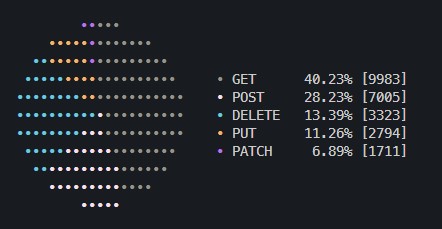
from term_piechart import Pie

requests = [
    {"name": "GET", "value": 9983},
    {"name": "POST", "value": 7005},
    {"name": "DELETE", "value": 3323},
    {"name": "PUT", "value": 2794},
    {"name": "PATCH", "value": 1711},
]

pie = Pie(
    requests,
    radius=5,
    autocolor=True,
    autocolor_pastel_factor=0.7,
    legend={"line": 0, "format": "{label} {name:<8} {percent:>5.2f}% [{value}]"},
)
More in examples
Class Arguments:
data(default:[]): A list of dicts with following elements representing the slicesname: Name of the elementvalue: Value of the elementfill(default:•): String to fill the slice withcolor: Hexcode or ANSII Colorname
radius(default:10): Amount of columns/rows as the radius to change sizeautocolor(default:False): Can be enabled if there are no colors specified in thedatadictautocolor_pastel_factor(default:0): Can be increased until 1fill(default:•): Overwrite the fill symboll for every elementlegend(default:True): Can be disabled viaFalseor configured with a dict with those keys:line(default:1): Number of lines between legend elementsleft(default:4): Number of spaces between chart and left of legendformat(default:{label} {name} {percent:.2f}): Supports{value}as well
aspect_ratio(default:2): Aspect ratio of the printed charttop(default:None): Amount of rows from top of the visible terminalleft(default:None): Amount of columns from the left of the visible terminal
References
term-piechart is a direct python derivate of:
- Original Ruby Library Piotr Murachs - TTY:Pie
- Generation of Random Colors Andrew Dewes - Distant Colors
Developement
Tox
There's a minimal tox.ini with a requirement on pyenv and un-def/tox-pyenv-redux. Zsh users can use this as a reference.
curl https://pyenv.run | bash
echo 'export PYENV_ROOT="$HOME/.pyenv"' >> ~/.zshrc
echo '[[ -d $PYENV_ROOT/bin ]] && export PATH="$PYENV_ROOT/bin:$PATH"' >> ~/.zshrc
echo 'eval "$(pyenv init -)"' >> ~/.zshrc
. ~/.zshrc
pyenv install -s 3.12 3.11 3.10 3.9 3.8
tox
1 maintainer

Metadata
1 maintainer
Release files for term-piechart 0.1.3
For a detailed explanation of source distributions (sdists) and built distributions (wheels), please see the package formats documentation.
Source distribution (sdist)
| File | Size | Uploaded | |
|---|---|---|---|
| term_piechart-0.1.3.tar.gz | 27.8 kB | Details |
Built distribution (wheel)
| File | Interpreter | ABI | Platform | Reset |
|---|---|---|---|---|
| term_piechart-0.1.3-py3-none-any.whl | Python 3 | none | any | Details |
Total release size: 35.0 kB
Release files / term_piechart-0.1.3.tar.gz
| Download URL | term_piechart-0.1.3.tar.gz |
|---|---|
| Size | 27.8 kB |
| Tags | Source |
|
SHA-256 checksum How to use checksums |
b2e97101b0d09ab4797de532f390470d72d50fd500791a7de1747edbb94470ad
|
|
BLAKE2b-256 checksum How to use checksums |
5ecfa7725c04ab2931482de8c4c3fca169bdfe6263ba5e237cad940df84eef29
|
| Upload date | |
|
Uploaded using Trusted Publishing? What is trusted publishing? |
Yes |
| Uploaded via |
twine/5.0.0 CPython/3.12.3
|
Release files / term_piechart-0.1.3-py3-none-any.whl
| Download URL | term_piechart-0.1.3-py3-none-any.whl |
|---|---|
| Size | 7.2 kB |
| Tags | Python 3 |
|
SHA-256 checksum How to use checksums |
9a4ca340a88394d554f55741a83a1cbfc8b109275a5d51ebc050a6755c13b30d
|
|
BLAKE2b-256 checksum How to use checksums |
a6206df4f89cca158f3198d8d95cbb387beeebf0c3e5be884c1dfb085a5d21a8
|
| Upload date | |
|
Uploaded using Trusted Publishing? What is trusted publishing? |
Yes |
| Uploaded via |
twine/5.0.0 CPython/3.12.3
|














