
termato
BUILT TO address my own problem:
https://psychology.stackexchange.com/questions/27694/the-perception-of-time-of-workaholics
People working on their laptops often forget the whole world while they're engrossed in their work. Some fall into compulsive habits or disorders, while others dislike installing complicated and overly colorful GUI nonsense. There are those who prefer minimalist tools that simply get the job done.
Basically, you know you need to get up and take a small break, but you convince yourself to finish "just one more thing," and before you know it, the entire day has slipped by. You’re still in front of your laptop or screen, trying to fix that one last thing. Sure, it’s rewarding, and I love that more than anything. But deep down, we know we need to take at least small breaks.
This program was built for me, but I don’t see why others wouldn’t find it useful too.
Why not simply buy a pomodoro? Well, I want my laptop to take care of me the way I do:)
Pomodoro Timer Help
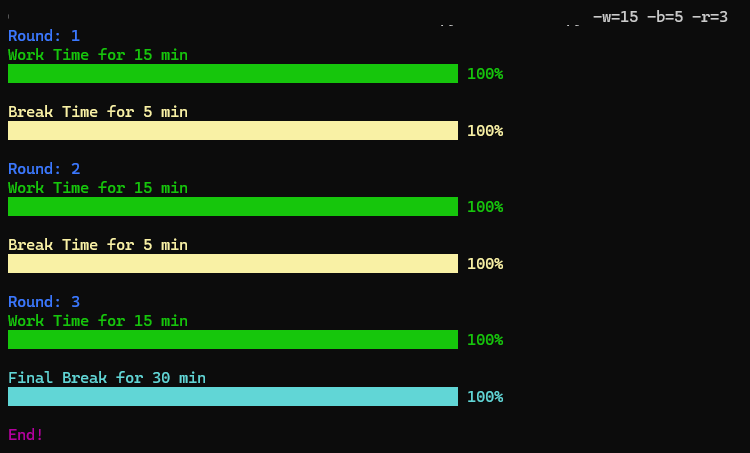
Install the package
pip install termato
pip3 install termato
How to execute
$ termato
Or
$ termato -w=25 -b=5 -r=4
Options
- -w=<work_time>: Set the duration of each work interval in minutes. Default: 25 minutes.
- -b=<break_time>: Set the duration of each regular break in minutes. Default: 5 minutes.
- -r=: Set the total number of completed pomodoro intervals (work round + break). Default: 4.
- -h: Display this help message.
Note
- The script will use default values if any option is not provided.
- Only
-w,-b,-roptions are recognized. All other parameters will be ignored. - Press Ctrl+C during the timer to stop the script.
License
This project is licensed under the Custom License. See the LICENSE file for details.
Future Versions, Bug, and Errors:
Well, I’m sorry, but I don’t have time for anything like that. Besides, I personally don’t think this code deserves much attention because it’s just a simple script turned into a command line and found this old script somewhere on my old file archives
1 maintainer

Metadata
1 maintainer
Release files for termato 1.0
For a detailed explanation of source distributions (sdists) and built distributions (wheels), please see the package formats documentation.
Source distribution (sdist)
| File | Size | Uploaded | |
|---|---|---|---|
| termato-1.0.tar.gz | 19.8 kB | Details |
Built distribution (wheel)
| File | Interpreter | ABI | Platform | Reset |
|---|---|---|---|---|
| termato-1.0-py3-none-any.whl | Python 3 | none | any | Details |
Total release size: 26.3 kB
Release files / termato-1.0.tar.gz
| Download URL | termato-1.0.tar.gz |
|---|---|
| Size | 19.8 kB |
| Tags | Source |
|
SHA-256 checksum How to use checksums |
7b8d5a4ecc6daca1540ab02e698585b30074e97b58f94740c7822b929298cad7
|
|
BLAKE2b-256 checksum How to use checksums |
1531374a1cc7e4dabb128dcfa7be3cf1509bc163507ee1ca6cc9a5cefa0e9356
|
| Upload date | |
|
Uploaded using Trusted Publishing? What is trusted publishing? |
No |
| Uploaded via |
twine/5.1.1 CPython/3.12.7
|
Release files / termato-1.0-py3-none-any.whl
| Download URL | termato-1.0-py3-none-any.whl |
|---|---|
| Size | 6.5 kB |
| Tags | Python 3 |
|
SHA-256 checksum How to use checksums |
d549995f068141c88f0f0004b5c5c107d37ed8d84b1d90c108fe433b0bb19399
|
|
BLAKE2b-256 checksum How to use checksums |
f5ae029b50ff8d843b55e62476c6249756e548890026a7e3f4acb4eef9cf8c2e
|
| Upload date | |
|
Uploaded using Trusted Publishing? What is trusted publishing? |
No |
| Uploaded via |
twine/5.1.1 CPython/3.12.7
|














