
termcolor_dg
📦 pypi/termcolor_dg | 📑 ANSI escape code | 📑 Color codes cheatsheet
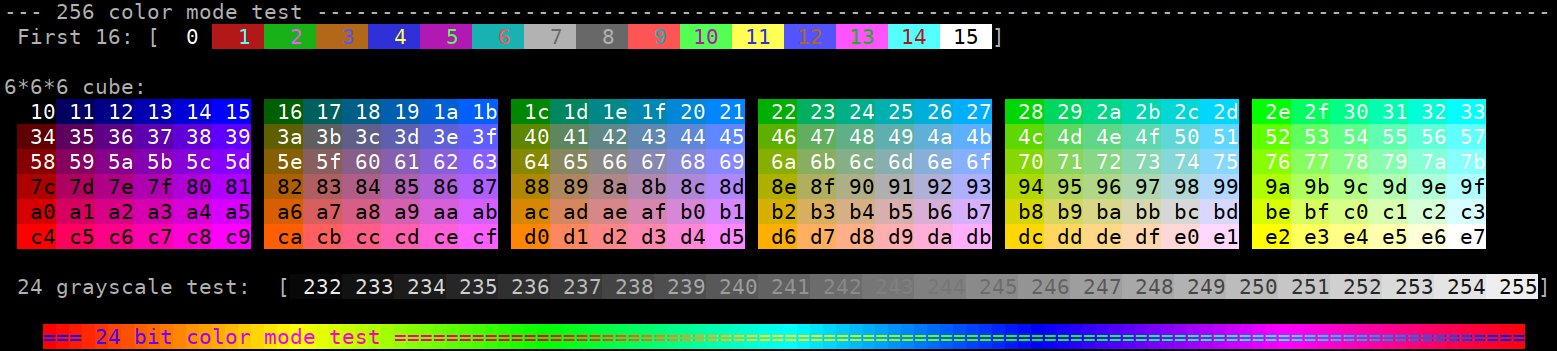
ANSI Color formatting for terminal output and log coloring. Supports 16 colors, 256 colors and 24-bit color modes.
Python 2 support is present for legacy projects, and because it is not too much work and I have to use it for now.
Example
from termcolor_dg import colored, cprint

print(colored('Hello, World!', 'light_red', 'on_blue'))
cprint('Hello, World!', 'blue', 'on_light_red', ['reverse', 'blink'])
print_red_on_cyan = lambda x: cprint(x, 'red', 'on_cyan')
print_red_on_cyan('Hello, World!')
for i in range(10):
  cprint(str(i), 'magenta', end=' ' if i != 9 else '\n')
import sys

cprint("Attention!", 196, attrs='bold', file=sys.stderr)  # 256 color mode
cprint("Attention!", (255, 0, 0), attrs='bold', file=sys.stderr)  # 24-bit color mode
import logging
from termcolor_dg import logging_basic_color_config

logging_basic_color_config()
logging.log(logging.INFO, 'test')
Colors demo screenshot (python -m termcolor_dg):
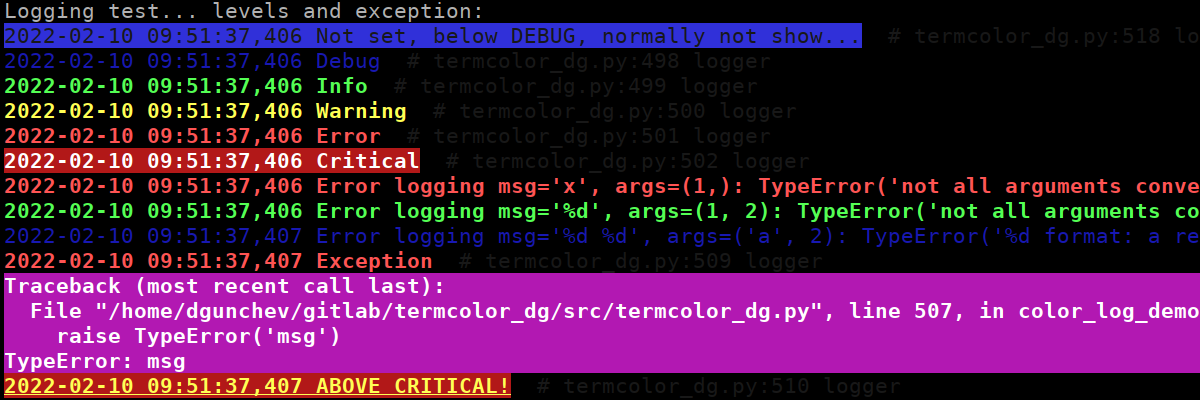
Colored logs demo screenshot (python -m termcolor_dg logs):
Environment variables
-
ANSI_COLORS_FORCE: If set to anything, even empty string, color escape sequences will be added.
-
ANSI_COLORS_DISABLED: If set to anything no coloring will be performed, overrides ANSI_COLORS_FORCE.
-
NO_COLOR: If set to anything no coloring will be performed, overrides ANSI_COLORS_FORCE, see https://no-color.org/.
If none of the environment variables is set the colors are used
only if the stdout is attached to a terminal: sys.stdout.isatty().
Text properties
| Text colors | Text highlights | Alt Text highlights | Attributes |
|---|---|---|---|
| black | black | on_black | bold |
| red | red | on_red | dark |
| green | green | on_green | underline |
| yellow | yellow | on_yellow | blink |
| blue | blue | on_blue | reverse |
| magenta | magenta | on_magenta | concealed |
| cyan | cyan | on_cyan | |
| light_grey | light_grey | on_light_grey | |
| dark_grey | dark_grey | on_dark_grey | |
| light_red | light_red | on_light_red | |
| light_green | light_green | on_light_green | |
| light_yellow | light_yellow | on_light_yellow | |
| light_blue | light_blue | on_light_blue | |
| light_magenta | light_magenta | on_light_magenta | |
| light_cyan | light_cyan | on_light_cyan | |
| white | white | on_white |
Functions
Adding ANSI colors
always_colored(text, color=None, on_color=None, attrs=None, reset=True) : Returns the text with ANSI color code in front and ANSI color reset after. Arguments: : - text is the text to add color to : - color and on_color define the character and background color. Each can be a name for 16 color mode, number for the 256 color variant and list/tuple of R, G and B for the 24 bit color support. The following all define light red: 'light_red', 9, 196 and (255, 0, 0). : - attrs attributes, single attribute name, list or tuple of attributes. : - reset if set to False will suppress adding of the reset ANSI sequence at the end. Useful if you are joining another colored string, only the last reset is really needed.
colored(text, color=None, on_color=None, attrs=None, reset=True) : same as always_colored but checks if the app is running on a terminal and if the colors have been forced or disabled. The boolean termcolor_dg.DISABLED is the variable checked.
Utility functions
cprint(text='', color=None, on_color=None, attrs=None, **kwargs) : same as colored, but prints the resulting string instead of returning it.
rainbow_color(n, steps, nmax=255) : calculates the color at step n needed to produce a rainbow in steps steps with intensity up to nmax. Ex: rainbow_color(0, 120) returns (255, 0, 0), rainbow_color(30, 120) returns (128, 255, 0).
monkey_patch_logging : Monkeypatch logging.Formatter to add colors to the logs on a terminal, not customizable for now. Monkeypatch logging.LogRecord.getMessage to log formatting errors in the log format instead of throwing useless exception.
logging_basic_color_config(level='DEBUG', fmt='%(asctime)s %(message)s # %(filename)s:%(lineno)d %(name)s', color_on_terminal=True) : Basic logging configuration, coloring and report formatting errors (monkey_patch_logging). Coloring code relies on ' # ' to determine the section to print in pale dark blue (comment).
monkey_unpatch_logging : Undo the monkeypatching done by monkey_patch_logging and remove coloring and error handling.
COLOR_RESET_STR : The color and attribute ANSI reset code.
Similar projects
You may want to check out:
- 📦 pypi/termcolor - the original project
- 📦 natmey/termcolor - fork of the original termcolor that termcolor_dg extends
- 📦 pypi/colorama for more advanced options.
Interesting links
- 📑 Terminal Colors discussion with examples
- 📑 ANSI/VT100 Terminal Control Escape Sequences
- 📑 ANSI escape code
- 📑 Color codes cheatsheet
- 📑 MarkdownGuide - Basic Syntax
Terminal properties support
Assume this information is outdated.
| Terminal | bold | dark | underline | blink | reverse | concealed | 256 colors | 24-bit color |
|---|---|---|---|---|---|---|---|---|
| linux | ❌1 | ❌1 | ✅1 | ✅1 | ✅ | ❌ | ❌ | ❌ |
| konsole | ✅ | ✅ | ✅ | ✅ | ✅ | ✅ | ✅ | ✅ |
| terminator | ✅ | ✅ | ✅ | ✅ | ✅ | ✅ | ✅ | ✅ |
| kitty | ✅ | ✅ | ✅ | ✅ | ✅ | ❌ | ✅ | ✅ |
| xterm | ✅ | ❌ | ✅ | ✅ | ✅ | ✅ | ✅ | ✅ |
| rxvt | ✅ | ❌ | ✅ | ✅ | ✅ | ❌ | ✅ | ❌ |
| dtterm | ✅ | ✅ | ✅ | reverse | ✅ | ✅ | ❓ | ❓ |
| teraterm | reverse | ❌ | ✅ | rev/red | ✅ | ❌ | ❓ | ❓ |
| aixterm | normal | ❌ | ✅ | ❌ | ✅ | ✅ | ❓ | ❓ |
| Windows | ❌ | ❌ | ❌ | ❌ | ✅ | ✅2 | ❓ | ✅ |
| PuTTY | ✅3 | ✅ | ✅ | ✅4 | ✅ | ❌ | ✅ | ✅ |
| Cygwin SSH | ✅ | ❌ | color | color | color | ✅ | ❓ | ❓ |
| Mac Terminal | ✅ | ❓ | ✅ | ✅ | ✅ | ✅ | ✅ | ❓ |
| iTerm2 | ✅ | ❓ | ✅ | ✅ | ✅ | ✅ | ✅ | ✅ |
termcolor_dg changes
1.0.0 (2023-05-25)
- fix DISABLED detection
- logging.basicConfig has no disable_existing_loggers argument.
- move back to GitHub, workflows does work and is free.
0.9.3.1 (2022-02-14)
- Adjust the log color scheme.
- pylint fixes in the color demo.
0.9.3 (2022-02-14)
- Adjust the log color scheme.
- pylint fixes in the color demo.
0.9.2 (2022-02-07)
- Combine color, background and attributes in a single escape sequence.
- Minor enhancements.
0.9.1 (2022-02-05)
- Rename to termcolor_dg (termcolor2 is taken).
0.9.0 (2022-02-05)
- Fork to termcolor2.
- Add 24-bit colors support.
- Add logging and color demos.
- Add ANSI_COLORS_DISABLED and ANSI_COLORS_FORCE environment variables.
- Add always_colored, rainbow_color.
- Add monkey_patch_logging and logging_basic_color_config utility functions.
- Better cprint and print compatibility (no arguments = new line).
- Drop 'gray' and 'on_gray' (it was an alias for black, bad idea?).
- Make the trailing reset sequence optional for colored.
- Use
python -m buildto build the project. - Remove regex usage, the following would have not been stripped but works:
echo -e '(\e[01;32mx\e[1;0033mx\e[m)'. - Remove PKG-INFO.
- README.md instead of README.rst.
- ... unit tests, INSTALL ...
termcolor changes
1.9.1 (2021-12-15)
- python 2 and 3 compatibility, avoid KeyError
- make pylint happy
- fix character escapes
- better .gitignore
- fix ALL to all
1.1.0 (2011-01-13)
- Added cprint function.
1.0.1 (2011-01-13)
- Updated README.rst.
1.0.0 (2011-01-13)
- Changed license to MIT.
- Updated copyright.
- Refactored source code.
0.2 (2010-09-07)
- Added support for Python 3.x.
0.1.2 (2009-06-04)
- Fixed bold characters. (Thanks Tibor Fekete)
0.1.1 (2009-03-05)
- Some refactoring.
- Updated copyright.
- Fixed reset colors.
- Updated documentation.
0.1 (2008-06-09)
- Initial release.
-
See VGA text mode ↩ ↩2 ↩3 ↩4
-
See Add support for the "concealed" graphic rendition attribute #6876 ↩
-
Supports color change, bold text or both. ↩
-
Disabled by default ↩
1 maintainer

Metadata
1 maintainer
Release files for termcolor-dg 1.0.2
For a detailed explanation of source distributions (sdists) and built distributions (wheels), please see the package formats documentation.
Source distribution (sdist)
| File | Size | Uploaded | |
|---|---|---|---|
| termcolor_dg-1.0.2.tar.gz | 292.4 kB | Details |
Built distribution (wheel)
| File | Interpreter | ABI | Platform | Reset |
|---|---|---|---|---|
| termcolor_dg-1.0.2-py2.py3-none-any.whl | Python 2, Python 3 | none | any | Details |
Total release size: 304.9 kB
Release files / termcolor_dg-1.0.2.tar.gz
| Download URL | termcolor_dg-1.0.2.tar.gz |
|---|---|
| Size | 292.4 kB |
| Tags | Source |
|
SHA-256 checksum How to use checksums |
f28cd9d5f50c991ecbdde49b94eb8407ec04489b0c258718e04bfd90d4a038ff
|
|
BLAKE2b-256 checksum How to use checksums |
d2a20c0f1b338dc32b2cc21a64c4022d662712c9ea8b64cf2e3e482c8f92ac50
|
| Upload date | |
|
Uploaded using Trusted Publishing? What is trusted publishing? |
No |
| Uploaded via |
twine/6.0.1 CPython/3.13.1
|
Release files / termcolor_dg-1.0.2-py2.py3-none-any.whl
| Download URL | termcolor_dg-1.0.2-py2.py3-none-any.whl |
|---|---|
| Size | 12.4 kB |
| Tags | Python 2 Python 3 |
|
SHA-256 checksum How to use checksums |
3ab777b840cb53680d931a2373bfa921f0479119ebde2366f7baf624c7bece1e
|
|
BLAKE2b-256 checksum How to use checksums |
a3596f7753ea9db1dc7b453579ad2327d322a2066956aa0c120288bc321bce9e
|
| Upload date | |
|
Uploaded using Trusted Publishing? What is trusted publishing? |
No |
| Uploaded via |
twine/6.0.1 CPython/3.13.1
|














