
termfetch




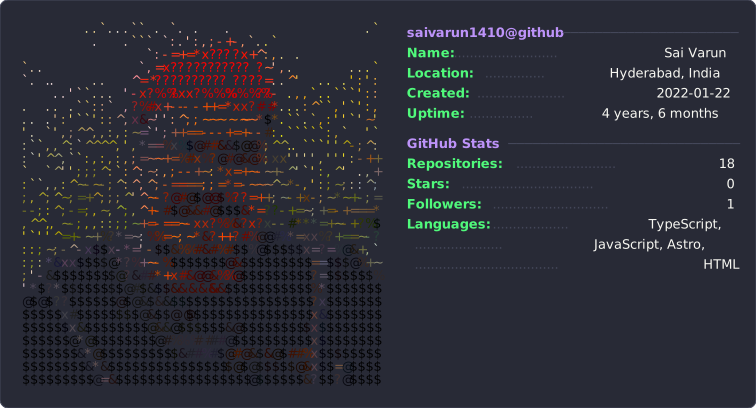
A neofetch-style profile card for your GitHub README — your photo as coloured terminal art on the left, live GitHub stats on the right, rendered to a single self-contained SVG.
Why termfetch?
- Your design, not a preset badge. Render your photo or logo as ASCII, blocks, or high-resolution half-block art.
- No image service at view time. The result is a static SVG committed to a repository you control.
- Live GitHub data at generation time. Repositories, stars, followers, languages, and account age are templatable.
- Live without being fragile. A scheduled GitHub Action refreshes the card without spending API quota on README views.
- Portable and customizable. Six themes, custom colours, flexible sections, and no JavaScript runtime.
Quickstart
Install the published CLI with pipx (recommended for command-line tools):
pipx install termfetch
Or install it into your current Python environment:
python -m pip install termfetch
Create a starter configuration and render your first card:
termfetch init --user YOUR_GITHUB_USERNAME --image path/to/photo.jpg
termfetch
This creates termfetch.json and termfetch.svg. Add the generated card to your profile README:

Already have a configuration or want different filenames?
termfetch --config config.json --out card.svg
--no-fetch skips the GitHub API entirely when you only want to iterate on the art. Run
termfetch --help and termfetch init --help for every option.
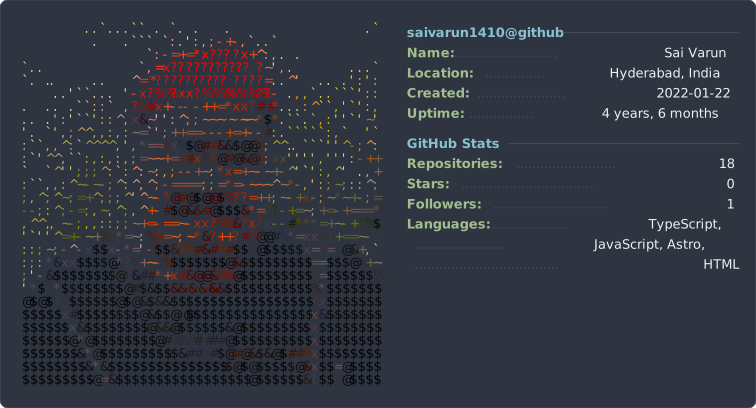
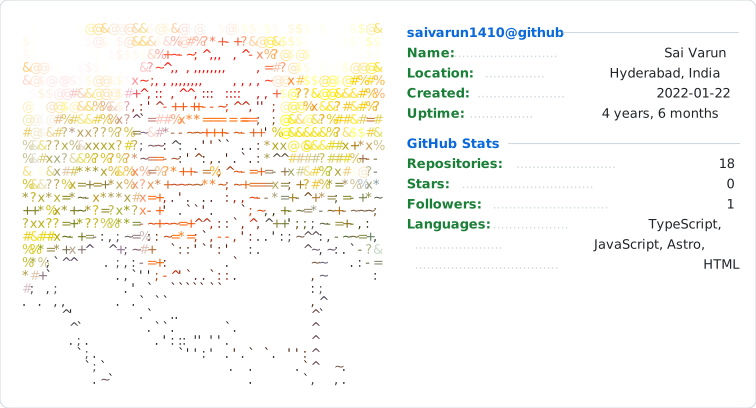
Theme gallery
| GitHub Dark | Dracula |
|---|---|
 |
 |
| Nord | GitHub Light |
 |
 |
Configuration
termfetch init creates a generic starter config. Everything remains editable in one JSON file:
{
  "github": "saivarun1410",
  "image": "assets/me.jpg",
  "imageCrop": [630, 0, 780, 780],
  "imageCols": 52,
  "charset": "blocks",
  "theme": "github-dark",
  "panelAlign": "middle",
  "sections": [
    {
      "title": "{{username}}@github",
      "fields": [
        ["Name", "{{name}}"],
        ["Member for", "{{uptime}}"],
        ["Editor", "Neovim"]
      ]
    }
  ]
}
Image
| Key | Default | Notes |
|---|---|---|
image |
– | Path to the source image, relative to the config file. |
imageCrop |
whole image | [x, y, width, height] in source pixels, applied before scaling. |
imageCols |
56 |
Width in characters. Row count follows from the aspect ratio. |
charset |
blocks |
ascii, blocks, solid, or halfblocks. See below. |
coloredImage |
true |
false renders in the theme's single foreground colour. |
contrast / brightness / gamma |
1.2 / 1.0 / 1.05 |
Applied before sampling. |
colorStep |
8 |
Colour quantisation. Higher merges more cells and shrinks the SVG. |
invert |
false |
Flip the brightness-to-character mapping. |
Choosing a charset.
halfblocks— sharpest. Every cell is▀, with the glyph painting the upper pixel and a background rect the lower one, so vertical resolution is doubled for the same card width. Use this if the art looks blocky; the cost is file size, since a photograph has few neighbouring cells that can merge.blocks(░▒▓█) — keeps a visible terminal texture while letting colour carry the image. Much smaller output, noticeably coarser.ascii(.:-=+*#%@) — looks the most like real neofetch output, but it maps brightness to character density, so a backlit photo where the subject is darker than the background comes out as a hole. Good for logos and high-key images, risky for portraits.solid— every cell█. Clear, but reads as pixel art rather than terminal art.
File size. A halfblocks card is a few hundred KB; blocks is a few tens. Raising
colorStep helps only slightly on photographs — the cost is the per-cell geometry, not
repeated colours — so reducing imageCols is the effective lever if size matters.
Cropping. The card looks best framed on a face. Find the pixel coordinates however you like — this snippet prints a labelled grid over your image:
from PIL import Image, ImageDraw
im = Image.open("assets/me.jpg"); d = ImageDraw.Draw(im)
for x in range(0, im.width, 200):  d.line([(x,0),(x,im.height)], fill="cyan", width=4); d.text((x+6,6), str(x), fill="cyan")
for y in range(0, im.height, 200): d.line([(0,y),(im.width,y)], fill="magenta", width=4); d.text((6,y+6), str(y), fill="magenta")
im.show()
Layout and theme
| Key | Default | Notes |
|---|---|---|
theme |
github-dark |
github-dark, github-light, dracula, gruvbox, nord, tokyo-night. |
colors |
– | Override individual theme colours: {"key": "#ff79c6"}. |
windowTitle |
{{username}}@github |
Text in the title bar. Empty string to omit. |
chrome |
true |
Draw the title bar and traffic-light buttons. |
fontSize |
13 |
Panel text size. |
artFontSize |
matches fontSize |
Art cell size, set separately. This is the knob for "sharp but not huge". Detail comes from imageCols; if the art cell is tied to the panel text, adding columns is the same as enlarging the picture until it dwarfs the text. Drop this to 6–8 and raise imageCols instead. |
keyWidth |
13 |
Characters reserved for the key column. Widen if labels are truncated-looking. |
panelAlign |
top |
middle centres the text against the art — better when you have few rows. |
valueWrap |
0 |
Wrap values longer than this many characters onto continuation rows aligned under the value column. 0 disables it. Without this, one long bio makes the card 1500px wide. |
Data
| Key | Default | Notes |
|---|---|---|
github |
– | Username to fetch stats for. Omit to use only static text. |
languageMode |
repos |
repos counts primary language per repo (1 API call). bytes sums bytes actually written (1 call per repo, more representative). |
topLanguages |
5 |
Available template variables: {{username}}, {{name}}, {{bio}}, {{location}},
{{company}}, {{blog}}, {{repos}}, {{stars}}, {{forks}}, {{followers}},
{{following}}, {{languages}}, {{created}}, {{uptime}}, {{today}}.
A field is dropped when its value resolves to nothing, or when it still references a variable
there was no data for — so an unset bio leaves no dangling label, and --no-fetch renders a
clean card rather than one covered in literal {{bio}} text. Fields can also be plain strings
for a full-width line with no key column.
Keeping it current
Copy examples/refresh-card.yml into
.github/workflows/refresh-card.yml in your profile repository, then adjust the config and output
paths if needed. The complete workflow is reproduced below:
name: refresh-card
on:
  schedule: [{ cron: "0 5 * * *" }]
  workflow_dispatch:

permissions:
  contents: write

jobs:
  refresh:
    runs-on: ubuntu-latest
    steps:
      - uses: actions/checkout@v7
      - uses: actions/setup-python@v7
        with: { python-version: "3.12" }
      - run: python -m pip install termfetch
      - run: termfetch --config termfetch.json --out termfetch.svg
        env:
          GITHUB_TOKEN: ${{ secrets.GITHUB_TOKEN }}
      - run: |
          git config user.name "github-actions[bot]"
          git config user.email "41898282+github-actions[bot]@users.noreply.github.com"
          git add termfetch.svg
          git diff --cached --quiet || { git commit -m "Refresh profile card"; git push; }
GITHUB_TOKEN is optional but raises the API rate limit from 60 requests/hour per IP to
5,000, which matters if you use languageMode: "bytes".
If the default branch requires pull requests, either configure the workflow to open a PR or write the generated card to a dedicated automation branch. Do not place a long-lived personal access token in the repository to bypass protection rules.
How it works
- Sample. The image is cropped, resized to the character grid, and each cell becomes a character picked from a luminance ramp plus the cell's average colour.
- Quantise. Colours are snapped to a coarser grid so runs of neighbouring cells share a value and collapse into one SVG span. This is most of the difference between a 60 KB file and a 300 KB one.
- Position every glyph explicitly. SVGs embedded in a README render as images, so
webfonts never load and the viewer's monospace fallback is whatever their OS provides.
Relying on the font's own advance width would let columns drift apart on some machines, so
each span carries an absolute
x.
Limitations
- Character cells are assumed to be 0.6× as wide as they are tall. That holds for the fonts in the stack; a wildly different fallback would shear the art slightly.
- Colour is per character cell, so effective resolution is
imageCols× about0.6 × imageCols. Portraits work; fine detail and text in the source image do not. - Stats come from the public REST API, so private repositories and private contributions are not counted.
Development
git clone https://github.com/saivarun1410/termfetch.git
cd termfetch
python -m pip install -e '.[dev]'
python -m pytest -q
See CONTRIBUTING.md before opening a pull request and CHANGELOG.md for release history.
Licence
MIT — see LICENSE. The example photograph is not covered by it; replace it with your own.
1 maintainer

Release files for termfetch 0.2.0
For a detailed explanation of source distributions (sdists) and built distributions (wheels), please see the package formats documentation.
Source distribution (sdist)
| File | Size | Uploaded | |
|---|---|---|---|
| termfetch-0.2.0.tar.gz | 1.3 MB | Details |
Built distribution (wheel)
| File | Interpreter | ABI | Platform | Reset |
|---|---|---|---|---|
| termfetch-0.2.0-py3-none-any.whl | Python 3 | none | any | Details |
Total release size: 1.3 MB
Release files / termfetch-0.2.0.tar.gz
| Download URL | termfetch-0.2.0.tar.gz |
|---|---|
| Size | 1.3 MB |
| Tags | Source |
|
SHA-256 checksum How to use checksums |
c4aaee0bbe60210e8e569408957280583d4f8f96ce0150658ec79f4bfa18e5e4
|
|
BLAKE2b-256 checksum How to use checksums |
784688d548aa7798ff67778cf5c5f1e0d501b0acd5c69a506c78ff0d99ee31bf
|
| Upload date | |
|
Uploaded using Trusted Publishing? What is trusted publishing? |
Yes |
| Uploaded via |
twine/7.0.0 CPython/3.13.14
|
Provenance
Provenance describes where a file came from. On PyPI, provenance is shared via attestations, which provide a verifiable record of the build or publishing details. View details, limitations and caveats.


PyPI Publish Attestation
PyPI verified that this artifact, at this checksum, originated from the publisher listed below.
Signed by GitHub Actions, verified by PyPI on Aug 15, 2026.
Transparency logRelease files / termfetch-0.2.0-py3-none-any.whl
| Download URL | termfetch-0.2.0-py3-none-any.whl |
|---|---|
| Size | 21.4 kB |
| Tags | Python 3 |
|
SHA-256 checksum How to use checksums |
a715adbe4c85ba677353abaed30b195ed6f80f47739bc4e65b6a227b949ba3d2
|
|
BLAKE2b-256 checksum How to use checksums |
291ca17ecc2b7e3071785bc12f413781bedea712dd8027cb883ddf8bc350cf47
|
| Upload date | |
|
Uploaded using Trusted Publishing? What is trusted publishing? |
Yes |
| Uploaded via |
twine/7.0.0 CPython/3.13.14
|
Provenance
Provenance describes where a file came from. On PyPI, provenance is shared via attestations, which provide a verifiable record of the build or publishing details. View details, limitations and caveats.
PyPI Publish Attestation
PyPI verified that this artifact, at this checksum, originated from the publisher listed below.
Signed by GitHub Actions, verified by PyPI on Aug 15, 2026.
Transparency log













