


Terminal Formatters
Simple Python package for producing colored and formated terminal text.
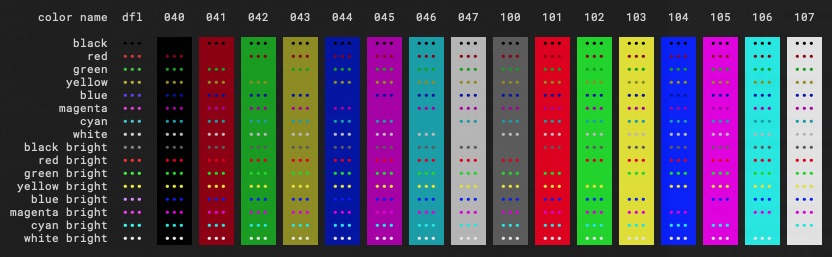
Terminals traditionally take an input of bytes and display them as white text on a black background. But if the input contains specific CSI (Control Sequence Introducer) sequences then the terminal may alter certain display properties of the text, such as the style or color. Using styles and colors in console applications helps us analyze information faster and focus on important parts of the displayed information.
The package creates ANSI escape character sequences for changing the color and style of the font, based on human-readable parameters like black, green, italic etc.
ANSI Escape Codes for Terminal Graphics
The ANSI escape code standard, formally adopted as ISO/IEC 6429, defines a series of control sequences. Each control sequence begins with a Control Sequence Introducer (CSI), defined as an escape character followed immediately by a bracket: ESC[. The ANSI ASCII standard represents the escape ESC character by the decimal number 27 (33 in octal, 1B in hexadecimal). The ESC[ is followed by any number (including none) of “parameter bytes” in the range 0x30–0x3F (ASCII 0–9:;<=>?), then by any number of “intermediate bytes” in the range 0x20–0x2F (ASCII space and !"#$%&'()*+,-./), then finally by a single “final byte” in the range 0x40–0x7E (ASCII @A–Z[\]^_a–z{|}~`).
All common sequences just use the parameters as a series of semicolon-separated numbers. Missing numbers are treated as 0 and no parameters at all in ESC[m acts like a 0 reset code.
Select Graphic Rendition (SGR) parameters
The control sequence CSI n m, named Select Graphic Rendition (SGR), sets display attributes. Several attributes can be set in the same sequence, separated by semicolons. Each display attribute remains in effect until a following occurrence of SGR resets it. If no codes are given, CSI m is treated as CSI 0 m (reset / normal).
The package uses only basic parameters to control the font style and its color. The most commonly used SGR parameters to control the font style in the range (0-8) and the 8 actual colors within the ranges (30-37, 40-47, 90-97, 100-107) are defined by the ANSI standard. The package put these parameters together to create a full SGR command.
The original specification only had 8 colors, and just gave them names. The SGR parameters 30–37 selected the foreground color, while 40–47 selected the background. Quite a few terminals implemented “bold” (SGR code 1) as a brighter color rather than a different font, thus providing 8 additional foreground colors. Usually you could not get these as background colors, though sometimes inverse video (SGR code 7) would allow that. Examples: to get black letters on white background use ESC[30;47m, to get red use ESC[31m, to get bright red use ESC[1;31m. To reset colors to their defaults, use ESC[39;49m (not supported on some terminals), or reset all attributes with ESC[0m. Later terminals added the ability to directly specify the “bright” colors with 90–97 and 100–107.
The following diagram shows the complete text style and color rendering scheme.
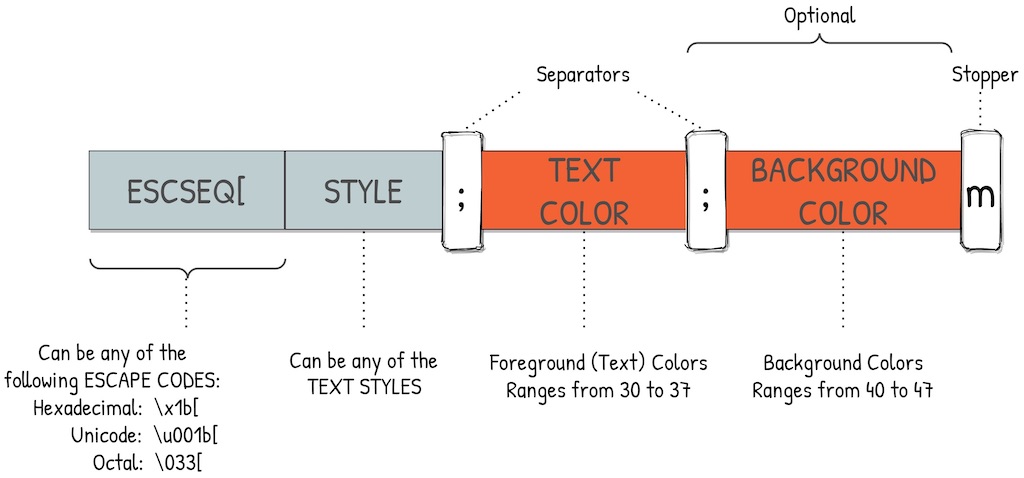
The package supports the parameters shown in the tables below:
Font Styles
Parameter |
Name |
Note |
|---|---|---|
0 |
Reset or normal |
All attributes off |
1 |
Bold or increased intensity |
As with faint, the color change is a PC (SCO/CGA) invention |
2 |
Faint, decreased intensity, or dim |
May be implemented as a light font weight like bold |
3 |
Italic |
Not widely supported. Sometimes treated as inverse or blink |
4 |
Underline |
Style extensions exist for Kitty, VTE, mintty and iTerm2 |
5 |
Blink or Slow blink |
Sets blinking to less than 150 times per minute |
7 |
Negative, Reverse or invert |
Swap foreground and background colors; inconsistent emulation |
8 |
Conceal or hide |
Not widely supported |
Foreground/Background Colors
Foreground |
Background |
Name |
|---|---|---|
30 |
40 |
Black |
31 |
41 |
Red |
32 |
42 |
Green |
33 |
43 |
Yellow |
34 |
44 |
Blue |
35 |
45 |
Magenta |
36 |
46 |
Cyan |
37 |
47 |
White |
90 |
100 |
Black Bright or Grey |
91 |
101 |
Red Bright |
92 |
102 |
Green Bright |
93 |
103 |
Yellow Bright |
94 |
104 |
Blue Bright |
95 |
105 |
Magenta Bright |
96 |
106 |
Cyan Bright |
97 |
107 |
Bright |
Test scripts in the source code repository print formatted/colored tables using supported ANSI sequences. The following styles and colors works with most terminal applications.

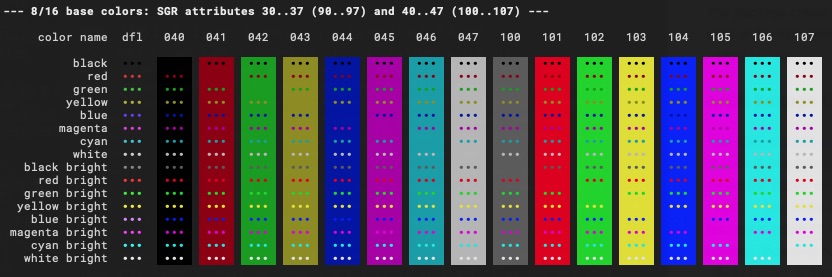
The package has no requirements other than the standard library.
Usage
How to use the module in your own python code:
from termformatters import StyleFormatters
from termformatters import ForegroundFormatters
from termformatters import BackgroundFormatters

"""Creating Formatters Instances"""
S = StyleFormatters()
FG = ForegroundFormatters()
BG = BackgroundFormatters()

print(FG.green("Printing `Green` colored text"))
print(FG.cyan("Printing `Cyan` colored text"))
print(
    S.bold(
        FG.white_bright(
            "Printing `Bold` and `White Bright` text"
        )
    )
)
print(
    FG.yellow(
        BG.blue_bright(
            "Printing `Yellow` text on `Blue` background"
        )
    )
)
References
1 maintainer

Metadata
1 maintainer
Release files for termformatters 0.2.1
For a detailed explanation of source distributions (sdists) and built distributions (wheels), please see the package formats documentation.
Source distribution (sdist)
| File | Size | Uploaded | |
|---|---|---|---|
| termformatters-0.2.1.tar.gz | 14.3 kB | Details |
Built distribution (wheel)
| File | Interpreter | ABI | Platform | Reset |
|---|---|---|---|---|
| termformatters-0.2.1-py3-none-any.whl | Python 3 | none | any | Details |
Total release size: 27.8 kB
Release files / termformatters-0.2.1.tar.gz
| Download URL | termformatters-0.2.1.tar.gz |
|---|---|
| Size | 14.3 kB |
| Tags | Source |
|
SHA-256 checksum How to use checksums |
01a1f2128b823c701bda9539b6177dbb1f47f370c897e710a9e61eb40f8d329b
|
|
BLAKE2b-256 checksum How to use checksums |
82da949165b54fa2f8b041e152d7a770fe08e1ce2eb03e4f2f75528a9ac6827c
|
| Upload date | |
|
Uploaded using Trusted Publishing? What is trusted publishing? |
No |
| Uploaded via |
twine/4.0.1 CPython/3.9.15
|
Release files / termformatters-0.2.1-py3-none-any.whl
| Download URL | termformatters-0.2.1-py3-none-any.whl |
|---|---|
| Size | 13.5 kB |
| Tags | Python 3 |
|
SHA-256 checksum How to use checksums |
f4d5e45e9ee98cf3625bb0f755644cc86afb54ce10edb67da60197b4a44cea1e
|
|
BLAKE2b-256 checksum How to use checksums |
76fdffa84bfe37d7da5b35c756dededae9ac38a27b72d3c715591b8d31e54711
|
| Upload date | |
|
Uploaded using Trusted Publishing? What is trusted publishing? |
No |
| Uploaded via |
twine/4.0.1 CPython/3.9.15
|













