
clock
A terminal clock: one analog face per time zone, its name and digital readout underneath, ordered by the time they read and spread over the window. Two independent implementations — Python and Go — that render byte-for-byte identical output.
./pyclock.py 10001,PT,Jakarta,UTC
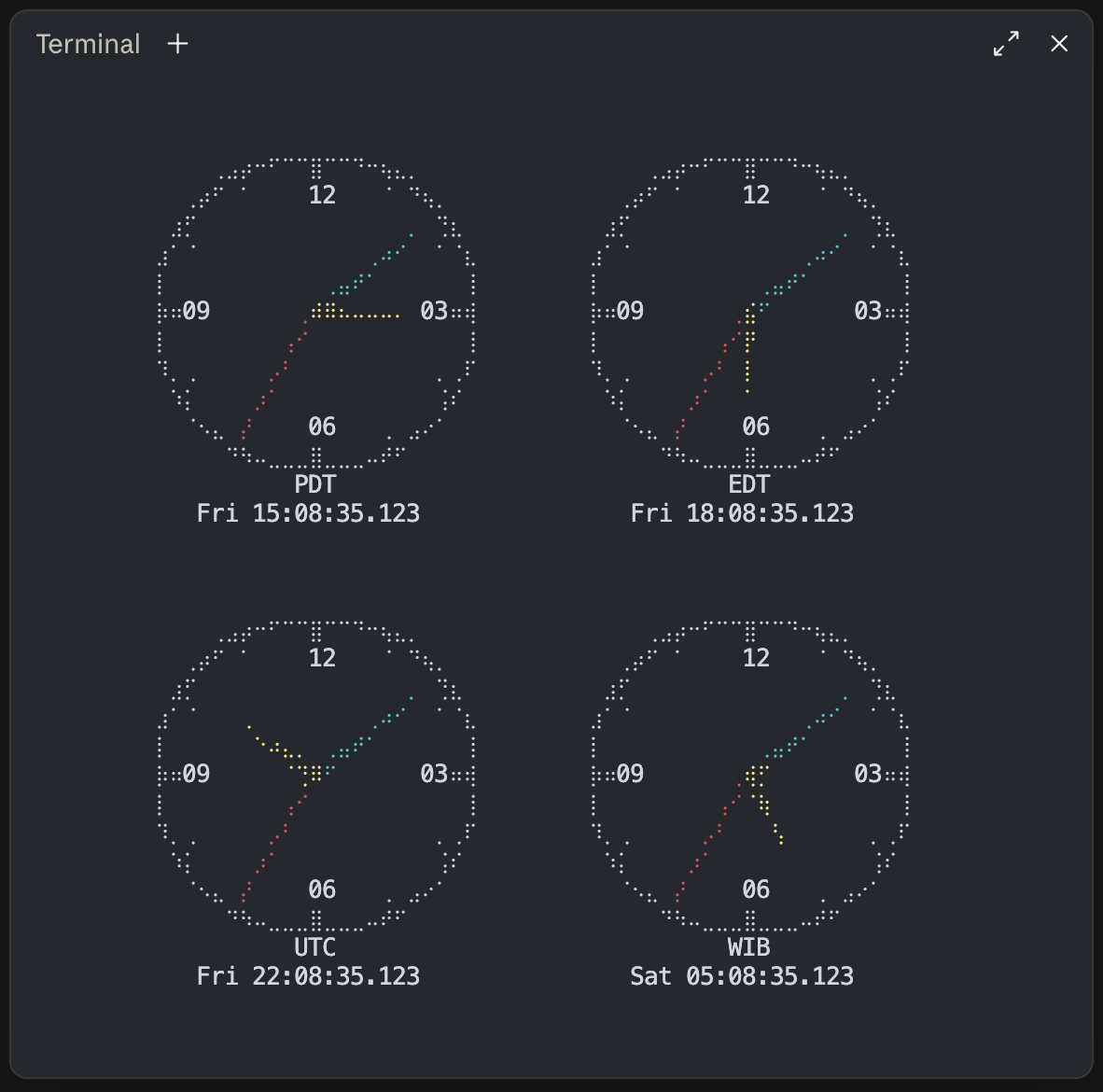
On a terminal the hands are coloured apart — hour yellow, minute cyan, second red.
Running
python3 pyclock.py   # or: make run-py
go run .            # or: make run-go
Press space to hold the frame still, h or ? for the key list, and q (or
Ctrl+C) to quit.
Go needs go run ., not go run clock.go: the three termios ioctl requests
are the one thing that differs between the BSDs and Linux, so they live in
build-tagged term_*.go files, and naming a single file skips them.
Installation
Neither implementation has a third-party dependency. The Go side is standard
library only; the Python side needs nothing beyond zoneinfo, which has
shipped in the standard library since 3.9. The one thing either reaches outside
itself for is ziptz, the ZIP-to-zone
library — also standard library only, and also written in both languages.
The shortest path, if you have a Go toolchain:
go install github.com/choey/clock@latest
That puts a clock on your PATH in $GOPATH/bin (or $GOBIN), fetches
ziptz itself, and needs no checkout. Everything below is for working from
one.
go build -o clock . && mv clock /usr/local/bin/
builds the binary and puts it wherever you like; go install . does the same
but drops it in $GOPATH/bin. Both find ziptz through the replace
directive in go.mod, so a fresh clone builds without fetching anything.
Go has no notion of an optional dependency, so every Go build resolves ZIP codes. The Python side is where that is a choice, and it is made the same way — see below.
pyclock.py is executable on its own — it carries a #!/usr/bin/env python3
shebang — so the Python side needs no build step, only a copy of it and of
ziptz.py beside it:
cp pyclock.py /usr/local/bin/pyclock          # and, for ZIP codes:
curl -sO https://raw.githubusercontent.com/choey/ziptz/v0.1.0/ziptz.py
mv ziptz.py /usr/local/bin/
or, to manage it like any other Python tool instead:
pip install .
which puts a pyclock entry point on your PATH inside whatever environment
you ran pip in, and pulls ziptz-us with it. pip install -e . does the
same but re-reads this checkout on every run, for working on it in place. To
run the test suite from a clone, make setup is the shorter path — it builds a
.venv here that every make target then uses.
ziptz is a requirement of the Python package, not an extra, so a pip install of the clock resolves ZIP codes exactly as a go install of it does.
It is named ziptz-us there — that is its distribution name on PyPI, where the
bare ziptz is an old empty registration pip cannot install — and it still
imports as ziptz. It is 23 KB with no dependencies of its own, so requiring
it costs less than explaining when you would want it left out.
Not pip install clock. That name on PyPI belongs to an unrelated datetime
library from 2014, and installing it will quietly get you that instead. This
publishes under a distribution name of its own; the command it installs is
still clock, the same way ziptz-us still imports as ziptz. pipx is the
better verb for a program rather than a library, since it gets its own
environment and puts the command on your PATH regardless:
pipx install terminal-clock # then: pyclock ET,PT,UTC
ziptz-us comes with it, so ZIP codes work out of the box exactly as they do
from a go install.
The Python command is pyclock, not clock. go install already produces
a binary called clock — that name is the last element of the Go module path
and not ours to choose — so the two would shadow each other on PATH. Named
apart, both can be installed at once, which is the only way to check this
project's central claim without a checkout:
clock ET,PT,UTC | diff - <(pyclock ET,PT,UTC) && echo "byte for byte"
They print the same help, report the same version, and answer to the same name in their own usage text; only the file, the module and the command differ.
Copying is still a first-class path, and it is the reason pyclock.py guards its
import of ziptz rather than requiring it outright: without the library every
zone name, abbreviation and country code still works, and a ZIP code says what
to install instead of the clock refusing to start.
That is also the one thing a checkout no longer does for free. ziptz used to
sit in this repository, so python3 pyclock.py 94110 worked out of a clone with
nothing installed; it is its own module now, so the Python clock wants it
installed — pip install ziptz-us, or a copy of ziptz.py beside pyclock.py.
Every other kind of zone works without it, and make test says so plainly
rather than reporting a Go clock that resolves ZIPs and a Python one that
cannot as hundreds of differences.
However it got there, clock --version says which release you have, and both
implementations print the same line. ziptz is released on its own cycle and
answers separately — ziptz.Version in Go, ziptz.__version__ in Python — so
a ZIP that resolves to the wrong zone is a question about that version rather
than this one.
Usage
clock [-n N | --per-row N] [--color[=WHEN]] [--day[=WHEN]] [-q | --quiet]
      [--halign WHERE] [--valign WHERE] [--hpad SPACE] [--vpad SPACE]
      [--cell-ratio N] [--scale N] [ZONES]
With no arguments you get one clock, in your local zone. Otherwise ZONES is a
comma-separated list, and -n caps how many sit side by side before the grid
wraps to a new row. By default -n is auto too, alongside --scale: rather
than a fixed cap it picks whichever count grows the clocks the most, which
for a wide, short window can be more than the plain default (3) and for a
tall, narrow one can be fewer. Give it a number to cap it the old way instead.
Flags may go before or after the zone list — all four of these are the same command:
clock ET,PT,UTC -n 2
clock -n 2 ET,PT,UTC
clock ET,PT,UTC --per-row 2
clock --per-row 2 ET,PT,UTC
Layout
The clocks are centred in the window, across and down, and the space around
and between them is shared out evenly — so they sit in from the edges rather
than against them, and the grid re-settles as the window changes. With the
default --scale auto this usually has little to work with, since the
clocks have already grown to use most of it; see Tuning for that.
It still decides the axis auto-scale didn't need to fill, and everything
below still applies in full at a fixed --scale.
| flag | takes | default |
|---|---|---|
--halign |
left, center, right |
center |
--valign |
top, center, bottom |
center |
--hpad |
even, or a share of the width, 10% |
even |
--vpad |
even, or a share of the height, 5% |
even |
An even fill counts the margins as gaps: three clocks make four spaces, two of them against the edges, and each gets an equal share of what the faces leave over. Sharing between the clocks alone would give every spare column to the gutters and press the outer clocks flat against the borders — which is the one arrangement nobody wants, and which no amount of guessing at a padding should be needed to escape.
The share stops at the width of a face. Past that the clocks read as scattered rather than as a group, so on a wide window the extra goes to the margins and the clocks stay a cluster in the middle: at 300 columns two clocks sit 23 apart with 115 either side of them, not 254 apart in opposite corners. It never goes below the packed 3 columns either, so a window just big enough for the grid gets the packed layout rather than a squeeze.
Give a padding instead and the gap is that and nothing else, with everything over going to the margins, so the alignment decides where the grid sits:
clock --hpad 5% ET,PT,UTC               # 5% of the window between clocks
clock --hpad 5% --halign left ET,PT,UTC # that grid, against the left edge
clock --vpad 0 --valign top ET,PT,UTC   # rows stacked at the top, touching
A percentage is a share of the whole window, not of what is left over: at 100
columns, --hpad 10% puts 10 columns between neighbours whatever else is on
screen, and unlike the even fill it is neither floored at 3 nor capped at a
face. The flags take their value either way round — --hpad 5% or
--hpad=5%.
An odd column cannot be halved into two margins — but a gutter can swallow it. Where the even fill leaves an odd column over, one gutter is widened by one instead, and the margins come out exactly equal: at 200 columns three clocks sit 23 and 24 apart with 42 either side, dead centre. The widened gutter is always the last of a full row, so a short row's clocks still line up with the row above.
One clock has no gutter to put it in, so there the face itself sits a column
off centre; the readout under it then leans the other way, and that row comes
out level. A padding named with --hpad is left exactly as named — it is not
nudged to make the arithmetic work — so an odd column there goes to the right
margin, one column and no more. (A short last row is asymmetric on purpose:
its faces keep the gutters and margin of a full row rather than re-centring
themselves under it.)
Padding is not allowed to break the frame. The faces per row still drop to what
the width holds, counted against the padding you asked for rather than the
default 3 columns, and a --vpad that would push the grid past the last line
is refused the same way a too-tall grid always was.
A window that cannot be measured — redirected to a file, say — has nothing to fill or centre, so it keeps the packed layout instead: three columns between clocks, one row between rows, no margins.
Order
Faces are laid out in the order their clocks read, earliest first — left to
right, then top to bottom — whatever order you typed them in. clock JST,PT,UTC draws PDT, then UTC, then JST, and the grid reads chronologically:
each face is later than the one to its left, and the last face of a row is
earlier than the first of the next.
Sorting on the offset is the same thing. Every face renders one instant, so
what a clock reads is that instant plus its offset, and the westernmost zone is
the one furthest behind. Two faces on the same offset — UTC and GMT are
two faces, since they are labelled differently — keep the order you typed them
in. Like the merging, the sort is redone once a second as the clock runs, so a
zone entering daylight saving slides a place along as it happens.
Different days
When the faces on screen do not all fall on the same date, every readout picks up a weekday:
          PDT                       EDT                       UTC
   Tue 22:02:41.901          Wed 01:02:41.901          Wed 05:02:41.901
The weekday is absolute rather than a -1d counted from some reference face:
it is true on its own terms, and it does not change meaning when you reorder
the list. It appears under every face or none, so the columns stay lined up,
and only when there is a disagreement to point out — a row of clocks all
reading Wednesday says nothing worth three characters.
Nothing off screen is consulted. The clock compares the faces it draws against
each other and never asserts a date for a zone you did not ask for, so clock JST on its own stays bare; name local alongside it to bring your own day
into the comparison.
Up to three dates can be on screen at once — UTC−12 to UTC+14 spans 26 hours, which crosses two midnights — one reason the readout names the day outright instead of counting days from somewhere.
--day overrides the rule: --day (or --day=always) puts a weekday under
every face whatever they read, --no-day (or --day=never) keeps it off
entirely, and --day=auto is the rule above, which is the default.
A pinned clock defaults to always instead. CLOCK_FREEZE makes a still of
one instant, usually to photograph, and an undated photograph records half of
it — so a pinned frame carries its date even when every face agrees.
--day=auto asks for the live rule back.
A face has to be 16 columns wide to hold Wed 05:02:41.901, which it is at any
CLOCK_CELL_RATIO from about 1.5 up. Below that the weekday is dropped rather
than the alignment, whatever --day says.
Keys
| key | |
|---|---|
| space | hold the frame still, and again to carry on |
h or ? |
show or hide the key list |
q |
quit, as does Ctrl+C |
Ctrl+Z suspends it, like any other job. The clock hands the terminal back for
the length of the stop and takes it again on fg; see Terminal
requirements.
h or ? opens the key list in a bordered box centred over the clocks, the
same way a dialog sits over a window — not tucked under the grid, so it works
whatever the grid's size or alignment. In a window too small to hold the box,
the key press does nothing rather than clip or wrap it.
For the first three seconds a clock says Press q or Ctrl+C to quit, in that
same boxed style, then drops it — a clock that has taken the whole screen owes
you the way back out, but only until you have read it. -q/--quiet skips
this hint from the start, for a launch that doesn't blink; the key list is
still there on h or ? regardless. Pressing h/? before the three
seconds are up shows the key list in its place, since the list already says
everything the hint does.
Holding a frame
Space stops the clock where it stands; space again lets it go on. Nothing else
changes — the frame stays on screen, the window can still be resized, and q
still quits — so a screenshot taken while it is held catches a still face and a
readout that agrees with it, down to the millisecond. Left to run, the second
hand moves within a single screenshot's exposure and the milliseconds are a
blur.
Holding is the only way to keep a frame you can see: quitting restores the
screen underneath, exactly as less does, so the clocks are gone before you
can photograph them, and redirecting to a file keeps a frame but draws no
clocks.
For a frame you can reproduce exactly — the ones in this README, for instance — pin the instant instead:
CLOCK_FREEZE=2026-07-15T05:02:41.901000Z clock UTC,10001,PT
The hands never move, space has nothing to hold back, and h and q work as
usual. Every readout carries its weekday, for the same reason a photograph
wants a date on it. Redirect that same command to a file and it draws the one
frame and exits, instead of staying up.
The fraction is optional, and so is its length — 2026-07-15T05:02:41Z and
2026-07-15T05:02:41.9Z both pin the same second. For a time without a date
in mind, a bare UTC clock time works too — CLOCK_FREEZE="15:30 UTC" (minutes
and seconds are each optional) pins whichever of yesterday, today or tomorrow,
by the wall clock right now, lands closest to that reading. A date ahead of
it fills in what it leaves out: CLOCK_FREEZE="2026-07-22 15:30 UTC",
CLOCK_FREEZE="2026/07/22 15:30 UTC" or CLOCK_FREEZE="7/22/2026 15:30 UTC"
pin that exact day, CLOCK_FREEZE="7/22/26 15:30 UTC" the same day with the
year written short, while CLOCK_FREEZE="7/22 15:30 UTC" — no year — pins
whichever July 22, again by the wall clock right now, lands closest.
The zone does not have to be UTC either — it can be anything a --zones
argument accepts, an IANA name, alias or fixed-offset abbreviation included:
CLOCK_FREEZE="8/22 09:53 PT" pins whichever August 22 in Pacific time is
closest to now, daylight saving and all.
CLOCK_FREEZE pins the time, not the size: with the default --scale auto,
the same command still comes out a different size in a different window. Add
a fixed --scale too — --scale 1 for these README frames — for a screenshot
that reproduces byte for byte regardless of what window it's taken in.
Colour
The three hands are coloured apart — hour yellow, minute cyan, second red, in the terminal's own palette rather than fixed RGB, so they follow whatever theme it is wearing. The rim, the ticks and the numerals stay plain.
Colour is on for a terminal and off for a pipe or a file, so a redirected frame
stays plain text. --color=always keeps it when redirecting, and any of
--no-color, --color=never, --color=off or NO_COLOR in the environment
drops it everywhere — though an explicit --color=always outranks NO_COLOR,
since that is what asking for always means.
Bare --color means --color=always and never eats the following argument,
the same rule ls and git use: clock --color ET is a coloured Eastern
clock, while clock --color always ET is two zone lists and an error. The
value only ever follows an =.
Where two hands cross, the shorter one is on top — hour over minute over second. A longer hand covers a shorter one along its whole length, while the short one can only ever hide a slice of it, so drawn the other way round the hour hand disappears under the minute hand for minutes at a time. The hour hand is the one you most want to find at a glance, and it is the one with nowhere to hide.
Because a braille cell carries eight dots and one colour, a crossing tints whole cells: where the minute hand passes under the hour hand, the shared cells go yellow, taking a few of the minute hand's dots with them. Numerals win outright — a cell holding one drops its dots and its colour together.
Zone names
Resolved in this order, first match winning:
| You type | You get | |
|---|---|---|
ET CT MT PT |
America/New_York and friends |
follows daylight saving, so it reads EST in winter and EDT in summer |
AKT HT BST UK IST JST KST SGT HKT AET ACT AWT NZT |
the obvious place | same |
Europe/Berlin UTC EST MST HST GMT CET Etc/GMT+5 |
itself | any name the tz database knows |
Berlin Jakarta New_York Indiana/Indianapolis |
the zone that ends in it | the city alone, where only one zone ends that way |
PST PDT EDT CST CDT MDT AKST AKDT HDT |
that exact offset | a fixed clock that never shifts |
JP GB DE |
that country's zone | 2-letter ISO code, via zone.tab |
94110 941 |
the zone that ZIP is in | US only |
local |
your system zone | TZ decides it; see below |
Your system zone
With no zone list, and for the local token, the clock draws whatever TZ
says — or /etc/localtime where TZ is unset, as everything else does.
TZ has a second form, though, which this clock refuses: the POSIX rule,
PST8PDT,M3.2.0,M11.1.0 or <+07>-7 or GMT+5, spelling out the offsets and
the transition dates rather than naming a zone. The C library reads those and
Go's standard library does not, so the two implementations here would disagree
by whole hours about what time it is, each of them certain. Rather than have
one of them quietly wrong, both stop:
clock: TZ="PST8PDT,M3.2.0,M11.1.0" is not a zone name, and a POSIX TZ rule
is not something both clocks read alike; name a zone as an argument instead
Which is the fix: clock PT draws Pacific whatever TZ says. A TZ naming a
zone the database does not have — a typo, usually — is refused the same way,
where before it silently drew UTC. Nothing is checked when it is not needed: a
zone list that names its zones outright never asks TZ anything.
The city alone
An IANA name ends in the city, and the city on its own will do when only one
zone ends that way — Berlin for Europe/Berlin, Jakarta for
Asia/Jakarta. Case does not matter, and any whole tail of the name works, so
Indianapolis and Indiana/Indianapolis both reach
America/Indiana/Indianapolis.
Whole segments only: York is not New_York, and Berl is not Berlin.
Names come from zone.tab, the same file the country codes are read from,
which lists the canonical zones and leaves out the backward-compatibility
links — so Eastern is not a name here, while US/Eastern still resolves the
ordinary way, in full.
This is looked up last, after the tz database has had its say, so a city can never shadow a name the database itself answers to.
Ambiguity is refused rather than guessed at:
$ clock Berlin
clock: Berlin names 2 zones; name one in full: Europe/Berlin, America/Berlin
Every city in the tz database is unique today — all 418 zones in zone.tab
end differently — but nothing promises it stays that way, and two clocks an
ocean apart is not a choice to make on your behalf.
The abbreviations only fill gaps the tz database leaves, which is why EST and
ET are different clocks and both are right: EST is the fixed −05:00 zone
that never shifts, while ET is the eastern US, which does. Same for
MST vs MT and HST vs HT. GMT and CET are likewise left alone —
aliasing GMT to Europe/London would make it read BST every July.
PST, PDT, EDT and the rest name an offset rather than a place — nowhere
is on PDT in January — so the tz database has nothing to look up. They become
fixed-offset clocks instead, which is exactly what the names mean. Put a pair
side by side in July and the difference shows:
$ clock PST,PT,PDT
          PST                     PDT/PT
     12:00:00.000              13:00:00.000
PST stays on −08:00 while PT has moved to PDT — and PT and PDT, being
the same clock in July, have merged into one face. In January they separate
again, with PT back on PST.
Two of these carry a judgement call. CST is the US Central reading, −06:00,
not China — for China use CN or Asia/Shanghai. And HDT is −09:00, the
Aleutian daylight zone, since Hawaii itself never leaves HST.
A country that genuinely spans zones asks you to pick:
$ clock US
clock: US spans 8 time zones; name one: America/New_York, America/Chicago, ...
Countries whose zones merely agree — Germany lists both Europe/Berlin and the
Europe/Busingen enclave — collapse to one and resolve without complaint.
Duplicates
Two zones showing the same wall clock are one face, whatever you called them:
PDT,PDT, UK,BST and ET,America/New_York each draw once. The face is
labelled with the abbreviation, and when more than one spelling collapsed onto
it, with those spellings too — UK,BST reads BST/UK, while PDT,PDT was
never ambiguous and stays plain PDT.
Whether two zones agree is a property of the instant, not of the zones, so the
grouping is redone as the clock runs rather than fixed at startup. PT and
PDT are one face in July and two in January, and a clock left running across
the boundary splits itself as it happens — within a frame of the transition,
since the grouping is recomputed once a second, the coarsest interval that
cannot skip one.
ZIP code accuracy
Give all five digits and the answer is exact. Three digits (the prefix alone) is usually right but not always: 233 ZIP codes, across 30 prefixes, sit on the losing side of a zone boundary their prefix rounds the wrong way.
$ clock 79835        # Canutillo, TX — El Paso County
   MDT               # right: five digits are always exact
$ clock 798          # the prefix alone
   CDT               # wrong: most of 798 is CDT, but not this ZIP
Verified against the source: of 33,791 ZIP codes, 233 (0.69%) resolve wrongly from the prefix alone, and none resolve wrongly from all five digits.
The worst case a prefix gets wrong is 96799, American Samoa, an hour behind
Honolulu; the mildest is 86502, which resolves to Phoenix where its prefix
rounds to Denver — the same time all winter, an hour apart all summer, since
Arizona skips daylight saving and the Navajo Nation around it does not.
One gap remains: PO-box and single-building ZIPs have no delivery-area data to place them precisely, so even given in full they fall back to their prefix's answer. See ARCHITECTURE.md for how the two lookup tables are built and encoded, and When to regenerate for when they need to be.
The tables and the two lookups over them are not part of the clock: they are
ziptz, a library of its own, in Go and in
Python, usable and installable without the clock.
Tuning
--cell-ratio is your font's cell height / width, and is the only knob that
decides whether the face is round. Braille dots are square at exactly 2; most
fonts sit near 2.1, which is the default. Raise it if the face looks squished,
lower it if it bulges sideways.
clock --cell-ratio 2.6
Both it and --scale stop at a million, which no font or window is anywhere
near: past that the face's width stops being the same number in the two
implementations, Python's integers being unbounded where Go's are 64 bits.
CLOCK_CELL_RATIO sets the same thing, for a terminal you'd rather configure
once than pass a flag to every time; --cell-ratio wins if both are set. A
value it cannot use — including one over that million — leaves the default
standing, the same as an unset one: an environment variable may be stale or
meant for another program, which is not the same as a typo on the command
line.
CLOCK_CELL_RATIO=2.6 python3 pyclock.py
Inside, ROWS/rowsN is the face height in terminal rows — what --scale
resolves to, rather than a knob of its own — and the width follows from the
cell ratio, as floor(ROWS * CELL_RATIO + 0.5): 23 columns at the defaults. A
whole frame is then
width  = perRow * COLS + (perRow - 1) * GAP
height = rows * (ROWS + 2) + (rows - 1) * VGAP
so one clock is 23x13, three across is 75x13, four zones at -n 2 is 49x27,
and five zones at -n 2 is 49x41. GAP and VGAP, 3 and 1, are the least
space the layout will leave between clocks: that is the size a grid packs down
to, and what decides how many faces fit.
By default --scale is auto: rather than a fixed size with the window's
extra room spread out as padding, it picks the largest size that still fits
using nothing more than --hpad/--vpad's own minimum gap — so growing the
window grows the clocks themselves, not the space around them. It re-solves
every frame, so resizing the window live resizes the clocks with it. Whichever
axis isn't the tight one still has room left over, and that's exactly what
Layout's halign/valign/hpad/vpad describe — a wide window with one
short row of clocks, say, still centres them top-to-bottom.
It will give up a few rows of that maximum for a size where the 12/3/6/9
numerals sit flush against their tick marks rather than half a cell off —
visible on some terminals, depending on how they draw braille next to text.
A fixed --scale skips that check and gives exactly the size asked for.
-n's own default, auto, is what actually lets that maximum be found:
against a wide, short window a narrow cap forces more rows of clocks than the
window needs, and each of those rows steals height the face could have used
instead, so -n auto searches per-row counts too rather than assuming the
plain default (3) is the right shape for whatever window it finds. Cap -n
to a number and --scale auto still maximises the face, just against
whatever fixed shape that cap leaves it.
Give --scale a number instead for a fixed size, unrelated to the window:
--scale 2 is twice the plain default (11 rows), --scale 0.5 is half. A
fixed size is what leaves the window's leftover room as padding, the way
Layout and the geometry above describe — and it is also where a
fixed -n stops being just a cap on -n auto's search and starts deciding
the grid's shape outright, exactly as it always did.
clock --scale 1.5
clock --scale auto -n auto   # the defaults; only worth naming to be explicit
Terminal requirements
macOS and Linux. Windows is not supported — it has no termios and no select
on stdin — and both implementations say so and exit rather than failing
obscurely; use WSL.
You need a font with braille coverage, and a window big enough for one face
(23 columns at --scale 1, the base unit --scale/--cell-ratio work
from). The clock measures the terminal every frame; by default that is what
--scale auto/-n auto size and shape the grid against, and with a fixed
--per-row it is quietly lowered to whatever fits instead, so a narrow
window rewraps rather than garbling.
When not even one face fits, or the grid is taller than the window, the clocks give way to the reason:
2 rows of clocks need 27 lines and this terminal has 26;
raise --per-row, or name fewer zones
It stays there, folded to whatever width there is, until the window can hold
the clocks again — dragging a corner back is the fix, and quitting to read an
error on a screen that is about to be restored is no help to anyone. Note that
a too-tall grid is fixed by raising --per-row, the opposite of a too-narrow
one. q and Ctrl+C still work while it is up.
Redirected output has no window to drag, so there the same conditions are what they always were: the message goes to stderr and the clock exits 1. When it can't measure at all, e.g. piped to a file, it renders exactly what you asked for.
Because the clock runs on the alternate screen, quitting restores whatever was
on screen before it and the last frame does not linger — the same as less or
vim. Redirect to a file to keep a frame, or hold one with space and
photograph it.
Ctrl+Z suspends it like any other job, and gets the same treatment: the clock
gives the screen and the terminal back before it stops, so a stopped clock
leaves a shell you can use rather than one with no echo and no cursor, and
takes them again when fg brings it back. A clock stopped this way is stopped
by SIGSTOP rather than SIGTSTP — the reason is in
ARCHITECTURE.md, and the visible part of it is that the
shell says Stopped(SIGSTOP) where it usually says Stopped.
Piping into something that stops reading — clock | head — is an ordinary way
to end a clock and is treated as one: both implementations stop without a word,
give the terminal back, and exit 141, the status a shell reports for a filter
killed by SIGPIPE.
A kill -9 skips the terminal restore and leaves echo off and the alternate
screen active; stty sane and printf '\033[?1049l' fix it.
Development
See ARCHITECTURE.md for how the renderer itself works — the braille canvas, the colour layering, the repaint strategy.
tools/difftest.sh proves the two implementations agree. It pins both to a
fixed instant with CLOCK_FREEZE (an instant like
2026-07-15T09:53:07.123456Z, which redirected draws exactly one frame and
exits, and on a terminal stays up) and to a fixed window with
COLUMNS/LINES, then compares stdout, stderr and exit status across
hundreds of argument lists, terminal sizes and cell ratios — including the
--scale/-n auto searches, at window shapes chosen to land on both odd and
even sizes. Colour is compared too, under --color=always — a redirected
clock is plain otherwise — including the instants where the hands cross and
the layering decides what shows. It also cross-compiles for Linux, macOS and
Windows, and diffs the generated tables out of the two ziptz files.
tools/difftest.sh -v
What none of that can see is a change that alters the picture in both
implementations — which is how every change is made, in one pass. So sixteen
frames are kept as bytes in tools/golden/, one of each kind of picture the
clock can draw, and compared after the two are compared with each other.
Shortening the second hand in both passes every differential case and fails
15 of the 16 goldens.
BLESS=1 tools/difftest.sh # accept the new rendering, deliberately
The diff in the commit is the only review those get, so bless on purpose and
read it. Blessing also writes tools/golden/+VERSION, the tz database the
bytes hold the zone names of: rename an abbreviation upstream and the goldens
fail exactly as a broken renderer would, so a failing one ends by saying
whether this machine's tzdata is the release they were blessed under.
CLOCK_FRAMES makes a case a sequence rather than a frame: it draws that
many, stepping the pinned instant by CLOCK_STEP milliseconds each time — one
tick, 19ms, by default — and compares the whole run.
CLOCK_FREEZE=2026-11-01T05:59:59.900000Z CLOCK_FRAMES=21 clock ET,PT,EST,UTC
That covers what a single frame cannot show, and what nothing else in the
harness reaches: the second hand sweeping between whole seconds, the rewind
repainting over the frame before it, and the faces regrouping mid-run — the
one above steps across the US fall-back, where ET lands on the fixed EST
and the two faces become one. Since the grouping is cached on the instant's
whole second, a one-frame case can never outlive that cache; a sequence can.
Both variables need CLOCK_FREEZE, are refused if it is absent, and like it
are dev hooks kept out of --help.
tools/keytest.py covers what difftest cannot reach at all: the keys, and one
thing that is not a key -- whether stdout is a terminal at all. /dev/null is
a character device, and a clock that reads that as a terminal runs forever
instead of drawing its frame and exiting; difftest redirects to regular files
and has no timeout, so it would hang rather than say so. Space,
h, ? and q are read only from a terminal in cbreak mode, so nothing
redirected ever presses one — difftest compares the table the key list is
built from, not what pressing h does. Each implementation runs under a pty,
both get the same keys at the same points, and what they paint is compared.
Two of the keys are not read by the clock at all. Ctrl+C and Ctrl+Z are turned into signals by the terminal driver, which only has somewhere to send them if the clock is a job: its own process group, in the foreground of a terminal some session owns. A pty opened by a test harness is none of that, so those two cases start the clock under a shim that arranges it the way a shell does, and the shim reports what becomes of the clock — since only a parent can wait for a stopped child. That is what makes it possible to ask the question a stopped clock exists to answer: what state did it leave the terminal in.
tools/keytest.py -v
A clock repaints every 19ms whether or not anything changed, so the streams are
collapsed to their distinct frames first: how many repaints landed between
two keystrokes is the machine's speed, not the clock's behaviour. Pinned with
CLOCK_FREEZE, what is left is exactly the states the keys walked through —
h q ends on a frame with the key list still up, an unknown key paints
nothing new. Holding is checked on a live clock instead, where there is
something to hold: both must paint one readout over and over while held, and
many while running.
difftest also keeps everything the Python clock writes to stderr and, at the
end, checks that every message pyclock.py can raise turned up in it —
tools/errcover.py. A message nothing ever prints is a message nothing tests,
and it looks exactly like one nobody has broken yet. Two are exempt, with the
reason written down: both need a machine with no working tz database, and Go
will not give its up even then, falling back to the copy inside the binary.
That check is what turned up the clock's one Python-only behaviour going
untested: without ziptz installed, a ZIP token says what to install while
every zone name, abbreviation and country code still works. Two cases now run
pyclock.py from a directory where the library is not there to import.
tools/fitfuzz.py throws window sizes at both implementations and checks what
comes back fits in them: no line wider than the window, no more lines than it
has. That is the same blind spot the goldens cover, generatively — a grid that
overflows overflows in both implementations, agrees with itself, and matches no
golden because no golden has that size. It is seeded, so a failure repeats.
tools/fitfuzz.py 400
It checks where the grid sits, too, when it was told: --halign left leaves
no margin on the left, right ends at the last column, center balances the
two to within a column, and the same three vertically. Making pyclock.py
ignore --valign fails it within a few dozen sizes.
It found one on its first run, in both implementations: the readout under a
face is a fixed twelve characters, the layout measured only the face, and a
window narrow enough to shrink the face below twelve wrote the readout past
the right edge — where it wraps, and a wrapped line desynchronises the repaint
that fit_per_row exists to protect. A face's column is now the wider of the
face and its readout.
tools/docnums.py holds the prose to the tables. The documents quote figures
that come out of the data — 233 ZIPs across 30 prefixes, 157 range records,
and the 11 letters those fold onto — and regenerating the tables would leave those
sentences quietly false, since they still read fine and nothing else reads
prose. It recomputes each from the shipped tables and checks the file says it.
Dropping one exception group makes four documents fail at once.
.github/workflows/test.yml runs all of that on push and pull request, on the
floor and the ceiling of what the project claims to support — Go 1.21 with
Python 3.9, and current versions of both. The floor is the one that matters:
pyproject.toml promises 3.9 and nothing but that job checks it. A third job
runs the ceiling on macOS, the other platform Terminal
requirements promises: term_bsd.go is compiled
nowhere else, and termios, select and the pty are BSD's there rather than
glibc's. It runs the ceiling only — the floor's Python has no build for the
arm64 runners, and macOS is there for the platform, not the version.
It resizes the window too, which difftest cannot: that pins COLUMNS/LINES
for a run and never changes them, so the re-measure the clock does every frame
— the reason it does not trap SIGWINCH — went untested until now. The cases
drag the window smaller and larger, and at a fixed --scale drag it smaller
than the clocks can fit, which on a terminal complains and keeps measuring
where redirected output would have exited. A clock that measured once at
startup fails four of them.
tools/framecost.py is the odd one out in that directory: it measures what a
frame costs against the 19ms the clock has to draw it in, and has nothing to
pass or fail, since the answer belongs to the machine it runs on. make test
leaves it alone. Run it when a change makes you wonder.
tools/framecost.py
tools/argfuzz.py is the same idea aimed at the arguments rather than the
window. It mutates ordinary invocations into badly spelt ones — a digit
swapped for the Arabic-Indic digit that means the same thing, a space in front
of a number, a zone name in a case nobody types, a value handed to the flag
next door — and requires both implementations to answer identically. That is
where the two standard libraries part company, and where five bugs were found
in an afternoon: --scale ١ drew a clock in Python and complained in Go,
--cell-ratio 0x1p2 did the reverse, and İstanbul resolved under one and
not the other. The seed is fixed, so a failure repeats.
tools/argfuzz.py -v --cases 2000 --seed 3
ziptz has tests of its own, and holds its two libraries to one shared list
of cases in its own testdata/cases.json — the same idea as the difftest, a
rung down. Where the clock can only sample its input space, that library can
exhaust it, so it also sweeps every ZIP there is through both implementations:
101,000 answers, which either match or the build stops. make test runs those
and the difftest together.
make test
The ZIP tables are ziptz's, not the clock's, and so is regenerating them:
see Regenerating and When to
regenerate there, and run
it there. The short version is almost never, and not for
daylight-saving changes — the tables store zone names, not offsets, so a rule
change arrives with an OS update and needs nothing here.
The data derives from US Census ZCTA Gazetteer centroids (a US Government work, public domain) resolved through timezonefinder, whose boundaries come from timezone-boundary-builder (ODbL).
Licence
MIT; see LICENSE.
NOTICE is the other half, and matters because a clock is not only
this repository's code. go build links ziptz into the binary and the
documented Python install copies ziptz.py alongside pyclock.py, so
distributing a clock distributes its ZIP tables — which carry an ODbL
attribution from the boundary data they were produced against. NOTICE states
it, and belongs with any copy you pass on. The zone names, offsets and
abbreviations a clock reads at runtime are the system's tz database and are not
copied into anything here.
1 maintainer

Download files
Download the file for your platform. If you're not sure which to choose, learn more about installing packages.
Source Distribution
Built Distribution
Filter files by name, interpreter, ABI, and platform.
If you're not sure about the file name format, learn more about wheel file names.
Copy a direct link to the current filters
File details
Details for the file terminal_clock-0.2.1.tar.gz.
File metadata
- Download URL: terminal_clock-0.2.1.tar.gz
- Upload date:
- Size: 84.2 kB
- Tags: Source
- Uploaded using Trusted Publishing? No
- Uploaded via:
uv/0.10.12 {"installer":{"name":"uv","version":"0.10.12","subcommand":["publish"]},"python":null,"implementation":{"name":null,"version":null},"distro":{"name":"macOS","version":null,"id":null,"libc":null},"system":{"name":null,"release":null},"cpu":null,"openssl_version":null,"setuptools_version":null,"rustc_version":null,"ci":null}
File hashes
| Algorithm | Hash digest | |
|---|---|---|
| SHA256 |
8e8a94188f7f4324a9f031cc7646d8af535ab3be40d46ad5b9ab247a678e05d5
|
|
| MD5 |
7e74893b9640bdc6d407a9c1d02982bd
|
|
| BLAKE2b-256 |
4710c2c6f826458e59a587d546dd1bceb141b0b2578a1a0ceebfda660157beea
|
File details
Details for the file terminal_clock-0.2.1-py3-none-any.whl.
File metadata
- Download URL: terminal_clock-0.2.1-py3-none-any.whl
- Upload date:
- Size: 53.0 kB
- Tags: Python 3
- Uploaded using Trusted Publishing? No
- Uploaded via:
uv/0.10.12 {"installer":{"name":"uv","version":"0.10.12","subcommand":["publish"]},"python":null,"implementation":{"name":null,"version":null},"distro":{"name":"macOS","version":null,"id":null,"libc":null},"system":{"name":null,"release":null},"cpu":null,"openssl_version":null,"setuptools_version":null,"rustc_version":null,"ci":null}
File hashes
| Algorithm | Hash digest | |
|---|---|---|
| SHA256 |
251d67c7720486a657c475b165a477f3caf37dfd908f92af2476afdb94e68a8f
|
|
| MD5 |
2cc049e2a239480178b89622004b61f8
|
|
| BLAKE2b-256 |
63c01464a64281fffee71cd790cf855a4d8a4a572a9909c67d05fd93a079a6ee
|













