
Terminal Style - simple text styling for your terminal
| Package |    |
| Meta |   |
Styling text in a terminal is a pain and weirdly, there are no libraries that are both simple to use and multi-task for this. So I made a very simple lightweight Python library for styling terminal text with colors, backgrounds, and text effects. No complex features, no hassle.
install using pip: pip install -U terminal-style
Using terminal-style : 3 tools that will make your life easier
sprintacts likeprintbut allows you to style the text :
sprint("Hello, world!", color="red", bold=True)

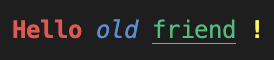
styleis a function that returns a styled string formatted terminal use. Can be used in regular print statements :
print(
  style("Hello", color="red", bold=True),
  style("old", color="blue", italic=True),
  style("friend", color="green", underline=True),
  style("!", color="yellow", bold=True),
)
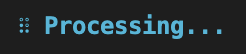
spinneris a function that will show a spinner in the terminal : the spinner will stop automatically when a next line is printed in the terminal. It runs in parallel, so don't worry about blocking the main thread.
spinner("Processing...", color="cyan", bold=True, type="dots")
Available Styles
| color/bg_color | Spinner | Text Effect |
|---|---|---|
black  |
dots ⠋ |
bold |
red  |
line | |
dim |
green  |
arrow ← |
italic |
yellow  |
bouncingBar [ ] |
underline |
blue  |
bouncingBall ( ● ) |
blink |
magenta/purple  |
earth 🌍 |
reverse |
cyan  |
moon 🌑 |
hidden |
white  |
weather ☀️ |
strikethrough |
bright_black/gray/grey  |
hearts 💛 |
strike |
bright_red  |
growHorizontal ▏ |
double_underline |
bright_green  |
modern ▰▱▱▱▱▱▱ |
overline |
bright_yellow  |
growVertical ▁ |
|
bright_blue  |
||
bright_magenta  |
||
| bright_purple |
||
bright_cyan  |
||
| bright_white |
||
orange  |
||
pink  |
||
light_pink  |
||
deep_pink  |
||
lime  |
||
gold  |
||
navy  |
||
maroon  |
||
olive  |
||
teal  |
||
silver  |
||
brown  |
||
indigo  |
||
violet  |
||
turquoise  |
||
coral  |
||
salmon  |
||
khaki  |
||
crimson  |
||
forest_green  |
||
sky_blue  |
||
lavender  |
||
peach  |
||
mint  |
Incoming Features
- automatic indentation of text
- pre-built styles for common use cases
- support for custom styles
Development
Contributions are welcome! Please feel free to submit a Pull Request.
git clone https://github.com/colinfrisch/terminal-style
cd terminal-style
pip install -e .
Install development dependencies:
pip install -e ".[dev]"
Run tests:
pytest
# or
python run_tests.py
License
This project is licensed under the MIT License - see the LICENSE file for details.
Author : Colin Frisch - linkedin.com/colinfrisch
Make your terminal output beautiful and readable with terminal-style!
1 maintainer

Metadata
1 maintainer
Release files for terminal-style 0.0.4
For a detailed explanation of source distributions (sdists) and built distributions (wheels), please see the package formats documentation.
Source distribution (sdist)
| File | Size | Uploaded | |
|---|---|---|---|
| terminal_style-0.0.4.tar.gz | 83.2 kB | Details |
Built distribution (wheel)
| File | Interpreter | ABI | Platform | Reset |
|---|---|---|---|---|
| terminal_style-0.0.4-py3-none-any.whl | Python 3 | none | any | Details |
Total release size: 93.2 kB
Release files / terminal_style-0.0.4.tar.gz
| Download URL | terminal_style-0.0.4.tar.gz |
|---|---|
| Size | 83.2 kB |
| Tags | Source |
|
SHA-256 checksum How to use checksums |
51f8fd29169222b4e636cddf6bcb331a16b632f519642797a0e74e0ba3e04c25
|
|
BLAKE2b-256 checksum How to use checksums |
fa41c23b30a34e32b3145e28b473cd826b99950c80750f6c223677f41e9b1d2d
|
| Upload date | |
|
Uploaded using Trusted Publishing? What is trusted publishing? |
No |
| Uploaded via |
twine/6.1.0 CPython/3.13.2
|
Release files / terminal_style-0.0.4-py3-none-any.whl
| Download URL | terminal_style-0.0.4-py3-none-any.whl |
|---|---|
| Size | 10.0 kB |
| Tags | Python 3 |
|
SHA-256 checksum How to use checksums |
94ec7095a2e9864e1c8f0289e1c7e70dde7c94a277be330c414bcb3f9ff520f6
|
|
BLAKE2b-256 checksum How to use checksums |
65f6bb43c6ff7fab4ee50072e61732931b0c9dc9096981b973a3887231313107
|
| Upload date | |
|
Uploaded using Trusted Publishing? What is trusted publishing? |
No |
| Uploaded via |
twine/6.1.0 CPython/3.13.2
|














