





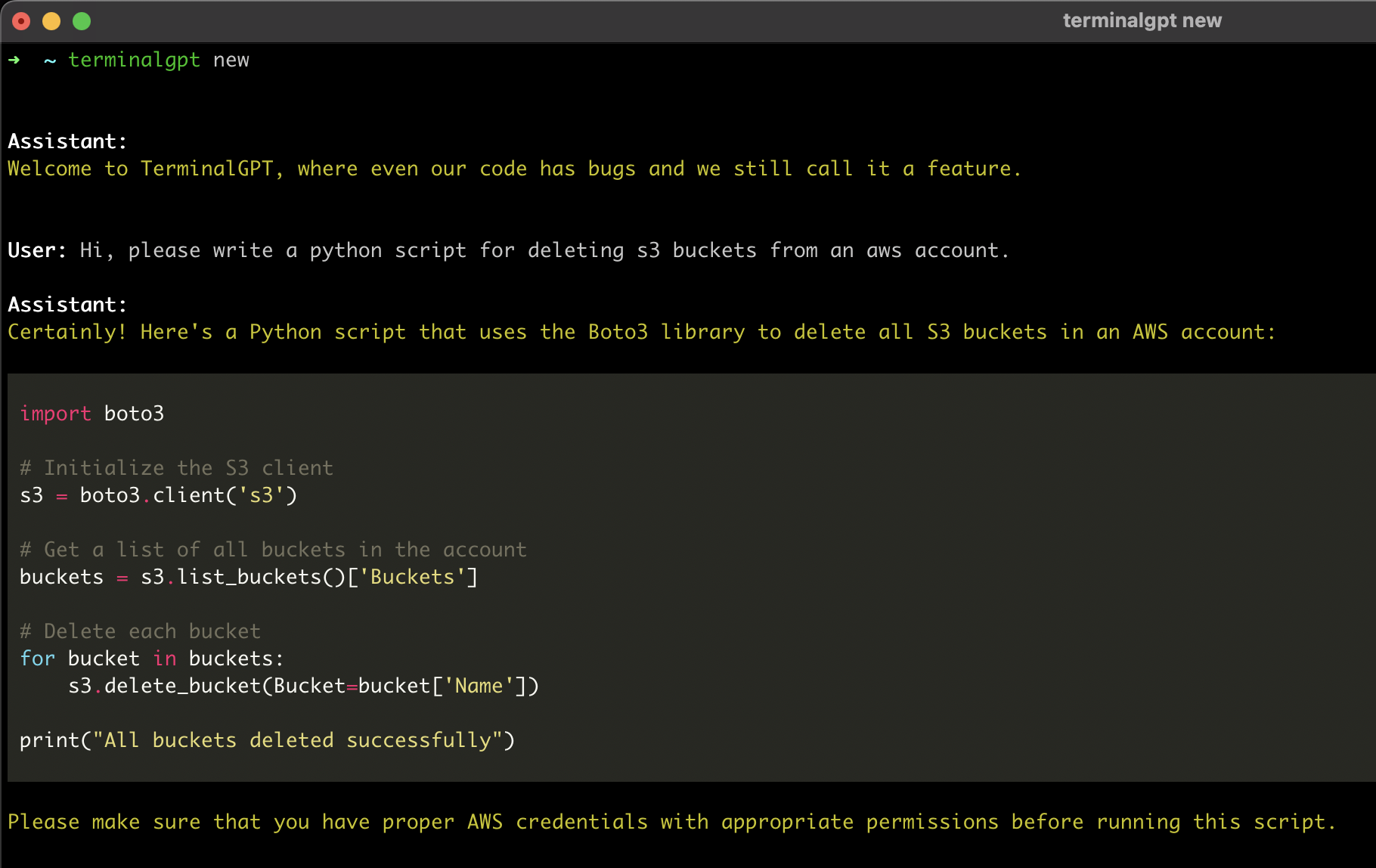
Welcome to terminalGPT, the terminal-based ChatGPT personal assistant app! With terminalGPT, you can easily interact with the OpenAI GPT-3.5, GPT-4, and GPT-5 language models.
Whether you need help with a quick question or want to explore a complex topic, TerminalGPT is here to assist you. Simply enter your query and TerminalGPT will provide you with the best answer possible based on its extensive knowledge base.
Supported Models
- gpt-3.5-turbo
- gpt-4-turbo
- gpt-4o
- gpt-4o-mini
- o1
- o1-mini
- gpt-5-mini
Why?
Some advantages of using TerminalGPT:
- TerminalGPT's answers are tailored to your machine's operating system, distribution, and chip-set architecture.
- Doesn't use your conversation data for training the model.
- Your conversations are stored locally on your machine, so only you can access them.
- Efficient context management for super cheap api usage.
- It's highly available and can be used whenever you need it.
- You can use TerminalGPT with your IDE terminal, which means you won't have to constantly switch between your browser and your IDE when you have questions.
- Fast, reliable, lightweight.
- Quick one shot question mode.
Pre-requisites
- Python 3.6 or higher
- An OpenAI Account and API key.
- Sign up at https://platform.openai.com/signup using email or Google/Microsoft account.
- Go to https://platform.openai.com/account/api-keys or click on "View API keys" in the menu to get your API key.
Installation
Using pip
- Install the latest TerminalGPT with pip install.
pip install terminalgpt -U --user
or
pip3 install terminalgpt -U --user
Using pipx
- remove old installation that was installed with pip
(do this only if you are migrating from a version that was installed with pip)
package_location=$(which terminalgpt)
rm "$package_location"
- install with pipx
pipx install terminalgpt==2.2.7 --force
Setup
- Now you have
terminalgptcommand available in your terminal. Run the following install command to configure the app.
terminalgpt install
-
Enter your OpenAI API key when prompted and press enter.
-
Choose one of the models below as the default model. it can be overridden with the
-m --modelflag later. -
Choose a printing style
That's it! You're ready to use TerminalGPT!
You can now start a new conversation with terminalgpt new or load a previous conversation with terminalgpt load. Also you can reinstall with terminalgpt install or delete previous conversations with terminalgpt delete.
Usage
TL;DR
Usage: terminalgpt [OPTIONS] COMMAND [ARGS]...

  *~ TerminalGPT - Your Personal Terminal Assistant ~*

Options:
  --version                       Show the version and exit.
  -m, --model [gpt-3.5-turbo|gpt-4-turbo|gpt-4o|gpt-4o-mini|o1|o1-mini|gpt-5-mini]
                                  Choose a model to use.  [default:
                                  gpt-4o-mini]
  -s, --style [markdown|plain]    Output style.  [default: plain]
  -t, --token-limit INTEGER       Set the token limit. this will override the
                                  default token limit for the chosen model.
  --help                          Show this message and exit.

Commands:
  delete    Choose a previous conversation to delete.
  install   Installing the OpenAI API key and setup some default settings.
  load      Choose a previous conversation to load.
  new       Start a new conversation.
  one-shot  One shot question answer.
New
Start a new conversation:
terminalgpt new
One-Shot (I love this feature)
One shot question to get a fast answer in the terminal.
terminalgpt one-shot "What is the meaning of life?"
Note: I recommend to make an alias, see at Recommended aliases.
Load
Load previous conversations:
terminalgpt load
Delete
Delete previous conversations:
terminalgpt delete
Recommended aliases
Zsh
echo alias tgpt="terminalgpt" >> ~/.zshrc
echo alias tgpto="terminalgpt one-shot" >> ~/.zshrc
echo alias tgptn="terminalgpt new" >> ~/.zshrc
Bash
echo alias tgpt="terminalgpt" >> ~/.bashrc
echo alias tgpto="terminalgpt one-shot" >> ~/.bashrc
echo alias tgptn="terminalgpt new" >> ~/.bashrc
1 maintainer

Metadata
1 maintainer
Release files for terminalgpt 2.2.8
For a detailed explanation of source distributions (sdists) and built distributions (wheels), please see the package formats documentation.
Source distribution (sdist)
| File | Size | Uploaded | |
|---|---|---|---|
| terminalgpt-2.2.8.tar.gz | 14.7 kB | Details |
Built distribution (wheel)
| File | Interpreter | ABI | Platform | Reset |
|---|---|---|---|---|
| terminalgpt-2.2.8-py3-none-any.whl | Python 3 | none | any | Details |
Total release size: 31.3 kB
Release files / terminalgpt-2.2.8.tar.gz
| Download URL | terminalgpt-2.2.8.tar.gz |
|---|---|
| Size | 14.7 kB |
| Tags | Source |
|
SHA-256 checksum How to use checksums |
4132dea8843d7fd040a0309d21cc2725d7cae0fb070a6b00888bbb04c70710a3
|
|
BLAKE2b-256 checksum How to use checksums |
56768c88039b68af5964c534ef5eeae9fd2bb7dc33e1a18b09fc7353e949763c
|
| Upload date | |
|
Uploaded using Trusted Publishing? What is trusted publishing? |
No |
| Uploaded via |
poetry/2.1.3 CPython/3.13.5 Darwin/24.6.0
|
Release files / terminalgpt-2.2.8-py3-none-any.whl
| Download URL | terminalgpt-2.2.8-py3-none-any.whl |
|---|---|
| Size | 16.6 kB |
| Tags | Python 3 |
|
SHA-256 checksum How to use checksums |
e0a91884a189b74d1ad45c15d0c60758b523e6db811f30d35b0faee159bd40bb
|
|
BLAKE2b-256 checksum How to use checksums |
56ccae7c1a2ae6eb3fb87a1fd0c74b78888dab68015394af4fb00b482c05e59b
|
| Upload date | |
|
Uploaded using Trusted Publishing? What is trusted publishing? |
No |
| Uploaded via |
poetry/2.1.3 CPython/3.13.5 Darwin/24.6.0
|














