
terminux
A fast, reliable, cross-platform terminal, organized the way you actually work.
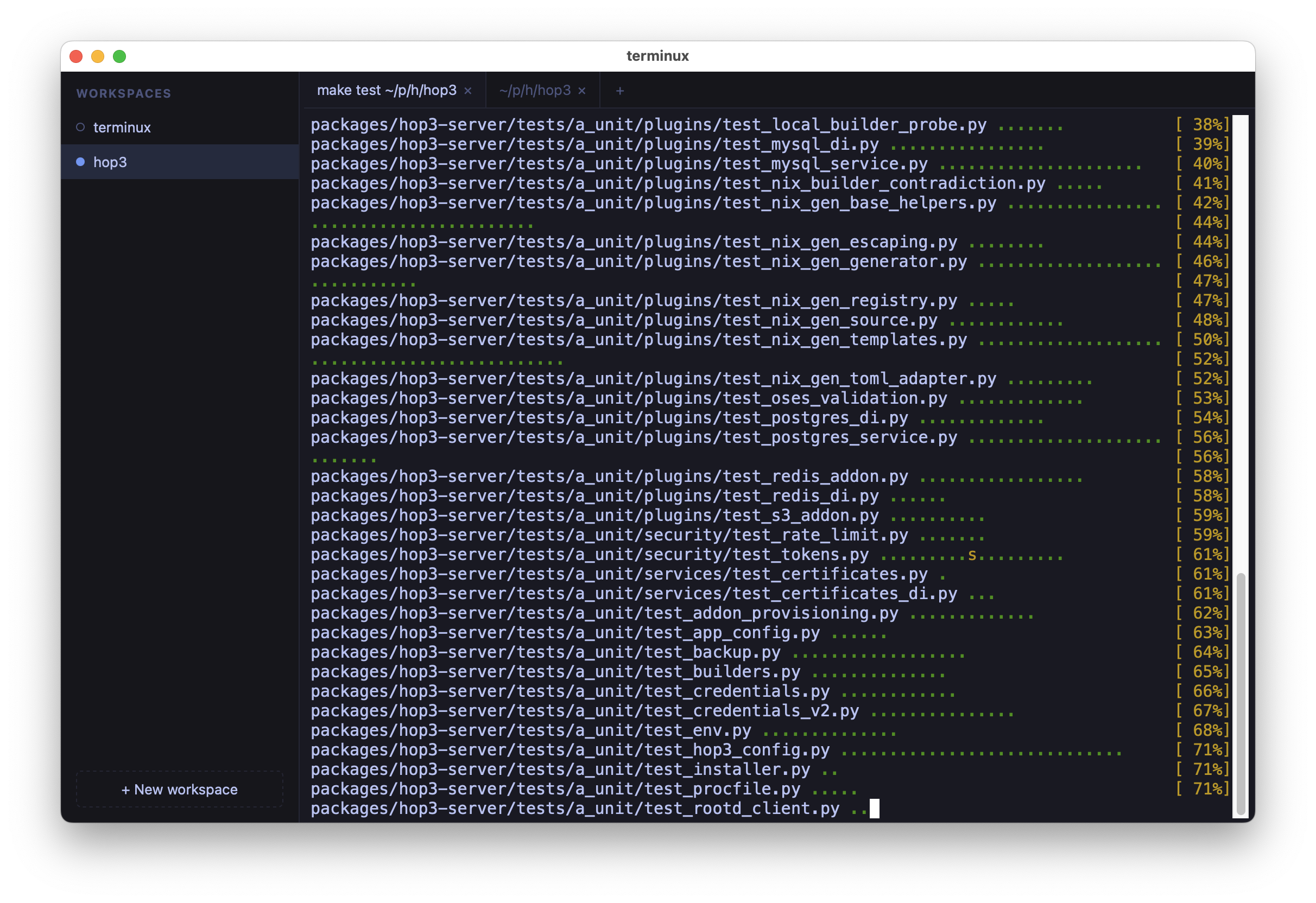
Workspaces sit on the left, tabbed terminals in the middle, and everything stays where you left it.




Why terminux?
You have six projects on the go. Each one is a different directory, a different mental context, a different set of running shells. terminux gives each of them a home (a workspace) and keeps them alive and arranged exactly how you left them, even across restarts.
It's the workspace UX of cmux, rebuilt in Python on a clean, auditable two-process architecture inspired by terax, with reliability over features as the guiding principle. There is no account, telemetry, or AI: just a terminal that respects your flow.
uv sync && make frontend
uv run terminux
That's it. You're in.
✨ What you get
- Workspaces sidebar: a persistent list of named workspaces. Names track the first tab's working directory automatically (until you pin one).
- Tabbed terminals: every workspace has its own tabs, each a real PTY shell. Switch freely; background tabs keep streaming, no jank.
- Everything comes back: workspaces, tabs, window geometry, font size, each shell's working directory, and the visible scrollback of every tab are restored after a restart. Fresh shells, same layout, same view you left.
- Remote access: run the backend on a server, connect from your laptop with
--connect. Shells and long-running builds keep going through lid-closes, network hops, and device switches; terminals reconnect automatically and repaint from the server's buffer. See Remote access. - Keyboard-first: sidebar shows a keycap on each of the first nine workspaces; jump straight there with
Ctrl+Shift+1..9on Linux (Cmd+1..9on macOS). Plus a fuzzy quick-switcher, find-in-terminal, font zoom, and more. - Platform-respecting shortcuts: Linux uses
Ctrl+Shift+<key>for app shortcuts (matching GNOME Terminal, Konsole, Alacritty, Ghostty, kitty), so rawCtrl+P/Ctrl+B/Ctrl+Fflow straight to your shell. macOS usesCmdfor the same job; rawCtrlis left alone. - Clickable URLs & iTerm2-style copy: modifier-click opens links; optional auto-copy on selection, persisted, off by default.
- Working vs ready: a two-color sidebar dot reads like a CI traffic light: amber while a foreground task is actively working (idle TUIs and parked prompts don't count), green once it finishes. Works out of the box; opt-in shell integration makes it more precise. Plain output by itself never falsely promotes to green.
- Drag & drop: reorder workspaces and tabs with live drop feedback. Drop a file to paste its shell-quoted path.
- Local-first & hardened: loopback-only by default, per-session auth token, CSP and security headers, atomic versioned persistence.
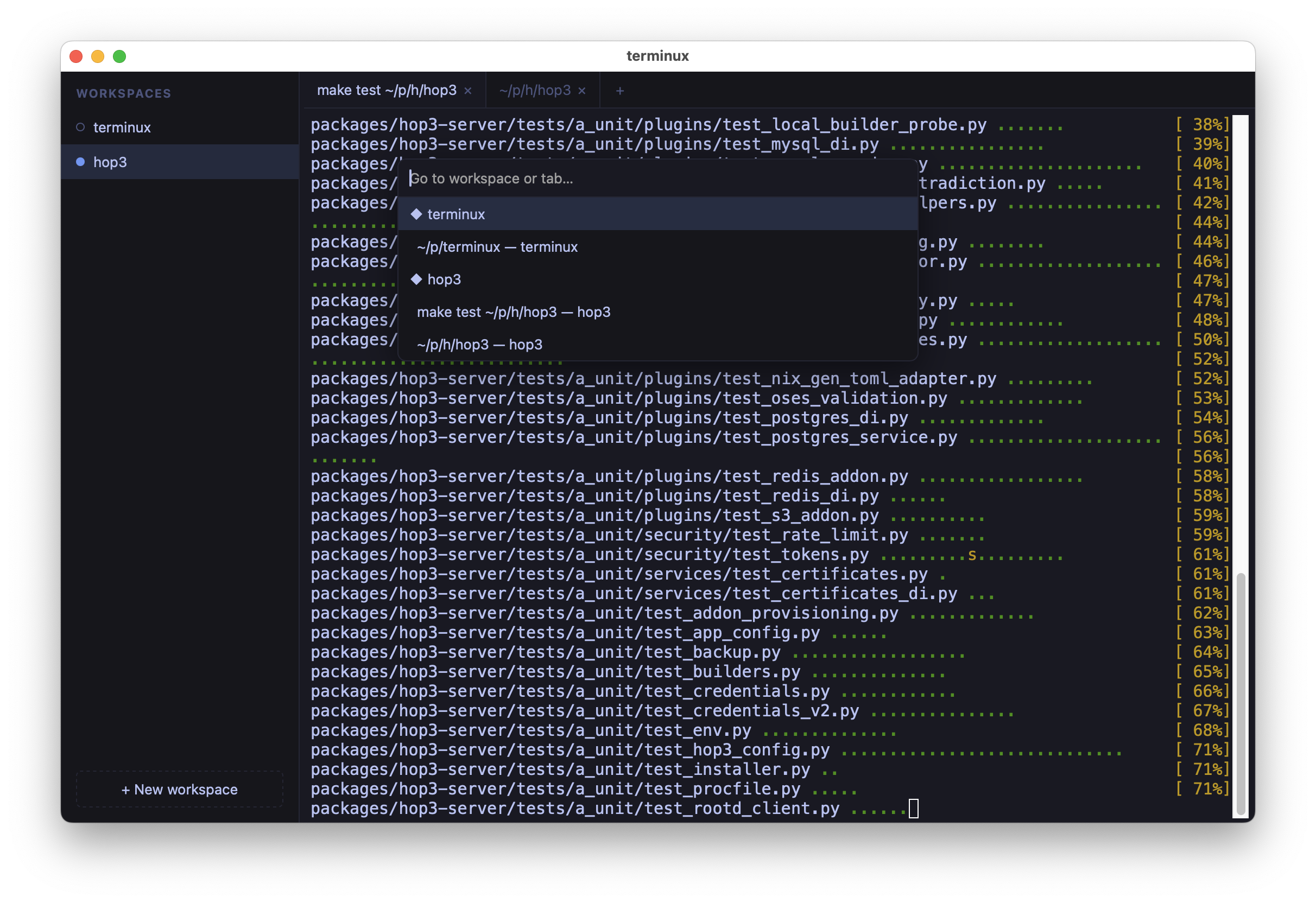
The fuzzy quick switcher (Ctrl+Shift+P on Linux, Cmd+P on macOS): jump to any workspace or tab.
Run
uv sync
make frontend                # build the web UI (needs Node; first run only)
uv run terminux              # desktop window (pywebview)
uv run terminux --no-window  # server only; open the printed URL in a browser
uv run terminux --debug      # verbose logs + slow-op warnings
uv run terminux --trace      # extreme: log every save/load/cwd lookup
--no-window serves the same UI to any browser, handy for development and for running terminux where no display is available. --debug and --trace are diagnostics flags; see Debugging knobs.
Remote mode
Run terminux on a headless server and connect from your laptop:
# on the server
uv run terminux --server --port 8443
# prints: terminux server listening — connect with:
#           http://127.0.0.1:8443/?t=abc-def-ghi

# on the laptop (one shell)
ssh -L 8443:localhost:8443 server.example.com

# on the laptop (another shell)
uv run terminux --connect http://localhost:8443/?t=abc-def-ghi
Shells, workspaces, and scrollback live on the server: disconnect, sleep the laptop, reconnect later, everything's where you left it. See Remote access for the full recipe (multi-client, firewall guidance, systemd service).
Install / package
terminux ships as a self-contained desktop app; no Python or Node required to run the bundle.
make build-linux  # Linux bundle (built in Docker) → dist/linux/terminux/terminux
make docker-run   # run headless web mode on :8000
make build-macos  # macOS .app → dist/terminux.app
The documentation has the full platform notes (signing, Gatekeeper, X11, architectures).
Documentation
Docs are built with Zensical; sources live in docs/src/, configuration in docs/zensical.toml.
make docs-serve    # live preview at http://127.0.0.1:8000
make docs          # static site → docs/site/
Start with docs/src/index.md. The original vision, functional spec, and technical spec are in notes/.
Develop
make help            # every target, grouped and described
make frontend        # build TS/Vite UI → src/terminux/web/static
make frontend-dev    # live Vite dev server against a --no-window backend
make frontend-test   # vitest unit tests (fast, no browser)
make frontend-cov    # frontend coverage report
make test            # everything: vitest, then pytest unit/integration/e2e
make lint            # ruff + ty + pyrefly + mypy
make format
The e2e tier drives the served UI with a real browser (no pywebview); install it once with uv run playwright install chromium.
Status: 0.8 preview
Works today: workspaces sidebar (create / rename / reorder / close, working/ready dot), tabs with multiple live terminals, real PTY shells streaming in the background, layout and scrollback restored across restarts (always with fresh shells), remote mode (--server / --connect) with automatic reconnection, program-printed hyperlinks, self-diagnosing freeze watchdog, macOS & Linux bundles. 0.8 also hardened the remote-auth path and restored support for older Macs (Safari-14-era WebKit).
Not yet: split panes, Windows PTY, multi-user.
Architecture in one breath
A Vite/TypeScript web UI (xterm.js for the terminals, Preact for the chrome around them) runs in a sandboxed pywebview window and talks to a loopback Starlette/uvicorn backend that owns the PTYs and streams raw bytes over per-terminal WebSockets. The frontend build output is committed to src/terminux/web/static/, so the Python package runs with no Node toolchain.
1 maintainer

Metadata
1 maintainer
Release files for terminux 0.9.0
For a detailed explanation of source distributions (sdists) and built distributions (wheels), please see the package formats documentation.
Source distribution (sdist)
| File | Size | Uploaded | |
|---|---|---|---|
| terminux-0.9.0.tar.gz | 341.5 kB | Details |
Built distribution (wheel)
| File | Interpreter | ABI | Platform | Reset |
|---|---|---|---|---|
| terminux-0.9.0-py3-none-any.whl | Python 3 | none | any | Details |
Total release size: 689.6 kB
Release files / terminux-0.9.0.tar.gz
| Download URL | terminux-0.9.0.tar.gz |
|---|---|
| Size | 341.5 kB |
| Tags | Source |
|
SHA-256 checksum How to use checksums |
d8d897cc5a3803af2fd148e49e73f5fb6283b05f000dac3bf25948d307e41242
|
|
BLAKE2b-256 checksum How to use checksums |
287cdfa8fc444eb072520bc0743e1519b6e3b81db0985b003ed0097c01fe219f
|
| Upload date | |
|
Uploaded using Trusted Publishing? What is trusted publishing? |
No |
| Uploaded via |
uv/0.12.12 {"installer":{"name":"uv","version":"0.12.12","subcommand":["publish"]},"python":null,"implementation":{"name":null,"version":null},"distro":{"name":"macOS","version":null,"id":null,"libc":null},"system":{"name":null,"release":null},"cpu":null,"openssl_version":null,"setuptools_version":null,"rustc_version":null,"ci":null}
|
Release files / terminux-0.9.0-py3-none-any.whl
| Download URL | terminux-0.9.0-py3-none-any.whl |
|---|---|
| Size | 348.1 kB |
| Tags | Python 3 |
|
SHA-256 checksum How to use checksums |
0ab16082e15867de4fb0730f8e8ddefc65899edfb80ff101261103e295058773
|
|
BLAKE2b-256 checksum How to use checksums |
35db82dc11e1ea1c19a3243d19639373af3d78dde7099e4568d8de355286810e
|
| Upload date | |
|
Uploaded using Trusted Publishing? What is trusted publishing? |
No |
| Uploaded via |
uv/0.12.12 {"installer":{"name":"uv","version":"0.12.12","subcommand":["publish"]},"python":null,"implementation":{"name":null,"version":null},"distro":{"name":"macOS","version":null,"id":null,"libc":null},"system":{"name":null,"release":null},"cpu":null,"openssl_version":null,"setuptools_version":null,"rustc_version":null,"ci":null}
|














