
The tables have termed.








termtables is a lightweight Python 3 package for pretty-printing tables on the command line. Install with
pip install termtables
The code
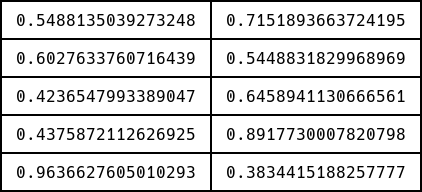
import termtables as tt
import numpy

numpy.random.seed(0)
data = numpy.random.rand(5, 2)

tt.print(data)
# tt.to_string(data) returns the string
produces
You can control border style, padding, alignment, and various other attributes. For example,
import termtables as tt

header = ["a", "bb", "ccc"]
data = [
    [1, 2, 3], [613.23236243236, 613.23236243236, 613.23236243236]
]

tt.print(
    data,
    header=header,
    style=tt.styles.markdown,
    padding=(0, 1),
    alignment="lcr"
)
produces
| a               |       bb        |             ccc |
|-----------------|-----------------|-----------------|
| 1               |        2        |               3 |
| 613.23236243236 | 613.23236243236 | 613.23236243236 |
which is useful for copy-pasting into websites that support Markdown (like GitHub).
See
test/test_termtables.py
for more examples.
If the styles in termtables.styles
thin
thin_thick
thin_double
rounded
rounded_thick
rounded_double
thick
thick_thin
double
double_thin
booktabs

ascii_thin
ascii_thin_double
ascii_double
ascii_double_thin
ascii_booktabs

markdown
aren't good enough for you, simply provide your own style as a string of length 11 or 15 (the extra 4 including header-separating characters). For example
import termtables as tt

header = ["a", "bb", "ccc"]
data = [
    [1, 2, 3], [613.23236243236, 613.23236243236, 613.23236243236]
]

tt.print(
    data,
    header=header,
    style="x0123456789abcd"
)
produces
1xxxxxxxxxxxxxxxxx7xxxxxxxxxxxxxxxxx7xxxxxxxxxxxxxxxxx2
0 a               0 bb              0 ccc             0
abbbbbbbbbbbbbbbbbcbbbbbbbbbbbbbbbbbcbbbbbbbbbbbbbbbbbd
0 1               0 2               0 3               0
5xxxxxxxxxxxxxxxxx9xxxxxxxxxxxxxxxxx9xxxxxxxxxxxxxxxxx6
0 613.23236243236 0 613.23236243236 0 613.23236243236 0
3xxxxxxxxxxxxxxxxx8xxxxxxxxxxxxxxxxx8xxxxxxxxxxxxxxxxx4
Testing
To run the termtables unit tests, check out this repository and type
tox
Other software for terminal tables
License
This software is published under the GPL-3.0 license.
1 maintainer

Metadata
1 maintainer
Release files for termtables 0.2.4
For a detailed explanation of source distributions (sdists) and built distributions (wheels), please see the package formats documentation.
Source distribution (sdist)
| File | Size | Uploaded | |
|---|---|---|---|
| termtables-0.2.4.tar.gz | 17.7 kB | Details |
Built distribution (wheel)
| File | Interpreter | ABI | Platform | Reset |
|---|---|---|---|---|
| termtables-0.2.4-py3-none-any.whl | Python 3 | none | any | Details |
Total release size: 35.6 kB
Release files / termtables-0.2.4.tar.gz
| Download URL | termtables-0.2.4.tar.gz |
|---|---|
| Size | 17.7 kB |
| Tags | Source |
|
SHA-256 checksum How to use checksums |
797c6afeb78abdab97cd5bfbbd2fc1bfbd9630052699dc881b27b334bcc6a73f
|
|
BLAKE2b-256 checksum How to use checksums |
8635b2a0e5abf04e219c92cdc35af72dfcd157c1f43fda538adc282b34a26357
|
| Upload date | |
|
Uploaded using Trusted Publishing? What is trusted publishing? |
No |
| Uploaded via |
twine/3.4.1 importlib_metadata/4.2.0 pkginfo/1.7.0 requests/2.25.1 requests-toolbelt/0.9.1 tqdm/4.61.0 CPython/3.9.4
|
Release files / termtables-0.2.4-py3-none-any.whl
| Download URL | termtables-0.2.4-py3-none-any.whl |
|---|---|
| Size | 17.9 kB |
| Tags | Python 3 |
|
SHA-256 checksum How to use checksums |
0ca860eed8957db0045020bcdfcf6620e188b0d776e8543a57ff539fcfeec26d
|
|
BLAKE2b-256 checksum How to use checksums |
f951e56764d0db7ec7b2eb121749e6521a53697e8c1cd55a9d0e4374dd587543
|
| Upload date | |
|
Uploaded using Trusted Publishing? What is trusted publishing? |
No |
| Uploaded via |
twine/3.4.1 importlib_metadata/4.2.0 pkginfo/1.7.0 requests/2.25.1 requests-toolbelt/0.9.1 tqdm/4.61.0 CPython/3.9.4
|














