
A Terminal based typing practice application

Project description
termtyper
termtyper is a terminal based typing practice command-line application written in Python3 using curses library. It can run on mac/linux/unix and also windows.
Installation
pip install termtyper
Note:
- Please install latest python3(version >= 3.7) from www.python.org (with pip), though python come with your system. There are some issues (like permission errors) with python that comes with system by default (as it is insatlled system level not user level). DO NOT UNININSTALL the python that came with your system by default. Just install one latest python at user level.
- On windows termtyper works with windows-terminal but one issue is, it crashes when we resize the terminal. So try not to resize the terminal after application got started (windows-terminal can be installed from microsoft store).
- If you are mac user and get the SSL: CERTIFICATE_VERIFY_FAILED error for the first time you open application, then goto applications folder, and find the python folder and double click the file Install Certificates.command. then you are good to go.
Usage of command
Just type termtyper on terminal to start application
usage: termtyper [-h] [--version] [--upgrade]
Features
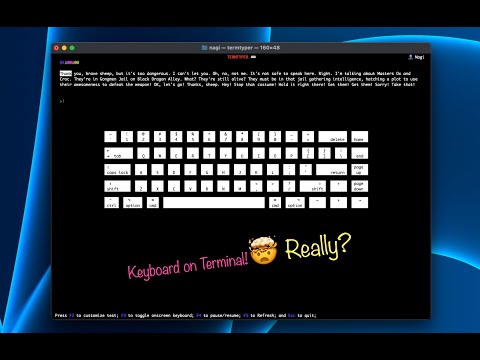
- Onscreen keyboard to see typing effect and has option to toggle onscreen keyboard.
- Can be customized the typing test challenge with 1 minute, 2 minute, 3 minute, 5 minute,10 minute and 15 minute.
- Can be customized the text for the typing test with English(12 options) or Programming languages (12 languages)
- Timer starts when first key is pressed and has option to pause/resume the typing test.
- Maintains performance statistics and shows Histogram for typing speed.
- Very much like GUI application despite the fact that the application is terminal based.
Versions
2.0.5
Fixed Bug! (crashing termtytper when we press some unwanted keys(like Insert, DELETE))
2.0.4
Updated setup.py (chnaged minimum python version requirement from 3.6 to 3.7)
2.0.3
Fixed Bug in staticstics(date key Error)
2.0.2
Fixed Bug in correct word count and wrong word count calculation
2.0.1
Fixed mistakes in the text of movie scripts in the English Language Category
2.0.0
Added features:
- Maintains performance statistics (All-time, Month, Week, Day) with total time (in minutes), top speed (wpm), and average speed (wpm) and also display the Histogram for typing speed.
- Added 9 language options (famous movie scripts) in the English language category while removing 3 languages options (Top 50 words, Top 100 Words, and Top 300 words).
- Shows new updates to upgrade (when available).
1.1.x
Added features and bug fixes:
- Bug fix: install_requires keyword in setup.py(now windows-curses package will be autometically installed as required package for windows system)
- Added command line argument feature to upgrade (if latest version available) and for getting version information
- Pause/resume the typing test feature has been added in this version.
1.0.0
First version
Languages
The following languages are available
English
- Top 200 words
- Too 500 words
- Top 1000 words
- Toy Story(1-4)
- Srek (1-4)
- Happy Feet(1-2)
- Kungfu Panda (1-3)
- Frozen (1-2)
- Moana
- Harry Potter (1-3)
- Lord of The Rings (1-3)
- Titanic
Programming
- C/CPP
- C#
- Java
- Python
- Swift
- HTML
- Java Script
- GO
- PHP
- Ruby
- Kotlin
- Rust
Challanges
The following practice challenges available
- 1 minute test
- 2 minute test
- 3 minute test
- 5 minute test
- 10 minute test
- 15 minute test
Release history Release notifications | RSS feed


Download files
Download the file for your platform. If you're not sure which to choose, learn more about installing packages.
Source Distribution
Built Distribution
Filter files by name, interpreter, ABI, and platform.
If you're not sure about the file name format, learn more about wheel file names.
Copy a direct link to the current filters
File details
Details for the file termtyper-2.0.5.tar.gz.
File metadata
- Download URL: termtyper-2.0.5.tar.gz
- Upload date:
- Size: 400.1 kB
- Tags: Source
- Uploaded using Trusted Publishing? No
- Uploaded via: twine/3.4.1 importlib_metadata/3.4.0 pkginfo/1.7.0 requests/2.22.0 requests-toolbelt/0.9.1 tqdm/4.48.0 CPython/3.7.10
File hashes
| Algorithm | Hash digest | |
|---|---|---|
| SHA256 |
e3ee07ab50827ef74ee7b5919d020c70ceefea484ecca68de66024cce1aba022
|
|
| MD5 |
a4becfeaecfe7c00c945ffa0cc2f0c43
|
|
| BLAKE2b-256 |
9aac40b752f2ee73e03cb37c211029568f6639a750229484da4c375b5bd7c655
|
File details
Details for the file termtyper-2.0.5-py3-none-any.whl.
File metadata
- Download URL: termtyper-2.0.5-py3-none-any.whl
- Upload date:
- Size: 410.4 kB
- Tags: Python 3
- Uploaded using Trusted Publishing? No
- Uploaded via: twine/3.4.1 importlib_metadata/3.4.0 pkginfo/1.7.0 requests/2.22.0 requests-toolbelt/0.9.1 tqdm/4.48.0 CPython/3.7.10
File hashes
| Algorithm | Hash digest | |
|---|---|---|
| SHA256 |
bdf71f46bdf28064ee20601a9163d768c8023c72b7dcf18c3c2101764f89d036
|
|
| MD5 |
a07f042755826e04c72cddf79ac009db
|
|
| BLAKE2b-256 |
ead5e3dbf20942f2edc8c15da2b17947691bb07105de8137de98d362b465b3d8
|






