
The first offline-first, source-based TUI package manager built natively for Termux
Verified details
These details have been verified by PyPIProject links
GitHub Statistics
Maintainers

Project description

Termux App Store
The first offline-first, source-based TUI package manager built natively for Termux.








Offline-first • Source-based • Binary-safe • Termux-native
What is Termux App Store?
Termux App Store is a TUI (Terminal User Interface) built with Python (Textual) and CLI that lets Termux users browse, build, and manage tools/apps directly on Android — no account, no telemetry, no cloud dependency.
[!IMPORTANT] Termux App Store is not a centralized binary repository and not a hidden auto-installer. All builds run locally, transparently, and under full user control.
Who Is It For?
| User | Use Case |
|---|---|
| Termux Users | Full control over builds & packages |
| Developers | Distribute tools via source-based packaging |
| Reviewers & Auditors | Review and validate build scripts |
| Maintainers | Manage multiple Termux packages at once |
Screenshots

Tui Interface
| TUI Main Interface | TUI Install Interface | Menu Palette |
|---|---|---|
 |
 |
 |
| TUI main menu | Package install process | Command palette |
TUI User-friendly with full touchscreen support
CLI Interface
| Other tools support | CLI Install Interface | CLI View Interface |
|---|---|---|
 |
 |
 |
| tasctl and termux-build | Package install process | CLI help, list and show |
GuideBook
| List menu | Menu about | Menu how to upload |
|---|---|---|
 |
 |
 |
| GuideBook main menu | Information termux-app-store | Guide how to upload |
GuideBook is a information, run:
python guidebook.py
Screenrecord
Record termux-app-store TUI, CLI, Other tool tasctl, termux-build, guidebook.py |
|---|
 |
Quick Install and Uninstall
Option 1 (Recommended)
pkg install python
pip install termux-app-store
Option 2 (Manual)
Simple (Recommended for not download high memory)
curl -fsSL https://raw.githubusercontent.com/djunekz/termux-app-store/master/tasctl | bash -s install
or
With git clone (For download full files repository)
git clone https://github.com/djunekz/termux-app-store
cd termux-app-store
bash install.sh
or
git clone https://github.com/djunekz/termux-app-store
cd termux-app-store
./tasctl install
After download and install then run:
termux-app-store        # Open interactive TUI
termux-app-store -h     # Show CLI help
Uninstall
pip uninstall termux-app-store
or
./tasctl uninstall
Usage
TUI — Interactive Interface
termux-app-store
CLI — Direct Commands
termux-app-store list                  # List all packages
termux-app-store show <package>        # Show package details
termux-app-store install <package>     # Build & install a package
termux-app-store update                # Check for available updates
termux-app-store upgrade               # Upgrade all packages
termux-app-store upgrade <package>     # Upgrade a specific package
termux-app-store version               # Check latest version
termux-app-store help                  # Full help
Features
|
Package Browser (TUI)
Browse packages from the Smart Build Validator Detects unsupported Termux dependencies with automatic status badges. Real-time Search & Filter Instantly search packages by name or description — no reload needed. One-Click Build
Install or update a package in one click via |
One-Click Validator
Validate packages before distribution via One-Click Manage
Install / update / uninstall Termux App Store itself via Self-Healing Path Resolver Auto-detects app location even if the folder is moved or renamed. Privacy-First No account, no tracking, no telemetry — fully offline. |
Package Status Badges
| Badge | Description |
|---|---|
| NEW | Newly added package (< 7 days) |
| UPDATE | A newer version is available |
| INSTALLED | Installed version is up-to-date |
| UNSUPPORTED | Dependency not available in Termux |
Adding a Package
Every package must have a build.sh file:
packages/<tool-name>/build.sh
Minimal build.sh Template
TERMUX_PKG_HOMEPAGE=""
TERMUX_PKG_DESCRIPTION=""
TERMUX_PKG_LICENSE=""
TERMUX_PKG_MAINTAINER="@your-github-username"
TERMUX_PKG_VERSION=""
TERMUX_PKG_SRCURL=""
TERMUX_PKG_SHA256=""
[!NOTE] See the full template in
template/build.shor run:./termux-build template
Adding a Package using termux-build
Open directory termux-app-store
cd termux-app-store
Then run
./termux-build create nameyourtool
[!NOTE] When naming, do not use spaces, use the - sign in the name. For example: this-is-my-tool
termux-build — Build package and Validation Tool
termux-build is a validation and reviewer helper tool — not an auto-upload or auto-publish tool.
./termux-build create <package>      # Create package for distribution
./termux-build lint <package>        # Lint a build script
./termux-build init <url-repo>       # Auto create and build package for distribution
./termux-build check-pr <package>    # Check PR readiness
./termux-build doctor                # Diagnose environment
./termux-build suggest <package>     # Get improvement suggestions
./termux-build explain <package>     # Detailed package explanation
./termux-build template              # Generate build.sh template
./termux-build guide                 # Contribution guide
[!NOTE] termux-build only reads and validates — it does not modify files, or upload to GitHub.
tasctl — Termux App Store Controller
tasctl is a controller termux-app-store system
./tasctl install       # Install Termux App Store (latest)
./tasctl update        # Update to latest version
./tasctl uninstall     # Remove Termux App Store
./tasctl doctor        # Diagnose environment
./tasctl self-update   # Update tasctl itself
./tasctl help          # Show this help
guidebook — All Information Termux App Store
guidebook.py is a information use, build, contributing to Termux App Store
python guidebook.py
[!NOTE] guidebook currently only supports two languages: English and Indonesia
Architecture
termux-app-store/
├── packages/              # All packages directory
│   └── <tool-name>/
│       └── build.sh       # Metadata & build script
├── template/
│   └── build.sh           # Package template
├── tasctl                 # TAS installer/updater/uninstaller
├── termux-build           # Validation & review tool
└── install.sh             # Main installer
Full details: ARCHITECTURE
Security & Privacy
|
Security
|
Privacy
|
Full details: SECURITY | PRIVACY | DISCLAIMER
Upload Your Tool to Termux App Store
Want to share your tool with the Termux community?
Benefits of uploading:
- Your tool becomes available to all Termux users
- Updates only require changing
versionandsha256inbuild.sh - Your tool appears in the TUI with automatic status badges
How to upload:
# 1. Fork this repo
# 2. Add your package folder:
mkdir packages/your-tool-name
# 3. Create build.sh from the template or with termux-build
# 4. Validate with termux-build:
./termux-build lint packages/your-tool-name
# 5. Submit a Pull Request
Full guide: How to upload package in termux-app-store
Contributing
All contributions are welcome!
| How to Contribute | Description |
|---|---|
| Add a package | Submit a new tool package |
| Report a bug | Open an issue on GitHub |
| Send a PR | Code or documentation improvements |
| Review PRs | Help validate others' contributions |
| Security audit | Review build script security |
| Improve docs | Clarify or translate documentation |
Full guide: CONTRIBUTING
Help & Documentation
| Document | Description |
|---|---|
| FAQ | Frequently asked questions |
| TROUBLESHOOTING | Solutions to common problems |
| HOW TO UPLOAD | How to upload your tool |
| CONTRIBUTING | Contribution guide |
| SUPPORT | How to get support |
Philosophy
"Local first. Control over convenience. Transparency over magic."
Termux App Store is built for users who want to:
- Fully understand what runs on their device
- Control builds and sources directly
- Avoid vendor lock-in and cloud dependency
- Share tools openly with the Termux community
License
This project is licensed under the MIT License — see LICENSE for details.
Maintainer
Djunekz — Independent & Official Developer

Support This Project
If Termux App Store has been useful to you:
- Star this repo — helps others discover it
- Share it in Termux & Android communities
- Report bugs via Issues
- Submit a PR for any improvement
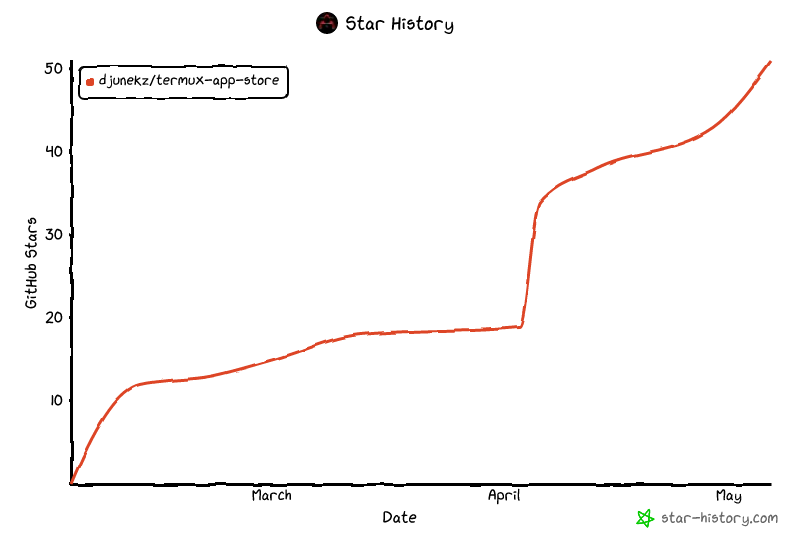
Star History
© Termux App Store — Built for everyone, by the community.
termux · termux app store · termux package manager · termux tui · android terminal tools · termux tools · termux packages · termux cli
Project details
Verified details
These details have been verified by PyPIProject links
GitHub Statistics
Maintainers
Release history Release notifications | RSS feed


Download files
Download the file for your platform. If you're not sure which to choose, learn more about installing packages.
Source Distribution
Built Distribution
Filter files by name, interpreter, ABI, and platform.
If you're not sure about the file name format, learn more about wheel file names.
Copy a direct link to the current filters
File details
Details for the file termux_app_store-0.2.6.tar.gz.
File metadata
- Download URL: termux_app_store-0.2.6.tar.gz
- Upload date:
- Size: 43.2 kB
- Tags: Source
- Uploaded using Trusted Publishing? Yes
- Uploaded via: twine/6.1.0 CPython/3.13.13
File hashes
| Algorithm | Hash digest | |
|---|---|---|
| SHA256 |
ef2778dffe50acdaf67d23e5a640c7d1645a2318e84a8ea8aa7e9af63865be01
|
|
| MD5 |
da2d9d0036aa602da6eef2930ddaf67e
|
|
| BLAKE2b-256 |
183ff795ce1b05e6deb061039aca71763bf580cbde96a67bd74e722cbe35aeac
|
Provenance
The following attestation bundles were made for termux_app_store-0.2.6.tar.gz:
Publisher:
publish.yml on djunekz/termux-app-store
-
Statement:
-
Statement type:
https://in-toto.io/Statement/v1 -
Predicate type:
https://docs.pypi.org/attestations/publish/v1 -
Subject name:
termux_app_store-0.2.6.tar.gz -
Subject digest:
ef2778dffe50acdaf67d23e5a640c7d1645a2318e84a8ea8aa7e9af63865be01 - Sigstore transparency entry: 1360885086
- Sigstore integration time:
-
Permalink:
djunekz/termux-app-store@7be7ce36d67cb9eb117cd4f073885b70afd0afe5 -
Branch / Tag:
refs/tags/v0.2.6 - Owner: https://github.com/djunekz
-
Access:
public
-
Token Issuer:
https://token.actions.githubusercontent.com -
Runner Environment:
github-hosted -
Publication workflow:
publish.yml@7be7ce36d67cb9eb117cd4f073885b70afd0afe5 -
Trigger Event:
release
-
Statement type:
File details
Details for the file termux_app_store-0.2.6-py3-none-any.whl.
File metadata
- Download URL: termux_app_store-0.2.6-py3-none-any.whl
- Upload date:
- Size: 27.8 kB
- Tags: Python 3
- Uploaded using Trusted Publishing? Yes
- Uploaded via: twine/6.1.0 CPython/3.13.13
File hashes
| Algorithm | Hash digest | |
|---|---|---|
| SHA256 |
03416455df6888de1f9f2fc80f6ba6af70c2db03bd9d0c978df002d69b717a64
|
|
| MD5 |
f6b2196195865a2238381527efda1dbc
|
|
| BLAKE2b-256 |
96d7505adcf7077e8b58e670b524e5abdfa6cf979f64406048c2e2e081e51404
|
Provenance
The following attestation bundles were made for termux_app_store-0.2.6-py3-none-any.whl:
Publisher:
publish.yml on djunekz/termux-app-store
-
Statement:
-
Statement type:
https://in-toto.io/Statement/v1 -
Predicate type:
https://docs.pypi.org/attestations/publish/v1 -
Subject name:
termux_app_store-0.2.6-py3-none-any.whl -
Subject digest:
03416455df6888de1f9f2fc80f6ba6af70c2db03bd9d0c978df002d69b717a64 - Sigstore transparency entry: 1360885122
- Sigstore integration time:
-
Permalink:
djunekz/termux-app-store@7be7ce36d67cb9eb117cd4f073885b70afd0afe5 -
Branch / Tag:
refs/tags/v0.2.6 - Owner: https://github.com/djunekz
-
Access:
public
-
Token Issuer:
https://token.actions.githubusercontent.com -
Runner Environment:
github-hosted -
Publication workflow:
publish.yml@7be7ce36d67cb9eb117cd4f073885b70afd0afe5 -
Trigger Event:
release
-
Statement type:






