
Termux-SSH
+-----------------------------------------------------------+
| _____                                _____ _____ _   _    |
||_   _|                              /  ___/  ___| | | |   |
|  | | ___ _ __ _ __ ___  _   ___  __ \ `--.\ `--.| |_| |   |
|  | |/ _ \ '__| '_ ` _ \| | | \ \/ /  `--. \`--. \  _  |   |
|  | |  __/ |  | | | | | | |_| |>  <  /\__/ /\__/ / | | |   |
|  \_/\___|_|  |_| |_| |_|\__,_/_/\_\ \____/\____/\_| |_/   |
|                                A tool by Dhrumil Mistry   |
+-----------------------------------------------------------+
| ~ ~ ~ ~ ~ A tool Specially Designed for Termux ~ ~ ~ ~ ~  |
+-----------------------------------------------------------+
Termux SSH helps user to setup SSH server on termux android application, which will help them to execute commands remotely using a command line. If your device is rooted then you can have full control over the android smartphone. You can take screenshots, record and capture audio, video, images remotely using termux apis.
This feature might not work on few devices. Refer Termux-API documentation for more information.
Screenshot
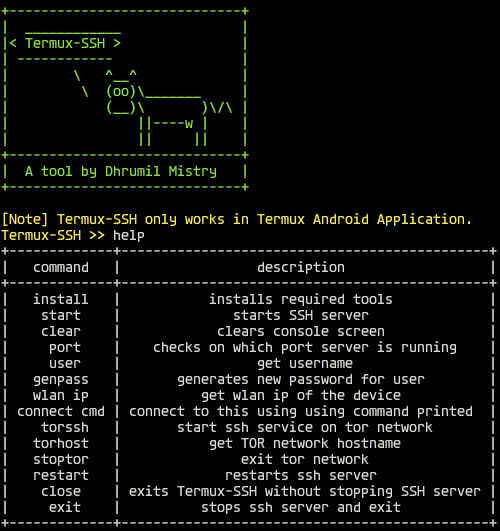
Installation
Using bash script
-
Execute command in Termux App
cd $HOME && mkdir tmp && cd tmp && curl -O https://raw.githubusercontent.com/dmdhrumilmistry/Termux-SSH/main/install.sh && chmod +x $HOME/tmp/install.sh && ./install.sh; cd $HOME ;rm -rf $HOME/tmp
Maually
-
Open Termux terminal
-
Install Python and git packages
pkg install python git -y
-
Install required packages
pip install git+https://github.com/dmdhrumilmistry/Termux-SSH.git
-
Start Termux-SSH and Install required tools
python -m termux_ssh
install
Commands List
| command | description |
|---|---|
| install | installs required tools |
| start | starts SSH server |
| clear | clears console screen |
| port | checks on which port server is running |
| user | get username |
| genpass | generates new password for user |
| wlanip | get wlan ip of the device |
| conncmd | connect to this using using command printed |
| torssh | start ssh service on tor network |
| torhost | get TOR network hostname |
| torstop | exit tor network |
| restart | restarts ssh server |
| close | exits Termux-SSH without stopping SSH server |
| exit | stops ssh server and exit |
Features
- Helps user to setup basic SSH server
- Automated Setup
- Instructed Steps
- Secure script
Dependencies
Termux-SSH requires following programs to run properly -
Pythonsubprocess modulecoloramaprettytablenetifaces
OpenSSHNmaptermux-apitermux-auth
All the dependencies will be installed automatically when you run install.py script
License
MIT License
Have any Issues?
Create an issue from Issues Tab
Leave A Star⭐
Video Tutorial
- For Previous Version

Support Me on
| Platforms | |
|---|---|
 |
 |
 |
 |
 |
 |
1 maintainer

Metadata
1 maintainer
Release files for termux-ssh 1.2.0
For a detailed explanation of source distributions (sdists) and built distributions (wheels), please see the package formats documentation.
Source distribution (sdist)
| File | Size | Uploaded | Provenance | |
|---|---|---|---|---|
| termux_ssh-1.2.0.tar.gz | 6.8 kB | Without provenance | Details |
Built distribution (wheel)
| File | Interpreter | ABI | Platform | Reset |
|---|---|---|---|---|
| termux_ssh-1.2.0-py3-none-any.whl | Python 3 | none | any | Details |
Total release size: 14.7 kB
Release files / termux_ssh-1.2.0.tar.gz
| Download URL | termux_ssh-1.2.0.tar.gz |
|---|---|
| Size | 6.8 kB |
| Tags | Source |
|
SHA-256 checksum How to use checksums |
eed4db7335ce1ef02df12dbad03230bbc74ca15b89c76eb9290145dcb529ed56
|
|
BLAKE2b-256 checksum How to use checksums |
ada6325e82ab91edb9084bb15c2cb084c137531f0625b40dfc495f79ff8e1d46
|
| Upload date | |
|
Uploaded using Trusted Publishing? What is trusted publishing? |
Yes |
| Uploaded via |
twine/4.0.2 CPython/3.11.9
|
Release files / termux_ssh-1.2.0-py3-none-any.whl
| Download URL | termux_ssh-1.2.0-py3-none-any.whl |
|---|---|
| Size | 8.0 kB |
| Tags | Python 3 |
|
SHA-256 checksum How to use checksums |
964620ac62301e65109196e5a082e92439f66b93e501b9eda1e96b8ca183903e
|
|
BLAKE2b-256 checksum How to use checksums |
6422e48cecba6f5f1dd91c281bcdfbd3773fa874c421103f38fc28bf6b2699fa
|
| Upload date | |
|
Uploaded using Trusted Publishing? What is trusted publishing? |
Yes |
| Uploaded via |
twine/4.0.2 CPython/3.11.9
|
Security for termux-ssh 1.2.0
Provenance
Provenance describes where a file came from. On PyPI, provenance is shared via attestations, which provide a verifiable record of the build or publishing details. View details, limitations and caveats.
No provenance found
None of the files in this release were uploaded with provenance metadata.
A note on package security
PyPI is a repository for distributing packages, not a service for auditing them. While third-party security researchers and our staff do their best to detect and remove malicious packages, PyPI cannot guarantee the quality, security or suitability of any given package.
To learn more about protecting yourself from malicious actors, visit our package security documentation.














