
████████╗███████╗██████╗ ██╗  ██╗
╚══██╔══╝██╔════╝██╔══██╗╚██╗██╔╝
   ██║   █████╗  ██████╔╝ ╚███╔╝
   ██║   ██╔══╝  ██╔══██╗ ██╔██╗
   ██║   ███████╗██║  ██║██╔╝ ██╗
   ╚═╝   ╚══════╝╚═╝  ╚═╝╚═╝  ╚═╝
Browser agent memory. Raw CDP. No Playwright dependency.


Browser agents repeat expensive work.
They log into the same dashboards, rediscover the same buttons, parse the same screens, and spend model tokens on workflows they already solved.
TERX is a replay memory layer for browser agents.
Run 1: your agent figures out the path. TERX records the exact Chrome DevTools Protocol (CDP) commands into a local SQLite cache. Run 2 onward: TERX replays the CDP commands directly. No LLM call, no screenshot parsing, and no repeated reasoning loop.
Run 1:  agent runs normally              3.05s · 1,985 tokens · $0.0065
         TERX silently records CDP commands

Run 2:  TERX replays                     0.090s · 0 tokens · $0.0000
Run 50: TERX replays                     ~0.09s · 0 tokens · $0.0000
Numbers
Real measurement. Real LLM (openai/gpt-oss-120b via Groq). Token counts from API response headers.
| task | agent | terx | speedup | tokens |
|---|---|---|---|---|
| User Login | 3.05s · $0.0065 | 0.090s · $0 | 34.0x | 1,985 → 0 |
| Search + Filter | 17.82s · $0.0108 | 0.099s · $0 | 179.3x | 2,634 → 0 |
| Multi-step Signup | 41.05s · $0.0142 | 0.103s · $0 | 399.4x | 4,339 → 0 |
| Data Table | 11.27s · $0.0093 | 0.088s · $0 | 128.7x | 1,756 → 0 |
| average | 160.93s total · $0.0925 | 0.926s total · $0 | 173.9x | 23,782 → 0 |
Cache hit rate: 10/10. Reproduce: GROQ_API_KEY=... python -m terx.benchmarks.real_agent
Full methodology → docs/benchmarks.md
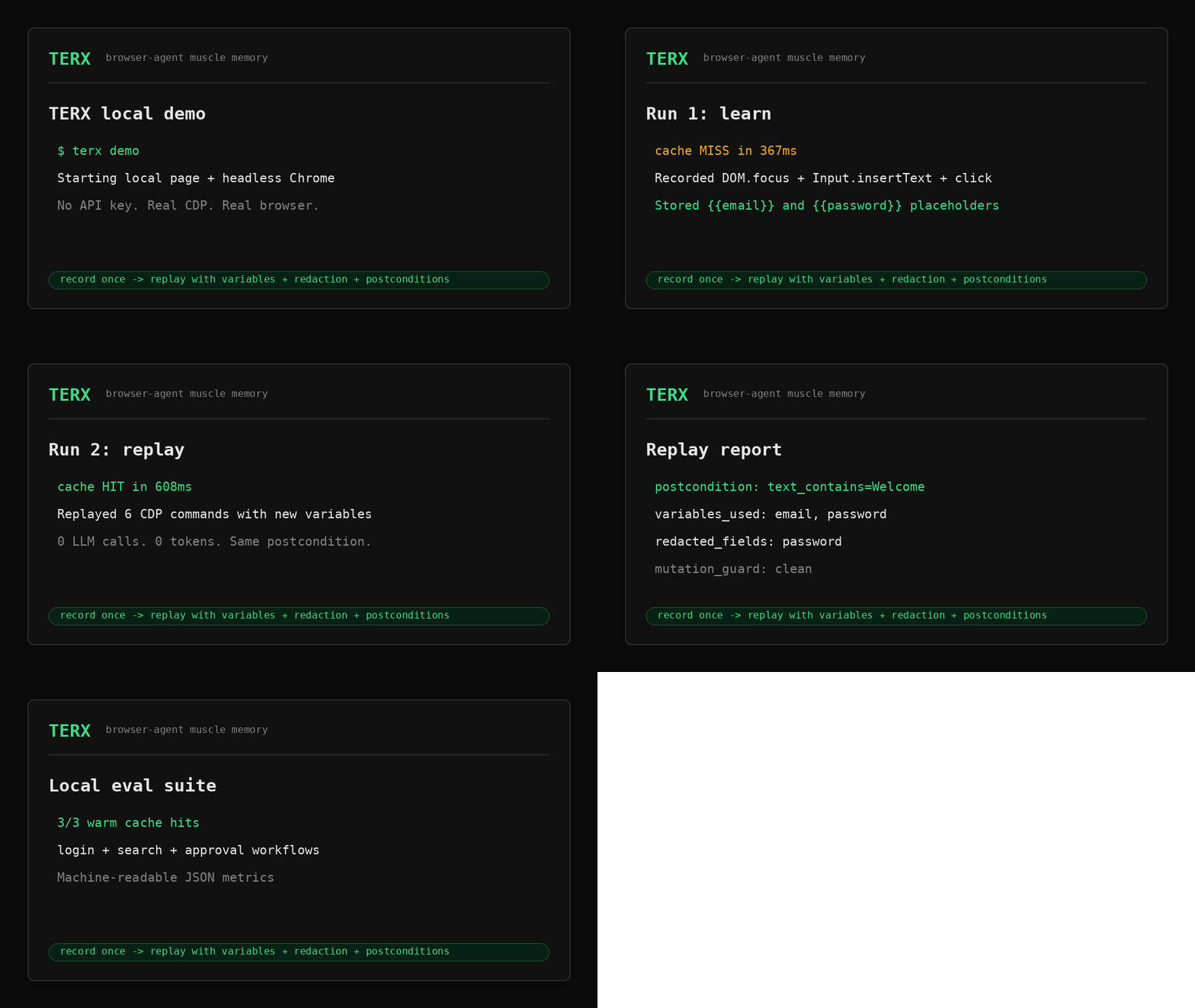
No API key proof path:
terx demo
terx eval-local
Those commands run real headless Chrome against local pages and verify cold recording, warm replay, variables, redaction, postconditions, and replay reports.
Install
pip install terx
Use it
Option 1: MCP server — use with Claude Desktop, Cursor, Windsurf.
google-chrome --remote-debugging-port=9222 --no-first-run
terx-server
mcp.json:
{ "mcpServers": { "terx": { "command": "terx-server" } } }
For repeatable workflows, wrap the browser actions with:
browser_task_start("login to dashboard")
...normal browser tools...
browser_task_finish(success=true)
On the next matching run, browser_task_start replays the cached CDP sequence immediately.
Each task response includes a structured replay report with commands replayed,
variables used, redacted fields, postcondition metadata, and mutation guard stats.
Option 2: Python library — wrap your existing agent.
from terx.cdp.session import BrowserSession
from terx.cache.cache import MemoryCache, session_for

cache = MemoryCache()

async with BrowserSession() as session:
    bridge = session.bridge()
    variables = {"email": "user@example.com", "password": "..."}

    async with session_for(
        cache,
        bridge,
        "login to salesforce",
        variables=variables,
        postcondition={"text_contains": "Welcome"},
    ) as ctx:
        if ctx.hit:
            await ctx.replay()        # 0 tokens, ~80ms
        else:
            await your_agent.run()    # first time: agent runs, TERX records
Typed values that match variables are stored as {{email}}, {{password}}, etc.
Sensitive fields such as password/token/API-key inputs are redacted by default.
Set TERX_REDACT_ALL_TEXT=1 to force every typed value through placeholders.
Set TERX_REDACT_FIELDS=tenant,workspace to add custom sensitive labels.
Option 3: Browser Use-style adapter — wrap any agent object with an async run().
from terx.integrations.browser_use import wrap_browser_use

agent = BrowserUseAgent(...)  # or any Browser Use-style object with run()
agent = wrap_browser_use(
    agent,
    cache=cache,
    bridge=bridge,
    task="login to dashboard",
    variables={"email": "...", "password": "..."},
    postcondition={"text_contains": "Welcome"},
)

result = await agent.run()
How it works
Three things, each doing one job:
CDP Bridge — raw asyncio WebSocket to Chrome. No Playwright subprocess. No Selenium. Direct wire protocol. <50ms startup, ~2MB RAM.
DOM Extractor — reads Chrome's Accessibility Tree, not raw HTML. Assigns stable numeric IDs to interactive elements. Computes a fuzzy structural hash that survives CSS refactors and A/B tests without breaking cache hits.
Muscle Memory Cache — SQLite. On task success: stores the CDP command sequence keyed by (domain, dom_hash, task). On future runs: replays directly. Uses INSERT OR IGNORE — first successful recording is canonical, never silently overwritten.
On replay, TERX re-snapshots the DOM and translates old backendNodeIds to current equivalents by matching role + label — so replays work even after Chrome restarts.
TERX also validates optional postconditions after replay. A replay that executes commands but lands on the wrong page does not count as a hit. During replay, a MutationObserver guard tracks DOM churn and raises on abnormal mutation drift before a suspicious replay is counted as healthy.
The terx CLI gives operators cache visibility:
terx doctor
terx stats
terx inspect --domain app.example.com
terx purge app.example.com
Why not Playwright?
Playwright is a full browser automation framework. TERX is a lean replay/memory layer for agents that already know how to drive Chrome.
| Playwright | TERX | |
|---|---|---|
| Memory across runs | ✗ | ✓ |
| Raw CDP (no subprocess) | ✗ | ✓ |
| RAM per instance | ~120MB | ~2MB |
| Works with any agent | ✗ | ✓ |
| MCP server built-in | ✗ | ✓ |
MCP tools
browser_task_start browser_task_finish browser_get_state browser_navigate
browser_click browser_click_at browser_type browser_screenshot
browser_screenshot_get browser_scroll browser_new_tab cache_stats
cache_invalidate
Screenshots return hash refs, not base64 blobs — no context window poisoning.
Navigation validates URL schemes — blocks javascript: data: file: injections.
Task wrappers record successful workflows and replay cache hits without another LLM call.
Task wrappers accept variables and postcondition for safe parametric replay.
Task wrappers also return report objects so MCP clients can audit what TERX did.
Roadmap
- Raw CDP bridge
- AX tree extractor + stable element IDs
- Fuzzy structural hasher
- Muscle memory cache (SQLite, INSERT OR IGNORE)
- Schema versioning + migrations
- MCP server (13 tools)
- Self-healing replay (LLM fallback on DOM drift)
- Real LLM benchmark suite (
terx-bench-real) - Parametric replay —
{{email}}variable interpolation - Secret redaction for typed password/token/API-key fields
- Replay postconditions
- Browser Use-style adapter
- MutationObserver replay drift guard
- CLI doctor/stats/inspect/purge
- Local Chrome eval suite (
terx eval-local)
Docs
ixchio.github.io/terx · Quick Start · Benchmarks · Architecture · Project Structure · Stagehand · Changelog
Dev
git clone https://github.com/ixchio/terx && cd terx
pip install -e ".[dev]"
pytest tests/ -v
terx demo                 # local Chrome demo with variables + redaction
terx eval-local           # deterministic local browser replay eval suite
terx-bench                # modeled baseline (no API key needed)
GROQ_API_KEY=... terx-bench-real  # real LLM run
MIT · built by ixchio
1 maintainer

Download files
Download the file for your platform. If you're not sure which to choose, learn more about installing packages.
Source Distribution
Built Distribution
Filter files by name, interpreter, ABI, and platform.
If you're not sure about the file name format, learn more about wheel file names.
Copy a direct link to the current filters
File details
Details for the file terx-0.3.2.tar.gz.
File metadata
- Download URL: terx-0.3.2.tar.gz
- Upload date:
- Size: 145.1 kB
- Tags: Source
- Uploaded using Trusted Publishing? No
- Uploaded via:
twine/6.2.0 CPython/3.12.3
File hashes
| Algorithm | Hash digest | |
|---|---|---|
| SHA256 |
c5f622f21ad95ec67b6407a55ef5723c862dbd2158996e2783cda7ef30a67a34
|
|
| MD5 |
9ec01bf9c90f44f013f0c0404f174afc
|
|
| BLAKE2b-256 |
c1c63096db1390de0b041b475c52134fb45d2176219d13637e4003ea3abcb06e
|
File details
Details for the file terx-0.3.2-py3-none-any.whl.
File metadata
- Download URL: terx-0.3.2-py3-none-any.whl
- Upload date:
- Size: 61.3 kB
- Tags: Python 3
- Uploaded using Trusted Publishing? No
- Uploaded via:
twine/6.2.0 CPython/3.12.3
File hashes
| Algorithm | Hash digest | |
|---|---|---|
| SHA256 |
a99e8849e3306d9e90537ed0afc34d00fc403ec78c36b344e6f525d20e4513c8
|
|
| MD5 |
3b6fac9e86f74e82cecd02eba0efdee3
|
|
| BLAKE2b-256 |
8e2dbca1f364887103c50bf01458a8316093caceb6b171c7dce43ad00f4c08c8
|














