
Create TPFs and LCs for solar system asteroids observed by NASA's TESS mission.

Project description






tess-asteroids
tess-asteroids allows you to make Target Pixel Files (TPFs) and Light Curve Files (LCFs) for any object that moves through the TESS field of view, for example solar system asteroids, comets or minor planets.
See the full documentation, including tutorials, here.
Installation
The easiest way to install tess-asteroids and all of its dependencies is to run the following command in a terminal window:
pip install tess-asteroids
lkspacecraft dependency
tess-asteroids uses lkspacecraft to derive barycentric time corrections (see below). The first time you run lkspacecraft it will download a set of files (the SPICE kernels for TESS). This will take approximately 5 minutes, depending on your internet connection, and the total file volume will be about 1GB. The files will be cached once they are downloaded and if a new version of any file becomes available they will be automatically retrieved.
Quickstart
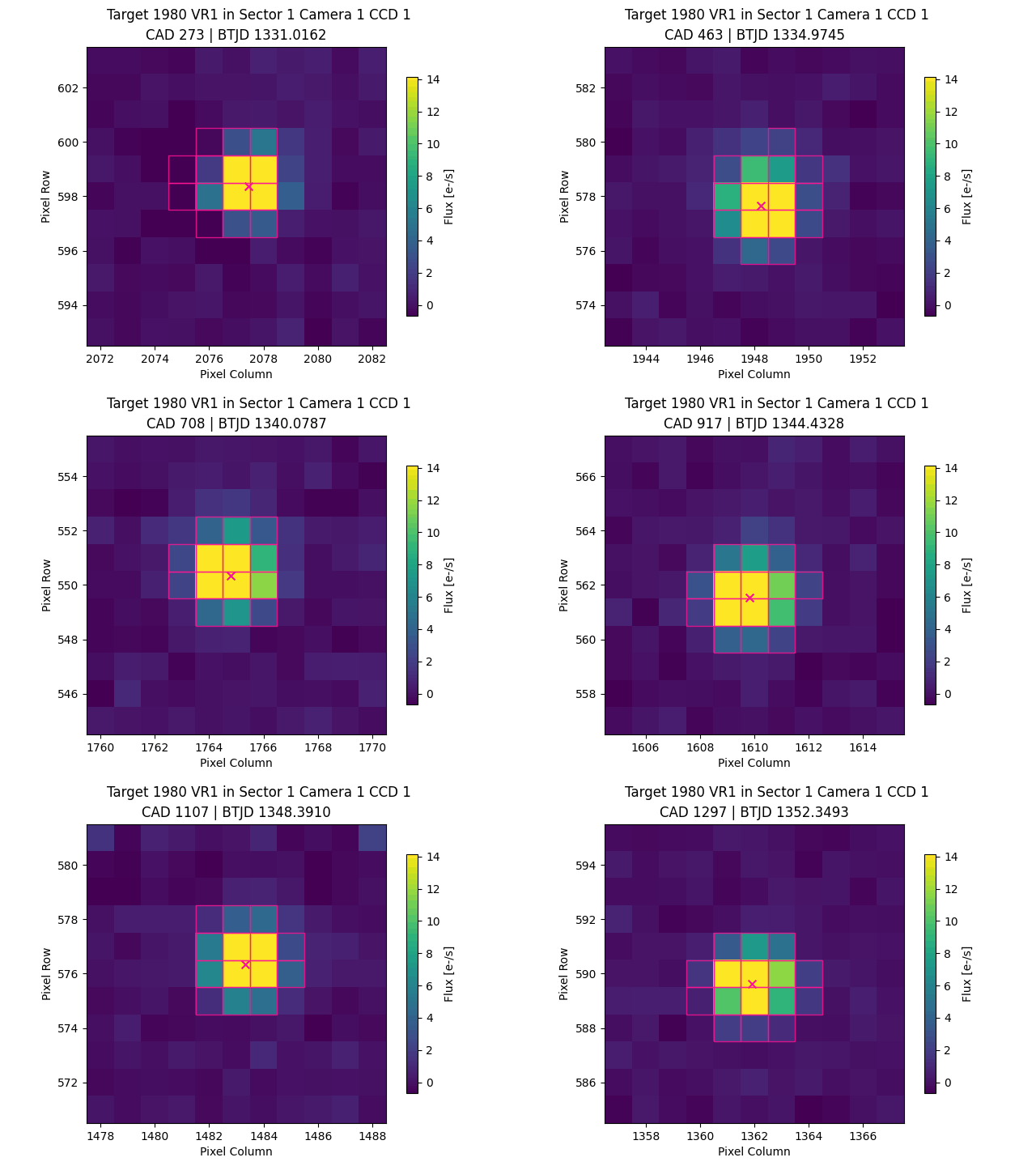
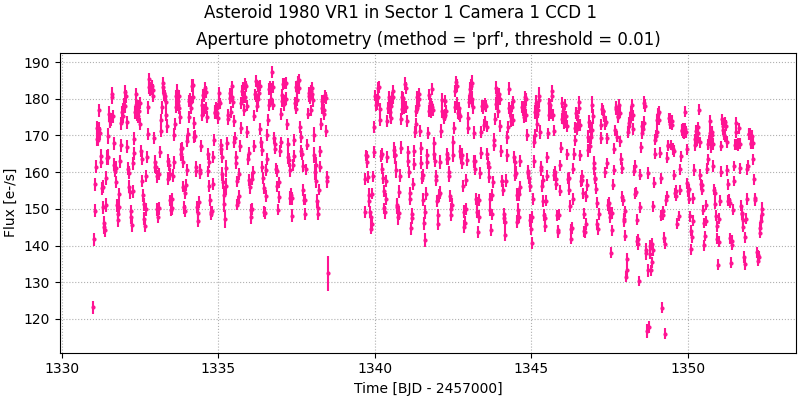
You can easily make and save a TPF and LCF for any object in the JPL Small-Body Database that has been observed by TESS. For example,
from tess_asteroids import MovingTPF

# Initialise MovingTPF for asteroid 1980 VR1 in TESS sector 1
target = MovingTPF.from_name("1980 VR1", sector=1, camera=1, ccd=1)

# Make TPF and save to file (tess-1980VR1-s0001-1-1-shape11x11-moving_tp.fits)
target.make_tpf(save=True)

# Make LC and save to file (tess-1980VR1-s0001-1-1-shape11x11_lc.fits)
target.make_lc(save=True)
Tutorial
Making a TPF
You can create a TPF that tracks a moving object from the JPL Small-Body Database by providing the object's name and TESS sector:
from tess_asteroids import MovingTPF

# Initialise MovingTPF for asteroid 1998 YT6 in TESS sector 6
target = MovingTPF.from_name("1998 YT6", sector=6)

# Make TPF and save to file (tess-1998YT6-s0006-1-1-shape11x11-moving_tp.fits)
target.make_tpf(save=True)
The make_tpf() function is retrieving and reshaping the FFI data, performing a background correction, computing an aperture and saving a SPOC-like TPF. There are a few optional parameters in the make_tpf() function. This includes:
shapecontrols the shape (nrows,ncols) of the TPF. Default : (11,11).bg_methoddefines the method used to correct the background flux. Default:linear_model.ap_methoddefines the method used to create the aperture. Default:prf.savedetermines whether or not the TPF will be saved as a FITS file. Default:False.outdiris the directory where the TPF will be saved. Note, the directory is not automatically created.file_nameis the name the TPF will be saved with. If one is not given, a default name will be generated.
These settings can be changed as follows:
# Make TPF and save to file - change default settings
target.make_tpf(shape=(20,10), bg_method="rolling", ap_method="threshold", save=True, file_name="test.fits", outdir="movingTPF")
A TPF can only be created for a single combination of sector/camera/CCD at a time. If the object crosses multiple cameras or CCDs during a sector, then the camera/CCD must also be specified when initialising MovingTPF():
# Initialise MovingTPF for asteroid 2013 OS3 in TESS sector 20
target = MovingTPF.from_name("2013 OS3", sector=20, camera=2, ccd=3)
You can also initialise MovingTPF() with your own ephemeris:
from tess_asteroids import MovingTPF
import numpy as np
import pandas as pd

# Create an artificial ephemeris
time = np.linspace(1790.5, 1795.5, 100)
ephem = pd.DataFrame({
            "time": time,
            "sector": np.full(len(time), 18),
            "camera": np.full(len(time), 3),
            "ccd": np.full(len(time), 2),
            "column": np.linspace(500, 600, len(time)),
            "row": np.linspace(1000, 900, len(time)),
        })

# Initialise MovingTPF
target = MovingTPF("example", ephem, barycentric=False)

# Make TPF, but do not save to file
target.make_tpf()
A few things to note about the format of the ephemeris:
timemust have format (JD - 2457000) in the TDB scale. See explanation of thebarycentricparameter below.sector,camera,ccdmust each have one unique value.column,rowmust be one-indexed, where the lower left pixel of the FFI has value (1,1).
Animating the TPF
animate_tpf() is a built-in helper function to plot the TPF and aperture over time:
from tess_asteroids import MovingTPF

# Initialise MovingTPF for asteroid 1998 YT6 in TESS sector 6
target = MovingTPF.from_name("1998 YT6", sector=6)

# Make TPF, but do not save to file
target.make_tpf()

# Animate TPF and save to file (tess-1998YT6-s0006-1-1-shape11x11-moving_tp.gif)
target.animate_tpf(save=True)
Making a LC
You can extract a LC from the TPF, using aperture photometry, as follows:
from tess_asteroids import MovingTPF

# Initialise MovingTPF for asteroid 1998 YT6 in TESS sector 6
target = MovingTPF.from_name("1998 YT6", sector=6)

# Make TPF and save to file (tess-1998YT6-s0006-1-1-shape11x11-moving_tp.fits)
target.make_tpf(save=True)

# Make LC and save to file (tess-1998YT6-s0006-1-1-shape11x11_lc.fits)
target.make_lc(save=True)
The make_lc() function extracts the lightcurve, creates a quality mask and optionally saves the LCF. There are a few optional parameters in the make_lc() function. This includes:
methoddefines the method used to perform photometry. Default:aperture.savedetermines whether or not the LCF will be saved as a FITS file. Default:False.outdiris the directory where the LCF will be saved. Note, the directory is not automatically created.file_nameis the name the LCF will be saved with. If one is not given, a default name will be generated.
Compatibility with lightkurve
The TPFs and LCFs that get created by tess-asteroids can be opened with lightkurve, as follows:
import lightkurve as lk

# Read in TPF and LCF, without removing bad cadences
tpf = lk.TessTargetPixelFile("tess-1998YT6-s0006-1-1-shape11x11-moving_tp.fits", quality_bitmask="none")
lc = lk.io.tess.read_tess_lightcurve("tess-1998YT6-s0006-1-1-shape11x11_lc.fits", quality_bitmask="none")

# Plot TPF and aperture for a single frame
tpf.plot(aperture_mask=tpf.hdu[3].data["APERTURE"][200], frame=200)

# Plot LC
lc.plot()
Time
When you initialise MovingTPF(), the parameter barycentric is defined as follows:
True(default): this means the inputtimemust be in TDB measured at the solar system barycenter. This is the case for the TSTART/TSTOP keywords in SPOC FFI headers and the TIME column in SPOC TPFs and LCFs.False: this means the inputtimemust be in TDB measured at the spacecraft. This can be recovered from the SPOC data products: for FFIs subtract the header keyword BARYCORR from TSTART/TSTOP and for TPFs/LCFs subtract the TIMECORR column from the TIME column.
When MovingTPF() is initialised from_name(), the barycentric parameter is handled internally. As a user, you will only need to consider the barycentric parameter if you are inputting a custom ephemeris.
For more information about time scales, see the astropy documentation.
Barycentric time correction
The barycentric time correction derived by SPOC (BARYCORR) is used to transform the time at the spacecraft into the time at the solar system barycenter. This correction is calculated at the center of each FFI (i.e. one correction for each CCD) but, in reality, the correction depends upon RA and Dec. Therefore, within tess-asteroids we use lkspacecraft to re-derive the barycentric time correction based upon the position of the moving target. In the output TPFs and LCFs, you will see columns called ORIGINAL_TIME (FFI timestamp in TDB at barycenter, as derived by SPOC), ORIGINAL_TIMECORR (correction to transform time at spacecraft into time at barycenter, as derived by SPOC), TIME (re-derived time in TDB at barycenter) and TIMECORR (re-derived time correction).
Understanding the TPF and LCF
The TPF has four HDUs:
- "PRIMARY" - a primary HDU containing only a header.
- "PIXELS" - a table with the same columns as a SPOC TPF. Note that "POS_CORR1" and "POS_CORR2" are defined as the offset between the center of the TPF and the expected position of the moving object given the input ephemeris.
- "APERTURE" - an image HDU containing the average aperture across all times.
- "EXTRAS" - a table HDU containing columns not found in a SPOC TPF. This includes "RA_PRED"/"DEC_PRED" (expected position of target in world coordinates), "CORNER1"/"CORNER2" (original FFI column/row of the lower-left pixel in the TPF), "PIXEL_QUALITY" (3D pixel quality mask identifying e.g. strap columns, non-science pixels and saturation), "APERTURE" (aperture as a function of time) and "ORIGINAL_TIME"/"ORIGINAL_TIMECORR" (time and barycentric correction derived by SPOC).
The LCF has two HDUs:
- "PRIMARY" - a primary HDU containing only a header.
- "LIGHTCURVE" - a table HDU with columns including "TIME" (timestamps in BTJD), "FLUX"/"FLUX_ERR" (flux and error from aperture photometry) and "TESSMAG"/"TESSMAG_ERR" (measured TESS magnitude and error).
Citation
If you make use of tess-asteroids in your work, please cite our software using the version-specific DOI from Zenodo. You can generate a BibTex citation using Zenodo.
Release history Release notifications | RSS feed


Download files
Download the file for your platform. If you're not sure which to choose, learn more about installing packages.
Source Distribution
Built Distribution
Filter files by name, interpreter, ABI, and platform.
If you're not sure about the file name format, learn more about wheel file names.
Copy a direct link to the current filters
File details
Details for the file tess_asteroids-1.2.6.tar.gz.
File metadata
- Download URL: tess_asteroids-1.2.6.tar.gz
- Upload date:
- Size: 42.3 kB
- Tags: Source
- Uploaded using Trusted Publishing? Yes
- Uploaded via: twine/6.1.0 CPython/3.12.9
File hashes
| Algorithm | Hash digest | |
|---|---|---|
| SHA256 |
c54de42c64426593026d83245e97c2ddeb938bf72eb6c79a1b3979409b29ccd2
|
|
| MD5 |
25096c9c40a82dc81a519367abf9ede1
|
|
| BLAKE2b-256 |
2faba264b0f39f64c460aa280a50c901d00b90faa363d6966d597dd1f5008f1a
|
Provenance
The following attestation bundles were made for tess_asteroids-1.2.6.tar.gz:
Publisher:
python-publish.yml on altuson/tess-asteroids
-
Statement:
-
Statement type:
https://in-toto.io/Statement/v1 -
Predicate type:
https://docs.pypi.org/attestations/publish/v1 -
Subject name:
tess_asteroids-1.2.6.tar.gz -
Subject digest:
c54de42c64426593026d83245e97c2ddeb938bf72eb6c79a1b3979409b29ccd2 - Sigstore transparency entry: 302665141
- Sigstore integration time:
-
Permalink:
altuson/tess-asteroids@35023eae5c44c623ab0c43908b0b06e68f3d8fb4 -
Branch / Tag:
refs/tags/v1.2.6 - Owner: https://github.com/altuson
-
Access:
public
-
Token Issuer:
https://token.actions.githubusercontent.com -
Runner Environment:
github-hosted -
Publication workflow:
python-publish.yml@35023eae5c44c623ab0c43908b0b06e68f3d8fb4 -
Trigger Event:
release
-
Statement type:
File details
Details for the file tess_asteroids-1.2.6-py3-none-any.whl.
File metadata
- Download URL: tess_asteroids-1.2.6-py3-none-any.whl
- Upload date:
- Size: 41.0 kB
- Tags: Python 3
- Uploaded using Trusted Publishing? Yes
- Uploaded via: twine/6.1.0 CPython/3.12.9
File hashes
| Algorithm | Hash digest | |
|---|---|---|
| SHA256 |
e7dd2c31ca2e62389bf2870fcf65d98e2a54d36676dd4e653ca82f4c1b06a459
|
|
| MD5 |
4ffe4cbc9d13bbf7decd147025efd9ee
|
|
| BLAKE2b-256 |
41b9d4a42a07dd4583c468197d74c04a3500a3c76941c1f4348b0a2a108e9a6f
|
Provenance
The following attestation bundles were made for tess_asteroids-1.2.6-py3-none-any.whl:
Publisher:
python-publish.yml on altuson/tess-asteroids
-
Statement:
-
Statement type:
https://in-toto.io/Statement/v1 -
Predicate type:
https://docs.pypi.org/attestations/publish/v1 -
Subject name:
tess_asteroids-1.2.6-py3-none-any.whl -
Subject digest:
e7dd2c31ca2e62389bf2870fcf65d98e2a54d36676dd4e653ca82f4c1b06a459 - Sigstore transparency entry: 302665145
- Sigstore integration time:
-
Permalink:
altuson/tess-asteroids@35023eae5c44c623ab0c43908b0b06e68f3d8fb4 -
Branch / Tag:
refs/tags/v1.2.6 - Owner: https://github.com/altuson
-
Access:
public
-
Token Issuer:
https://token.actions.githubusercontent.com -
Runner Environment:
github-hosted -
Publication workflow:
python-publish.yml@35023eae5c44c623ab0c43908b0b06e68f3d8fb4 -
Trigger Event:
release
-
Statement type:






