

hazen
Quality assurance framework for Magnetic Resonance Imaging
Explore the docs »
View repo
·
Report Bug
·
Request Feature


Please STAR this repo to receive updates about new versions of hazen!
Overview
hazen is a software framework for performing automated analysis of magnetic resonance imaging (MRI) Quality Assurance data.
It provides automatic quantitative analysis for the following measurements of MRI phantom data:
- Signal-to-noise ratio (SNR)
- Spatial resolution
- Slice position and width
- Uniformity
- Ghosting
- MR Relaxometry
Some example outputs from hazen:
| hazen snr | hazen ghosting |
|---|---|
 |
 |
Installation
pip
Hazen can be installed using pip on python 3.9 or higher, it is recommended to use a virtual environment
python3 -m venv hazen-venv
source hazen-venv/bin/activate
pip install hazen
Docker
The Docker version of hazen as it is easy to get up-and-running and is linked to the most stable release. Refer to the Docker installation instructions to install Docker on your host computer.
For ease of use, it is recommended to copy the hazen-app script to a location accessible on the path such as /usr/local/bin. This will allow you to run hazen from any location on your computer. Then, to use Docker hazen, simply run the hazen-app script appended with the function you want to use (e.g.: snr).
In Terminal:
cd hazen
cp ./hazen-app /usr/local/bin

# run hazen with CLI arguments
hazen-app snr tests/data/snr/Siemens/

latest: Pulling from gsttmriphysics/hazen
Digest: sha256:18603e40b45f3af4bf45f07559a08a7833af92a6efe21cb7306f758e8eeab24a
Status: Image is up to date for gsttmriphysics/hazen:latest
docker.io/gsttmriphysics/hazen:latest
{   'snr_smoothing_measured_seFoV250_2meas_slice5mm_tra_repeat_PSN_noDC_2_1': 191.16,
    'snr_smoothing_measured_seFoV250_2meas_slice5mm_tra_repeat_PSN_noDC_3_1': 195.58,
    'snr_smoothing_normalised_seFoV250_2meas_slice5mm_tra_repeat_PSN_noDC_2_1': 1866.09,
    'snr_smoothing_normalised_seFoV250_2meas_slice5mm_tra_repeat_PSN_noDC_3_1': 1909.2,
    'snr_subtraction_measured_seFoV250_2meas_slice5mm_tra_repeat_PSN_noDC_2_1': 220.73,
    'snr_subtraction_normalised_seFoV250_2meas_slice5mm_tra_repeat_PSN_noDC_2_1': 2154.69}
Linux & MacOS
For developers, hazen can be installed from source using pip. We highly recommend using a virtual environment.
# Install OpenSSL
# Go to local hazen repo directory
cd hazen

# Create and activate a virtual environment
python3 -m venv ./hazen-venv
source hazen-venv/bin/activate

# Install requirements
pip install --upgrade pip setuptools wheel
pip install -r requirements.txt

# Install hazen
python setup.py install

# Run tests to ensure everything is working
pytest tests/
Usage
Command Line
The CLI version of hazen is designed to be pointed at single folders containing DICOM file(s). Example datasets are provided in the tests/data/ directory. If you are not using the Docker version of hazen, replace hazen-app with hazen in the following commands.
To perform an SNR measurement on the provided example Philips DICOMs:
hazen-app snr tests/data/snr/Philips
To perform a spatial resolution measurement on example data provided by the East Kent Trust:
hazen-app spatial_resolution tests/data/resolution/philips
To see the full list of available tools, enter:
hazen-app -h
The --report option provides additional information for some of the functions. For example, the user can gain additional insight into the performance of the snr function by entering:
hazen-app snr tests/data/snr/Philips --report
Web Interface
WIP: we are developing a web interface for hazen.
Contributing
- The Release Manager should create a release branch for the future planned release e.g. release-X.X.X
- The RMs shall organise backlog refinement sessions to ensure issues are allocated to the appropriate release
- The RM should ensure their release branch is kept up-to-date with master
- PRs should be merged into the appropriate release branch for the issue(s) it is addressing
If you want to contribute to the development of hazen, please take a look at: CONTRIBUTING.md.
Users
Please raise an Issue if you have any problems installing or running hazen.
We have used hazen with MRI data from a handful of different MRI scanners, including multiple different vendors. If your MRI data doesn't work with hazen, or the results are unexpected, please submit an Issue and we will investigate.
Releasing
The Release Manager should ensure:
-
All outstanding issues for the current release have been closed, or, transferred to future release.
-
All tests are passing on Github Actions.
-
All documentation has been updated with correct version numbers:
- Version number in
docs/conf.py - Version number in
hazenlib/__init__.py - Version number in
CITATION.cff
- Version number in
-
The
releasebranch has been merged intomainbranch -
A new release has been created with a new version tag (tag = version number)
-
RMs of other branches should update their release from the latest release as soon as possible and deal with any merge conflicts.
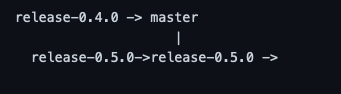
- RMs: Tom Roberts, Lucrezia Cester
1 maintainer

Metadata
1 maintainer
Release files for test-hazen 1.0.3
For a detailed explanation of source distributions (sdists) and built distributions (wheels), please see the package formats documentation.
Source distribution (sdist)
| File | Size | Uploaded | Provenance | Actions |
|---|---|---|---|---|
| test_hazen-1.0.3.tar.gz | 86.2 kB | Without provenance | Details for test_hazen-1.0.3.tar.gz |
Built distribution (wheel)
| File | Interpreter | ABI | Platform | Actions Reset |
|---|---|---|---|---|
| test_hazen-1.0.3-py3-none-any.whl | Python 3 | none | any | Details for test_hazen-1.0.3-py3-none-any.whl |
Total release size: 180.0 kB
Release files / test_hazen-1.0.3.tar.gz
| Download URL | test_hazen-1.0.3.tar.gz |
|---|---|
| Size | 86.2 kB |
| Tags | Source |
|
SHA-256 checksum How to use checksums |
7868ab9f46e9df280027c215edd98f6b18e586b1fdb1271a271d3432006a90a9
|
|
BLAKE2b-256 checksum How to use checksums |
c1567c9516a0f17aff9887746a1eac2e3f2d0e5680638a69a85e4ad0a8345fc7
|
| Upload date | |
|
Uploaded using Trusted Publishing? What is trusted publishing? |
No |
| Uploaded via |
twine/4.0.1 CPython/3.9.14
|
Release files / test_hazen-1.0.3-py3-none-any.whl
| Download URL | test_hazen-1.0.3-py3-none-any.whl |
|---|---|
| Size | 93.8 kB |
| Tags | Python 3 |
|
SHA-256 checksum How to use checksums |
d703636c55f229a87136aa48ba0ed020477cea1a208648a5bb16ee82d0cf5bfc
|
|
BLAKE2b-256 checksum How to use checksums |
7cb45d847c98b7338e2b88e0f0f288b875ea41d0651efcd90c7f060d05b4a762
|
| Upload date | |
|
Uploaded using Trusted Publishing? What is trusted publishing? |
No |
| Uploaded via |
twine/4.0.1 CPython/3.9.14
|
Security for test-hazen 1.0.3
Provenance
Provenance describes where a file came from. On PyPI, provenance is shared via attestations, which provide a verifiable record of the build or publishing details. View details, limitations and caveats.
No provenance found
None of the files in this release were uploaded with provenance metadata.
A note on package security
PyPI is a repository for distributing packages, not a service for auditing them. While third-party security researchers and our staff do their best to detect and remove malicious packages, PyPI cannot guarantee the quality, security or suitability of any given package.
To learn more about protecting yourself from malicious actors, visit our package security documentation.













