
Run large language models at home, BitTorrent-style.
Fine-tuning and inference up to 10x faster than offloading



Generate text with distributed Llama 2 (70B), Falcon (40B+), BLOOM (176B) (or their derivatives), and fine‑tune them for your own tasks — right from your desktop computer or Google Colab:
from transformers import AutoTokenizer
from petals import AutoDistributedModelForCausalLM

# Choose any model available at https://health.petals.dev
model_name = "petals-team/StableBeluga2"  # This one is fine-tuned Llama 2 (70B)

# Connect to a distributed network hosting model layers
tokenizer = AutoTokenizer.from_pretrained(model_name)
model = AutoDistributedModelForCausalLM.from_pretrained(model_name)

# Run the model as if it were on your computer
inputs = tokenizer("A cat sat", return_tensors="pt")["input_ids"]
outputs = model.generate(inputs, max_new_tokens=5)
print(tokenizer.decode(outputs[0]))  # A cat sat on a mat...
🔏 Privacy. Your data will be processed with the help of other people in the public swarm. Learn more about privacy here. For sensitive data, you can set up a private swarm among people you trust.
🦙 Want to run Llama 2? Request access to its weights at the ♾️ Meta AI website and 🤗 Model Hub, then run huggingface-cli login in the terminal before loading the model. Or just try it in our chatbot app.
💬 Any questions? Ping us in our Discord!
Connect your GPU and increase Petals capacity
Petals is a community-run system — we rely on people sharing their GPUs. You can check out available models and help serving one of them! As an example, here is how to host a part of Stable Beluga 2 on your GPU:
🐧 Linux + Anaconda. Run these commands for NVIDIA GPUs (or follow this for AMD):
conda install pytorch pytorch-cuda=11.7 -c pytorch -c nvidia
pip install git+https://github.com/bigscience-workshop/petals
python -m petals.cli.run_server petals-team/StableBeluga2
🪟 Windows + WSL. Follow this guide on our Wiki.
🐋 Docker. Run our Docker image for NVIDIA GPUs (or follow this for AMD):
sudo docker run -p 31330:31330 --ipc host --gpus all --volume petals-cache:/cache --rm \
    learningathome/petals:main \
    python -m petals.cli.run_server --port 31330 petals-team/StableBeluga2
🍏 macOS + Apple M1/M2 GPU. Install Homebrew, then run these commands:
brew install python
python3 -m pip install git+https://github.com/bigscience-workshop/petals
python3 -m petals.cli.run_server petals-team/StableBeluga2
📚 Learn more (how to use multiple GPUs, start the server on boot, etc.)
💬 Any questions? Ping us in our Discord!
🦙 Want to host Llama 2? Request access to its weights at the ♾️ Meta AI website and 🤗 Model Hub, generate an 🔑 access token, then add --token YOUR_TOKEN_HERE to the python -m petals.cli.run_server command.
🔒 Security. Hosting a server does not allow others to run custom code on your computer. Learn more here.
🏆 Thank you! Once you load and host 10+ blocks, we can show your name or link on the swarm monitor as a way to say thanks. You can specify them with --public_name YOUR_NAME.
How does it work?
- You load a small part of the model, then join a network of people serving the other parts. Single‑batch inference runs at up to 6 tokens/sec for Llama 2 (70B) and up to 4 tokens/sec for Falcon (180B) — enough for chatbots and interactive apps.
- You can employ any fine-tuning and sampling methods, execute custom paths through the model, or see its hidden states. You get the comforts of an API with the flexibility of PyTorch and 🤗 Transformers.
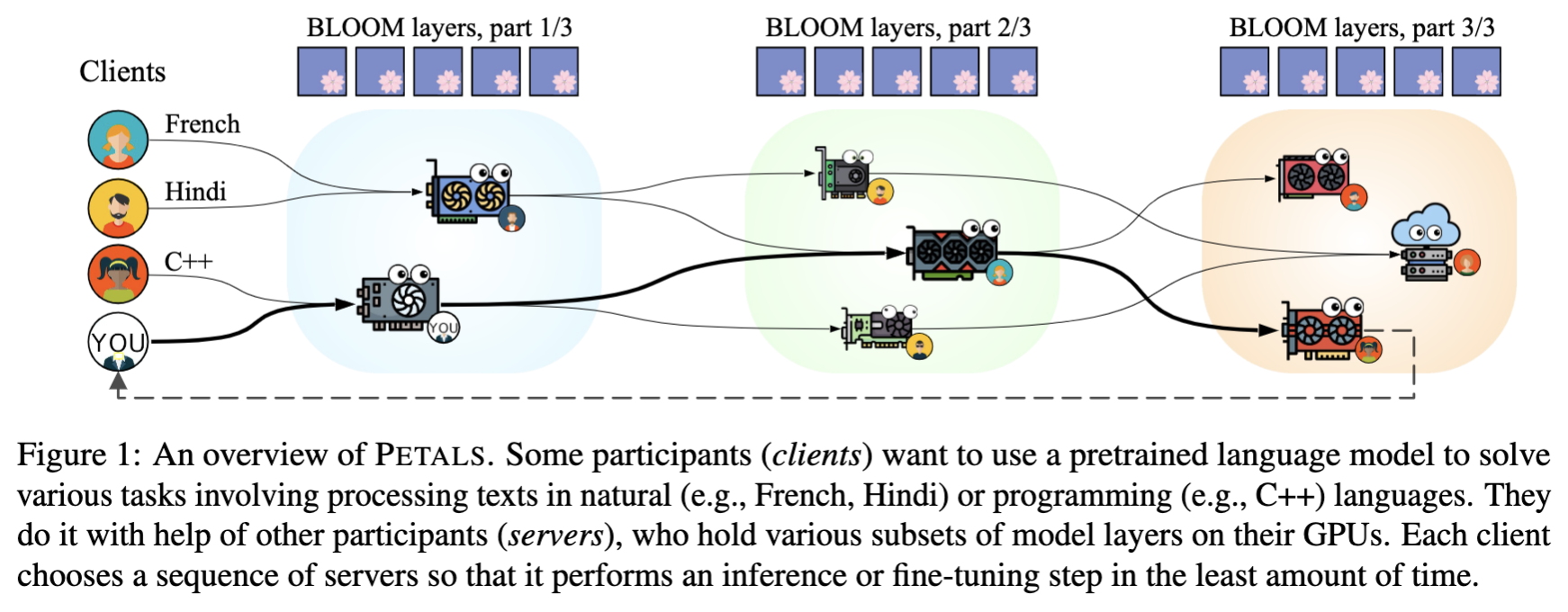
📜 Read paper 📚 See FAQ
📚 Tutorials, examples, and more
Basic tutorials:
- Getting started: tutorial
- Prompt-tune Llama-65B for text semantic classification: tutorial
- Prompt-tune BLOOM to create a personified chatbot: tutorial
Useful tools:
- Chatbot web app (connects to Petals via an HTTP/WebSocket endpoint): source code
- Monitor for the public swarm: source code
Advanced guides:
Benchmarks
Please see Section 3.3 of our paper.
🛠️ Contributing
Please see our FAQ on contributing.
📜 Citation
Alexander Borzunov, Dmitry Baranchuk, Tim Dettmers, Max Ryabinin, Younes Belkada, Artem Chumachenko, Pavel Samygin, and Colin Raffel. Petals: Collaborative Inference and Fine-tuning of Large Models. arXiv preprint arXiv:2209.01188, 2022.
@article{borzunov2022petals,
  title = {Petals: Collaborative Inference and Fine-tuning of Large Models},
  author = {Borzunov, Alexander and Baranchuk, Dmitry and Dettmers, Tim and Ryabinin, Max and Belkada, Younes and Chumachenko, Artem and Samygin, Pavel and Raffel, Colin},
  journal = {arXiv preprint arXiv:2209.01188},
  year = {2022},
  url = {https://arxiv.org/abs/2209.01188}
}
This project is a part of the BigScience research workshop.

1 maintainer

Metadata
1 maintainer
Release files for test-petals 2.2.0.post1
For a detailed explanation of source distributions (sdists) and built distributions (wheels), please see the package formats documentation.
Source distribution (sdist)
| File | Size | Uploaded | |
|---|---|---|---|
| test-petals-2.2.0.post1.tar.gz | 108.4 kB | Details |
Built distribution (wheel)
| File | Interpreter | ABI | Platform | Reset |
|---|---|---|---|---|
| test_petals-2.2.0.post1-py3-none-any.whl | Python 3 | none | any | Details |
Total release size: 225.5 kB
Release files / test-petals-2.2.0.post1.tar.gz
| Download URL | test-petals-2.2.0.post1.tar.gz |
|---|---|
| Size | 108.4 kB |
| Tags | Source |
|
SHA-256 checksum How to use checksums |
b1c0055f72b8c7ea95b6244a2a41000ed9ac7871df431d298cdd72afb382c6fd
|
|
BLAKE2b-256 checksum How to use checksums |
85d6aff58548af23e35c962a31d5c52f772f06bacf5215d5548fe2b786a61196
|
| Upload date | |
|
Uploaded using Trusted Publishing? What is trusted publishing? |
No |
| Uploaded via |
twine/4.0.2 CPython/3.11.5
|
Release files / test_petals-2.2.0.post1-py3-none-any.whl
| Download URL | test_petals-2.2.0.post1-py3-none-any.whl |
|---|---|
| Size | 117.1 kB |
| Tags | Python 3 |
|
SHA-256 checksum How to use checksums |
fd384019fc609ac1fa2731077bf8eab7beddc5d495ebec81d213260771e29bce
|
|
BLAKE2b-256 checksum How to use checksums |
c383e128ff5fb61abf512cb9232b4ee69a848ddde9d2af029193879ec0519c4a
|
| Upload date | |
|
Uploaded using Trusted Publishing? What is trusted publishing? |
No |
| Uploaded via |
twine/4.0.2 CPython/3.11.5
|













