
Testosterone
See what broke, what's flaky and what got slower on every run. Test history, run-to-run diffs and flaky detection for pytest, Playwright, Jest, go test or any runner that writes JUnit XML: on your laptop, in CI, or on one shared server for the whole team.




Live demo: https://taltal-beep.github.io/testosterone/ · Docs: https://taltal-beep.github.io/testosterone/docs/
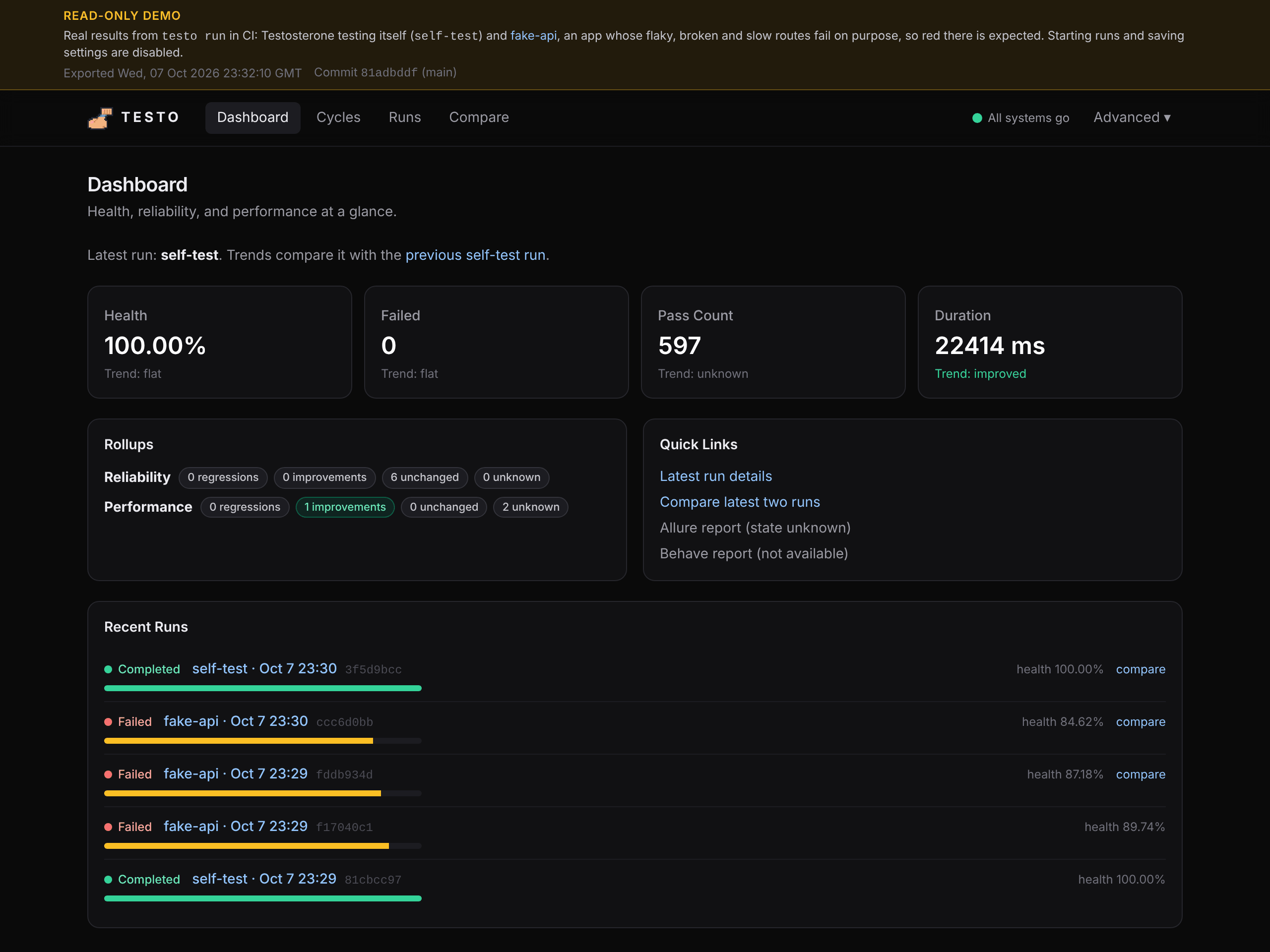
| Run detail (failed fake-api run) | Compare (two fake-api runs) |
|---|---|
 |
 |
| Cycle page with its flaky tests | Dashboard on a phone |
 |
 |
What you're looking at: Testosterone testing itself (its own test suite) and fake-api, a
small app whose routes fail on purpose. CI runs both cycles and publishes the real results as a
read-only static site.
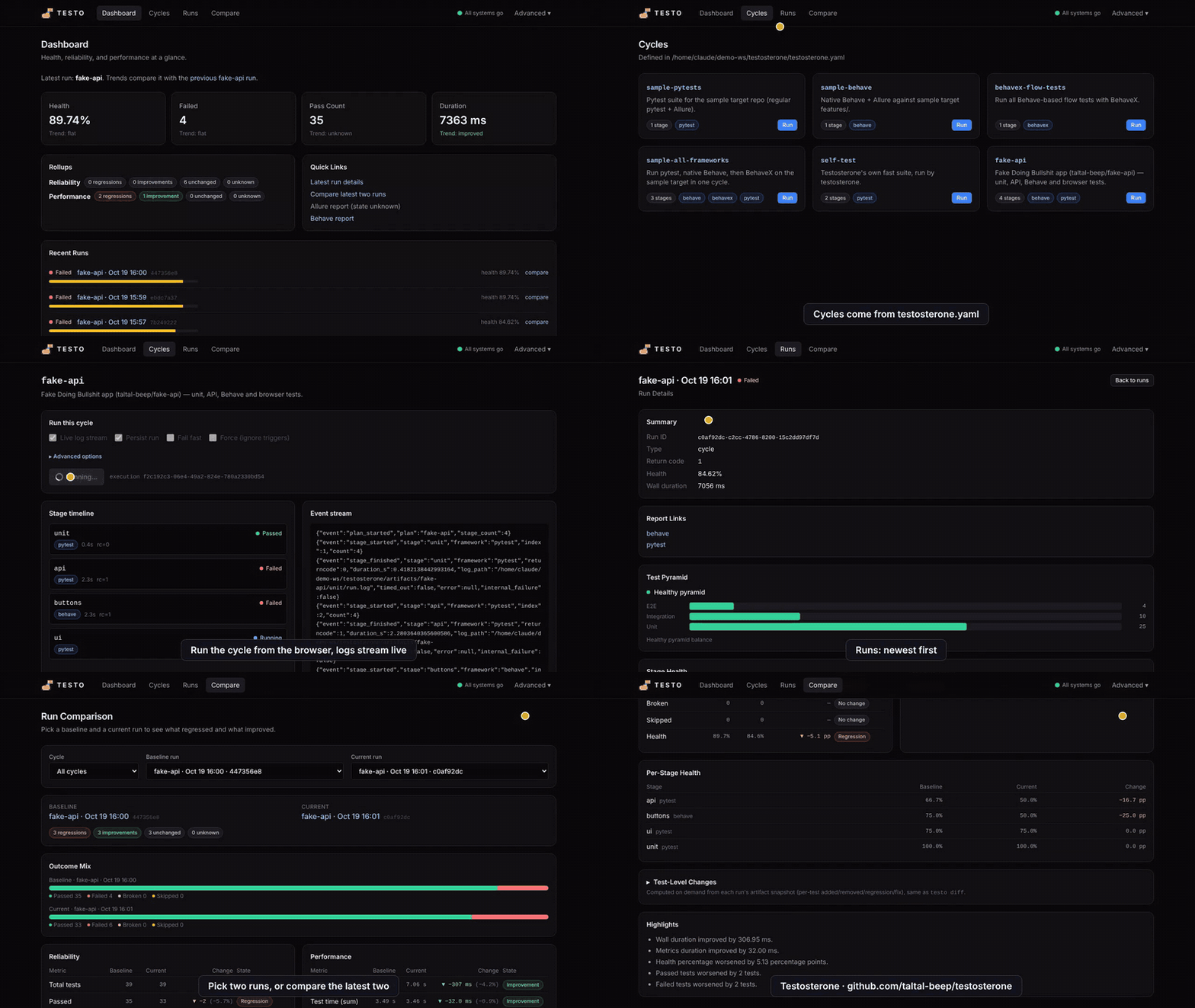
Watch a walkthrough of the UI (animated, under a minute)
What's new
New in 1.2.0:
testo ingest: bring any runner. Keep your CI as it is and add one step after the tests:testo ingest 'reports/**/*.xml' --cycle web. JUnit XML from Jest, Vitest,go test, JUnit5 or anything else becomes a recorded run with history, Compare,testo flakyand the PR comment. Notestosterone.yamlneeded.- Team server.
docker compose upin deploy/server/ starts the API, the web UI and Postgres in one place; CI jobs upload withtesto ingest --server URL --token ...so the whole team shares one history. Guide: Team Server. - Lighter install.
pip install testo-coreno longer pulls in Behave, BehaveX and Allure-Behave. Behave users add the extra:pip install 'testo-core[bdd]'. - Flaky test detection.
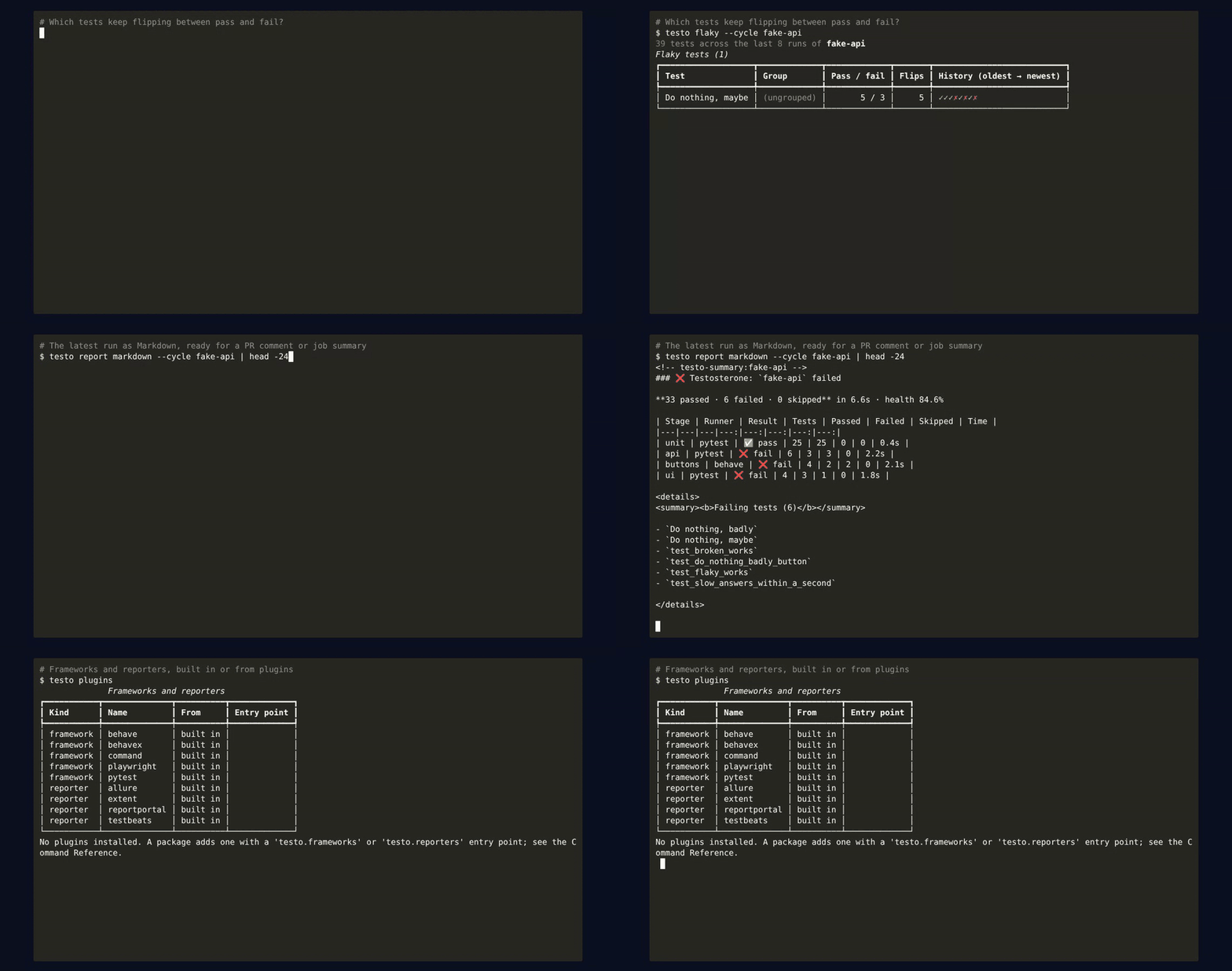
testo flaky --cycle <name>lists tests that keep flipping between pass and fail across a cycle's recent runs (--fail-on-flakyto gate CI), and the cycle page in the UI shows them too. - Pull request comments. The GitHub Action writes the run, its failing tests and what changed
since the previous run to the job summary, and with
comment-on-pr: "true"keeps one comment per cycle on the pull request. The text comes fromtesto report markdown. - Plugins. Add your own test runner or reporter from any package through the
testo.frameworks/testo.reportersentry points;testo pluginslists what is installed. examples/plugin/ is a complete one. - Playwright.
equipment: playwrightrunsnpx playwright testwith its JUnit and HTML reporters wired in, so its tests count in summaries, diffs and the UI with no extra setup. - A restyled web UI (navy glass cards, a sidebar on desktop) and a docs site with a Getting Started guide.
- Fixes: a
pip installedtesto-corekeeps its run data in./.testo/(or$TESTO_HOME) instead ofsite-packages, and BehaveX stages keep BehaveX's own full HTML report.
See the new commands: testo flaky, testo report markdown and testo plugins on the fake-api cycle
Full list in CHANGELOG.md.
Why
After a red build the question is never just "what failed?". It's what changed since the last green run, is this test flaky, and did anything get slower? CI logs and one-off HTML reports can't answer that, because they forget every run as soon as it ends. Testosterone records every run and answers it: per-test regressions and fixes between runs, flaky tests, durations over time, a test pyramid and an optional AI summary of the failures.
There are two ways in. testo ingest records JUnit XML that your existing CI already writes,
so adoption is one extra step. testo run goes further: it runs several frameworks as one
cycle of stages from a testosterone.yaml (pytest, Playwright, Behave, any command), the
same way from the CLI, CI or the web UI. Point either at a shared
team server and every CI job lands in one history.
How it compares. Allure renders one run; ReportPortal is a large server to operate.
Testosterone is a pip install that keeps the history and diffs runs against each other, works
with whatever runner you have, and can still hand results to Allure, ReportPortal, Extent or
TestBeats as reporters.
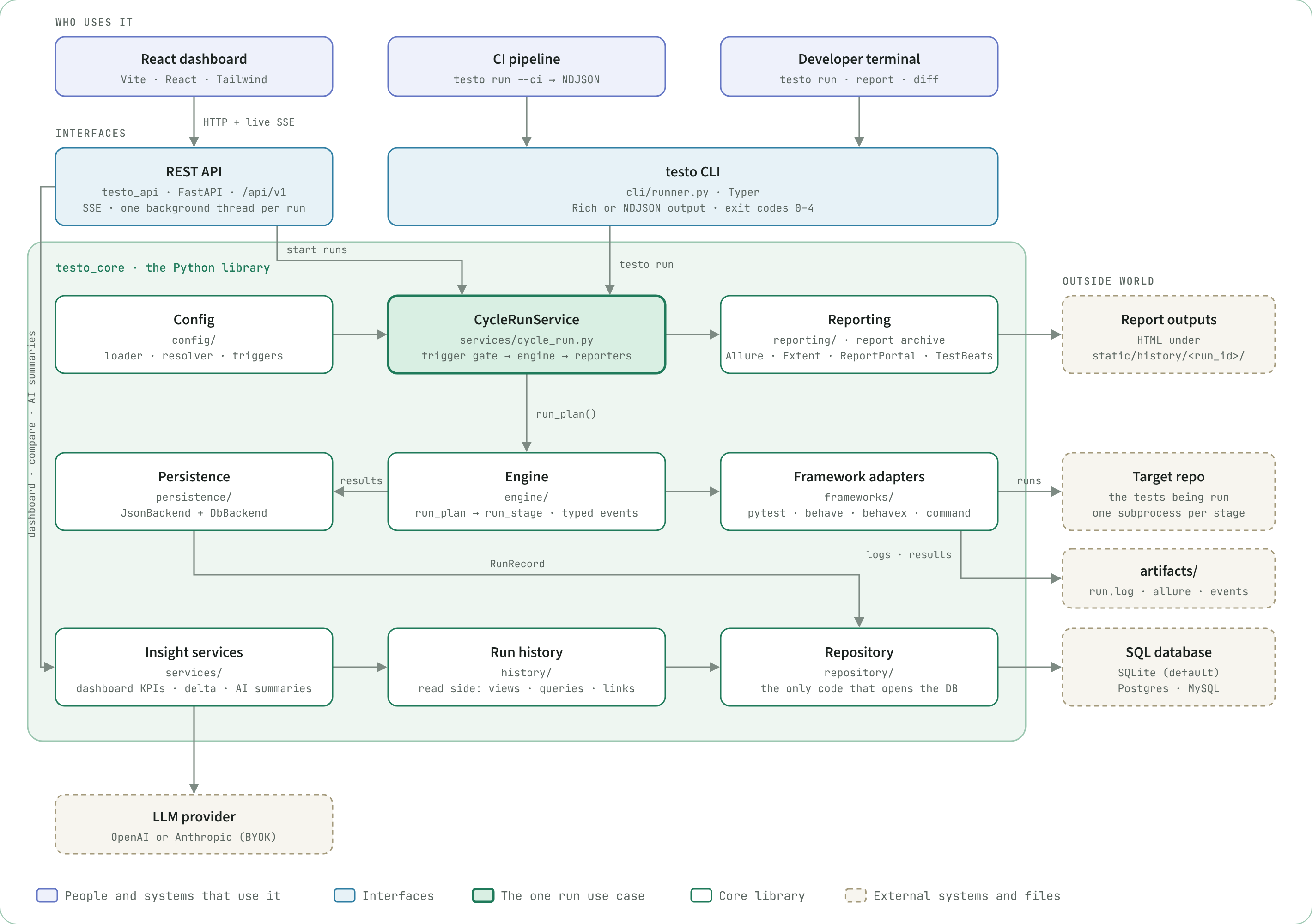
What ships: the testo CLI (--ci streams NDJSON events, exit codes 0–4), a FastAPI
backend (testo_api, /api/v1, live runs over server-sent events), a React frontend
(frontend/), and GitHub Action / GitLab CI wrappers around testo run --ci. See
ARCHITECTURE.md for how the pieces fit.
Quickstart
Install the CLI from PyPI and point it at your own tests:
Already have tests that write JUnit XML? Record them, no config needed:
pip install testo-core
npx jest --ci --reporters=default --reporters=jest-junit   # or pytest --junitxml, go test, ...
testo ingest 'junit*.xml' --cycle web                      # recorded; run again to see the diff
testo summary --cycle web
Or let Testosterone run the tests as a cycle:
pip install testo-core            # the `testo` CLI; add [api] for the REST API, [db] for Postgres,
                                  # [bdd] for Behave and BehaveX
testo config init                 # writes a starter testosterone.yaml; edit its stages
testo run --cycle smoke-test      # run a cycle from it
An installed testo keeps per-run report copies in ./.testo/ (set TESTO_HOME to move them).
Getting Started goes further in about five minutes: a regression between two runs, then the same cycle in GitHub Actions.
Or work from a checkout of this repository, which ships sample cycles:
git clone https://github.com/taltal-beep/testosterone.git
cd testosterone
python -m venv .venv && source .venv/bin/activate
pip install -e ".[dev]"

testo run --cycle sample-pytests      # run a cycle from testosterone.yaml
testo report --cycle sample-pytests   # build the Allure report for it
Watch it run: install, testo doctor, then a cycle against the deliberately broken fake-api app
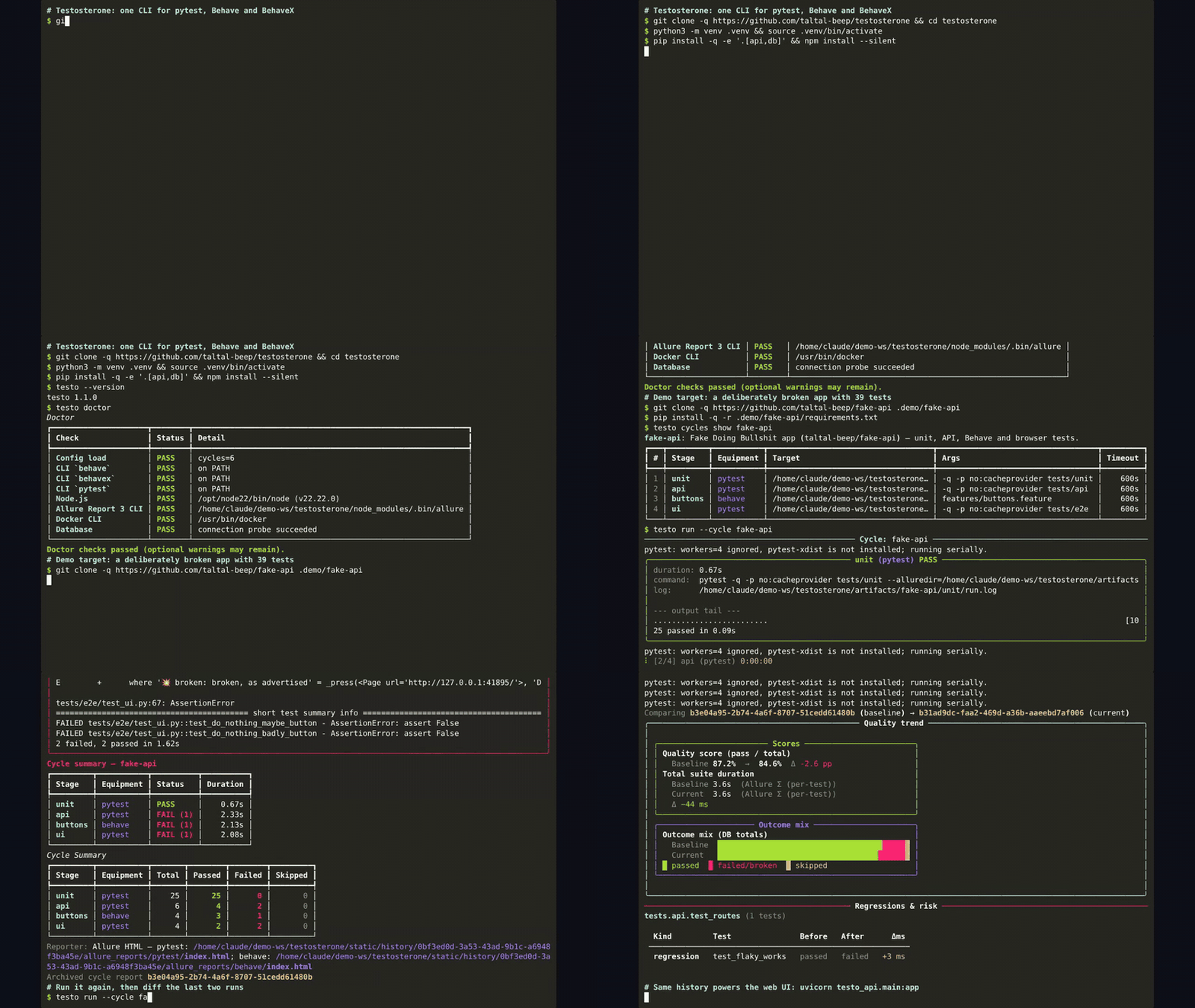
Adding Testosterone to your own project with an AI coding assistant? Paste one of the Setup Prompts.
Runs are stored in SQLite by default (database.url in testosterone.yaml, or
DATABASE_URL). Postgres and MySQL work too; docker compose up -d postgres starts one.
UI
testo-api                              # FastAPI on http://127.0.0.1:8000
npm --prefix frontend install
npm --prefix frontend run dev          # React on http://localhost:5173
Pages: Dashboard, Cycles (run any cycle and watch its stages live, see its flaky tests), Runs and Run Detail (reports, test pyramid, AI summary), Compare (delta between two runs), Quick Run (run one framework against a repo without defining a cycle) and AI settings.
Defining cycles
version: 1
defaults:
  target_repo: .
  artifacts_root: artifacts
  timeout_s: 600
reporters:
  - type: allure
cycles:
  smoke:
    description: Unit tests, then BDD flows.
    trigger:                     # optional: skip unless these paths changed
      paths: ["src/**", "tests/**"]
    stages:
      - name: unit
        equipment: pytest
        args: [-q, tests/unit]
      - name: flows
        equipment: behave
        args: [features/smoke.feature]   # always target Behave features explicitly
      - name: browser
        equipment: playwright            # npx playwright test, JUnit + HTML report wired in
        args: [tests/e2e]
      - name: web
        equipment: command               # any runner; results come from JUnit XML
        args: [npx, jest, --ci]
        junit_xml: ["reports/junit/*.xml"]
Built-in equipment: pytest, behave, behavex, playwright, command and junit (records
JUnit XML another step wrote; what testo ingest uses). behave and behavex need
pip install 'testo-core[bdd]'. A package can add more (see Plugins).
testo config validate checks the file; testo init writes one interactively. The full
schema and every flag are in Command Reference.
CLI
| Command | What it does |
|---|---|
testo run --cycle <name> |
Run a cycle (--ci NDJSON, --stream live output, --force ignore triggers, --no-persist) |
testo ingest <files> --cycle <name> |
Record JUnit XML from any runner as a run (--server/--token upload to a team server) |
testo report … |
Generate, list, open and export reports (testo diff compares two archived runs) |
testo report markdown --cycle <name> |
The latest run as Markdown: results, failing tests, changes since the previous run (job summary or PR comment) |
testo summary |
Rich diff of the two most recent runs (--cycle to pick one) |
testo cycles list/show |
Inspect configured cycles |
testo watch --cycle <name> |
Re-run a cycle when files change |
testo flaky --cycle <name> |
Tests that keep flipping between pass and fail across recent runs (--fail-on-flaky for CI) |
testo plugins |
Built-in and installed frameworks and reporters (--check imports them, --json) |
testo doctor |
Check config, database and tools on PATH |
Exit codes: 0 success (or trigger-skipped), 1 tests failed, 2 invalid input,
3 infrastructure failure, 4 internal error.
Details: Troubleshooting and Error Codes.
API
| Area | Endpoints (/api/v1) |
|---|---|
| Cycles | GET /cycles, GET /cycles/{cycle} |
| Executions | POST /cycles/{cycle}/executions, POST /adhoc-executions, GET /cycle-executions/{id}, GET /cycle-executions/{id}/events (SSE) |
| Ingest | POST /ingest (JUnit XML upload from testo ingest --server) |
| Runs | GET /runs, GET /runs/{id}, GET /runs/{id}/reports, GET /runs/{id}/pyramid |
| Analytics | GET /analytics/delta, GET /analytics/delta/cases, GET /analytics/flaky, GET /dashboard/overview, GET /dashboard/runs/recent |
| AI (bring your own key) | GET /ai/config/status, PUT /ai/config, GET /runs/{id}/ai-summary, POST /runs/{id}/ai-summary:generate |
| Health | GET /health/live, GET /health/ready |
Interactive docs at http://127.0.0.1:8000/docs while testo-api runs.
CI
GitHub Actions:
- uses: taltal-beep/testosterone/integrations/github-action@v1
  with:
    cycle: smoke          # optional: config-path, ci-mode, persist, python-version
    comment-on-pr: "true" # results as a pull request comment (needs pull-requests: write)
GitLab CI (a GitLab mirror of this repo is coming; until then, include the template straight from GitHub, or copy ci/gitlab/testo.gitlab-ci.yml):
include:
  - remote: "https://raw.githubusercontent.com/taltal-beep/testosterone/v1/ci/gitlab/testo.gitlab-ci.yml"
variables:
  TESTO_CYCLE: "smoke"
Both run testo run --ci, keep the NDJSON event stream, and expose the final plan_finished
event (exit code, per-stage results). The GitHub Action also writes the run to the job summary
(job-summary, on by default) and, with comment-on-pr, keeps one up-to-date comment per cycle
on the pull request: results per stage, failing tests and per-test changes since the last run. Run records written in CI carry the provider, pipeline,
job, commit and branch. Inputs and outputs: integrations/github-action/README.md.
Optional integrations
- Metrics push: after each run, test KPIs go to InfluxDB when
INFLUXDB_URL,INFLUXDB_TOKEN,INFLUXDB_ORGandINFLUXDB_BUCKETare set, and to a Prometheus Pushgateway whenPROMETHEUS_PUSHGATEWAY_URLis set (PROMETHEUS_JOB_NAMEdefaults totesto). Pushes are best-effort and never change the run result. - Reporters:
allure,extent,reportportal,testbeatsunderreporters:. - Plugins: a package adds a test runner or a reporter through the
testo.frameworks/testo.reportersentry point groups, with no change to Testosterone;testo pluginslists and checks them. examples/plugin/ adds aunittestrunner and ajson-summaryreporter. - AI failure summaries: opt in on the AI settings page with an OpenAI or Anthropic key, or point it at any OpenAI-compatible endpoint (a free tier such as Groq or Gemini, or a local Ollama). Failed runs store their failing cases, first traceback and log tail (redacted), which is what the summary is built from.
Development
pip install -e ".[dev]"
pre-commit install
ruff check .
ruff format --check .
mypy testo_core testo_api
pytest -q -m "tier_fast and not quarantined" --no-cov
npm --prefix frontend run typecheck
npm --prefix frontend test
ruff check, ruff format --check and mypy testo_core testo_api are all blocking in CI
(.github/workflows/ci.yml's format job), as are the frontend typecheck and tests.
See CONTRIBUTING.md for the full checklist. Start with
ARCHITECTURE.md for the design; docs/ holds the design
notes and ADRs, also published as the docs site
(pip install -e ".[docs]" and mkdocs serve to preview it).
Contributors
Thank you to everyone who has helped make Testosterone better:
| Contributor | Contributions |
|---|---|
| @taltal-beep | Creator and maintainer |
| @evidentart | Run history records the repository each run tested (#115, fixes #102) |
Want to join them? The good first issues are a friendly place to start, and CONTRIBUTING.md walks you through the setup.
History
The project started as UQO ("Unified Quality Orchestrator") and was renamed to Testosterone
(the uqo command and UQO_* variables became testo and TESTO_*). v1.1 replaced the Streamlit UI
with the React frontend and dropped the Docker-based headless runner (stages now run as host
subprocesses). Full details in CHANGELOG.md.
Migrating from v1.0
| v1.0 | v1.1 |
|---|---|
Streamlit UI (testo-ui, streamlit run app.py) |
React frontend (frontend/) |
uqo command, UQO_* env vars |
testo, TESTO_* |
uqo run --config runs.yaml (runs: list of test_type/cli_args) |
a cycle in testosterone.yaml, run with testo run --cycle <name> |
--ghost, --json, --stream-json |
--ci (NDJSON events, plan_finished last) |
POST /api/v1/executions + /executions/{id}/events |
POST /api/v1/adhoc-executions (one framework) or POST /api/v1/cycles/{cycle}/executions; status and SSE under /cycle-executions/{id} |
| "Legacy Execution" page | Quick Run (/quick-run) |
Tests run in one-off Docker containers (UQO_RUNNER_IMAGE, UQO_RUNNER_PREBUILT) |
stages run as host subprocesses; use Dockerfile.testo-runner as the CI job image if you want isolation |
| Allure results uploaded to MinIO per run | per-run reports under static/history/<run_id>/ (served at /history) and the report archive DB |
locust test type |
equipment: command with args: [locust, --headless, …] |
Pluggy plugins/*.py runner hooks |
a framework adapter or reporter in your own package, registered as a testo.frameworks / testo.reporters entry point (see examples/plugin/) |
1 maintainer

Metadata
1 maintainer
Release files for testo-core 1.2.0
For a detailed explanation of source distributions (sdists) and built distributions (wheels), please see the package formats documentation.
Source distribution (sdist)
| File | Size | Uploaded | Provenance | |
|---|---|---|---|---|
| testo_core-1.2.0.tar.gz | 342.4 kB | With provenance | Details |
Built distribution (wheel)
| File | Interpreter | ABI | Platform | Reset |
|---|---|---|---|---|
| testo_core-1.2.0-py3-none-any.whl | Python 3 | none | any | Details |
Total release size: 610.1 kB
Release files / testo_core-1.2.0.tar.gz
| Download URL | testo_core-1.2.0.tar.gz |
|---|---|
| Size | 342.4 kB |
| Tags | Source |
|
SHA-256 checksum How to use checksums |
c3bd1077877685c07e5f9076fb0ebd736e2b4cc3badfef6f25931ce91421b603
|
|
BLAKE2b-256 checksum How to use checksums |
0b1b0d11da8255f6fbc03f816f8d82e1065c41e365d791ca9a4e1edfe42785a1
|
| Upload date | |
|
Uploaded using Trusted Publishing? What is trusted publishing? |
Yes |
| Uploaded via |
twine/7.0.0 CPython/3.13.16
|
Provenance
Provenance describes where a file came from. On PyPI, provenance is shared via attestations, which provide a verifiable record of the build or publishing details. View details, limitations and caveats.


PyPI Publish Attestation
PyPI verified that this artifact, at this checksum, originated from the publisher listed below.
Signed by GitHub Actions, verified by PyPI on Oct 24, 2026.
Transparency logRelease files / testo_core-1.2.0-py3-none-any.whl
| Download URL | testo_core-1.2.0-py3-none-any.whl |
|---|---|
| Size | 267.7 kB |
| Tags | Python 3 |
|
SHA-256 checksum How to use checksums |
bcfa56b443d75d9c740f8a9583d5aa1508f5cb6d82a7723a6dbc22108c0db8ac
|
|
BLAKE2b-256 checksum How to use checksums |
ef3ad54aadf4d9e232baf19e34c65b361c6570201b9f65c51513d66751c41853
|
| Upload date | |
|
Uploaded using Trusted Publishing? What is trusted publishing? |
Yes |
| Uploaded via |
twine/7.0.0 CPython/3.13.16
|
Provenance
Provenance describes where a file came from. On PyPI, provenance is shared via attestations, which provide a verifiable record of the build or publishing details. View details, limitations and caveats.
PyPI Publish Attestation
PyPI verified that this artifact, at this checksum, originated from the publisher listed below.
Signed by GitHub Actions, verified by PyPI on Oct 24, 2026.
Transparency logSecurity for testo-core 1.2.0
Provenance
Provenance describes where a file came from. On PyPI, provenance is shared via attestations, which provide a verifiable record of the build or publishing details. View details, limitations and caveats.
Full provenance
All 2 files in this release have been uploaded with provenance metadata.
Attestation for testo_core-1.2.0.tar.gz
PyPI Publish Attestation
PyPI verified that this artifact, at this checksum, originated from the publisher listed below.
Signed by GitHub Actions, verified by PyPI on Oct 24, 2026.
Transparency logA note on package security
PyPI is a repository for distributing packages, not a service for auditing them. While third-party security researchers and our staff do their best to detect and remove malicious packages, PyPI cannot guarantee the quality, security or suitability of any given package.
To learn more about protecting yourself from malicious actors, visit our package security documentation.














