
Tetrascience CLI

Project description
ts-cli
Tetrascience CLI
Table of Contents
Show
Intro
ts-cli allows you to interface with the Tetrascience Data Platform from the comfort of your shell
Example
Create and publish a new task script:
ts-cli config save ~/Downloads/ts-cfg.json
ts-cli init task-script
ts-cli publish
Install
pip install tetrascience-cli
Usage
Create an artifact
Create an IDS, Protocol, Task Script, Tetraflow, or Data App artifact
ts-cli init <kind>
To set up the artifact's configuration interactively, use the --interactive or -i flag.
ts-cli init --interactive
Publish an artifact
Including IDS, Protocol, Task Script, or Data App artifacts from their source code
ts-cli publish
The artifact's type, namespace, slug and version are automatically read from its manifest.json
file if it exists.
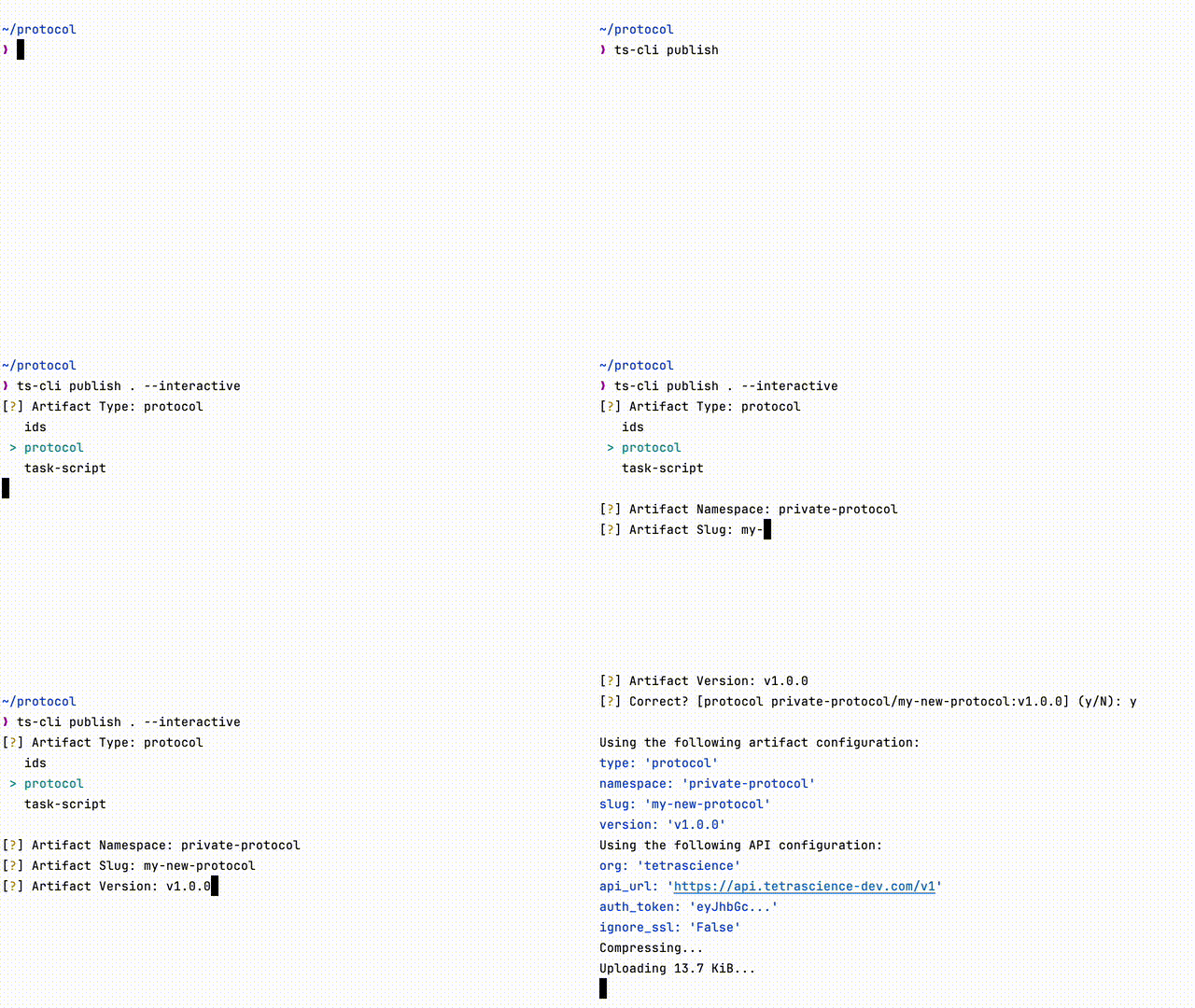
To set up the artifact's configuration interactively, use the --interative or -i flag. Examples:
ts-cli publish --interactive
API Configuration
An API configuration is required.
This can be the API configuration JSON file (cfg.json) found on the Tetra Data Platform.
{
	"api_url": "https://api.tetrascience.com/v1",
	"auth_token": "your-token",
	"org": "your-org",
	"ignore_ssl": false
}
This configuration can be referred to explicitly in the command line. Example:
ts-cli publish --config cfg.json
Or saved to a specific profile.
ts-cli config save cfg.json --profile dev
ts-cli publish --profile dev
To apply the API configuration to all your projects automatically, save your configuration file globally
ts-cli config save cfg.json --global
ts-cli publish
IDS Validation
When uploading IDS artifact, validation will be performed using ts-ids-validator package.
Validation failures for IDS will be printed to the console.
Extras
Protocol Validation
The ts-cli can additionally run protocol v3 validation.
Requirements
npmat the time of installation to populate dependencies. NeithernpmnorNode.jswill be used at runtime
Installation
pip install tetrascience-cli[protocol-validation]
Documentation
Click here for --help and a development guide
Changelog
Show
v1.6.1
- Add validation for artifact version in interactive mode
v1.6.0
- Add support for new
schemaartifact type
v1.5.2
- Increase artifact size for connectors and data apps to 2 GB
- Add verbose flag to the publish command
- Add URL normalization for API configuration
- Update base image for Streamlit Data Apps
v1.5.1
- Fix encoding issues when publishing data apps
v1.5.0
- Add support for publishing Streamlit Data Apps from a template
v1.4.2
- update tetraflow template to reflect the latest syntax updates
- adjust files and dirs permissions to ensure lambda user can access all task files
- fix ts-cli init protocol for 3.5 deployments
v1.4.1
- update to the latest protocol compiler version
v1.4.0
- typecheck protocols during publish validation using the protocol virtual machine compiler
v1.3.4
- exclude betas and RCs from latest version check
v1.3.3
- update vulnerable dependencies
- update documentation
v1.3.2
- fix output of monitored build when no args provided (build from the artifact directory)
v1.3.1
- output {namespace, slug, version} when monitored build (via CodeBuild) completes
v1.3.0
- Rename the
deletecommand tounpublish - Display the number of other artifacts that depend on artifact that is to be unpublished
- Example:
warning: This protocol artifact is used by at least 1 pipeline
- Example:
v1.2.0
- Allow publishing of connectors artifacts
v1.1.0
- Adjust publish to support Codebuild build_id in response for all artifact types
v1.0.5
- Fix incorrect messages to console when using
ts-cli init --interactive
v1.0.4
- Add a
deletecommand - Remove extra
<unset>strings in task script configurations
v1.0.3
- Rename the
nodeTypefield tocategoryin the tetraflow template - Fix a crash on
ts-cli config {save,set} - Fix broken IDS schemas generated from non-existent manifest.json
v1.0.2
- Adds the dry-run flag to the
publishcli
v1.0.1
- Fix a crash on startup
v1.0.0
- Initial release
- Includes the
init,publishandconfigcommands
Release history Release notifications | RSS feed


Download files
Download the file for your platform. If you're not sure which to choose, learn more about installing packages.
Source Distribution
Built Distribution
Filter files by name, interpreter, ABI, and platform.
If you're not sure about the file name format, learn more about wheel file names.
Copy a direct link to the current filters
File details
Details for the file tetrascience_cli-1.6.1.tar.gz.
File metadata
- Download URL: tetrascience_cli-1.6.1.tar.gz
- Upload date:
- Size: 69.8 kB
- Tags: Source
- Uploaded using Trusted Publishing? No
- Uploaded via: twine/6.1.0 CPython/3.13.7
File hashes
| Algorithm | Hash digest | |
|---|---|---|
| SHA256 |
7e44186861502e24c51785f837f79e29910fba30b9fff194c6b34cb252c827e4
|
|
| MD5 |
57680c05e9d0ded735247bb34a87ef09
|
|
| BLAKE2b-256 |
373d61284fff9120e284eb39eb5b9e62cdbc1b5def0c465aba697a54a41b2362
|
File details
Details for the file tetrascience_cli-1.6.1-py3-none-any.whl.
File metadata
- Download URL: tetrascience_cli-1.6.1-py3-none-any.whl
- Upload date:
- Size: 94.5 kB
- Tags: Python 3
- Uploaded using Trusted Publishing? No
- Uploaded via: twine/6.1.0 CPython/3.13.7
File hashes
| Algorithm | Hash digest | |
|---|---|---|
| SHA256 |
a38f9b49b1d3543c937030001f202d1f4ed3d755501df294f38815459d4c32f0
|
|
| MD5 |
29e91d87a36792dd6558775e845b8d6d
|
|
| BLAKE2b-256 |
95653f9b27d9173ce15bd9184521f4b34d0bdc9fc9f9cee401a8ee7a5ee8dbe9
|






