
texas2step
Throughput, latency, jitter and packet loss between endpoints, measured from a web browser. Open the page and press Start. texas2step measures the path between you and the server with multi-stream HTTP transfers, latency probes idle and under load, and real UDP packet loss over WebRTC, then shows every figure as discrete metrics and graphs. The same measurements are available as a REST API, a command-line client, and server-to-server functions.
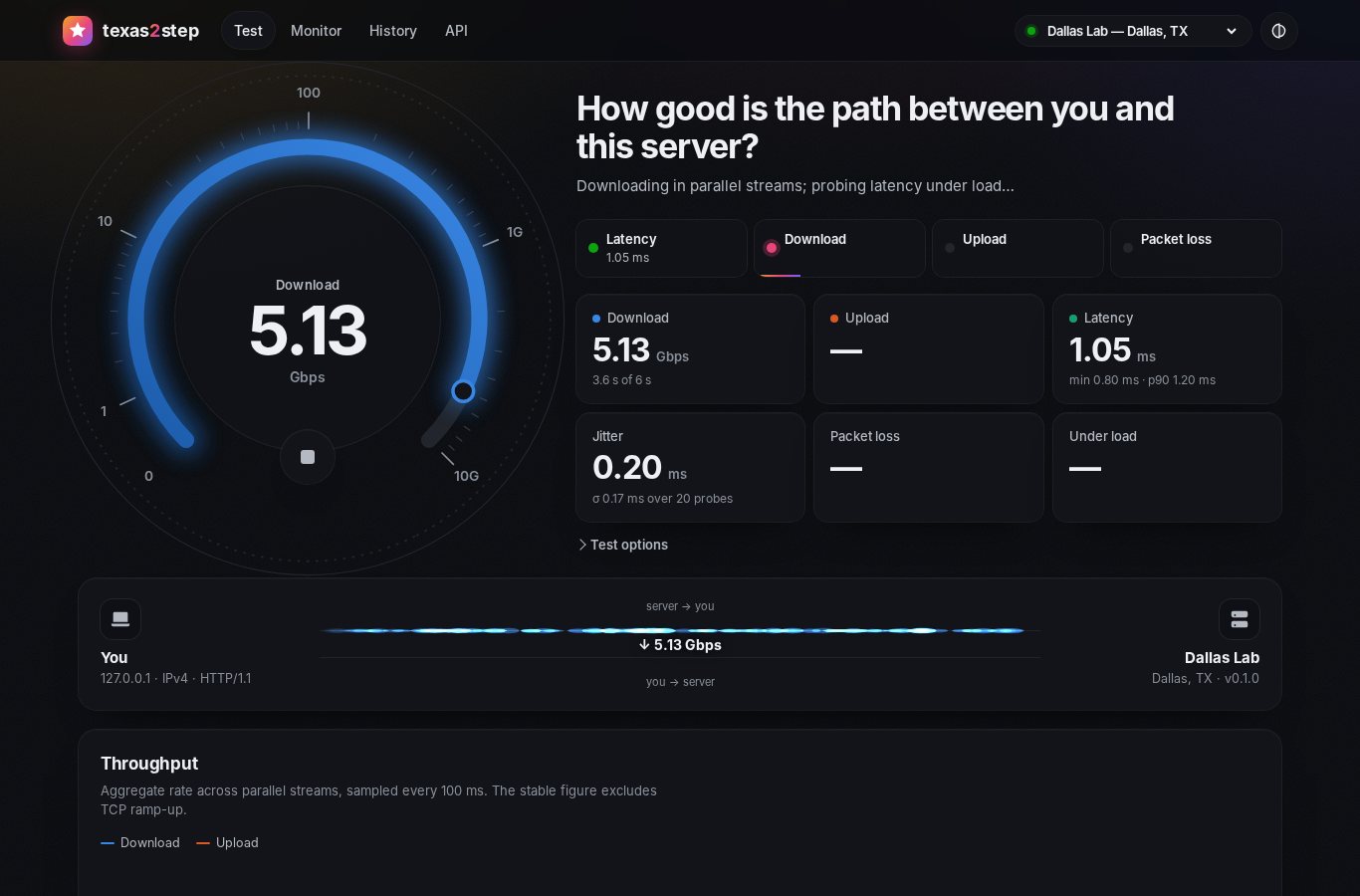
Inspired by speed.cloudflare.com (cloudflare/speedtest), but self-hosted: a Python server, a dependency-free TypeScript client, and no third-party services, so it works on air-gapped and internal networks.
New to texas2step? texas2step at a glance shows what it does and where it helps, on one page.
What it measures
| Metric | How | Transport |
|---|---|---|
| Latency | 20 keep-alive pings, timed with Resource Timing, server time removed | HTTP |
| Jitter | Mean absolute difference between consecutive RTTs | HTTP |
| Download / upload | N parallel streams for T seconds, 100 ms timeline, ramp-up excluded | HTTP |
| One stream | One stream's download for the same time: what a single file copy gets | HTTP |
| Rate limit | A rate that holds, then steps down and stays down: a shaper, a policer or the end of a speed boost | derived |
| Latency under load | Probes every 250 ms on a separate connection during each transfer, graded A+ to F | WebSocket |
| Packet loss | Numbered probes on an unreliable data channel, echoed and stamped by the server; each direction's loss and delay apart | UDP (WebRTC) |
| Stream fairness | Per-stream rates and Jain's index | HTTP |
| Call quality | A G.711 call's MOS (1 to 5) each way, from the ITU-T E-model: delay, and packets lost, late or in bursts | derived |
| Responsiveness | Round trips per minute under load, on new connections and the loaded one, as the IETF draft and macOS's networkQuality count them |
HTTP, WebSocket |
| Readiness | Grades for streaming, video calls, reaction time/VDI/SSH and bulk transfers | derived |
Details and definitions: docs/methodology.md. What the scores mean to the people using a connection: docs/experience.md.
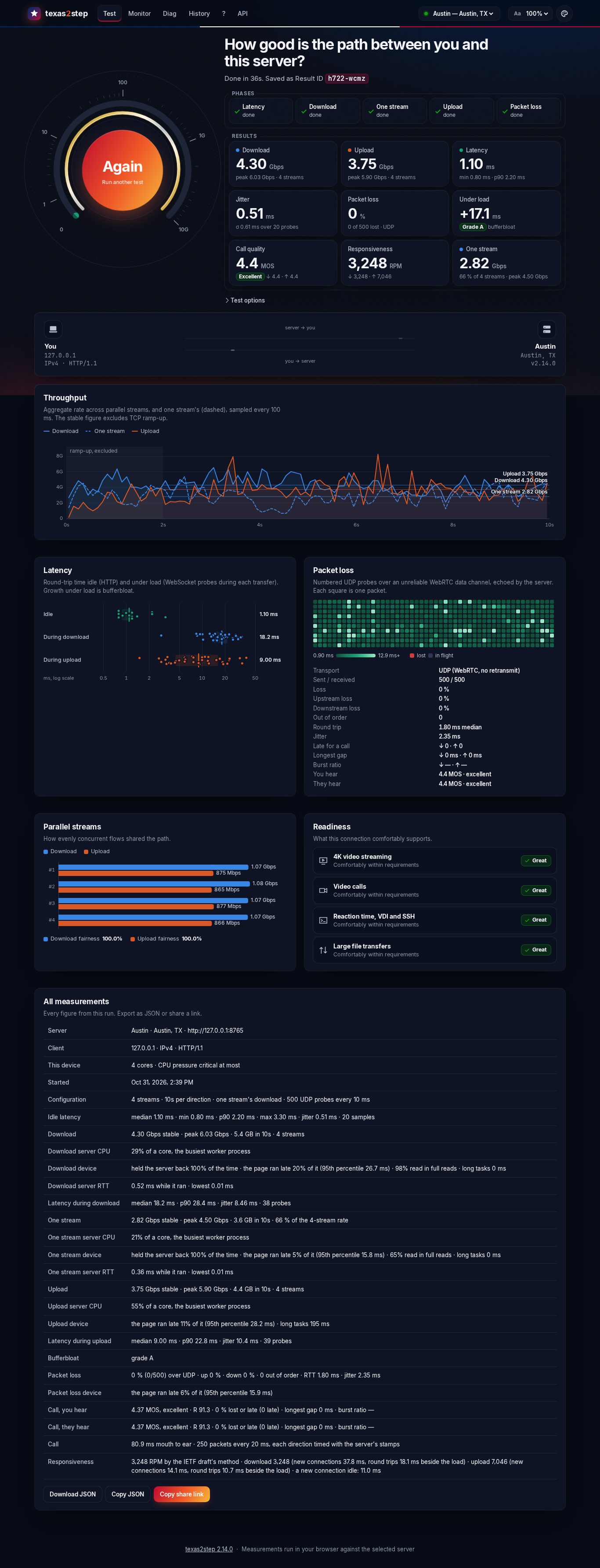
The UI has six views: Test (gauge, live link animation, charts, exportable and
shareable results), Monitor (continuous UDP probing with a scrolling RTT and loss
trace, to one server or to two at once for a side-by-side comparison, or a voice or video
call's packets scored every 10 seconds), Diag (HTTP/1.1,
HTTP/2 and HTTP/3, WebSocket and UDP over IPv4 and IPv6, tried once a second, with your addresses, NAT,
TLS and an event log), History (saved runs and trend), ? (what the tool does, in plain
words, for anyone), and API (copy-ready examples). A site can hide any of them
(page_test, page_monitor, page_diag, page_history, page_help, page_api). Every
chart has a hover readout and a table equivalent.
Visitors pick a theme from the header: Light, Dark, America, Energy, Federal, Military or Texas, or one that follows the OS. A page-size drop-down beside it (70% to 125%) fits more on smaller screens. Operators can rename the site, add their logo, organization and support links, show a notice on every page and set the default theme; see Branding and themes.
Install
On an Ubuntu 26.04 LTS server that already runs nginx, install the Debian package from
the releases page and add
one line to your site's server { } block:
sudo apt install ./texas2step-*-amd64.deb        # the package from the releases page
#   in /etc/nginx/sites-available/<your site>:  include snippets/texas2step.conf;
sudo nginx -t && sudo systemctl reload nginx     # → https://www.example.net/texas2step/
Or let texas2step-setup, which ships next to the .deb, check the server first. It
reports what it will change and what you must fix, then writes an install script for
that server. The script installs, reinstalls or upgrades texas2step, merges your
settings into the new template, publishes it through nginx and opens the UDP range:
sudo ./texas2step-setup --id houston --name "houston.example.net" --location "Houston, TX"
sudo ./texas2step-install.sh                     # after reading it
Once installed, sudo texas2step update upgrades it to the newest release, and a timer
can do that unattended. On a server without internet access,
sudo texas2step update --from <directory> installs a release whose two files you put
there. The install guide covers the rest: the setup
tool's options, the optional /speedtest address, configuration, the firewall rule for
the UDP test, updates, clearing saved results, cloning a server and removal.
Or run the container image, with Docker or Podman on any Linux host, amd64 or arm64. It brings its own nginx; see Container:
docker run -d --name texas2step --network host --restart unless-stopped \
    -v texas2step-etc:/etc/texas2step -v texas2step-data:/var/lib/texas2step \
    ghcr.io/robert-patrick-texas/texas2step:2     # → https://<this host>/texas2step/
To run it from source instead:
uv sync && uv run texas2step serve # http://localhost:8080
Building, testing, the docs site and packaging are covered in docs/development.md.
Command line
t2s is the command-line client to copy onto any workstation or server: one file for Linux, macOS or Windows, with nothing to install, that runs the Test page's full test or any part of it, Monitor and Diag (t2s):
curl -fLo t2s https://github.com/robert-patrick-texas/texas2step/releases/latest/download/t2s-linux-amd64
chmod +x t2s
./t2s run https://www.example.net/texas2step
./t2s monitor https://dallas.example.net/texas2step https://houston.example.net/texas2step
./t2s diag https://www.example.net/texas2step
The server's package also has a command line in Python, texas2step, with the same tests:
installed as /usr/bin/texas2step, or elsewhere from PyPI with uv tool install texas2step
(or pipx install texas2step).
texas2step run https://www.example.net/texas2step              # full test, human-readable
texas2step run https://www.example.net/texas2step --json --save
texas2step latency  https://www.example.net/texas2step --count 50
texas2step download https://www.example.net/texas2step --streams 8 --seconds 15
texas2step upload   https://www.example.net/texas2step
texas2step loss     https://www.example.net/texas2step --packets 1000 --interval 5
client 127.0.0.1 (IPv4, HTTP/1.1)
this computer 127.0.0.1

  Latency               1.85 ms   jitter 0.08 ms   (min 1.63 · p90 2.03 · 20 samples)
  Download         4,893.9 Mbps   peak 5,554.3   (2 streams · loaded -0.8 ms)
  One stream       5,720.1 Mbps   peak 6,167.7   (a single file copy · 117 % of 2 streams)
  Upload           8,681.2 Mbps   peak 11,391.7   (2 streams · loaded +0.1 ms)
  Loss                   0.00 %   (0/200 lost · ↑ 0.00 % ↓ 0.00 % · UDP RTT 1.19 ms · jitter 0.12 ms)
  Call quality          4.4 MOS   excellent   (you hear 4.4 · they hear 4.4 · longest gap ↓ 0 ↑ 0 ms · late ↓ 0.00 % ↑ 0.00 %)
  Responsiveness     28,501 RPM   (↓ 50,014 · ↑ 28,501 · a new connection 1.0 ms idle, 4.7 ms under load)
  Bufferbloat                A+
client is the address the server sees; this computer is the CLI's own on that
connection, before any NAT, with the interface's MAC address on Linux. --save stores
both with the result, and --no-local leaves them out.
API
Every primitive is a plain HTTP endpoint (/api/v1/ping, /down, /up, /ws,
/rtc/offer), and a server can measure toward another server on request:
curl -o /dev/null 'https://www.example.net/texas2step/api/v1/down?bytes=1000000000'
curl -s -X POST https://dallas.example.net/texas2step/api/v1/measure/full \
     -H 'content-type: application/json' -d '{"target": "https://houston.example.net/texas2step"}'
Full reference: docs/api.md, or /api/docs on a running server.
Several locations
List other texas2step servers in the config and they appear in the header's server picker. The browser tests the chosen server directly (cross-origin), and each server can measure the others through the API. See docs/configuration.md. For servers open to the Internet, see Access codes.
Documentation
- At a glance: what texas2step does and where it helps, on one page, also as a PDF to print on US Letter or A4.
- Install: the Ubuntu package, nginx, firewall, upgrades.
- Container: the image for Docker and Podman, its settings, certificate, networking and updates.
- t2s: the command-line client for Linux, macOS and Windows: tests, Monitor and Diag from any computer, and how it updates itself.
- Configuration: every setting.
- Access codes: servers open to the Internet, a code from the service desk, and the desk's tools kept to your networks.
- Traffic limits: a daily and monthly cap on what the tests move, for servers whose traffic is billed.
- Active clients: who is using the server now, page by page, without cookies.
- Server CPU: the workers' CPU beside what they serve, over 30 days; refusing tests while the host is busy with other work; and results that say when the server, not the network, set the rate.
- Security: the security controls, what each guards against, and what is left to the operator.
- Methodology: what is measured, and how.
- Quality and user experience: what the call-quality score and responsiveness mean to the people using a connection, the adjustments texas2step makes to match what they notice, and the sources.
- API: endpoints and the UDP probe protocol.
- Development: running from source, tests, docs site, packaging, releases.
- Roadmap: ideas for future work.
The same pages are published at robert-patrick-texas.github.io/texas2step.
License
Copyright 2026 Robert Patrick. Licensed under the Apache License 2.0.
1 maintainer

Metadata
1 maintainer
Release files for texas2step 2.13.0
For a detailed explanation of source distributions (sdists) and built distributions (wheels), please see the package formats documentation.
Source distribution (sdist)
| File | Size | Uploaded | Provenance | Actions |
|---|---|---|---|---|
| texas2step-2.13.0.tar.gz | 4.3 MB | With provenance | Details for texas2step-2.13.0.tar.gz |
Built distribution (wheel)
| File | Interpreter | ABI | Platform | Actions Reset |
|---|---|---|---|---|
| texas2step-2.13.0-py3-none-any.whl | Python 3 | none | any | Details for texas2step-2.13.0-py3-none-any.whl |
Total release size: 5.2 MB
Release files / texas2step-2.13.0.tar.gz
| Download URL | texas2step-2.13.0.tar.gz |
|---|---|
| Size | 4.3 MB |
| Tags | Source |
|
SHA-256 checksum How to use checksums |
2539558101fe0bbeb9b62462909791f7aa0ef8098bad5ccb8ba70616bb6175e7
|
|
BLAKE2b-256 checksum How to use checksums |
c10661ad0d6732c7e71487eae99adc1496e5f836d2f150bfb2c3fec79a4dfce9
|
| Upload date | |
|
Uploaded using Trusted Publishing? What is trusted publishing? |
Yes |
| Uploaded via |
twine/7.0.0 CPython/3.13.16
|
Provenance
Provenance describes where a file came from. On PyPI, provenance is shared via attestations, which provide a verifiable record of the build or publishing details. View details, limitations and caveats.


PyPI Publish Attestation
PyPI verified that this artifact, at this checksum, originated from the publisher listed below.
Signed by GitHub Actions, verified by PyPI on Oct 31, 2026.
Transparency logRelease files / texas2step-2.13.0-py3-none-any.whl
| Download URL | texas2step-2.13.0-py3-none-any.whl |
|---|---|
| Size | 928.0 kB |
| Tags | Python 3 |
|
SHA-256 checksum How to use checksums |
572044a41514589fc46bf8e7b8c999f93358ea87f28aec53d919b6743a0c2ecc
|
|
BLAKE2b-256 checksum How to use checksums |
f5e6b03c5a07e618dd2eb04101f137389ae609e411b837a9e6774e2569a220a9
|
| Upload date | |
|
Uploaded using Trusted Publishing? What is trusted publishing? |
Yes |
| Uploaded via |
twine/7.0.0 CPython/3.13.16
|
Provenance
Provenance describes where a file came from. On PyPI, provenance is shared via attestations, which provide a verifiable record of the build or publishing details. View details, limitations and caveats.
PyPI Publish Attestation
PyPI verified that this artifact, at this checksum, originated from the publisher listed below.
Signed by GitHub Actions, verified by PyPI on Oct 31, 2026.
Transparency logSecurity for texas2step 2.13.0
Provenance
Provenance describes where a file came from. On PyPI, provenance is shared via attestations, which provide a verifiable record of the build or publishing details. View details, limitations and caveats.
Full provenance
Both files in this release have been uploaded with provenance metadata.
Attestation for texas2step-2.13.0.tar.gz
PyPI Publish Attestation
PyPI verified that this artifact, at this checksum, originated from the publisher listed below.
Signed by GitHub Actions, verified by PyPI on Oct 31, 2026.
Transparency logA note on package security
PyPI is a repository for distributing packages, not a service for auditing them. While third-party security researchers and our staff do their best to detect and remove malicious packages, PyPI cannot guarantee the quality, security or suitability of any given package.
To learn more about protecting yourself from malicious actors, visit our package security documentation.














