
TeXFrog
[!NOTE] TeXFrog is an early-stage tool under active development. The input format, command-line interface, and output may change as the design evolves. Feedback, suggestions, and contributions are very welcome — see Contributing below.
[!WARNING] Much of this codebase was vibe-coded with the assistance of large language models. While it has a test suite and works on the examples we have tried, there may be rough edges. Please report any issues you encounter.
TeXFrog helps cryptographers manage game-hopping proofs in LaTeX. If you have ever maintained a dozen nearly-identical game files by hand, copying lines between them and trying to keep highlights consistent, TeXFrog is meant to solve that problem.
Key idea: Write your pseudocode once in a single .tex file. Tag content with the games it belongs to using \tfonly{games}{content} commands. TeXFrog produces:
- Individual per-game renderings with changed lines automatically highlighted (via
pdflatex— no extra tools needed) - Consolidated comparison figures showing multiple games side by side (via
pdflatex) - An interactive HTML viewer for navigating the proof in a browser (via the optional Python CLI)
All from that one source file.
TeXFrog currently supports the cryptocode and nicodemus pseudocode packages, and we are open to supporting others.
Live Demos
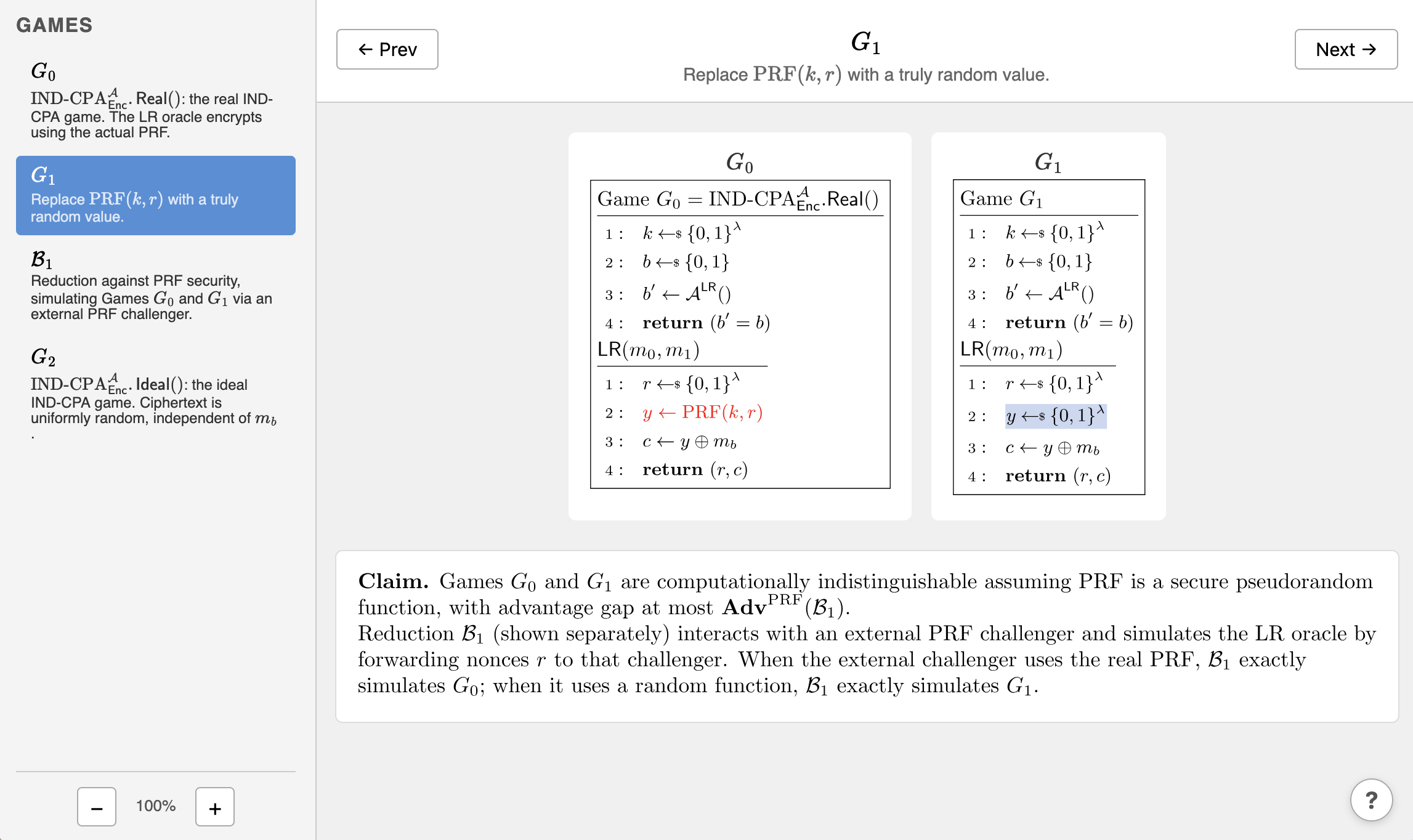
What The Source Code Looks Like
A snippet of the source file:
\tfonly{G0-G2}{k \getsr \{0,1\}^\lambda \\}
...
\tfonly{G0}{y \gets \mathrm{PRF}(k, r) \\}
\tfonly{G1}{y \getsr \{0,1\}^\lambda \\}
\tfonly{Red1}{y \gets \OPRF(r) \\}
...
\tfonly{G0,G1,Red1}{c \gets y \oplus m_b \\}
\tfonly{G2}{c \getsr \{0,1\}^\lambda \\}
Content outside \tfonly appears in every game. Content inside \tfonly{tags}{...} appears only in the listed games. Ranges like G0-G2 are resolved by position in the game list, so reductions interleaved between games work naturally.
When you want to include game figures in a certain spot in your paper:
\tfrendergame{myproof}{G1}
\tfrendergame[diff=G1]{myproof}{G2}
Installation
TeXFrog has two components. Most users only need the LaTeX package.
Option 1: LaTeX package only (no Python required)
If you just want to write game-hopping proofs in LaTeX with automatic diff highlighting and consolidated figures, all you need is the texfrog.sty file. No Python, no command line tools, no virtual environments.
Local installation:
- Download
texfrog.styfrom the repository. - Place it in the same directory as your
.texfile (or anywhere TeX can find it). - Add
\usepackage[package=cryptocode]{texfrog}to your preamble. - Compile with
pdflatexas usual.
On Overleaf: Upload texfrog.sty to your project and use it like any other local package.
This gives you everything needed to render individual games (\tfrendergame), consolidated comparison figures (\tfrenderfigure), and automatic change highlighting — all at compile time. See the tutorial-cryptocode-quickstart example for a complete working document.
Option 2: Full installation (Python CLI + LaTeX package)
The Python CLI adds an interactive HTML proof viewer, validation, scaffolding, and live-reload. Install it if you want the texfrog command-line tool.
Requirements:
- Python >= 3.10
- LaTeX — TeX Live or MacTeX (for
pdflatexandpdfcrop) - Poppler or pdf2svg — for
pdftocairo(brew install poppleron macOS), orpdf2svgas an alternative
LaTeX and Poppler are needed for the HTML viewer (texfrog html).
Installation:
pip install texfrog
Many Python installations don't let you install global packages, so you'll need to create a virtual environment:
cd my_working_directory      # wherever you want to install the venv
python3 -m venv .venv
source .venv/bin/activate    # on macOS/Linux; use .venv\Scripts\activate on Windows
pip install texfrog
When you open a new terminal session and want to run TeXFrog, you will need to reactivate the Python virtual environment:
cd my_working_directory      # wherever you installed the venv
source .venv/bin/activate    # on macOS/Linux; use .venv\Scripts\activate on Windows
After activating the virtual environment, you can cd to any directory on your computer and run the texfrog command.
Quick Start
Starting from the LaTeX package only
The fastest way to get started without Python is to copy the tutorial-cryptocode-quickstart example and modify it. Download texfrog.sty, main.tex, and macros.tex, then compile with pdflatex. On Overleaf, upload all three files to a new project.
Starting with the Python CLI
The fastest way to start a new proof is with texfrog init. This creates a minimal, runnable proof (proof.tex, macros.tex, and commentary/*.tex) with comments explaining each field.
# Scaffold a new proof in the current directory using cryptocode for pseudocode
texfrog init

# ... or in a new directory
texfrog init mydirectory

# ... or using the nicodemus package for pseudocode
texfrog init myproof --package nicodemus
The TeXFrog repository contains tutorials you can study:
# Download them from https://github.com/TeXFrog/TeXFrog/tree/main/examples
# or clone the repository using the following two lines:
git clone https://github.com/TeXFrog/TeXFrog
cd TeXFrog/examples

# Interactive HTML viewer with live reload
texfrog html serve tutorial-cryptocode/main.tex
Usage
Scaffold a new proof
texfrog init [DIRECTORY] [--package cryptocode|nicodemus]
Creates starter files in DIRECTORY (default: current directory). The --package option selects the pseudocode package (default: cryptocode). Existing files are never overwritten.
Validate a proof
texfrog check proof.tex [--strict]
Parses the proof and runs validation checks (file existence, tag consistency, empty games, commentary references) without generating any output. Prints a summary and exits with code 0 if valid. With --strict, exits with code 1 if there are any warnings.
Generate HTML output
texfrog html build proof.tex [-o OUTPUT_DIR]
Compiles each game to SVG via pdflatex and produces a self-contained HTML site. Open index.html in any browser. Games are shown side by side with changed lines highlighted, and you can navigate with arrow keys.
Open in a local web server
texfrog html serve proof.tex [--port 8080] [--no-live-reload]
Builds the HTML site, starts a local server, and opens your browser. By default, TeXFrog watches your source files and automatically rebuilds and refreshes the web browser when you save changes. Use --no-live-reload to disable this.
Writing a Proof
You need a single .tex file that serves as both the LaTeX document and the TeXFrog source:
proof.tex— declares the list of games and reductions, contains the pseudocode source with\tfonlytags, and optionally specifies commentary, figures, and which pseudocode package to use
See Writing a proof for a full guide, and the tutorials for worked examples.
Available Examples
All examples compile directly with pdflatex — no Python needed. Just place texfrog.sty in the same directory.
| Directory | Description | Package | Live Demo |
|---|---|---|---|
examples/tutorial-cryptocode-quickstart/ |
Minimal IND-CPA proof (recommended starting point) | cryptocode |
|
examples/tutorial-cryptocode/ |
Same proof with detailed walkthrough and commentary | cryptocode |
View demo |
examples/tutorial-nicodemus/ |
Same proof using nicodemus syntax |
nicodemus |
View demo |
examples/example-multiproof/ |
Multiple proofs in one document | cryptocode |
Comparing the cryptocode and nicodemus tutorials shows the syntax differences between pseudocode packages.
Documentation
- Writing a proof — reference for writing a TeXFrog proof
- Troubleshooting & FAQ — common problems proof authors may encounter
Contributing
TeXFrog is in its early stages and we are actively looking for feedback from cryptographers who write game-hopping proofs. If you try TeXFrog on your own proof and run into rough edges, have ideas for features, or want to contribute code, please open an issue or pull request. Your input will help shape the tool into something genuinely useful for the community.
To set up a development environment:
pip install -e ".[dev]"
Acknowledgements
TeXFrog was originally created by Douglas Stebila, based on discussions with many people over the years about the desire for a tool for managing LaTeX source code of pen-and-paper proofs. Much of this codebase was vibe-coded with the assistance of large language models, especially Anthropic Claude.
License
TeXFrog is released under the Apache License 2.0. See LICENSE.txt for details.
1 maintainer

Metadata
1 maintainer
Release files for texfrog 0.0.2
For a detailed explanation of source distributions (sdists) and built distributions (wheels), please see the package formats documentation.
Source distribution (sdist)
| File | Size | Uploaded | |
|---|---|---|---|
| texfrog-0.0.2.tar.gz | 71.0 kB | Details |
Built distribution (wheel)
| File | Interpreter | ABI | Platform | Reset |
|---|---|---|---|---|
| texfrog-0.0.2-py3-none-any.whl | Python 3 | none | any | Details |
Total release size: 120.8 kB
Release files / texfrog-0.0.2.tar.gz
| Download URL | texfrog-0.0.2.tar.gz |
|---|---|
| Size | 71.0 kB |
| Tags | Source |
|
SHA-256 checksum How to use checksums |
3e1135df02a2d4bf42fcbbf1107d225d9d5e101b1913a8c1e79b33561dad3ede
|
|
BLAKE2b-256 checksum How to use checksums |
3f1879c878e19d29cca7ac3d6fd975be817515986b04ec920913a4b01c14dbe6
|
| Upload date | |
|
Uploaded using Trusted Publishing? What is trusted publishing? |
No |
| Uploaded via |
twine/6.2.0 CPython/3.14.3
|
Release files / texfrog-0.0.2-py3-none-any.whl
| Download URL | texfrog-0.0.2-py3-none-any.whl |
|---|---|
| Size | 49.8 kB |
| Tags | Python 3 |
|
SHA-256 checksum How to use checksums |
ee5b9f914a195f29d006df629f1fac5f89b8b6c38ef1cacecba268156d44180d
|
|
BLAKE2b-256 checksum How to use checksums |
be8951248f96300c60cf89b67b84de156352c443b2cd5086087f84f641e47576
|
| Upload date | |
|
Uploaded using Trusted Publishing? What is trusted publishing? |
No |
| Uploaded via |
twine/6.2.0 CPython/3.14.3
|














