
Text classification with Graph Convolutional Networks






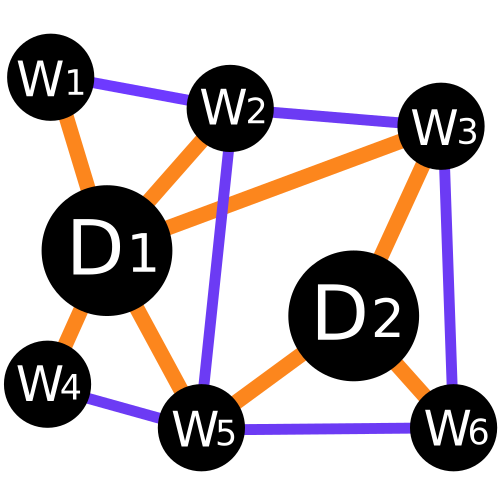
Text4GCN turns a corpus into one graph whose nodes are the documents and the words, and trains a Graph Convolutional Network on it to classify the documents (TextGCN, Yao et al., AAAI 2019). It implements the original TF-IDF + PMI graph and the smaller graphs of the Related Word Filter (RWF) of Pereira & de Castro (DCAI 2022), which connect only related words.
Why Text4GCN
The RWF keeps the accuracy of TextGCN with a fraction of its edges. On 20 Newsgroups (4 classes, 14,537 nodes, seed 1234, from tutorial 3):
| Graph | Edges | File | Test accuracy |
|---|---|---|---|
TextGCN: TF-IDF + PMI (Frequency.tfidf()) |
4.53 M | 52.0 MiB | 86.7% |
RWF: Word2Vec (Semantic.word2vec()) |
0.28 M | 3.3 MiB | 85.6% |
WordNet cosine (Semantic.cosine_similarity()) |
0.29 M | 3.4 MiB | 85.2% |
Scope and limitations
- Transductive learning. Test documents are nodes of the graph, as in the TextGCN paper. Classifying new documents means rebuilding the graph and retraining.
- Memory grows with the square of the node count (documents + vocabulary words): about 4 GB for 15k nodes. Very large corpora need a subset or a pruned graph.
- Not a replacement for fine-tuned transformers on short-text benchmarks; it is a tool for studying and using text graphs.
Installation
pip install text4gcn
pip install "text4gcn[syntactic]"   # optional: Stanford CoreNLP wrapper (Java jars still required)
pip install "text4gcn[bert]"        # optional: transformers, for the BERT builder
pip install "text4gcn[bert]"        # optional: transformers, for the BERT builder
Requires Python ≥ 3.10 and PyTorch ≥ 2.3, installed from PyPI with the package (CUDA-enabled on Linux, CPU-only on Windows and macOS). For another build, install PyTorch first from pytorch.org.
Quick start
from text4gcn import GNN, TextPipeline
from text4gcn.builder import Frequency
from text4gcn.datasets import download

# Step 0 — get a benchmark corpus (writes data/R8.txt and data/R8.meta)
download("R8", "data/")

# Step 1 — preprocess the raw text
TextPipeline(dataset_name="R8", dataset_path="data/").execute()

# Step 2 — build the word-document graph (returns its size)
stats = Frequency(dataset_name="R8", dataset_path="data/").tfidf()
print(stats)  # nodes, edges, density, file size

# Step 3 — train and evaluate
result = GNN(dataset_name="R8", dataset_path="data/").fit()
print(f"Test accuracy: {result.test_accuracy:.4f}")
Each step prints one summary line (verbose=0 silences it, verbose=2 prints one line
per training epoch instead of a progress bar). GNN.fit() returns a TrainingResult
with the test accuracy, metrics (macro-F1, …), a per-class report, the
confusion_matrix and the per-epoch history. To use your own data, write it with
save_corpus().
How it works
flowchart LR
    A["corpus<br/>R8.txt + R8.meta"] -->|TextPipeline| B["R8.shuffled/<br/>R8.node_features/"]
    B -->|"Frequency / Semantic /<br/>Syntactic builder"| C["R8.adjacency/<br/>ind.#lt;builder#gt;.R8.adj"]
    C -->|"GNN(builder=…).fit()"| D["TrainingResult<br/>accuracy · metrics · report"]
    C -.->|"RefinementConfig<br/>(optional)"| D
Each step writes its output to disk, so you can build several graphs from one preprocessed corpus and train on any of them. The graph has two kinds of nodes and two kinds of edges:
flowchart LR
    d1(["doc 1"]) ---|TF-IDF| w1["graph"]
    d1 ---|TF-IDF| w2["network"]
    d2(["doc 2"]) ---|TF-IDF| w2
    d2 ---|TF-IDF| w3["neural"]
    w1 -.-|word–word| w2
    w2 -.-|word–word| w3
Every builder uses the same TF-IDF document–word edges; they differ in the word–word edges:
| Builder class | Method | Word–word edges | Builder value for GNN |
|---|---|---|---|
Frequency |
.tfidf() |
positive PMI over a sliding window (TextGCN) | Builder.Tfidf |
Semantic |
.word2vec() |
RWF: adjacent words with similar corpus-trained Word2Vec embeddings | Builder.Word2Vec |
Semantic |
.bert() |
RWF: adjacent words with similar BERT embeddings (needs text4gcn[bert]) |
Builder.Bert |
Semantic |
.cosine_similarity() |
words with similar WordNet definitions (English only) | Builder.CosineSimilarity |
Syntactic |
.linguistic_inquiry() |
RWF: adjacent words sharing a LIWC category (needs a LIWC dictionary) | Builder.Liwc |
Syntactic |
.dependency_parsing() |
RWF: words linked by a dependency relation (experimental, needs CoreNLP) | Builder.DependencyParsing |
Pass the matching value to GNN(builder=…). A built graph can also be pruned before
training with RefinementConfig, without rebuilding it. The
documentation covers every parameter.
Tutorials
Five notebooks, meant to be read in order (overview):
| # | Tutorial | |
|---|---|---|
| 1 | Text as a graph: what nodes and edges Text4GCN builds |  |
| 2 | Your first classifier: 20 Newsgroups, from raw text to accuracy | |
| 3 | Choosing a graph builder: TF-IDF vs. Word2Vec RWF vs. cosine | |
| 4 | Refining the graph: fewer edges, same accuracy? | |
| 5 | Bring your own corpus: your data, any language | |
Benchmark datasets
| Dataset | Docs | Classes | Train | Test | Get it with |
|---|---|---|---|---|---|
| R8 | 7,674 | 8 | 5,485 | 2,189 | download("R8", path) |
| R52 | 9,100 | 52 | 6,532 | 2,568 | download("R52", path) |
| Ohsumed | 7,400 | 23 | 3,357 | 4,043 | download("ohsumed", path) |
| PubMed | 19,717 | 3 | 13,802 | 5,915 | download("pubmed", path) |
| 20NG | 18,846 before cleaning | 20 | 11,314 | 7,532 | twenty_newsgroups(path) |
download() fetches the files from the datasets-v1 GitHub release and verifies their
SHA-256. twenty_newsgroups() uses scikit-learn, strips headers, signatures and quotes,
and drops posts left with fewer than 5 words.
Reproducing DCAI 2022
From a clone of the repository (the script is not part of the pip package):
python scripts/reproduce_dcai2022.py --reference-only   # the paper's Tables 2 and 3
python scripts/reproduce_dcai2022.py --data-dir data/ --dataset R8 --builders frequency,semantic
Version 2.0 fixes two bugs that the paper's original code also had: Word2Vec trained 5 epochs instead of 20, and LIWC words were looked up letter by letter. See the changelog.
Migrating from 1.x
2.0 has a new public API (from text4gcn import GNN, TextPipeline, Builder), returns
results as dataclasses and no longer depends on argparse. Graph files built by 1.x are
not reused: build them again. The
changelog lists every change.
Documentation
vitormeriat.github.io/text4gcn: getting started, tutorials, guides and API reference.
Contributing
See CONTRIBUTING.md.
License
Distributed under the MIT License. See LICENSE.
Citation
If you use Text4GCN in your research, please cite:
@inproceedings{pereira2023text4gcn,
  author    = {Pereira, Vitor Cesar Moreira and de Castro, Leandro Nunes},
  title     = {Natural Language Processing Based on a Text Graph Convolutional Network},
  booktitle = {Distributed Computing and Artificial Intelligence, 19th International Conference (DCAI 2022)},
  series    = {Lecture Notes in Networks and Systems},
  volume    = {583},
  pages     = {1--10},
  publisher = {Springer},
  year      = {2023},
  doi       = {10.1007/978-3-031-20859-1_1}
}
References
- Pereira & de Castro (2023), Natural Language Processing Based on a Text Graph Convolutional Network, DCAI 2022. doi:10.1007/978-3-031-20859-1_1
- Yao, Mao & Luo (2019), Graph Convolutional Networks for Text Classification, AAAI.
- Kipf & Welling (2017), Semi-supervised Classification with Graph Convolutional Networks, ICLR.
1 maintainer

Metadata
1 maintainer
Release files for text4gcn 2.0.0
For a detailed explanation of source distributions (sdists) and built distributions (wheels), please see the package formats documentation.
Source distribution (sdist)
| File | Size | Uploaded | Provenance | |
|---|---|---|---|---|
| text4gcn-2.0.0.tar.gz | 50.1 kB | Without provenance | Details |
Built distribution (wheel)
| File | Interpreter | ABI | Platform | Reset |
|---|---|---|---|---|
| text4gcn-2.0.0-py3-none-any.whl | Python 3 | none | any | Details |
Total release size: 111.5 kB
Release files / text4gcn-2.0.0.tar.gz
| Download URL | text4gcn-2.0.0.tar.gz |
|---|---|
| Size | 50.1 kB |
| Tags | Source |
|
SHA-256 checksum How to use checksums |
0e659594d65a5d7fffc90fe76434c1b9ff729eba197192c05fec4c0b714eb952
|
|
BLAKE2b-256 checksum How to use checksums |
b0cf6107955b68b86e0a2bdae560f053e070b22fda60a4e97113efd5a6658b7b
|
| Upload date | |
|
Uploaded using Trusted Publishing? What is trusted publishing? |
No |
| Uploaded via |
poetry/2.5.1 CPython/3.12.3 Linux/6.17.0-1022-azure
|
Release files / text4gcn-2.0.0-py3-none-any.whl
| Download URL | text4gcn-2.0.0-py3-none-any.whl |
|---|---|
| Size | 61.5 kB |
| Tags | Python 3 |
|
SHA-256 checksum How to use checksums |
0a5563ba7aa4b7916e2afadccd42f3937745afa786fd102bca34558e93e5fa43
|
|
BLAKE2b-256 checksum How to use checksums |
c982d6e01c29206cdd1084008657b1b1b3c89443a41d2c16a51497d1f7ae401a
|
| Upload date | |
|
Uploaded using Trusted Publishing? What is trusted publishing? |
No |
| Uploaded via |
poetry/2.5.1 CPython/3.12.3 Linux/6.17.0-1022-azure
|
Security for text4gcn 2.0.0
Provenance
Provenance describes where a file came from. On PyPI, provenance is shared via attestations, which provide a verifiable record of the build or publishing details. View details, limitations and caveats.
No provenance found
None of the files in this release were uploaded with provenance metadata.
A note on package security
PyPI is a repository for distributing packages, not a service for auditing them. While third-party security researchers and our staff do their best to detect and remove malicious packages, PyPI cannot guarantee the quality, security or suitability of any given package.
To learn more about protecting yourself from malicious actors, visit our package security documentation.














