
textflowkit
Cross-platform media transcription toolkit. One core, one CLI, thin adapters.
Project landing page · PyPI package · GitHub releases · User manual · Developer and integration manual
Current release: v0.1.12.
The static site deployment is hosted on Cloudflare Pages. GitHub remains the source and CI host; the website does not run the transcription engine.
Paste a URL or point at a file; get timestamped transcripts and subtitle files back. Built as a reusable primitive for developers — designed to sit under multiple products, AI harnesses, and agents.
Quickstart
Requires Python ≥ 3.10 and ffmpeg on PATH.
Windows (PowerShell or CMD):
python -m pip install textflowkit
textflowkit doctor
textflowkit transcribe .\meeting.mp4 --formats srt,txt --output-dir .\out
macOS or Linux:
python -m pip install textflowkit
textflowkit doctor
textflowkit transcribe ./meeting.mp4 --formats srt,txt --output-dir ./out
doctor prints the Python, ffmpeg, yt-dlp, JavaScript-runtime, and
optional-extra versions this install will use. The transcribe example writes
the SRT and TXT files into out\ and prints the path of each one; give it a
supported URL instead of a path to fetch remote media. See Install below for
the extras, and Usage for language, translation, speaker labels, and resume.
What it does
URL or file  ─►  detect platform  ─►  acquire media  ─►  ffmpeg
                                                          │
                              ┌───────────────────────────┘
                              ▼
              speech-to-text (Whistle default; Whisper on request)
                              │
                              ▼
                 canonical transcript (JSON)
                              │
        ┌─────────┬───────────┼───────────┬──────────┐
        ▼         ▼           ▼           ▼          ▼
       TXT       SRT         VTT        JSON     Markdown
DOCX and PDF are available through the optional export extra.
Architecture
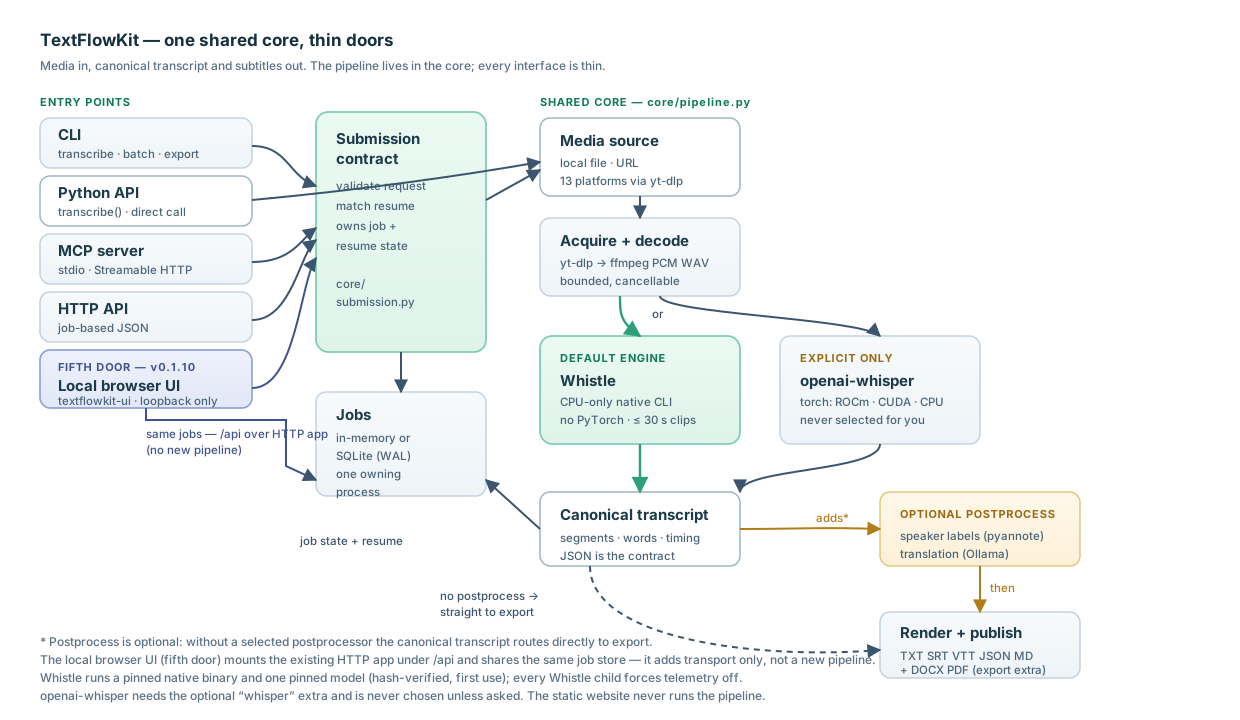
The design principle is one shared core, thin doors. Everything of substance lives in the core; the interfaces are thin — the local browser UI is a fifth door that adds only transport over the existing HTTP app and shared job store.
| Layer | Path | Responsibility |
|---|---|---|
| Core | src/textflowkit/core |
Canonical transcript model, pipeline orchestration |
| Sources | src/textflowkit/sources |
Per-platform URL normalization + media acquisition |
| Renderers | src/textflowkit/render |
TXT / SRT / VTT / JSON / Markdown / DOCX / PDF output |
| CLI | src/textflowkit/cli.py |
Reference interface (subprocess-friendly) |
| MCP | src/textflowkit/adapters/mcp_server.py |
stdio + Streamable HTTP, for AI harnesses |
| HTTP | src/textflowkit/adapters/http_server.py |
JSON API, for software products and web frontends |
| Local UI | src/textflowkit/ui |
Loopback-only browser workspace over the same HTTP app and job store |
Because the core owns the pipeline, adding a door is cheap — and adding a platform means writing one source adapter, not another tool.
For the job lifecycle, process ownership, checkpoints, and output publication, see docs/architecture.md.
Live microphone streaming (opt-in)
In v0.1.12, live streaming supports Windows x86_64 only. When
TEXTFLOWKIT_STREAMING=1 is set, the developer HTTP app serves a /stream
WebSocket and the local UI serves /api/stream, both transcribing a live microphone
as you speak. A runnable, self-hosted browser example ships at
/streaming-example (and /api/streaming-example under the UI): it captures with an
AudioWorklet, resamples any device rate to 16 kHz mono, and shows the transcript.
No CDN, no analytics, no external fetch. Requires the streaming extra:
python -m pip install "textflowkit[streaming]==0.1.12"
It is off by default — with the switch unset the endpoint does not exist — and
loopback-only: auth is fail-closed, so the UI accepts only its own origin and
capability, the standalone API requires TEXTFLOWKIT_API_TOKEN (even in developer
mode), and a separate origin — including the standalone browser example's own origin —
may stream only if listed in TEXTFLOWKIT_STREAMING_ORIGINS. The standalone
textflowkit CLI is unaffected: it does not open a microphone or a streaming socket.
Bounded live runs are verified on the native engine here — 65 s and 300 s
end-to-end on Windows x86_64; the transport and the browser resampler are covered by
tests, and a physical browser microphone has not yet been captured (the browser proof
drives the page against a fake audio device). See
docs/streaming.md.
Recognized sources
YouTube · TikTok · Facebook · Instagram · Vimeo · Twitch · Bilibili · Rumble · Kick · Zoom · Medal · Loom · Dropbox — plus direct media URLs and local files.
All 13 are recognised through yt-dlp; only YouTube has an opt-in, maintained
live end-to-end smoke. It is run on a Windows
maintainer machine before a release, not on GitHub-hosted runners or every pull
request. Local files have also been transcribed live. The other
12 are not release-verified end to end, and some sources require cookies or
change their access rules frequently. See docs/sources.md.
Install
Requires Python ≥ 3.10 and ffmpeg on PATH.
python -m pip install textflowkit
textflowkit doctor
The default engine is Whistle: a native CPU-only transcription CLI that
needs no PyTorch. It downloads one pinned model (about 17 MB) and a small pinned
binary on first use; a fresh default install therefore stays small and pulls no
torch. To use the openai-whisper engine instead — the ROCm/CUDA/CPU torch
stack — install the whisper extra and name it explicitly:
python -m pip install 'textflowkit[whisper]'
textflowkit transcribe meeting.mp4 --engine whisper --model small
See Whistle (default engine) for platform and
language coverage, and the install guide
for the AMD ROCm path, which applies to the explicit whisper engine and
diarization.
For MCP or the JSON HTTP adapter, install the matching extra:
python -m pip install 'textflowkit[mcp]'    # MCP server
python -m pip install 'textflowkit[http]'   # JSON HTTP API
PDF/DOCX export is optional. The default wheel stays small; the export extra
installs textflowkit-fonts for offline multilingual PDF rendering:
python -m pip install 'textflowkit[export]'
Windows desktop installer (v0.1.12; public EXE pending)
An installer for the existing local browser workspace accompanies core v0.1.12. The native Windows installer has been built and tested locally. The installer recipe ships in v0.1.12; the EXE remains local-only until unresolved corresponding-source compliance review is cleared. No public installer download link is available. The Python package remains supported for developers and integrations.
The candidate is designed to run without a separately installed Python, WSL, or
Docker. Its bundle includes a private embeddable CPython runtime, the
browser UI and HTTP, export, and streaming dependencies, the pinned Whistle model
and runtime, and ffmpeg, ffprobe, and Node. The setup installs per user,
creates a Start Menu shortcut, and offers an optional desktop shortcut. Opening
the shortcut will start the local server and open the existing browser UI at
localhost. It is designed to need no administrator rights in normal use, change
no global PATH, and avoid automatic updates.
The pinned Whistle assets and media binaries are prebundled, so local file jobs
need no first-use asset download. URL sources still need their normal network
access. The default Whistle engine supports only these seven advertised languages:
en, de, fr, es, it, nl, and pl. Optional openai-whisper and diarization dependencies are not
bundled; those features remain documented for the Python package when separately
installed and configured. Streaming dependencies are bundled, but live streaming
remains opt-in and physical browser microphone capture has not been verified.
The candidate is designed to keep UI data outside the application install directory and preserve it on upgrades and uninstall. Stop the UI server with Stop server and wait for it to exit before upgrading or uninstalling; the installer will block while it is running rather than force-killing active jobs. Cancel a job first if it should not drain to completion. The bundle also includes third-party license and notice files, including FFmpeg's LGPL notices and corresponding-source information. Check exact notices and source-distribution details against the final bundled binaries before publication. The candidate is unsigned, so Windows may show a SmartScreen warning. See the installer candidate notes.
Python API
The same pipeline used by the CLI and adapters is available to Python callers:
from textflowkit import transcribe

result = transcribe(
    "meeting.mp4",            # also accepts supported URLs
    formats=["json", "srt", "txt"],
    output_dir="transcripts", # omit to return the transcript without writing files
)
print(result.transcript.text)
print(result.transcript.duration)  # full media duration in seconds
print(result.outputs)              # pathlib.Path objects for written files
for segment in result.transcript.segments:
    print(segment.start, segment.end, segment.speaker, segment.text)
    for word in segment.words:
        print("  ", word.start, word.end, word.text)
engine defaults to the product default (Whistle) and model=None resolves to
that engine's own model. To use the Whisper-family engines, name one and its
model explicitly: transcribe("meeting.mp4", engine="whisper", model="small").
transcribe() returns TranscribeResult with a canonical Transcript and
written output paths. Transcript.to_dict() / .to_json() preserve segment and
word timing; older transcript JSON without words remains readable. Pass
input_root= to confine local input paths for untrusted callers. See
the install guide
for ffmpeg and Windows ROCm setup.
MCP and HTTP transcript reads omit word timings by default to keep responses
small; set include_words=true on a JSON read to receive them. Saved files,
Python results, and durable job records still retain the source-language words,
including when segment text has been translated.
AMD ROCm on native Windows: do not use the generic command in an environment with a working ROCm PyTorch install. Ordinary dependency resolution can replace that torch build. Follow the ROCm install notes to preserve it.
The same version's wheel and source archive are also on the
GitHub release page.
Starting with v0.1.6, every release published by this project's release
workflow carries a SHA256SUMS asset listing the SHA-256 hash of each wheel and
source archive it contains, so you can check a download with
sha256sum -c SHA256SUMS. Releases published before that change, v0.1.5
included, have no such asset. For editable source development, see
CONTRIBUTING.md.
Usage
# transcribe a URL or a local file
textflowkit transcribe "https://www.youtube.com/watch?v=..."

# pick formats and an output directory
textflowkit transcribe ./talk.mp4 --formats srt,vtt,txt,json --output-dir ./out

# force a language instead of auto-detecting
textflowkit transcribe "$URL" --language en

# translate the transcript (uses the configured backend)
textflowkit transcribe "$URL" --translate-to Spanish

# label speakers (requires the optional extra and a Hugging Face token)
textflowkit transcribe "$URL" --diarize

# resume a previous run instead of starting over
textflowkit transcribe "$URL" --resume
Resume reuses completed work from an earlier run. It needs two things: the
same source, model, language, and options as the original run, and a durable job
store (TEXTFLOWKIT_DB) - a checkpoint cannot outlive a process that kept it in
memory. For a local file, a completed-job resume checks the file still exists
and matches its checkpointed normalized path, size, and SHA-256 content digest.
Missing or changed files fail with an actionable error; v0.1.1-era local
checkpoints without a fingerprint must be resubmitted without --resume.
For URLs, resume deliberately reuses the saved transcript by URL/options; it
does not assert that the remote bytes are still identical.
# re-render an existing transcript in another format
textflowkit export ./transcript.json --format vtt
Whistle (default engine)
Whistle is the default engine as of v0.1.9. It is a native CPU-only CLI that
needs no PyTorch, so a fresh pip install textflowkit stays small and pulls no
torch; openai-whisper is an explicitly selectable opt-in engine.
- CPU only, no torch. It runs a pinned native binary and downloads one pinned
model on first use. Naming a GPU device is refused rather than silently
ignored: a GPU request names the explicit
whisperengine as the alternative, and the engine is never switched for you. - Seven advertised languages:
en,de,fr,es,it,nl,pl. A request for another language is refused at request construction, before any media is fetched. - Native platforms: Windows x86-64 and arm64, Linux x86-64 and arm64, and
Apple Silicon. Intel Macs are not supported; a request there is refused
with a message that names the explicit
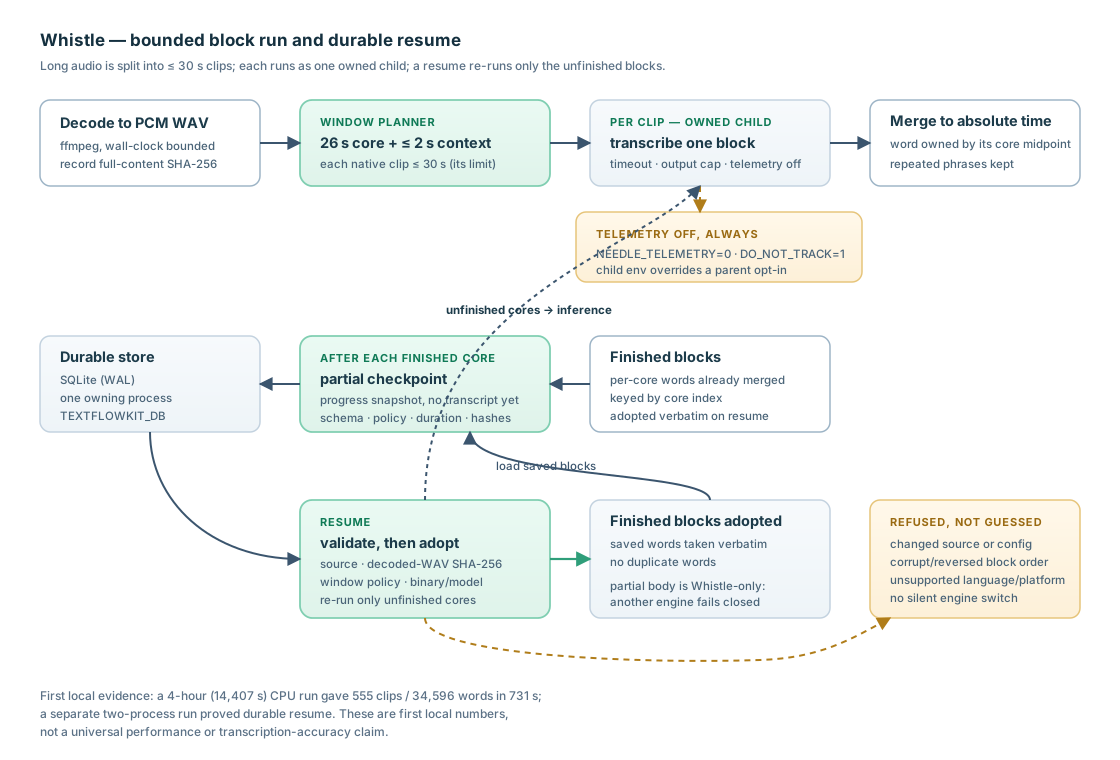
whisperengine instead. No WSL layer is involved. - How it works: long audio is split into 26-second cores with up to 2 seconds of context on each side, so every standalone clip is ≤ 30 seconds (the native CLI's limit). Overlap words are selected by core midpoint rather than text deduplication, so repeated spoken phrases are preserved.
- Standalone streaming is not used. The native
--audio-streammode failed its coverage and is never passed; only the committed standalone output is parsed. - Durable block resume. With
TEXTFLOWKIT_DBset, a long run writes partial per-block checkpoints; a resume checks the source and decoded-WAV hashes and the config, then re-runs only the blocks that were not finished. The durable store still assumes one owning process. - Cancellation. A running Whistle run terminates its exact owned child
process bounded by a per-clip timeout. A single long
openai-whispermodel call is still only cancellable at its next stage boundary, as documented for the Whisper engine. - Telemetry is off, unconditionally. Every Whistle child process forces
NEEDLE_TELEMETRY=0,DO_NOT_TRACK=1, andCI=1, overriding a parent that opted in. The product ships no analytics, usage SDK, anonymous ids, or events, and there is no opt-in setting. This applies the upstream documented gate; it is not a claim that the upstream binary's tracking code is physically removed. - Offline and downloads. Set
TEXTFLOWKIT_OFFLINEto refuse any download, andTEXTFLOWKIT_MODELS_DIRto choose the asset directory. The Whistle asset helper downloads only pinned runtime/model assets; media acquisition and optional translation may independently use the network. These downloads are not telemetry.
Verification boundary. A local run transcribed a 4-hour (14,407 s) recording on CPU into 555 clips / 34,596 words / 2,875 segments in 731 s, with telemetry forced off and offline mode on; a separate run proved durable block resume across two processes. These are first local test numbers, not a promise of universal performance or of accuracy equal to Whisper — no human-scored word-error rate is claimed. See the user manual and install guide.
Use as an MCP server
python -m pip install 'textflowkit[mcp]'
textflowkit-mcp                                  # stdio
textflowkit-mcp --transport http --port 8766     # Streamable HTTP
Tools: transcribe_media, submit_batch_media, resume_job,
get_job_status, get_transcript,
export_transcript, list_sources, list_jobs, cancel_job,
search_transcript.
Connection-smoked against DSH, Claude Code, OpenCode, and Codex desktop. These checks are not end-to-end transcription runs driven by each harness:
-
DSH - the server spawned as a child of the harness's MCP client, which then completed an MCP handshake, discovered the tools, and returned real data from a
list_sourcescall. -
Claude Code -
claude mcp listreportstextflowkit: √ Connected(stdio). -
OpenCode -
opencode mcp listreportstextflowkit connectedover Streamable HTTP. -
Codex desktop - after repair of an unrelated model-catalog issue, a live
list_jobstool call succeeded. This does not prove every tool or a full transcription in Codex.
There is also a protocol test that launches the server as a real subprocess and
speaks newline-delimited JSON-RPC over stdio, so the entry point, framing, and
version negotiation are covered on every CI run (tests/test_stdio_protocol.py).
See docs/adapters.md for per-harness configuration.
Use as an HTTP API
python -m pip install 'textflowkit[http]'
textflowkit-http --port 8767
Submit a job, poll it, fetch the transcript. Developer mode is unauthenticated and defaults to localhost. The opt-in JSON HTTP production profile requires a Bearer token, explicit roots, durable SQLite jobs, and request/rate/media/output limits; URL input additionally requires an SSRF-filtering egress proxy. See adapter deployment details.
A Dockerfile and a compose.yaml for that profile sit at the repository root:
ffmpeg and a JavaScript runtime in the image, a nonroot runtime user, the host
port published to loopback only, and a token the operator supplies (there is no
default). This is a Linux deployment example, not a published service - it
ships no TLS gateway and no egress proxy, so URL jobs fail closed until you
provide one. The image has not been built or started anywhere: only static
contract checks cover it, and running an actual build is deliberately out of
scope here, so no image is claimed to build or start. See
the container example.
Local browser interface
For point-and-click use there is a local browser workspace that runs on this
machine only, reuses the same pipeline and job store, and adds no dependency of
its own beyond the http extra. It ships with the core package as of v0.1.10:
a regular install of the current release carries it.
python -m pip install 'textflowkit[http,export]==0.1.12'
textflowkit-ui
On Windows you can create a desktop shortcut when you want one:
textflowkit-ui --create-shortcut                 # Start Menu entry (pythonw, no console)
textflowkit-ui --create-shortcut --shortcut-dir 'C:\path\to\folder'
The shortcut is created only on request and needs no pywin32. Under pythonw
there is no console, so a startup failure is written to a log file under the
per-user data directory and shown in a message box rather than failing silently.
The normal operator path is to launch from that shortcut; the console command
above is equivalent.
This is a local app, not a public website. The landing page is static documentation served by Cloudflare Pages; it does not run the transcription engine and offers no upload form. The browser workspace exists only on the machine that installed it.
- Loopback only. It binds
127.0.0.1(never off the machine, whateverTEXTFLOWKIT_ALLOW_REMOTEis set to) and opens a browser once it is serving. - One owner per database. A second launch against the same database opens the UI already running rather than starting a competing server. Stop server in the workspace shuts the local server down without a terminal, waiting for the current jobs to finish rather than interrupting them. Shutdown drains — it lets in-flight jobs complete; it does not auto-cancel them. Cancel a job first to stop it early.
- Durable jobs with cancel and resume. Jobs and checkpoints are stored
durably under the per-user data directory unless you set
TEXTFLOWKIT_DB/TEXTFLOWKIT_WORK_ROOT/TEXTFLOWKIT_OUTPUT_ROOT. A dropped file is capped at 2 GiB by default (TEXTFLOWKIT_UI_MAX_UPLOAD_BYTESoverrides it). In-workspace playback uses the browser's native player on the currently selected media, so it depends on what that browser can decode; it is a convenience preview, not a format guarantee. - No UI analytics. The page loads no CDN asset and no analytics, and the session token lives only in the page — never in a URL, cookie, or log line.
- What uses the network. The page itself loads nothing remote. A URL source is downloaded from the internet; an engine's model may be downloaded on first use; and remote or cloud translation (an advanced option) sends transcript text to that backend. With local media and a local translation model, no transcript leaves the machine.
--port,--no-browser, and--versionare available.
The other doors are unchanged: the CLI, Python API, MCP, and HTTP adapters keep their existing behavior, and the optional engines, diarization, and translation retain their documented dependency requirements. See the user manual and architecture guide.
Durable, bounded, cancellable
TEXTFLOWKIT_DB=./jobs.db            # job state survives restart (SQLite)
TEXTFLOWKIT_MAX_CONCURRENCY=1        # default; bounded job worker pool
cancel_job stops a queued job immediately, or a running job at its next stage
boundary. See docs/adapters.md.
Long jobs never block
The MCP and HTTP adapters are job-based: submission returns a job id immediately and clients poll for completion. The CLI uses the same core but waits for the result. This lets AI harnesses, software products, and the local browser interface share the job contract without blocking a request.
Status
v0.1.12 release. Adds optional UI-only local Ollama proofreading and native
Windows installer packaging; public EXE distribution remains gated on unresolved
corresponding-source compliance review, with no public installer download link.
Existing optional live streaming provides a transport-neutral
StreamingSession Python API, incremental transcript events, and authenticated
loopback WebSockets (/stream on the developer HTTP API and /api/stream on the
local UI), with a packaged browser microphone example. The native live capability
supports Windows x86_64 only and uses one owned child with a separately pinned
libneedle3.dll. The streaming extra supplies the WebSocket dependency;
TEXTFLOWKIT_STREAMING=1 enables the server routes. Streaming is off by default.
Existing file and URL transcription, CLI, MCP, durable jobs, and local browser
workspace defaults remain unchanged. Whistle stays the CPU-only standalone default;
openai-whisper remains an explicit opt-in engine. The local browser workspace
introduced in v0.1.10 still needs only the http extra for its ordinary job flow.
Fonts remain 0.1.6. Live sessions are ephemeral and have no durable resume.
Streaming evidence. Local English PCM runs exercised the native core for 65 s and 300 s; a separate assembled UI WebSocket run fed prerecorded PCM at real time for 12 s and returned incremental events and a final transcript. Browser lifecycle and resampling checks used fake audio. Physical browser microphone capture, live Linux/macOS, and the six other accepted languages were not verified. The public website remains static documentation and serves no streaming endpoint. Local source validation does not establish published-package or exact-commit CI results.
Verification limit. The local browser interface is covered by an automated suite, and the UI's behavior was proved on a native Windows machine in a real browser. No live optional-backend (translation/diarization) run through the UI is claimed, and no live Linux or macOS UI run was performed here — those platforms are covered by automated tests only, and CI across Windows, Linux, and macOS is a separate release gate. Release publication uses the tag workflow, which requires successful exact-commit main CI before PyPI uploads and creates the public GitHub release only afterward. Check the linked release for artifacts and workflow status; local source verification is not a fresh PyPI-install or individual-harness receipt.
The v0.1.8 release carried four fixes for the 2026-10-01 post-release audit-lite (findings AL-001 – AL-004): CLI owning-process startup recovery so an interrupted run's saved work can be resumed instead of being refused as "already active", preservation of the completed transcript across resume setup failures, a correction to the MCP batch cookie capability, and corrected roadmap evidence receipts. It built on the v0.1.7 audit repair set and the v0.1.6 review repairs that precede it. The v0.1.7 source candidate was verified with real CLI, HTTP and MCP speech, seven-format exports and completed resume; the v0.1.8 runtime fixes were independently checked through fresh-process CLI restart probes, real SQLite setup-failure tests, and the full Windows test suite. Those checks are not new individual-harness receipts. That is the previous releases' record, not evidence for v0.1.12.
The v0.1.6 release was the post-v0.1.5 review repair set: security hardening
for media acquisition and the HTTP and MCP adapters, safer subtitle wrapping and
output-file publication, job and checkpoint storage corrections, an opt-in
faster-whisper engine, a container example, and fail-closed release guards for
tagged versions, README claims, and exact-commit CI.
The v0.1.5 release added a speech-bearing self-test, full-media duration,
retained word timings, optional PDF fonts, and tokenless PyPI publishing.
Windows-native ROCm and a local Windows YouTube run on the v0.1.5 release commit
were verified. That run's receipt records the clip, timestamps, and hashes; the
checklist's recognized-speech assertion was added after it, so treat it as shape
evidence for that commit rather than proof of what was said.
The v0.1.6 release is public: the
v0.1.6 GitHub release
and both core and
fonts PyPI projects are
live — that is the v0.1.6 release's evidence, not a receipt for a later release.
Everything from here to the end of this section is the v0.1.6 release's
historical record as published: it is not re-verified for v0.1.12, whose separate release evidence is not supplied by these historical paragraphs.
Merged-main CI passed 16/16 on the tagged commit; the published wheel and
sdist digests match the GitHub release assets and their SHA-256 list; and a fresh
Windows Python 3.12 install of textflowkit[export,mcp,http]==0.1.6 from PyPI
passed doctor, selftest, and a tiny CPU transcription to JSON and PDF. A
local native-Windows YouTube run on the same commit returned 3 timestamped
segments and a whole-word elephants match; its receipt is stored outside this
repository. One clip is not proof of the other 12 recognized platforms or of
general accuracy.
The GitHub-hosted YouTube attempt was blocked by a bot challenge, so hosted
live transcription is not verified.
This does not imply that all 13 platforms or every harness workflow has been
tested end to end. See the user manual
and roadmap.
⚠️ NO WARRANTY — AS IS
This software is provided "AS IS", WITHOUT WARRANTY OF ANY KIND, express or implied, including but not limited to the warranties of MERCHANTABILITY, FITNESS FOR A PARTICULAR PURPOSE, and NONINFRINGEMENT. See LICENSE (Apache-2.0, §7–8) for the full disclaimer and limitation of liability.
You are responsible for what you transcribe. textflowkit can fetch media from third-party platforms. Copyright, terms-of-service, and privacy obligations for any media you choose to process are yours alone. See LEGAL.md.
License
Apache-2.0 — see LICENSE. Includes an explicit patent grant and a limitation of liability.
Contributing
Issues and PRs welcome. Please read LEGAL.md before adding a source adapter.
Optional local AI transcript cleanup (v0.1.12)
v0.1.12 adds opt-in proofreading in the local browser UI only. After a transcription finishes, choose an
installed local Ollama model and click Proofread with local AI. Cleanup never
runs automatically. Ollama and cleanup models are not bundled in the installer.
The optional default preference is qwen3.5:9b only if already installed; its
size/performance fit has not been verified. Otherwise choose an installed local
model explicitly, such as qwen3.8:27b-q4_K_M. Larger models are never silently
selected. Install a model yourself through Ollama when needed; TextFlowKit does
not pull models, enable cloud tags, or use a paid provider.
The original transcript, job JSON, original copy button, search, and all existing exports remain unchanged. Choose Original only or compare source original (left) / AI corrected (right) in timestamp-anchored rows. Use Copy corrected text or Save corrected TXT for the separate AI variant. The comparison proofreads original source speech, not an optional translation. AI can make plausible but wrong corrections, including names and facts: review against the original and audio before using it. Prompt instructions reduce errors but do not guarantee accuracy or resistance to instructions embedded in speech.
Corrected segments retain source start/end timestamps and stable zero-based
original segment indices. They have no inherited word alignment or translation;
corrected word timing is not verified. A separate persisted variant records
local provider, requested/returned model, UTC completion time, endpoint, successful
done_reason=stop, policy version and original SHA-256. If original job JSON
changes, its correction is invalidated. No partial replacement is published: bad,
truncated, missing, duplicated, reordered or extra segments fail the entire attempt.
A failed retry retains an earlier fully validated variant only if its original
hash still matches.
Cleanup uses a separate SQLite file named <job database filename>.cleanup.sqlite3
beside TEXTFLOWKIT_DB (or the UI default database). Include it when backing up UI
data; it contains transcript text and provenance. The canonical job store is never
updated by cleanup. Reloading/reopening a completed job retrieves its saved variant,
even if Ollama is offline. Model selection is per attempt; it is not a global
transcription/translation model setting.
Configuration is process-local environment, consistent with the existing UI:
TEXTFLOWKIT_CLEANUP_OLLAMA_URL: defaulthttp://127.0.0.1:11434; only HTTP on a literal loopback IP and explicit port is accepted (IPv6[::1]also works). DNS names, credentials, other paths, remote hosts and redirects are refused; proxy environment variables are ignored by the cleanup client.TEXTFLOWKIT_CLEANUP_MODEL: optional preferred installed local tag; defaults toqwen3.5:9b. If absent from installed tags, explicit selection is required. Cloud tags and Ollama remote-model metadata are refused.
One cleanup runs at a time; the browser polls a background worker and remains usable. Limits: 2,000 segments, 120,000 source characters, 60 chunks, at most 1,000 UTF-8 encoded bytes per chunk and 40 segments per chunk. A small read-only neighboring context helps with sentences spanning segments without merging them. Generation requests use temperature 0, thinking disabled, context 8,192 and at most 4,096 generated tokens per chunk. Requests have a 180-second socket timeout, bounded response reads (1 MiB), and strict 64 KiB model JSON limits. The overall work budget remains 600 seconds, checked between requests and reads; a blocking socket operation can take up to its remaining request timeout before failure is observed. Oversize or timeout failures leave the original available.
Normal UI shutdown drains an active cleanup (it can take several minutes); there is no cleanup cancellation button. Abrupt process exit leaves no partial variant; an interrupted running lease becomes retryable after at most 785 seconds from its start. Cleanup does not restart Ollama or stop/unload other models. Model text is rendered with DOM text nodes, never HTML. Cleanup adds no Python dependency, telemetry, cloud provider or network destination beyond the configured local Ollama service. Existing media acquisition/translation network behavior is separate.
Candidate validation status
The first cold full-UI attempt ended with a generic error and produced no variant;
the original remained intact. A subsequent hot 39-segment run returned zero text
edits despite clear source spelling errors, so it was not useful cleanup-quality
evidence. The final cold run began with the model explicitly unloaded and
completed all 39 segments in three chunks at
2026-10-16 17:39:52 UTC. It used matching requested/returned
qwen3.8:27b-q4_K_M and changed four segments. The original SQLite JSON matched
the source file, with segment IDs and timestamps preserved. The in-app-browser
side-by-side comparison was visible, and Save corrected TXT produced a
2,516-byte file whose SHA-256 matched the validated variant.
Observed edits included “guardrails,” “precludes,” and punctuation. “Fundamental” and “victims” were plausible guesses, not verified against the audio. This is measured evidence that the local full workflow completed and saved its separate variant for this run; it does not establish transcription accuracy or general cleanup quality. Review every correction against the audio. This is local workflow evidence, not an audio-accuracy certification.
1 maintainer

Metadata
1 maintainer
Release files for textflowkit 0.1.12
For a detailed explanation of source distributions (sdists) and built distributions (wheels), please see the package formats documentation.
Source distribution (sdist)
| File | Size | Uploaded | |
|---|---|---|---|
| textflowkit-0.1.12.tar.gz | 1.0 MB | Details |
Built distribution (wheel)
| File | Interpreter | ABI | Platform | Reset |
|---|---|---|---|---|
| textflowkit-0.1.12-py3-none-any.whl | Python 3 | none | any | Details |
Total release size: 1.5 MB
Release files / textflowkit-0.1.12.tar.gz
| Download URL | textflowkit-0.1.12.tar.gz |
|---|---|
| Size | 1.0 MB |
| Tags | Source |
|
SHA-256 checksum How to use checksums |
4e66a8a203d45bc324abf58b03228e518312dd928b0a6c395dea416c9d74aa4a
|
|
BLAKE2b-256 checksum How to use checksums |
a26d1497e2e206b2108a17adc530a7dc7577b105536a2b891ac4de12a7b6ba47
|
| Upload date | |
|
Uploaded using Trusted Publishing? What is trusted publishing? |
Yes |
| Uploaded via |
twine/7.0.0 CPython/3.13.14
|
Provenance
Provenance describes where a file came from. On PyPI, provenance is shared via attestations, which provide a verifiable record of the build or publishing details. View details, limitations and caveats.


PyPI Publish Attestation
PyPI verified that this artifact, at this checksum, originated from the publisher listed below.
Signed by GitHub Actions, verified by PyPI on Oct 17, 2026.
Transparency logRelease files / textflowkit-0.1.12-py3-none-any.whl
| Download URL | textflowkit-0.1.12-py3-none-any.whl |
|---|---|
| Size | 464.0 kB |
| Tags | Python 3 |
|
SHA-256 checksum How to use checksums |
7f50642137bea2c4cd2c4173ce05ff682ab5d2fc4b7d243c709ca845f091ada8
|
|
BLAKE2b-256 checksum How to use checksums |
0b0f41fe9a54fa274b0d01d55df3c9a6c12707486c7b47c0f0bb71f794e812dd
|
| Upload date | |
|
Uploaded using Trusted Publishing? What is trusted publishing? |
Yes |
| Uploaded via |
twine/7.0.0 CPython/3.13.14
|
Provenance
Provenance describes where a file came from. On PyPI, provenance is shared via attestations, which provide a verifiable record of the build or publishing details. View details, limitations and caveats.
PyPI Publish Attestation
PyPI verified that this artifact, at this checksum, originated from the publisher listed below.
Signed by GitHub Actions, verified by PyPI on Oct 17, 2026.
Transparency log













