
textomatic
Scratchpad for tabular data transformations
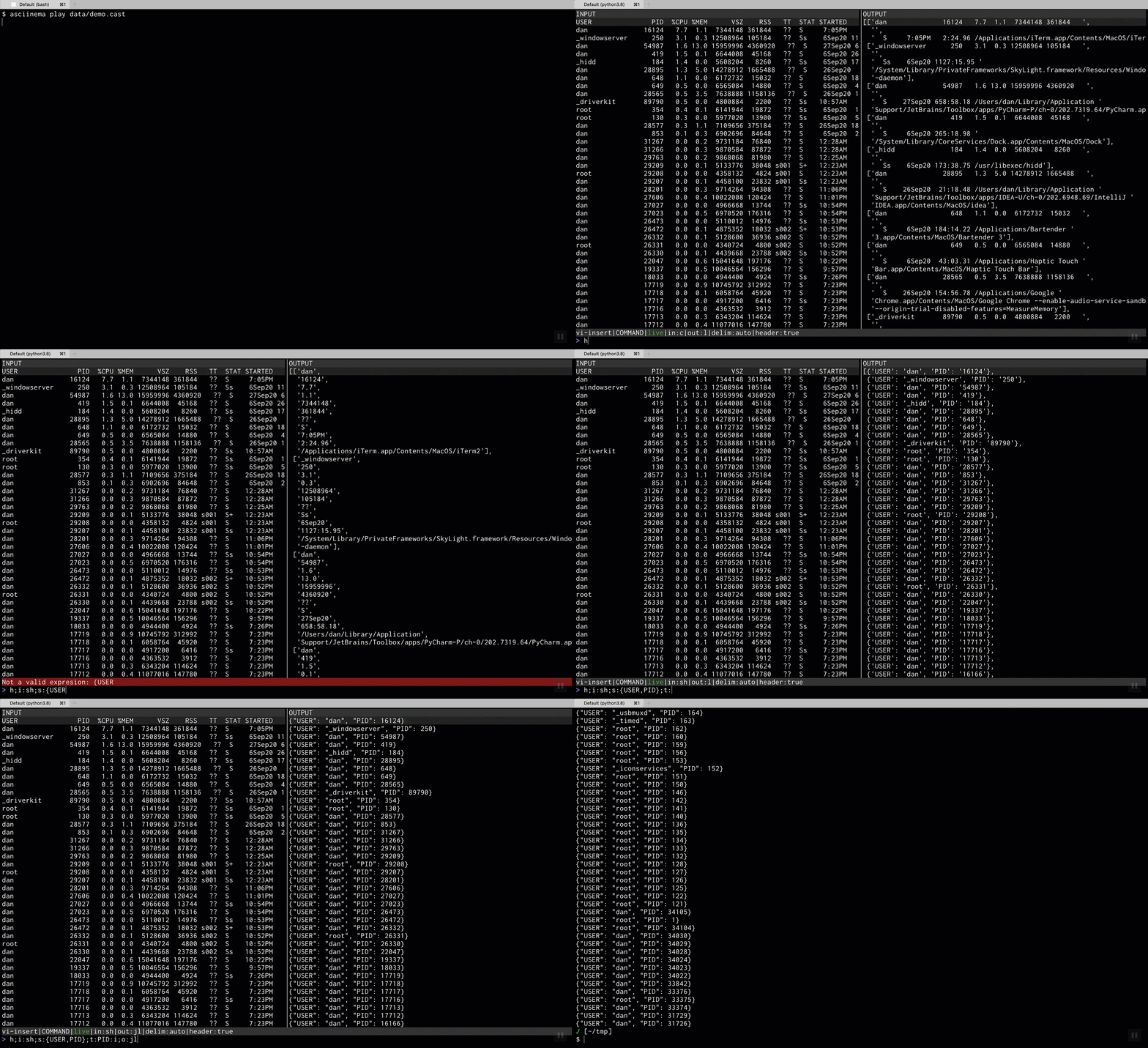
Given input of some tabular data (AKA INPUT),
and a command (AKA COMMAND), transform that input
into some other output (AKA OUTPUT).
Installation
pip install textomatic
At the moment, Python 3.8 or greater is required.
Running
Start it by running
$ tm
The above will start textomatic with a blank slate.
You can load a file by passing it as the first argument:
$ tm <PATH_TO_FILE>
You can also pipe content from stdin:
$ ls | tm
To see what arguments/options are available, run:
$ tm --help
When textomatic is running, type F1 to see available keyboard shortcuts.
To exit textomatic use CTRL-C to exit without any output or CTRL-O to print
current OUTPUT into standard out.
Use CTRL-P to put the current OUTPUT in the system clipboard.
Examples
Parsing ps aux output
Pipeing content from shell using ps aux | tm and transforming it into json lines where
each line containes the USER and PID columns with lower cased keys.
PID is casted into an integer.
COMMAND:
hsaysINPUTincludes a headeri:shsays theINPUTshould be parsed like shell outputs:{user:USER,pid:PID}specifies the output structureo:jlspecifies the output format to be json linest:PID:ispecifies thePIDcolumn shouldd ge parsed as integer
INPUT                                  │OUTPUT
USER               PID  %CPU %MEM      │{"user": "dan", "pid": 63507}
dan              63507   6.3  0.4  6178│{"user": "_windowserver", "pid": 250}
_windowserver      250   4.4  0.3 12494│{"user": "dan", "pid": 54987}
dan              54987   3.8 12.8 16080│{"user": "_hidd", "pid": 184}
_hidd              184   2.0  0.0  5608│
                                       │
                                       │
                                       │
                                       │
                                       │
                                       │
                                       │
                                       │
                                       │
                                       │
                                       │
                                       │
                                       │
                                       │
                                       │
                                       │
vi-insert|COMMAND|live|in:sh|out:jl|delim:auto|header:true
> h;i:sh;s:{user:USER,pid:PID};o:jl;t:PID:i
Pretty printing csv
COMMAND:
hsaysINPUTincludes a headero:tspecifies the output format to be a pretty printed table
INPUT                                  │OUTPUT
Name,Age,City                          │╒═══════════╤═══════╤════════╕
James Joe,34,NYC                       ││ Name      │   Age │ City   │
John Doe,25,London                     │╞═══════════╪═══════╪════════╡
                                       ││ James Joe │    34 │ NYC    │
                                       │├───────────┼───────┼────────┤
                                       ││ John Doe  │    25 │ London │
                                       │╘═══════════╧═══════╧════════╛
                                       │
                                       │
                                       │
                                       │
                                       │
                                       │
                                       │
                                       │
                                       │
                                       │
                                       │
                                       │
                                       │
                                       │
vi-insert|COMMAND|live|in:c|out:t|delim:auto|header:true
> h;o:t
Correcting bad input
COMMAND:
hsaysINPUTincludes a headert:Age:i/76/provides a default value when theAgecolumn cannot be parsed as integer
INPUT                                  │OUTPUT
Name,Age,City                          │[['James Joe', 34, 'NYC'],
James Joe,34,NYC                       │ ['John Doe', 76, 'London'],
John Doe,Not a number,London           │ ['Jane Row', 24, 'Tel Aviv']]
Jane Row,24,Tel Aviv                   │
                                       │
                                       │
                                       │
                                       │
                                       │
                                       │
                                       │
                                       │
                                       │
                                       │
                                       │
                                       │
                                       │
                                       │
                                       │
                                       │
                                       │
vi-insert|COMMAND|live|in:c|out:l|delim:auto|header:true
> h;t:Age:i/76/
Interactive jq
COMMAND:
rputs evaluation into raw mode where input is not assumed to be raw basedo:jquse thejqoutput and pass arguments to it wrapped with backticks.
INPUT                                  │OUTPUT
{"one": 1, "two": 2, "three": 3}       │{"o":1,"t1":2,"t2":3}
{"one": 1.0, "two": 2.0, "three": 3.0} │{"o":1,"t1":2,"t2":3}
                                       │
                                       │
                                       │
                                       │
                                       │
                                       │
                                       │
                                       │
                                       │
                                       │
                                       │
                                       │
                                       │
                                       │
                                       │
                                       │
                                       │
                                       │
                                       │
vi-insert|COMMAND|live|in:c|out:jq|delim:auto|header:false|raw:true
> r;o:jq`{o: .one, t1: .two, t2: .three}`
Usage
textomatic is split into 3 parts:
INPUT: The input data that is to be transformedOUTPUT: The result of applying theCOMMANDonINPUTCOMMAND: The transformation logic using a succinct expression language described below
Use the Tab key to move between them.
INPUT and COMMAND are edited using vim bindings.
COMMAND Expression Language
COMMAND is composed of different parts separated by ;, e.g.
> h;i:c;o:jl;s:[1,2]
The above will be explained in detail later on but for now we can see it has 4 parts:
h: specifies that the inputcsvhas a headeri:cspecifies that the input is in fact acsvo:jlspecified that the output should be in jsonlines formats:[1,2]specifies that the output should only include the first and second columns from the input, in that order
To use a different expression separator, start the command with :<SEP>, e.g.
> :|h|i:c
Expressions
The h expression (header)
The simplest expression. It is basically a flag denoting whether the input
includes headers. This is relevent for inputs like csv
The d expression (delimiter)
Used by the csv input. In most cases, the delimiter can be automatically
deduced. In cases where it cannot, use d, e.g. to set a , delimiter:
> d:,
To specify delimiters that are not easy to input, start the delimiter with
\, the remaining part will then be parsed as a python literal
(wrapped in string), for example this will set the delimiter to the unicode
character ─ (U+2500):
> d:\u2500
The i expression (input)
Used to specify the input format. Currently these are the available inputs:
c(csv, this is the default. The delimiter musn't be a,as the name may imply)jl(jsonlines)sh(shell, e.g. the output ofps aux)jq(Using jq)
The o expression (output)
Used to specify the output format. Currently these are the available outputs:
l(python literal, this is the default)j(json)jl(jsonlines)c(csv)t(pretty printed table)h(table html)jq(Using jq)
The t expression (types)
For inputs with no clear types (e.g. csv/shell), all columns are initially assumed to
be strings. To modify types of different columns use t.
The types are:
s(string, the default)f(float)i(integer)b(boolean, case insensitivetrue/yes/y/on/1will be parsed astrue)j(json, will JSON parse the column)l(literal, will parse a python literal usingast.literal_eval)
Using positional syntax:
> t:i,i,b
In the above:
- the first 2 columns will be parsed as integers
- the third column will be parsed as boolean
- the rest will be strings
Using indexed syntax:
> t:1:i,3:f
In the above:
- the first column will be parsed as integer
- the third column will be parsed as float
- the rest will be strings
Using named syntax:
> t:col1:b,col4:i
In the above, assuming the input contains headers:
- the column named
col1will be parsed as boolean - the column named
col4will be parsed as integer - the rest will be strings
Optional types:
If a certain value may be invalid, you can use ? to
mark it as optional, in this case, its value will be
converted to null when it is invalid:
> t:col1:i?,col4:i?
Defaults:
If you want the specify a value different than null for invalid entries
use the following syntax:
> t:col1:i/0/,col4:f/0.0/
The value between the /'s will be evaluated as a python literal.
The s expression (structure)
The s expression is used to specify the structure of the OUTPUT.
Some of the options are catered to the python output but they will fallback
to a reasonable alternative for other outputs.
Simple transformations:
s:[]- Each row will be a list inOUTPUTs:()- Each row will be a tuple inOUTPUTs:{}- Each row will be an object inOUTPUT(assumes input has headers)s:d()- Same ass:{}s:s()- Each row will be as set inOUTPUT
Complex transformations:
s:[1,2,col6]- Each row will contain the first and second columns and a column namedcol6. Note that it is wrapped with[]. This only means the output row will be a list. You can just as well wrap it with{}to get objects e.g.s:{1,2,col6}. The different wrapping options are desribed in "Simple Transformations" of the previous section.s:{first:1,second:2}- Each row will contain the first and second columns with The specified new headers (firstandsecond)s:[-2,-1]- Each row will contain the two last columns fromINPUTs:{1,second:2}- Column definitions can be mixed.
Nested transformations:
s:[{1,2},{3,4}]- Each row will contain two objects, the first object will contain the first and second columns, the second object will contain the third and fourth columns.
Nesting can be as complex as you wish and rules from previous sections can be applied freely. As an overly complex example:
> s:{k1:1,k2:{2,three},k3:[{four,5},d(-4,s7:seven)],eight,k4:(one, two, (four, five)),s:s(1,1,1)}
Fetching values of nested data:
s:[some_obj.key1.key2]- Each row will contain a single nested value from thesome_objcolumn.s:[some_obj.key1?.key2]- Same as above, but don't fail ifkey1doesn't exist, instead, replace it withnull.s:[some_obj.key1?.key2/100/]- Same as above, but use100instead ofnull.s:[some_obj.key1.key2/100/]- Default value without optional?is equivalent tos:[some_obj?.key1?.key2?/100/]
A caveat of using // for default values is that the default value cannot
include /. This is mostly due to a very simple parser that is currently
implemented for the expression language.
1 maintainer

Metadata
1 maintainer
Release files for textomatic 0.3.0
For a detailed explanation of source distributions (sdists) and built distributions (wheels), please see the package formats documentation.
Source distribution (sdist)
| File | Size | Uploaded | |
|---|---|---|---|
| textomatic-0.3.0.tar.gz | 22.0 kB | Details |
Built distribution (wheel)
| File | Interpreter | ABI | Platform | Reset |
|---|---|---|---|---|
| textomatic-0.3.0-py3-none-any.whl | Python 3 | none | any | Details |
Total release size: 43.9 kB
Release files / textomatic-0.3.0.tar.gz
| Download URL | textomatic-0.3.0.tar.gz |
|---|---|
| Size | 22.0 kB |
| Tags | Source |
|
SHA-256 checksum How to use checksums |
efc7873e6348accd95f3ca2e4d02fecd3aa3cdba1f245052ddadc2ab66fdb278
|
|
BLAKE2b-256 checksum How to use checksums |
be9e50757321f0a68c06bfa957806bd9f8a47ee3dfa01819574b6076ecd14f21
|
| Upload date | |
|
Uploaded using Trusted Publishing? What is trusted publishing? |
No |
| Uploaded via |
poetry/1.0.10 CPython/3.8.5 Darwin/19.6.0
|
Release files / textomatic-0.3.0-py3-none-any.whl
| Download URL | textomatic-0.3.0-py3-none-any.whl |
|---|---|
| Size | 21.9 kB |
| Tags | Python 3 |
|
SHA-256 checksum How to use checksums |
d1b8ed7aa31388a64469e22ef4203d327974239672f5b8da3d56105651490f03
|
|
BLAKE2b-256 checksum How to use checksums |
628a4d894fd42e97bacdfd833c9e2596485916e683c1646eaa25bb6c0bdf9edf
|
| Upload date | |
|
Uploaded using Trusted Publishing? What is trusted publishing? |
No |
| Uploaded via |
poetry/1.0.10 CPython/3.8.5 Darwin/19.6.0
|














