
TextPrepro - Text Preprocessing




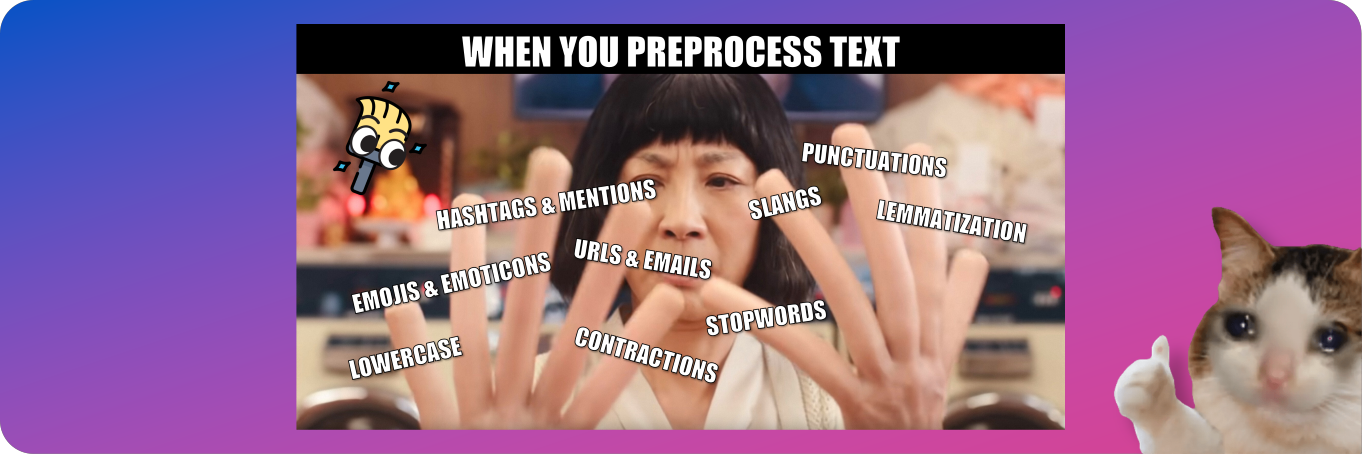
TextPrepro - Everything Everyway All At Once Text Preprocessing: Allow you to preprocess both general and social media text with easy-to-use features. Help you gain insight from your data with analytical tools. Stand on the shoulders of various famous libraries (e.g., NLTK, Spacy, Gensim, etc.).
Table of Contents
⏳ Installation
Simply install via pip:
pip install textprepro
or:
pip install "git+https://github.com/umapornp/textprepro"
🚀 Quickstart
-
🧹 Simply preprocess with the pipeline
You can preprocess your textual data by using the function
preprocess_text()with the default pipeline as follows:>>> import textprepro as pre # Proprocess text. >>> text = "ChatGPT is AI chatbot developed by OpenAI It is built on top of OpenAI GPT foundational large language models and has been fine-tuned an approach to transfer learning using both supervised and reinforcement learning techniques" >>> text = pre.preprocess_text(text) >>> text "chatgpt ai chatbot developed openai built top openai gpt foundational large language model finetuned approach transfer learning using supervised reinforcement learning technique"
-
📂 Work with document or dataFrame
You can preprocess your document or dataframe as follows:
-
If you work with a list of strings, you can use the function
preprocess_document()to preprocess each of them.import textprepro as pre >>> document = ["Hello123", "World!@&"] >>> document = pre.preprocess_document(document) >>> document ["hello", "world"]
-
If you work with a dataframe, you can use the function
apply()with the functionpreprocess_text()to apply the function to each row.import textprepro as pre import pandas as pd >>> document = {"text": ["Hello123", "World!@&"]} >>> df = pd.DataFrame(document) >>> df["clean_text"] = df["text"].apply(pre.preprocess_text) >>> df
text clean_text Hello123 hello World!@& world
-
-
🪐 Customize your own pipeline
You can customize your own preprocessing pipeline as follows:
>>> import textprepro as pre

# Customize pipeline.
>>> pipeline = [
        pre.lower,
        pre.remove_punctuations,
        pre.expand_contractions,
        pre.lemmatize
    ]

>>> text = "ChatGPT is AI chatbot developed by OpenAI It is built on top of OpenAI GPT foundational large language models and has been fine-tuned an approach to transfer learning using both supervised and reinforcement learning techniques"

>>> text = pre.preprocess_text(text=text, pipeline=pipeline)
>>> text
"chatgpt is ai chatbot developed by openai it is built on top of openai gpt foundational large language model and ha been finetuned an approach to transfer learning using both supervised and reinforcement learning technique"
💡 Features & Guides
TextPrep provides many easy-to-use features for preprocessing general text as well as social media text. Apart from preprocessing tools, TextPrep also provides useful analytical tools to help you gain insight from your data (e.g., word distribution graphs and word clouds).
-
📋 For General Text
👇 Misspelling Correction
Correct misspelled words:
>>> import textprepro as pre

>>> text = "she loves swiming"

>>> text = pre.correct_spelling(text)
>>> text
"she loves swimming"
👇 Emoji & Emoticon
Remove, replace, or decode emojis (e.g., 👍, 😊, ❤️):
>>> import textprepro as pre

>>> text = "very good 👍"

# Remove.
>>> text = pre.remove_emoji(text)
>>> text
"very good "

# Replace.
>>> text = pre.replace_emoji(text, "[EMOJI]")
>>> text
"very good [EMOJI]"

# Decode.
>>> text = pre.decode_emoji(text)
>>> text
"very good :thumbs_up:"
Remove, replace, or decode emoticons (e.g., :-), (>_<), (^o^)):
>>> import textprepro as pre

>>> text = "thank you :)"

# Remove.
>>> text = pre.remove_emoticons(text)
>>> text
"thank you "

# Replace.
>>> text = pre.replace_emoticons(text, "[EMOTICON]")
>>> text
"thank you [EMOTICON]"

# Decode.
>>> text = pre.decode_emoticons(text)
>>> text
"thank you happy_face_or_smiley"
👇 URL
Remove or replace URLs:
>>> import textprepro as pre

>>> text = "my url https://www.google.com"

# Remove.
>>> text = pre.remove_urls(text)
>>> text
"my url "

# Replace.
>>> text = pre.replace_urls(text, "[URL]")
>>> text
"my url [URL]"
👇 Email
Remove or replace emails.
>>> import textprepro as pre

>>> text = "my email name.surname@user.com"

# Remove.
>>> text = pre.remove_emails(text)
>>> text
"my email "

# Replace.
>>> text = pre.replace_emails(text, "[EMAIL]")
>>> text
"my email [EMAIL]"
👇 Number & Phone Number
Remove or replace numbers.
>>> import textprepro as pre

>>> text = "my number 123"

# Remove.
>>> text = pre.remove_numbers(text)
>>> text
"my number "

# Replace.
>>> text = pre.replace_numbers(text)
>>> text
"my number 123"
Remove or replace phone numbers.
>>> import textprepro as pre

>>> text = "my phone number +1 (123)-456-7890"

# Remove.
>>> text = pre.remove_phone_numbers(text)
>>> text
"my phone number "

# Replace.
>>> text = pre.replace_phone_numbers(text, "[PHONE]")
>>> text
"my phone number [PHONE]"
👇 Contraction
Expand contractions (e.g., can't, shouldn't, don't).
>>> import textprepro as pre

>>> text = "she can't swim"

>>> text = pre.expand_contractions(text)
>>> text
"she cannot swim"
👇 Stopword
Remove stopwords: You can also specify stopwords:
nltk,spacy,sklearn, andgensim.>>> import textprepro as pre >>> text = "her dog is so cute" # Default stopword is NLTK. >>> text = pre.remove_stopwords(text) >>> text "dog cute" # Use stopwords from Spacy. >>> text = pre.remove_stopwords(text, stpwords="spacy") >>> text "dog cute"
👇 Punctuation & Special Character & Whitespace
Remove punctuations:
>>> import textprepro as pre

>>> text = "wow!!!"

>>> text = pre.remove_punctuations(text)
>>> text
"wow"
Remove special characters:
>>> import textprepro as pre

>>> text = "hello world!! #happy"

>>> text = pre.remove_special_characters(text)
>>> text
"hello world happy"
Remove whitespace:
>>> import textprepro as pre

>>> text = "  hello  world  "

>>> text = pre.remove_whitespace(text)
>>> text
"hello world"
👇 Non-ASCII Character (Accent Character)
Standardize non-ASCII characters (accent characters):
>>> import textprepro as pre

>>> text = "latté café"

>>> text = pre.standardize_non_ascii(text)
>>> text
"latte cafe"
👇 Stemming & Lemmatization
Stem text:
>>> import textprepro as pre

>>> text = "discover the truth"

>>> text = pre.stem(text)
>>> text
"discov the truth"
Lemmatize text:
>>> import textprepro as pre

>>> text = "he works at a school"

>>> text = pre.lemmatize(text)
>>> text
"he work at a school"
👇 Lowercase & Uppercase
Convert text to lowercase & uppercase:
>>> import textprepro as pre

>>> text = "Hello World"

# Lowercase
>>> text = pre.lower(text)
>>> text
"hello world"

# Uppercase
>>> text = pre.upper(text)
>>> text
"HELLO WORLD"
👇 Tokenization
Tokenize text: You can also specify types of tokenization:
wordandtweet.>>> import textprepro as pre >>> text = "hello world @user #hashtag" # Tokenize word. >>> text = pre.tokenize(text, "word") >>> text ["hello", "world", "@", "user", "#", "hashtag"] # Tokenize tweet. >>> text = pre.upper(text, "tweet") >>> text ["hello", "world", "@user", "#hashtag"]
-
📱 For Social Media Text
👇 Slang
Remove, replace, or expand slangs:
>>> import textprepro as pre

>>> text = "i will brb"

# Remove
>>> pre.remove_slangs(text)
"i will "

# Replace
>>> pre.replace_slangs(text, "[SLANG]")
"i will [SLANG]"

# Expand
>>> pre.expand_slangs(text)
"i will be right back"
👇 Mention
Remove or replace mentions.
>>> import textprepro as pre

>>> text = "@user hello world"

# Remove
>>> text = pre.remove_mentions(text)
>>> text
"hello world"

# Replace
>>> text = pre.replace_mentions(text)
>>> text
"[MENTION] hello world"
👇 Hashtag
Remove or replace hashtags.
>>> import textprepro as pre

>>> text = "hello world #twitter"

# Remove
>>> text = pre.remove_hashtags(text)
>>> text
"hello world"

# Replace
>>> text = pre.replace_hashtags(text, "[HASHTAG]")
>>> text
"hello world [HASHTAG]"
👇 Retweet
Remove retweet prefix.
>>> import textprepro as pre

>>> text = "RT @user: hello world"

>>> text = pre.remove_retweet_prefix(text)
>>> text
"hello world"
-
🌐 For Web Scraping Text
👇 HTML Tag
Remove HTML tags.
>>> import textprepro as pre

>>> text = "<head> hello </head> <body> world </body>"

>>> text = pre.remove_html_tags(text)
>>> text
"hello world"
-
📈 Analytical Tools
👇 Word Distribution
Find word distribution.
>>> import textprepro as pre

>>> document = "love me love my dog"

>>> word_dist = pre.find_word_distribution(document)
>>> word_dist
Counter({"love": 2, "me": 1, "my": 1, "dog": 1})
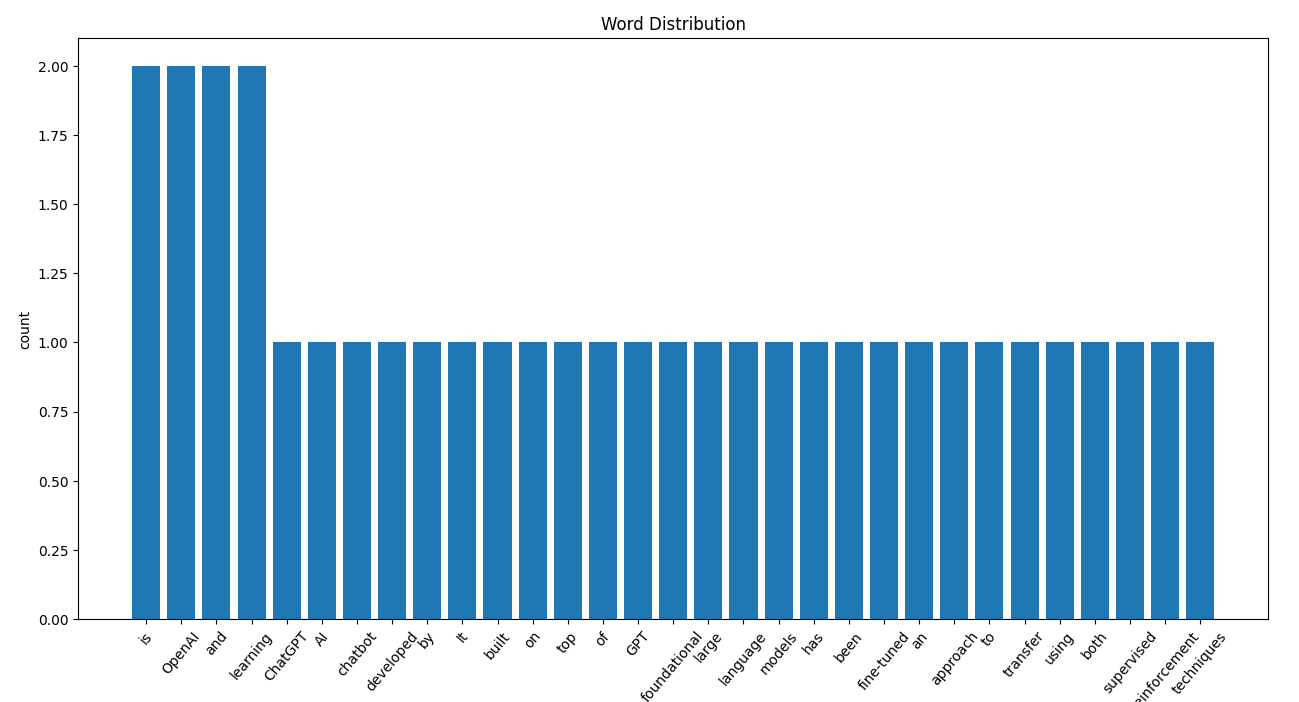
Plot word distribution in a bar graph.
>>> import textprepro as pre

>>> document = "ChatGPT is AI chatbot developed by OpenAI It is built on top of OpenAI GPT foundational large language models and has been fine-tuned an approach to transfer learning using both supervised and reinforcement learning techniques"

>>> word_dist = pre.find_word_distribution(document)
>>> pre.plot_word_distribution(word_dist)
👇 Word Cloud
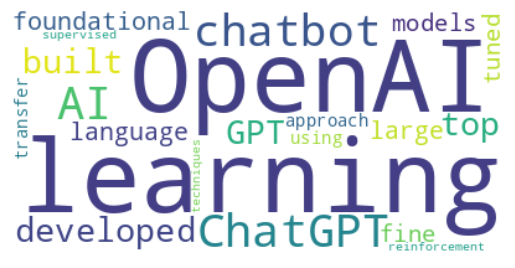
Generate word cloud.
>>> import textprepro as pre

>>> document = "ChatGPT is AI chatbot developed by OpenAI It is built on top of OpenAI GPT foundational large language models and has been fine-tuned an approach to transfer learning using both supervised and reinforcement learning techniques"

>>> pre.generate_word_cloud(document)
👇 Rare & Frequent Word
Remove rare or frequent words.
>>> import textprepro as pre

>>> document = "love me love my dog"

# Remove rare word
>>> document = pre.remove_rare_words(document, num_words=2)
"love me love"

# Remove frequent word
>>> document = pre.remove_freq_words(document, num_words=2)
"my dog"
1 maintainer

Metadata
1 maintainer
Release files for textprepro 0.0.1
For a detailed explanation of source distributions (sdists) and built distributions (wheels), please see the package formats documentation.
Source distribution (sdist)
| File | Size | Uploaded | Provenance | Actions |
|---|---|---|---|---|
| textprepro-0.0.1.tar.gz | 17.7 kB | Without provenance | Details for textprepro-0.0.1.tar.gz |
Built distribution (wheel)
| File | Interpreter | ABI | Platform | Actions Reset |
|---|---|---|---|---|
| textprepro-0.0.1-py3-none-any.whl | Python 3 | none | any | Details for textprepro-0.0.1-py3-none-any.whl |
Total release size: 30.9 kB
Release files / textprepro-0.0.1.tar.gz
| Download URL | textprepro-0.0.1.tar.gz |
|---|---|
| Size | 17.7 kB |
| Tags | Source |
|
SHA-256 checksum How to use checksums |
bf7509e342ef8bc6a9a3c610d44a38d0e2677852f728c22e9fa67b3153ac2122
|
|
BLAKE2b-256 checksum How to use checksums |
659106efb518c59611d6066623c0780041667540611d81bdd9b5757693710c8a
|
| Upload date | |
|
Uploaded using Trusted Publishing? What is trusted publishing? |
No |
| Uploaded via |
twine/4.0.2 CPython/3.10.11
|
Release files / textprepro-0.0.1-py3-none-any.whl
| Download URL | textprepro-0.0.1-py3-none-any.whl |
|---|---|
| Size | 13.2 kB |
| Tags | Python 3 |
|
SHA-256 checksum How to use checksums |
fb16828b9e2d6ab52f5a89f594f0041e94bb1d5b2ea9955c1e7d9bed8b2d5598
|
|
BLAKE2b-256 checksum How to use checksums |
932ca2c756006108f5f2ec3055011abf561013eb4216c52458c5251ffbd61d61
|
| Upload date | |
|
Uploaded using Trusted Publishing? What is trusted publishing? |
No |
| Uploaded via |
twine/4.0.2 CPython/3.10.11
|
Security for textprepro 0.0.1
Provenance
Provenance describes where a file came from. On PyPI, provenance is shared via attestations, which provide a verifiable record of the build or publishing details. View details, limitations and caveats.
No provenance found
None of the files in this release were uploaded with provenance metadata.
A note on package security
PyPI is a repository for distributing packages, not a service for auditing them. While third-party security researchers and our staff do their best to detect and remove malicious packages, PyPI cannot guarantee the quality, security or suitability of any given package.
To learn more about protecting yourself from malicious actors, visit our package security documentation.














