
textsynth
textsynth makes images of Perso-Arabic text. You give a string to the library.
The library gives a PIL.Image back.
The library can change the text before it draws the text. It can also add ink damage to the image. Use textsynth to make training data for OCR and HTR models.
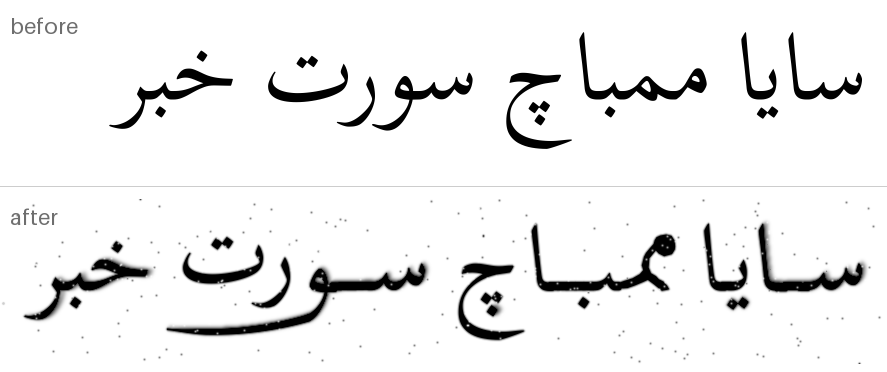
The top line is Scheherazade New with no rules. The bottom line is the same
text. It has one glyph for the pair مم, a kashida, a swept waw, and ink
damage. examples/all_tricks.py makes this image.
Install
pip install textsynth # or: uv add textsynth
Quick start
The library does not include a font. Give the path of a font that has Perso-Arabic letters.
from textsynth import render

image = render("بسم الله", "Amiri-Regular.ttf", size=72)
image.save("out.png")
The five stages
Synthesizer sends a string through five stages. You can use each stage alone.
Only the shaper is necessary.
| Stage | Modules | Function |
|---|---|---|
| text rules | textrules, kashida |
Change the string. |
| font patches | patching, glyphs, outlines |
Make a temporary font in memory that has new glyphs. |
| shaping, layout | shaping, raster, layout |
Shape the text with HarfBuzz. Then set the position of each glyph. |
| glyph rules | glyphrules, sweeps |
Change the shaped line. The measurements are known at this point. |
| effects | effects |
Add ink damage: smudge, blot, blob, bleed, erode, speckle, warp. |
from textsynth import (
    Synthesizer, Layout, GlyphSubstitution, BorrowedGlyph,
    Smudge, Blobify, InkBleed, orthographic_variation,
)

synth = Synthesizer(
    font="Amiri-Regular.ttf",
    layout=Layout(size=72, tracking=-1, supersample=2, jitter_y=0.6),
    text_rules=[orthographic_variation(swap=0.3)],
    font_patches=[GlyphSubstitution("مم", BorrowedGlyph("Oblegg-Jawi.otf", "A"))],
    effects=[Smudge(length=7), Blobify(), InkBleed(1.0)],
    seed=7,
)
image = synth("سايا ممباچ سورت خبر")
Elongation
Kashida
Kashida finds each connection in a word that you can extend. Then it puts
tatweels at these positions. contrast controls the distribution.
Kashida(frequency=6, contrast=0.8).apply("حكيم", rng) # 'حــــــكـيم'
A tatweel alone is not enough. The font draws a bar next to the letter, but it
does not move the dots. KashidaForms makes one glyph from the bar and the
letter, and moves the dots along the extension.
Synthesizer(
    font=FONT,
    text_rules=[Kashida(frequency=6, contrast=0.8)],   # keep this rule last
    font_patches=[KashidaForms(dot_shift=0.5)],        # 0 keeps the dots
)
Put Kashida last in the text rules. orthographic_variation removes
tatweels. A kashida before that rule does not stay in the text.
Tadakhul
Tadakhul continues the tail of a letter below the word. The letters above the
tail move up. Give the length in letters: length=2 makes the letter as long
as the two letters after it.
Synthesizer(font=FONT, glyph_rules=[TadakhulMerged(letters="و", length=2)])
Three rules make this shape:
| Rule | Length | Cost | Result |
|---|---|---|---|
TadakhulMerged |
exact | One font rebuild for each line. | One contour. |
TadakhulQuantised |
nearest of N steps | One font rebuild only. | One contour. |
TadakhulScaled |
exact | One font rebuild only. | Two glyphs that touch at the cut. |
A tail does not always go to the left. The jim family and the ayn family turn
back to the right. Such a letter sweeps below the letters before it. Put
these letters in reverse_letters. REVERSE_SWEEPERS holds the set for Amiri.
Synthesizer(font=FONT, glyph_rules=[
    TadakhulMerged(letters=SWEEPERS, reverse_letters=REVERSE_SWEEPERS, length=2)
])
A letter sweeps one way only, thus the two sets share no letter. In Amiri
SWEEPERS is ر ز و ؤ ژ ۆ ڑ ۏ and REVERSE_SWEEPERS is ج ح خ چ ع غ ڠ ے.
Command line
textsynth "ممتاز سايا" -f Amiri-Regular.ttf \
    --size 72 --tracking -1 --distress smudged \
    --substitute "مم=Oblegg-Jawi.otf:A" --vary 0.3 -o line.png
| Option | Values |
|---|---|
--distress |
none, light, smudged, heavy |
--substitute |
SEQUENCE=file.svg or SEQUENCE=font.ttf:CHAR |
--kashida N |
The number of tatweels for each word |
--sweep |
merged, quantised, scaled |
Refer to textsynth --help for all the options.
More
docs/design.md— how each stage operates, and why.examples/— one script for each feature.notebooks/— the notebooks, with their outputs.
Development
uv sync
uv run pytest
Without uv, install the checkout into a virtual environment first. The code
sits under src/, so import textsynth and the scripts in examples/ do not
work from the repository root until you do this.
python -m venv .venv && source .venv/bin/activate
pip install -e ".[dev]"
pytest
License
The library is under the MIT license.
assets/fonts/Amiri-Regular.ttf is Amiri, under the SIL Open Font License
(Amiri-OFL.txt).
assets/fonts/ScheherazadeNew-Regular.ttf is Scheherazade New, by SIL Global,
under the SIL Open Font License (ScheherazadeNew-OFL.txt).
1 maintainer

Metadata
1 maintainer
Release files for textsynth 0.2.0
For a detailed explanation of source distributions (sdists) and built distributions (wheels), please see the package formats documentation.
Source distribution (sdist)
| File | Size | Uploaded | Provenance | Actions |
|---|---|---|---|---|
| textsynth-0.2.0.tar.gz | 2.4 MB | Without provenance | Details for textsynth-0.2.0.tar.gz |
Built distribution (wheel)
| File | Interpreter | ABI | Platform | Actions Reset |
|---|---|---|---|---|
| textsynth-0.2.0-py3-none-any.whl | Python 3 | none | any | Details for textsynth-0.2.0-py3-none-any.whl |
Total release size: 2.5 MB
Release files / textsynth-0.2.0.tar.gz
| Download URL | textsynth-0.2.0.tar.gz |
|---|---|
| Size | 2.4 MB |
| Tags | Source |
|
SHA-256 checksum How to use checksums |
80ec7a2d2d8e58d2133179e906f80ac8a4dfb3bd0f04703d2184125396f970c8
|
|
BLAKE2b-256 checksum How to use checksums |
1b714edfddf08e137ed100a3ee25cf8ee62734f15aeb0d4a82084a3725f03e0a
|
| Upload date | |
|
Uploaded using Trusted Publishing? What is trusted publishing? |
No |
| Uploaded via |
uv/0.9.16 {"installer":{"name":"uv","version":"0.9.16","subcommand":["publish"]},"python":null,"implementation":{"name":null,"version":null},"distro":{"name":"macOS","version":null,"id":null,"libc":null},"system":{"name":null,"release":null},"cpu":null,"openssl_version":null,"setuptools_version":null,"rustc_version":null,"ci":null}
|
Release files / textsynth-0.2.0-py3-none-any.whl
| Download URL | textsynth-0.2.0-py3-none-any.whl |
|---|---|
| Size | 64.0 kB |
| Tags | Python 3 |
|
SHA-256 checksum How to use checksums |
8cb43b6c66dcfbc0dbbae68c77522460338e14b8014c5f6f06592da4ca8d1548
|
|
BLAKE2b-256 checksum How to use checksums |
6b6549f5366348fff6a9a3b1829d88e583a2adc7494498f1da444d0c47f60f07
|
| Upload date | |
|
Uploaded using Trusted Publishing? What is trusted publishing? |
No |
| Uploaded via |
uv/0.9.16 {"installer":{"name":"uv","version":"0.9.16","subcommand":["publish"]},"python":null,"implementation":{"name":null,"version":null},"distro":{"name":"macOS","version":null,"id":null,"libc":null},"system":{"name":null,"release":null},"cpu":null,"openssl_version":null,"setuptools_version":null,"rustc_version":null,"ci":null}
|
Security for textsynth 0.2.0
Provenance
Provenance describes where a file came from. On PyPI, provenance is shared via attestations, which provide a verifiable record of the build or publishing details. View details, limitations and caveats.
No provenance found
None of the files in this release were uploaded with provenance metadata.
A note on package security
PyPI is a repository for distributing packages, not a service for auditing them. While third-party security researchers and our staff do their best to detect and remove malicious packages, PyPI cannot guarantee the quality, security or suitability of any given package.
To learn more about protecting yourself from malicious actors, visit our package security documentation.














