
textToKnowledgeGraph
A Python package to generate BEL statements and CX2 networks from scientific text.
Table of Contents
Project Description
textToKnowledgeGraph is a Python package that converts natural language scientific text into structured knowledge graphs using advanced language models (LLMs). It is designed to:
- Generate BEL statements from scientific text.
- Extract entities and interactions to build knowledge graphs.
- Convert interactions into CX2 network format for visualization.
- Optionally upload the generated networks to NDEx.
Dependencies
- Python >= 3.11
- langchain
- langchain_core
- langchain_openai
- lxml==5.2.1
- ndex2>=3.8.0,<4.0.0
- pandas
- pydantic
- python-dotenv
- Requests
- nltk
- gilda
- markitdown[all]
- openai
Glossary
- BEL (Biological Expression Language): A language for representing scientific findings in a computable format. Learn More
- CX2 (Cytoscape Exchange Format 2): A JSON-based format for storing and exchanging network data. Learn More
- PMCID: A unique identifier for articles in PubMed Central. Learn More
- NDEx: An online resource for sharing, storing, and visualizing biological networks. Learn More
- LangChain: A framework to build applications powered by language models. Learn More
- Cytoscape: An open-source platform for network visualization and analysis. Learn More
- Knowledge Graph: A structured graph representation of entities and relationships.
- Pubtator: A tool for extracting and annotating biomedical entities from scientific literature. Learn More
- OpenAI: An AI research lab providing access to advanced language models. Learn More
Installation
Install the package via pip:
pip install textToKnowledgeGraph
Methodology
Features Available
- BEL Generation: Extracts biological interactions from scientific papers and generates BEL statements.
- CX2 Network Generation: Converts extracted interactions into CX2 network format for visualization in Cytoscape.
- Uploading to NDEx: Uploads the generated CX2 networks to NDEx for sharing and visualization.
BEL Generation
Input:
- The user provides one or more PMC IDs and/or local file paths (PDF or TXT) along with an OpenAI API key.
- If a PMC ID is provided, the tool fetches the XML version of the scientific paper from PubTator’s API.
- If a PDF/TXT path is provided, the tool extracts the text using MarkItDown.
Processing:
- The text is broken down into paragraphs and annotated.
- The prompt for the model is defined in a prompt file, which directs the LLM on how to extract BEL statements.
Output:
- The extracted BEL statements are saved in JSON files.
- The results are converted into a CX2 network format for visualization in Cytoscape.
CX2 Network Generation
Converts extracted interactions into CX2 network format for visualization in Cytoscape.
Uploading to NDEx
Uploads the generated CX2 networks to NDEx for sharing and visualization.
In order to use this function, you need to provide your NDEx email and password as an argument.
Usage
The package supports processing multiple documents in one run and requires an OpenAI API key.
Parameters:
- api_key (required): Your OpenAI API key used for LLM calls.
- pmc_ids (optional, list): A list of PMC IDs to process.
- pdf_paths (optional, list): A list of PDF file paths to process.
- txt_paths (optional, list): A list of TXT file paths to process.
- ndex_email (optional): NDEx account email for authentication.
- ndex_password (optional): NDEx account password for authentication.
- upload_to_ndex (flag): If set, uploads the generated networks to NDEx.
- style_path (optional): Path to a Cytoscape style JSON file; defaults to the file in the
datadirectory. - custom_name (optional): Custom name for the network; defaults to the timestamp.
- pmid_for_file (optional): In this case, the tool fetches metadata for the provided PMID/PMCID and this is used to set the network name.
Network Naming and Metadata
When processing a file, there are three options for naming the generated network:
-
Automatic Naming (Default): If you provide no custom name or PMID/PMCID, the network name defaults to a timestamp (e.g., 20250304_1537).
-
Custom Network Name: Provide a custom network name using the --custom_name parameter. The network will use that exact name.
-
Metadata-Based Naming: If you supply a PMID or PMCID via the --pmid_for_file parameter, the package will:
- Fetch metadata (title, abstract, and authors) from E-Utilities.
- Set the network name to the format:
- FirstAuthorLastName et al.: PMID_Number For example, if the first author is "Wen‐Cheng Lu" and the PMID is 35080342, the network name will be: Lu et al.: 35080342
- Set additional network attributes:
- description: Combining the paper's title and abstract.
- reference: Displayed as PMID: 35080342 (with "PMID: " prefixed). Note: When processing a PMC article (using a PMC ID input), the package automatically fetches metadata from E-Utilities. In this case, you do not need to provide the --pmid_for_file parameter because the metadata-based naming is handled internally.
Command Line Examples
**Example A: Processing a PMC Article (PMCID_Input)**
python -m textToKnowledgeGraph.main \
  --api_key YOUR_OPENAI_API_KEY \
  --pmc_ids PMC123456 PMC234567 \
  --pdf_paths /path/to/paper1.pdf /path/to/paper2.pdf \
  --txt_paths /path/to/document1.txt \
  --ndex_email <your_email@example.com> \
  --ndex_password your_password \
  --upload_to_ndex
**Example B: Processing Local Files (PDF/TXT_Input)**
python -m textToKnowledgeGraph.main \
  --api_key YOUR_OPENAI_API_KEY \
  --pmc_ids PMC123456 PMC234567 \
  --pdf_paths /path/to/paper1.pdf /path/to/paper2.pdf \
  --txt_paths /path/to/document1.txt \
  --ndex_email <your_email@example.com> \
  --ndex_password your_password \
  --upload_to_ndex \
  --custom_name My_Network \
  --pmid_for_file 35080342
Interactive Python Examples
from textToKnowledgeGraph import main

main(
    api_key="YOUR_OPENAI_API_KEY",
    pmc_ids=["PMC123456", "PMC234567"],
    pdf_paths=["/path/to/paper1.pdf", "/path/to/paper2.pdf"],
    txt_paths=["/path/to/document1.txt"],
    ndex_email="<your_email@example.com>",  # optional
    ndex_password="your_password",        # optional
    style_path=None,                      # uses default style file if None
    upload_to_ndex=False,
    custom_name="My_Network",            # optional
    pmid_for_file=35080342,              # optional
)
Expected Output
- BEL Statements: Extracted from the processed documents.
- CX2 Networks: Generated for each input and saved in a dedicated
results/directory named after each document or PMC ID. - NDEx Upload: If enabled, the networks will be uploaded to NDEx.
- Example of CX2 network:
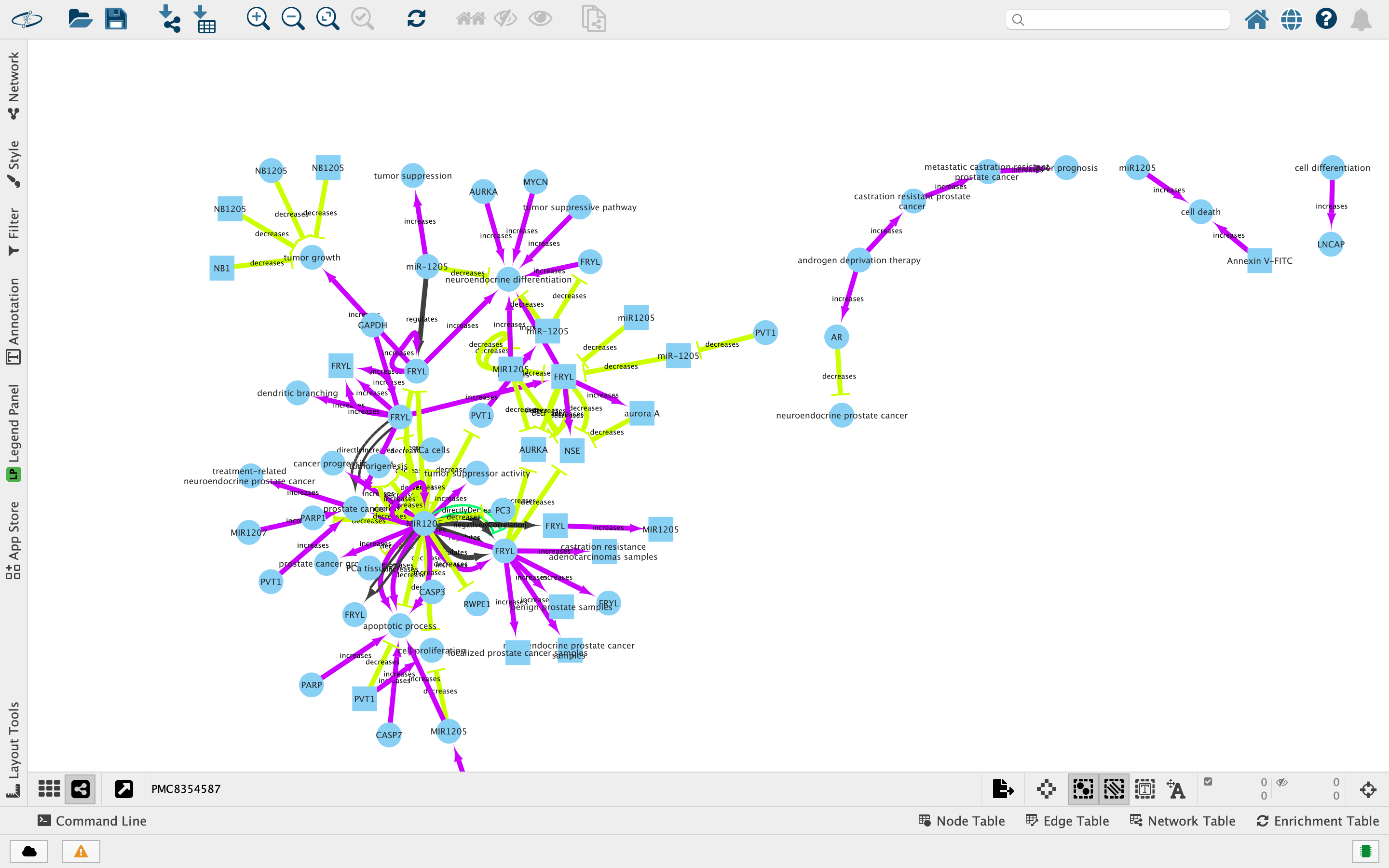
Notes
- The default style file is located at
<repo_root>/data/cx_style.json. You can override this with the--style_pathparameter. - Make sure your input files exist and that your API key is valid.
- The package logs detailed processing steps and total runtime for batch processing.
- You may need to run this
python -m nltk.downloader stopwordsto download the NLTK stopwords corpus if you encounter issues with text processing.
1 maintainer

Metadata
1 maintainer
Release files for texttoknowledgegraph 0.4.3
For a detailed explanation of source distributions (sdists) and built distributions (wheels), please see the package formats documentation.
Source distribution (sdist)
| File | Size | Uploaded | |
|---|---|---|---|
| texttoknowledgegraph-0.4.3.tar.gz | 89.7 kB | Details |
Built distribution (wheel)
| File | Interpreter | ABI | Platform | Reset |
|---|---|---|---|---|
| texttoknowledgegraph-0.4.3-py3-none-any.whl | Python 3 | none | any | Details |
Total release size: 193.4 kB
Release files / texttoknowledgegraph-0.4.3.tar.gz
| Download URL | texttoknowledgegraph-0.4.3.tar.gz |
|---|---|
| Size | 89.7 kB |
| Tags | Source |
|
SHA-256 checksum How to use checksums |
4f4aa818184c74b946224d73570686109fcf28dffc805820a3b687547237b262
|
|
BLAKE2b-256 checksum How to use checksums |
260bad525ff2464758810e1a58ead3ad43066195f3221d9397237f552b4ffc4e
|
| Upload date | |
|
Uploaded using Trusted Publishing? What is trusted publishing? |
No |
| Uploaded via |
twine/6.1.0 CPython/3.11.8
|
Release files / texttoknowledgegraph-0.4.3-py3-none-any.whl
| Download URL | texttoknowledgegraph-0.4.3-py3-none-any.whl |
|---|---|
| Size | 103.7 kB |
| Tags | Python 3 |
|
SHA-256 checksum How to use checksums |
335e6ebab77cda6a0a9eb2b7802b7e75d3ef85f1bb90abc182d688573bb6c07a
|
|
BLAKE2b-256 checksum How to use checksums |
b584bbfdce88e4e51abeaf729602d7b7985a1ee1de863f21fd24de0052db0937
|
| Upload date | |
|
Uploaded using Trusted Publishing? What is trusted publishing? |
No |
| Uploaded via |
twine/6.1.0 CPython/3.11.8
|














