
Dialogs for use with the Textual package.

Project description
textual-cogs

A collection of Textual dialogs.
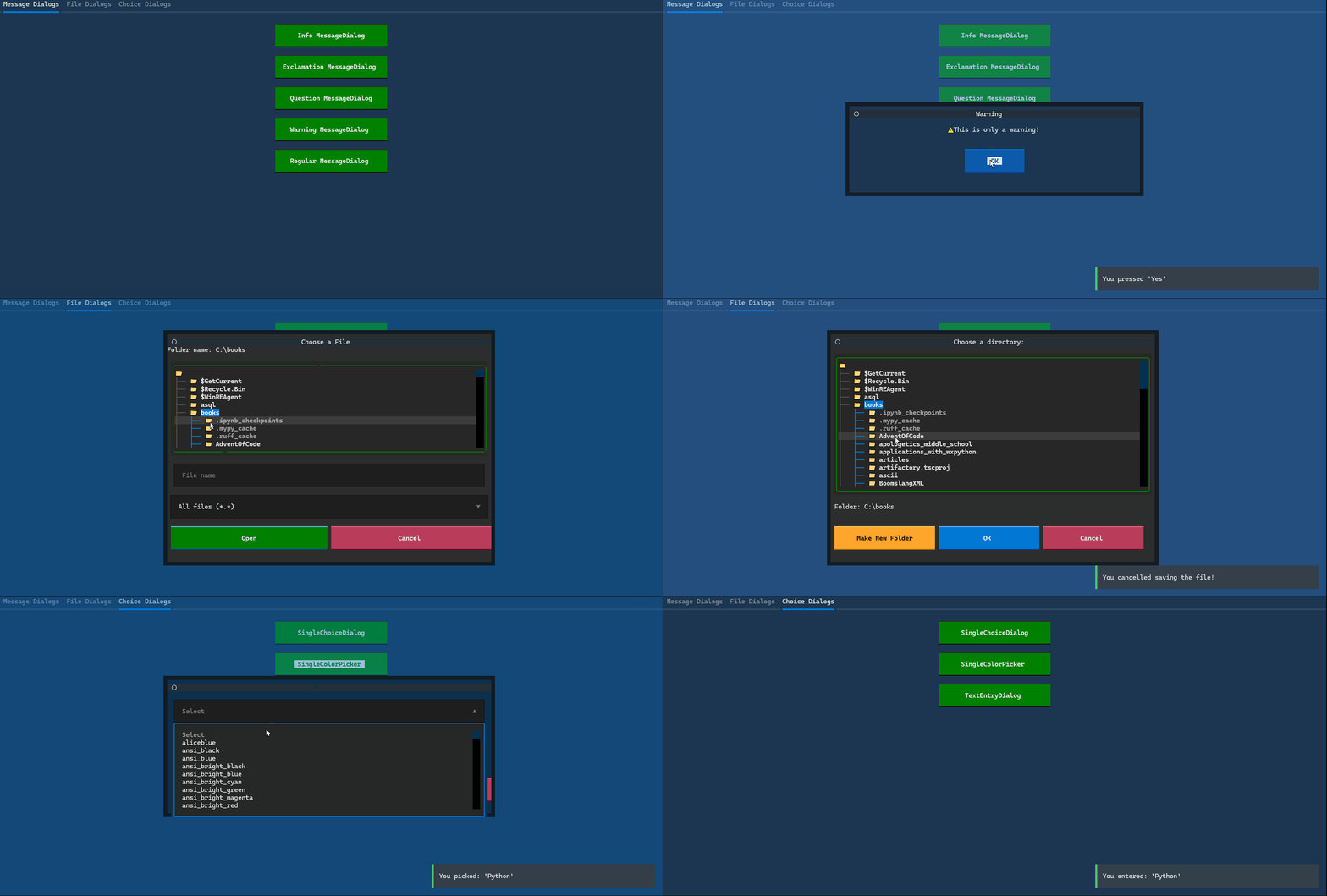
Dialogs included so far:
- Generic
MessageDialog- shows messages to the user OpenFileDialog- gives the user a way to select a file to openQuitDialog- ask the user if they want to quit the applicationSaveFileDialog- gives the user a way to select a location to save a fileSingleChoiceDialog- gives the user a series of choices to pick fromSingleColorPickerDialog- gives the user a way to select a colorTextEntryDialog- ask the user a question and get their answer using anInputwidget
Installation
You can install textual-cog using pip:
python -m pip install textual-cogs
You also need Textual to run these dialogs.
Example Usage
Here is an example of creating a small application that opens the MessageDialog immediately. You would normally open the dialog in response to a message or event that has occurred, such as when the application has an error or you need to tell the user something.
from textual.app import App
from textual.app import App, ComposeResult

from textual_cogs.dialogs import MessageDialog
from textual_cogs import icons


class DialogApp(App):
    def on_mount(self) -> ComposeResult:
        def my_callback(value: None | bool) -> None:
            self.exit()

        self.push_screen(
            MessageDialog(
                "What is your favorite language?",
                icon=icons.ICON_QUESTION,
                title="Warning",
            ),
            my_callback,
        )


if __name__ == "__main__":
    app = DialogApp()
    app.run()
When you run this code, you will get something like the following:

Creating a TextEntryDialog
Here is how you would create a TextEntryDialog:
from textual.app import App
from textual.app import App, ComposeResult

from textual_cogs.dialogs import TextEntryDialog


class DialogApp(App):
    def on_mount(self) -> ComposeResult:
        def my_callback(value: str | bool) -> None:
            self.exit()

        self.push_screen(
            TextEntryDialog("What is your name?", "Information"), my_callback
        )


if __name__ == "__main__":
    app = DialogApp()
    app.run()
When you run this code, you will see the following:

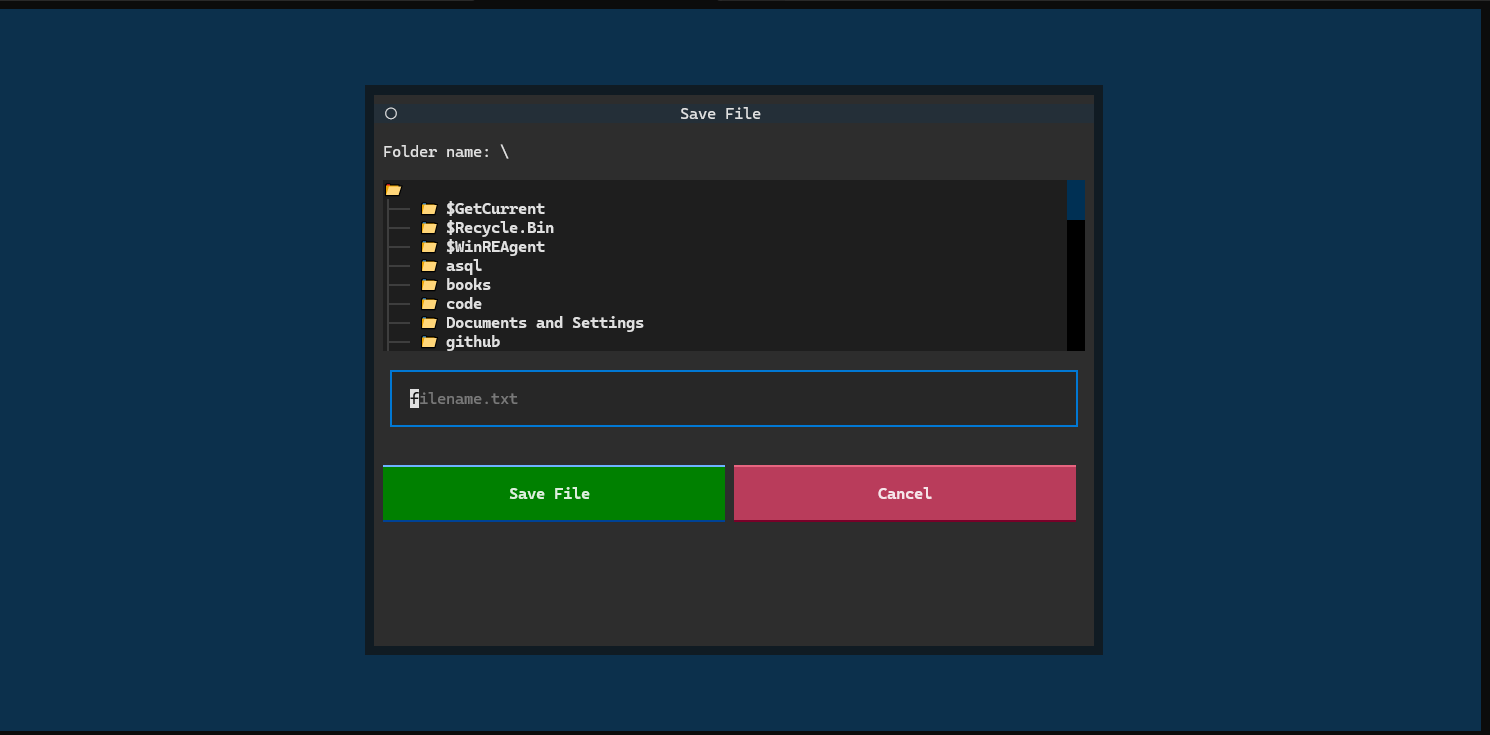
Creating a SaveFileDialog
The following code demonstrates how to create a SaveFileDialog:
from textual.app import App
from textual.app import App, ComposeResult

from textual_cogs.dialogs import SaveFileDialog


class DialogApp(App):
    def on_mount(self) -> ComposeResult:
        self.push_screen(SaveFileDialog())

if __name__ == "__main__":
    app = DialogApp()
    app.run()
When you run this code, you will see the following:


Download files
Download the file for your platform. If you're not sure which to choose, learn more about installing packages.
Source Distribution
Built Distribution
Filter files by name, interpreter, ABI, and platform.
If you're not sure about the file name format, learn more about wheel file names.
Copy a direct link to the current filters
File details
Details for the file textual_cogs-0.0.5.tar.gz.
File metadata
- Download URL: textual_cogs-0.0.5.tar.gz
- Upload date:
- Size: 10.3 kB
- Tags: Source
- Uploaded using Trusted Publishing? No
- Uploaded via: twine/6.1.0 CPython/3.12.3
File hashes
| Algorithm | Hash digest | |
|---|---|---|
| SHA256 |
af8420ea07874ba019e1b419d0dbd3a5ee2d0df186958ccdf2930d2a41b18e13
|
|
| MD5 |
4a547b1c7b25b84565de075dfdcfb404
|
|
| BLAKE2b-256 |
6b5050a0f97d3c47b79376642d8dda34a4e33e7cefdc6a77a52ea0418720f9c4
|
File details
Details for the file textual_cogs-0.0.5-py3-none-any.whl.
File metadata
- Download URL: textual_cogs-0.0.5-py3-none-any.whl
- Upload date:
- Size: 14.5 kB
- Tags: Python 3
- Uploaded using Trusted Publishing? No
- Uploaded via: twine/6.1.0 CPython/3.12.3
File hashes
| Algorithm | Hash digest | |
|---|---|---|
| SHA256 |
d082af0f6731c3147682420d628789dba638aed8bdb3fef584eb191c0bad9950
|
|
| MD5 |
ffaf45bd6f123512fabc5b1dddc41b30
|
|
| BLAKE2b-256 |
fe5ee3908b451860bf40cf12e34340a2e975a1e6dc77ec37737d44cc53c296ff
|






