






Textual Jumper
A keyboard-driven navigation widget for Textual TUI applications. Jump to any focusable widget instantly using intuitive keyboard shortcuts!
Note: This was created with Claude Code
Features
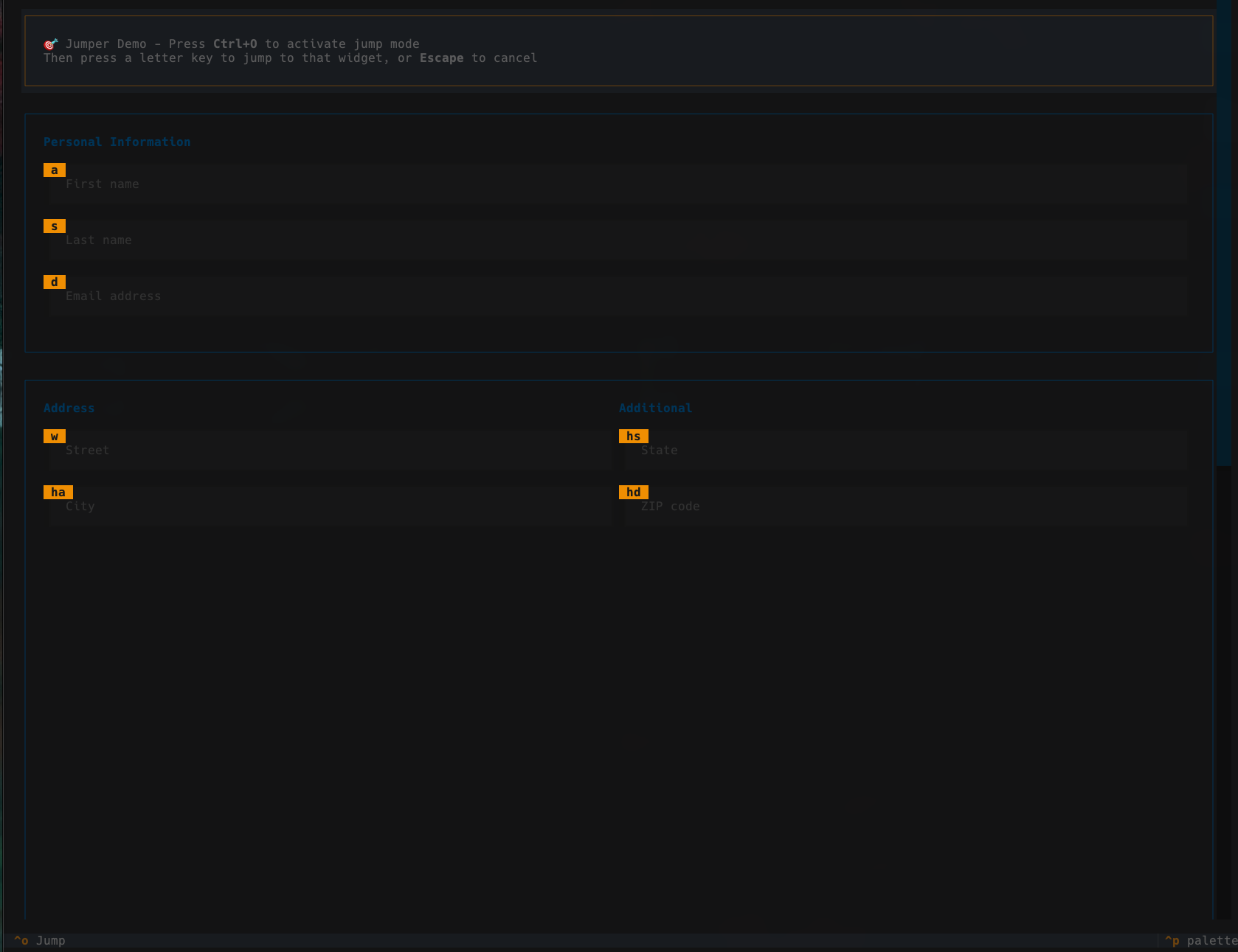
- Instant Navigation - Jump to any widget with 1-2 keystrokes
- Multi-Character Keys - Automatically generates key combinations for many widgets
- Visual Feedback - Real-time highlighting shows typed characters
- Customizable - Define your own key mappings or use defaults
- Zero Dependencies - Only requires Textual
- Easy Integration - Add to existing apps in minutes
Installation
Using uv:
uv add textual-jumper
Using pip:
pip install textual-jumper
Try the Demo
Run the interactive demo to see Textual Jumper in action:
uvx textual-jumper
Press Ctrl+O to activate jump mode, then press a key to jump to that widget!
Quick Start
from textual.app import App, ComposeResult
from textual.widgets import Input, Button, Header, Footer
from textual_jumper import Jumper

class MyApp(App):
    BINDINGS = [("ctrl+o", "show_overlay", "Jump")]

    def compose(self) -> ComposeResult:
        yield Header()
        yield Jumper()

        # Focus mode - widget will receive focus
        name_input = Input(placeholder="Name")
        name_input.jump_mode = "focus"
        yield name_input

        email_input = Input(placeholder="Email")
        email_input.jump_mode = "focus"
        yield email_input

        # Click mode - widget will be clicked
        submit_button = Button("Submit")
        submit_button.jump_mode = "click"
        yield submit_button

        yield Footer()

    def action_show_overlay(self) -> None:
        self.query_one(Jumper).show()

if __name__ == "__main__":
    MyApp().run()
How It Works
Single-Character Keys
For 8 or fewer widgets, each gets a single character:
Input Field 1  [a]
Input Field 2  [s]
Button         [d]
Press a to jump to Input Field 1.
Multi-Character Keys
For 9+ widgets, the system generates combinations with no conflicts:
Input 1   [a]     Input 5   [ha]    Input 9   [js]
Input 2   [s]     Input 6   [hs]    Input 10  [jd]
Input 3   [d]     Input 7   [hd]    Input 11  [jw]
Input 4   [w]     Input 8   [ja]
Smart allocation strategy ensures no conflicts between single and multi-character keys.
Jump Modes
textual-jumper supports two jump modes for different widget interactions:
Focus Mode
Widgets with jump_mode = "focus" will receive focus when jumped to. This is ideal for input fields, text areas, and other widgets where you want to interact with them directly.
name_input = Input(placeholder="Name")
name_input.jump_mode = "focus"
Click Mode
Widgets with jump_mode = "click" will be clicked automatically when jumped to. This is perfect for Buttons, Selects, and other widgets that trigger actions.
submit_button = Button("Submit")
submit_button.jump_mode = "click"
Also the Widget you want to jump to needs to be focusable, so Widget.can_focus = True must be set, if the widget is not focusable
by default.
Configuration
Custom Key Mappings
jumper = Jumper(ids_to_keys={
    "username": "u",
    "password": "p",
    "submit": "s"
})
Custom Available Keys
jumper = Jumper(keys=["a", "s", "d", "f", "j", "k", "l", ";"])
Acknowledgments
Inspired by Darren Burns jump functionality in Posting.
Feedback and Issues
Feel free to reach out and share your feedback, or open an Issue, if something doesn't work as expected. Also check the Changelog for new updates.
1 maintainer

Metadata
1 maintainer
Release files for textual-jumper 0.2.1
For a detailed explanation of source distributions (sdists) and built distributions (wheels), please see the package formats documentation.
Source distribution (sdist)
| File | Size | Uploaded | |
|---|---|---|---|
| textual_jumper-0.2.1.tar.gz | 7.8 kB | Details |
Built distribution (wheel)
| File | Interpreter | ABI | Platform | Reset |
|---|---|---|---|---|
| textual_jumper-0.2.1-py3-none-any.whl | Python 3 | none | any | Details |
Total release size: 17.1 kB
Release files / textual_jumper-0.2.1.tar.gz
| Download URL | textual_jumper-0.2.1.tar.gz |
|---|---|
| Size | 7.8 kB |
| Tags | Source |
|
SHA-256 checksum How to use checksums |
1f9a5d76b0ce42fd8308dd381567bf17f7c07707d72d48b9e4cec53b30facc7d
|
|
BLAKE2b-256 checksum How to use checksums |
76e4d9326d0439e44361dcb0c98a4ebed0a274c0ec936649b1d94369529e55f5
|
| Upload date | |
|
Uploaded using Trusted Publishing? What is trusted publishing? |
Yes |
| Uploaded via |
twine/6.1.0 CPython/3.13.7
|
Provenance
Provenance describes where a file came from. On PyPI, provenance is shared via attestations, which provide a verifiable record of the build or publishing details. View details, limitations and caveats.


PyPI Publish Attestation
PyPI verified that this artifact, at this checksum, originated from the publisher listed below.
Signed by GitHub Actions, verified by PyPI on Nov 22, 2025.
Transparency logRelease files / textual_jumper-0.2.1-py3-none-any.whl
| Download URL | textual_jumper-0.2.1-py3-none-any.whl |
|---|---|
| Size | 9.2 kB |
| Tags | Python 3 |
|
SHA-256 checksum How to use checksums |
580d4245b7c60b1cbaa3add8105ab5ceaff3912b3cb86c823ea680dc5e02dc4b
|
|
BLAKE2b-256 checksum How to use checksums |
5805277c9d3b474c9c3d29f105981ac57f591404e7b2bf1ff793e705f85495cb
|
| Upload date | |
|
Uploaded using Trusted Publishing? What is trusted publishing? |
Yes |
| Uploaded via |
twine/6.1.0 CPython/3.13.7
|
Provenance
Provenance describes where a file came from. On PyPI, provenance is shared via attestations, which provide a verifiable record of the build or publishing details. View details, limitations and caveats.
PyPI Publish Attestation
PyPI verified that this artifact, at this checksum, originated from the publisher listed below.
Signed by GitHub Actions, verified by PyPI on Nov 22, 2025.
Transparency log













