
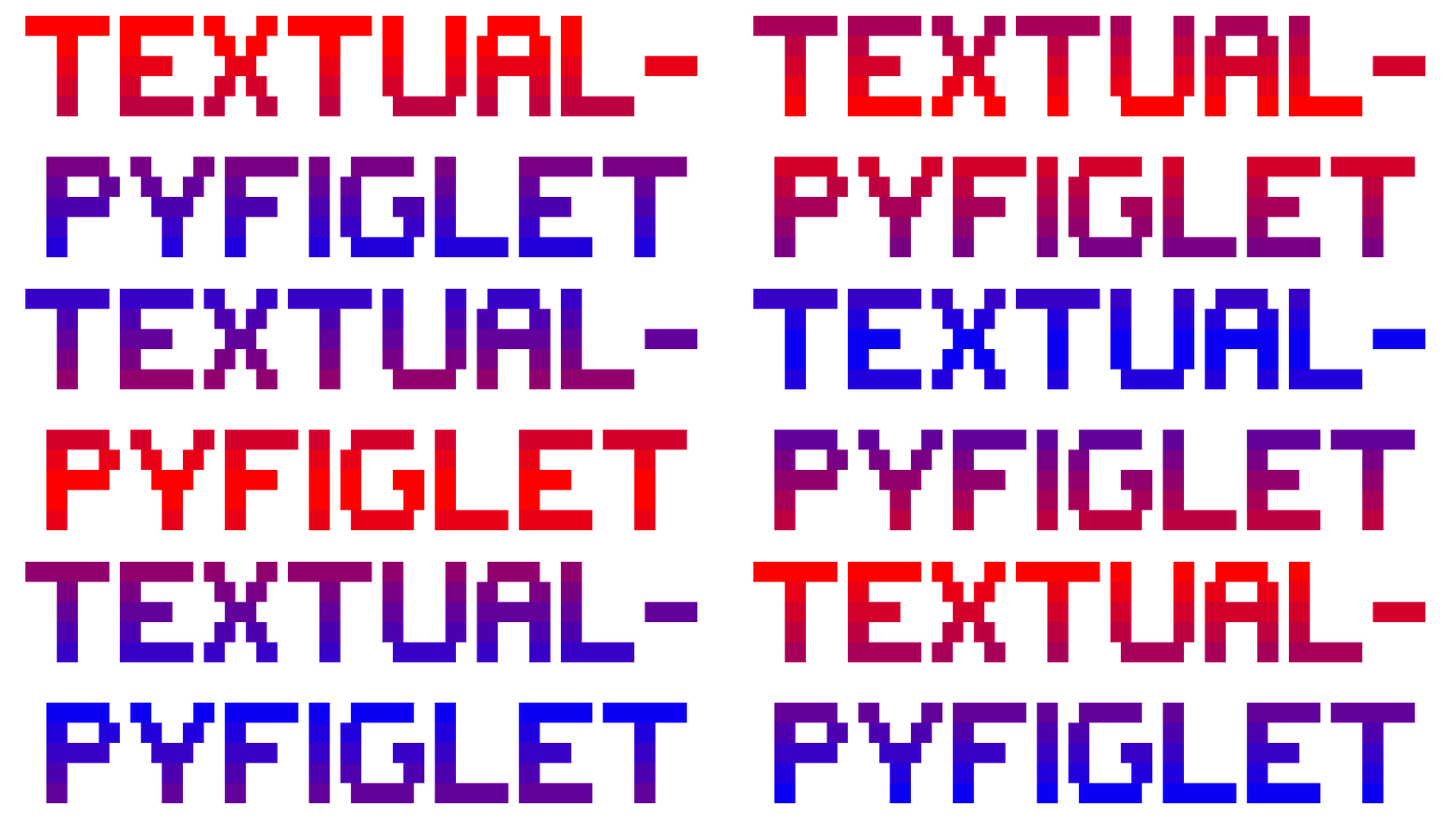
Textual-Pyfiglet





Textual-PyFiglet is an implementation of PyFiglet for Textual.
It provides a FigletWidget which makes it easy to add ASCII banners with colors and animating gradients.
This library is related to Rich-Pyfiglet, as well as utilizes Textual-Coloromatic to provide the Color/animation abilities.
Features
- Full integration of Pyfiglet into Textual. Change the text or the font in real time - This can be connected to user input or modified programmatically.
- Color system built on Textual's color system. Thus, it can display any color in the truecolor/16-bit spectrum, and can take common formats such as hex code and RGB, or just a huge variety of named colors.
- Make a gradient automatically between any two colors.
- Animation system that's simple to use. Just make your gradient and toggle it on/off. It can also be started or stopped in real-time.
- The auto-size mode will re-size the widget with the new rendered ASCII output in real-time. It can also wrap to the parent container and be made to resize with your terminal.
- Animation settings can be modified to get different effects. Set a low amount of colors and a low speed for a very old-school retro look, set it to a high amount of colors and a high speed for a very smooth animation.
- The fonts are type-hinted to give you auto-completion in your code editor, eliminating the need to manually check what fonts are available.
- Included demo app to showcase the features.
Demo App
If you have uv or pipx, you can immediately try the demo app:
uvx textual-pyfiglet
pipx run textual-pyfiglet
Documentation
Click here for documentation
Video
Your browser does not support the video tag.Questions, Issues, Suggestions?
Use the issues section for bugs or problems, and post ideas or feature requests on the TTY group discussion board.
Thanks and Copyright
Both Textual-Pyfiglet and the original PyFiglet are under MIT License. See LICENSE file.
FIGlet fonts have existed for a long time, and many people have contributed over the years.
Original creators of FIGlet:
https://www.figlet.org
The PyFiglet creators:
https://github.com/pwaller/pyfiglet
Textual:
https://github.com/Textualize/textual
And finally, thanks to the many hundreds of people that contributed to the fonts collection.
1 maintainer

Metadata
1 maintainer
Release files for textual-pyfiglet 1.1.0
For a detailed explanation of source distributions (sdists) and built distributions (wheels), please see the package formats documentation.
Source distribution (sdist)
| File | Size | Uploaded | |
|---|---|---|---|
| textual_pyfiglet-1.1.0.tar.gz | 140.7 kB | Details |
Built distribution (wheel)
| File | Interpreter | ABI | Platform | Reset |
|---|---|---|---|---|
| textual_pyfiglet-1.1.0-py3-none-any.whl | Python 3 | none | any | Details |
Total release size: 165.0 kB
Release files / textual_pyfiglet-1.1.0.tar.gz
| Download URL | textual_pyfiglet-1.1.0.tar.gz |
|---|---|
| Size | 140.7 kB |
| Tags | Source |
|
SHA-256 checksum How to use checksums |
f8b24c213bc5818ac50820403ca8e69e357bdb53c7bf8981d5e8a9aea8486658
|
|
BLAKE2b-256 checksum How to use checksums |
dcfdde3fafcca531b1c154c36de42f375de469d2d02d64215d5e3ccac8dd4776
|
| Upload date | |
|
Uploaded using Trusted Publishing? What is trusted publishing? |
Yes |
| Uploaded via |
twine/6.1.0 CPython/3.12.9
|
Provenance
Provenance describes where a file came from. On PyPI, provenance is shared via attestations, which provide a verifiable record of the build or publishing details. View details, limitations and caveats.


PyPI Publish Attestation
PyPI verified that this artifact, at this checksum, originated from the publisher listed below.
Signed by GitHub Actions, verified by PyPI on Aug 7, 2025.
Transparency logRelease files / textual_pyfiglet-1.1.0-py3-none-any.whl
| Download URL | textual_pyfiglet-1.1.0-py3-none-any.whl |
|---|---|
| Size | 24.3 kB |
| Tags | Python 3 |
|
SHA-256 checksum How to use checksums |
e1aff02de37734aaa2bf492578f629e541519f4aa4e68f957baaadaeb94f6c48
|
|
BLAKE2b-256 checksum How to use checksums |
4d561c7cc069c9270fbe8d1056738931478cbb1e6a01af3692c9149912158cf5
|
| Upload date | |
|
Uploaded using Trusted Publishing? What is trusted publishing? |
Yes |
| Uploaded via |
twine/6.1.0 CPython/3.12.9
|
Provenance
Provenance describes where a file came from. On PyPI, provenance is shared via attestations, which provide a verifiable record of the build or publishing details. View details, limitations and caveats.
PyPI Publish Attestation
PyPI verified that this artifact, at this checksum, originated from the publisher listed below.
Signed by GitHub Actions, verified by PyPI on Aug 7, 2025.
Transparency log













