
textual-totp: TOTP (authenticator) application using Python & Textual
Installation
You can install textual-totp with pip or pipx:
pipx install textual-totp
Configuration
Configuration is in the form of a TOML file inside the user's standard configuration
directory. On Linux, this is ~/.config/ttotp/settings.toml.
At startup, textual-totp invokes a program that prints out otpauth: and otpauth-migration URIs, one per line.
The author recommends storing your TOTPs in a password-protected fashion.
For example, if you use pass, the standard unix password manager,
you would configure with a command like
otp-command = ['pass', 'show', 'totp-tokens']
If you hate security, you can use an insecure command like cat, or just test things with echo:
otp-command = "echo 'otpauth://totp/example?algorithm=SHA1&digits=6&secret=IHACDTJ2TFCSLUJLMSHYDBD74FS7OY5B'"
If the command is a string, it is interpreted with the shell; otherwise, the list of arguments is used directly.
Auto-exit on idle
To auto exit after a specified inactivity period, use the auto-exit setting:
# Exit after 5 minutes (300 seconds) of inactivity
auto-exit = 300
Any key event, mouse click, or mouse scroll counts as "activity" and will reset the auto exit timer.
If auto-exit is not specified, or it is 0, there is no inactivity timeout.
Profiles
textual-totp supports multiple profiles. Profiles are organized as sections of the configuration file; if a setting is not specified within a profile section, the global setting is used.
For example, given
auto-exit=300
otp-command = ["..."]
[trusted-location]
auto-exit=0
textual-totp will normally exit after 5 minutes of inactivity, but when you run ttotp --profile trusted-location auto-exit will be disabled.
Obtaining TOTP URIs
There are a couple of ways to obtain your TOTP URIs, which are strings that begin otpauth://totp/.
- Scan individual QR codes when signing up for 2FA
- You can photograph or screen capture and then locally decode QR codes using a compatible tool such as PyQRCode
- Scan the QR code(s) from Google Authenticator's "transfer accounts" feature. These are in the form of an "offline otpauth-migration" URL.
- OTP apps frequently do not permit screenshots, but your laptop probably has a camera
- Transcribe the lengthy alphanumeric code that is shown during some 2FA signup processes into a complete otpauth URL, removing any whitespace that is present.
There are browser-based tools for helping with some of these tasks. However, it is difficult to determine whether web pages treat data safely. Therefore, none are recommended in this section.
Using textual-totp
The command to start textual-totp is textual-totp.
It has several options which can be shown with ttotp --help.
textual-totp will first invoke the otp-command to get the list of TOTPs.
This may require interaction
(for instance, the pass command may need to request your GPG key passphrase)
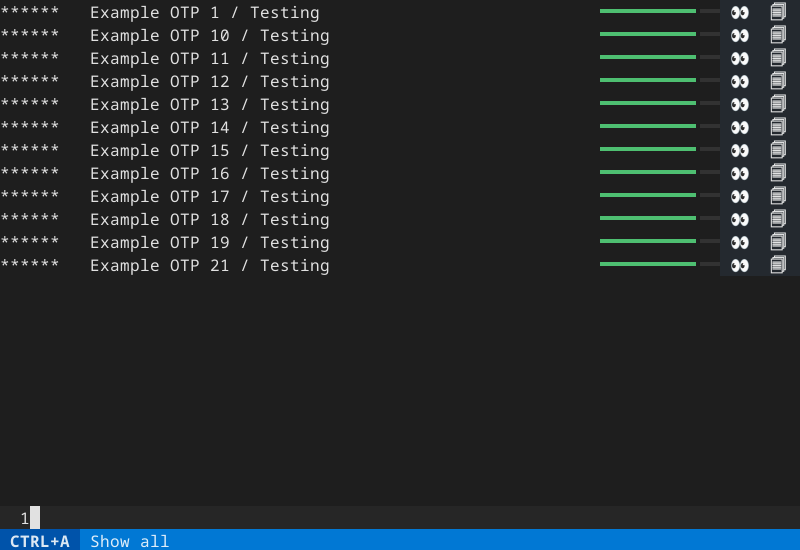
Once the otp-command finishes, textual-totp will show each available TOTP.
Each code will show as ****** until it is revealed.
You can specify an initial fuzzy search on the command line.
Navigate up/down in several ways:
- up and down keys
- tab and shift-tab keys
- "j" and "k" (vi keys)
To reveal a code, move to the desired line and press "s".
When the code expires, it will be replaced with ****** again.
Copy a code directly to the operating system's clipboard by pressing "c".
The code will be cleared from the clipboard after 30 seconds.
Your Operating System may report that textual-totp "pasted from the clipboard".
This is because textual-totp tries to only clear values that it set,
by checking that the current clipboard value is equal to the value it pasted earlier.
If you use an X11 system, you can install the xclip program, which allows textual-totp to clear the clipboard without querying it.
Search for a key by pressing "/" and then entering sub-strings to search for. Press Ctrl+A to show all keys again.
Textual's built in fuzzy match algorithm is used.
This makes it easy to search for e.g., "Jay Doe / example.com" by entering "ja d ex", while not requiring any sophisticated fuzzy search technology.
Due to the simple way this is implemented, a space character inside a character class does not function as expected. Since complicated regular expressions are likely seldom used, this is not likely to be a huge limitation.
Exit the app with Ctrl+C.
In-memory storage of TOTPs
As long as textual-totp is open, the TOTP secret values are stored in memory in plain text.
textual-totp never writes secret values to operating system files or stores them in environment variables.
(but your otp-command might! check any related documentation carefully)
Development Status
I (@jepler) wrote this software because it was useful to me. It fits my needs in its current form. I maintain it for my own needs and acting on issues and pull requests is unlikely to be a high priority. Thank you for your understanding about this!
I develop the software on Linux, generally Debian Linux. I often make compatibility with Debian Oldstable my goal, but this package has only been tested on stable Debian Trixie with Python 3.13.9. Improvements for compatibility on other platforms, including Python versions as old as 3.10 are welcome.
In the unlikely event that this project becomes popular, I would want to convert it to a community-run project with multiple maintainers. There are some issues in the tracker entered by me that seem like good directions to develop the software in.
1 maintainer

Metadata
1 maintainer
Release files for textual-totp 0.9.7
For a detailed explanation of source distributions (sdists) and built distributions (wheels), please see the package formats documentation.
Source distribution (sdist)
| File | Size | Uploaded | |
|---|---|---|---|
| textual_totp-0.9.7.tar.gz | 51.4 kB | Details |
Built distribution (wheel)
| File | Interpreter | ABI | Platform | Reset |
|---|---|---|---|---|
| textual_totp-0.9.7-py3-none-any.whl | Python 3 | none | any | Details |
Total release size: 64.4 kB
Release files / textual_totp-0.9.7.tar.gz
| Download URL | textual_totp-0.9.7.tar.gz |
|---|---|
| Size | 51.4 kB |
| Tags | Source |
|
SHA-256 checksum How to use checksums |
2930e745e26563868f7d2e24d4c5b982eddd6cc594e30773eca29c9f3253d8ab
|
|
BLAKE2b-256 checksum How to use checksums |
0343ca9ab475024f2ea2533504d22a10cf79468f892a2bf0acd0640f3abb9086
|
| Upload date | |
|
Uploaded using Trusted Publishing? What is trusted publishing? |
No |
| Uploaded via |
uv/0.12.15 {"installer":{"name":"uv","version":"0.12.15","subcommand":["publish"]},"python":null,"implementation":{"name":null,"version":null},"distro":{"name":"Debian GNU/Linux","version":"13","id":"trixie","libc":null},"system":{"name":null,"release":null},"cpu":null,"openssl_version":null,"setuptools_version":null,"rustc_version":null,"ci":true}
|
Release files / textual_totp-0.9.7-py3-none-any.whl
| Download URL | textual_totp-0.9.7-py3-none-any.whl |
|---|---|
| Size | 12.9 kB |
| Tags | Python 3 |
|
SHA-256 checksum How to use checksums |
e1efdb5e21b020a41d1f0b8b965ae0a7fe45c4f97b1da87470ad6a5ff8cfa104
|
|
BLAKE2b-256 checksum How to use checksums |
5bdab17c4ae8cae2f338c6e8f67b42a806ea61a7c21c5276649618d998138df2
|
| Upload date | |
|
Uploaded using Trusted Publishing? What is trusted publishing? |
No |
| Uploaded via |
uv/0.12.15 {"installer":{"name":"uv","version":"0.12.15","subcommand":["publish"]},"python":null,"implementation":{"name":null,"version":null},"distro":{"name":"Debian GNU/Linux","version":"13","id":"trixie","libc":null},"system":{"name":null,"release":null},"cpu":null,"openssl_version":null,"setuptools_version":null,"rustc_version":null,"ci":true}
|














