
tf-peek





The Terraform plan reviewer that knows what your team considers dangerous.
Declare your risk model once in peek_config.toml. Get a Markdown review report that escalates what
matters, silences what doesn't, and fails the build when something irreversible is on the table.
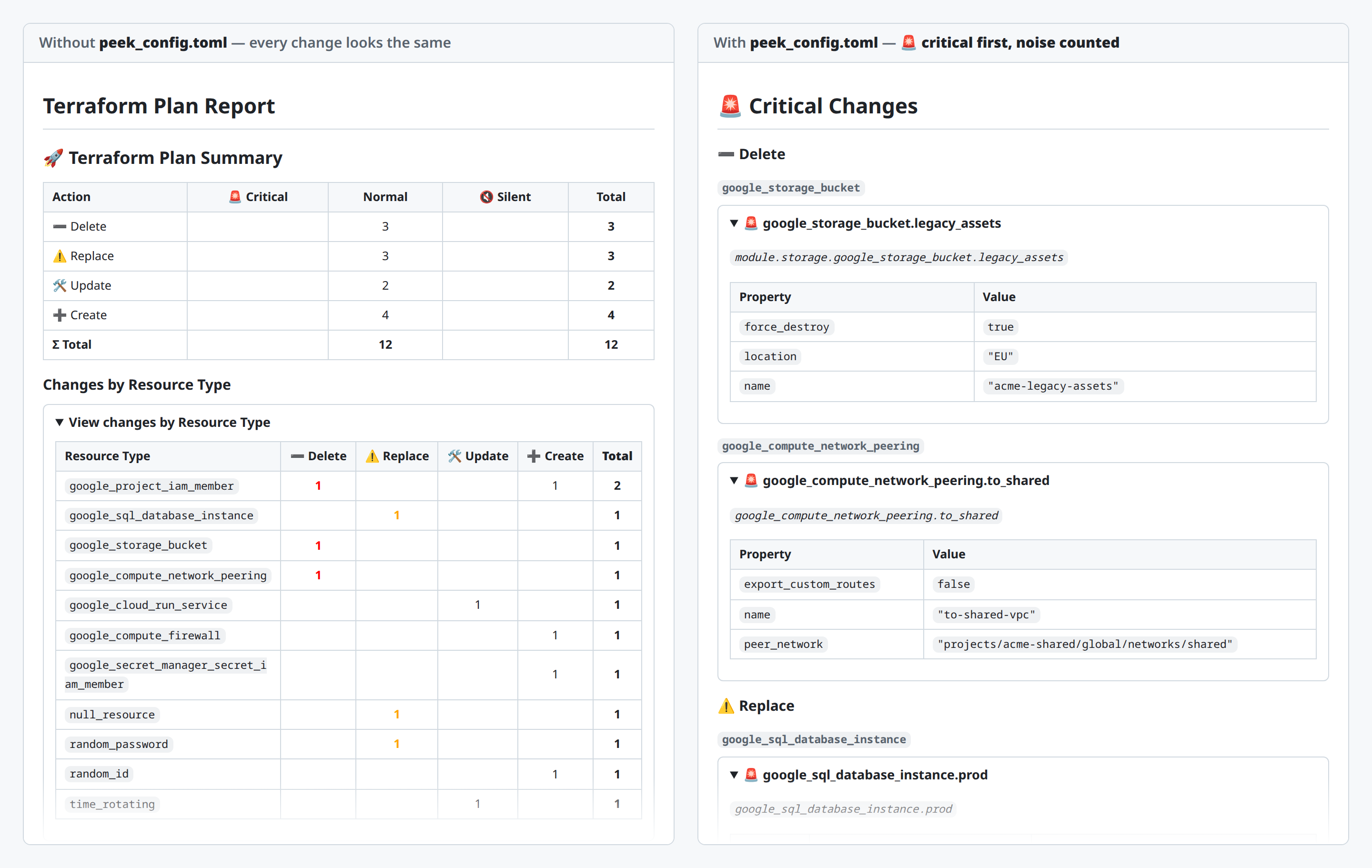
Same plan, same command, one peek_config.toml apart. On the left, 12 changes all look alike and the
replaced production database is somewhere below the fold. On the right, 3 critical operations are
hoisted above the summary and 4 routine changes are counted but not detailed.
Why tf-peek
Every other plan renderer shows you what changes. tf-peek renders an opinion about the plan.
- Three tiers, declared per repository —
silent,normal,critical, matched on resource type or on an address regex. No policy DSL, no Rego, no SaaS. - Per-action escalation —
critical_on = ["delete", "replace"]: creating a bucket is routine, deleting one is not. - 🚨 above the fold — critical changes render before the summary, so a destructive operation survives a skim of a 400-line report.
- Silenced, never hidden — silent resources are still counted, so the report never lies by omission.
- Sensitive values masked by default — anything Terraform marks sensitive renders as
(sensitive value)at any nesting depth;--show-sensitiveis an explicit opt-out. - A gate, not just a report —
--fail-on-criticalexits3when a critical operation is on the table, so CI can block the merge. - Deterministic and offline — same plan in, byte-identical report out. No network calls, no state access, no credentials. Safe to run in any pipeline.
Install
uv tool install tf-peek # or: pipx install tf-peek or: pip install tf-peek
Quick start
terraform plan -out=tfplan
terraform show -json tfplan > plan.json
tf-peek plan.json --output report.md
Or pipe the plan straight in:
terraform show -json tfplan | tf-peek -
Declare your risk model
tf-peek reads peek_config.toml from the current working directory, or the file given to
--config:
# Counted in the summary, never detailed.
[[resources]]
match_type = "null_resource"
tier = "silent"

# Deleting or replacing this is a 🚨 event — and so is updating it.
[[resources]]
match_type = "google_sql_database_instance"
tier = "critical"
critical_on = ["delete", "replace", "update"]

# Noisy but harmless: title only, no attribute diff.
[[resources]]
match_type = "google_project_iam_member"
tier = "normal"
detail = "summary"
Without a config file every resource is normal — that is the left-hand side of the screenshot
above. The full GCP-flavoured example used for the right-hand side is
config.toml, and the plan it was run
against is examples/demo-plan.json.
Gate CI on critical changes
tf-peek plan.json --fail-on-critical --output report.md
status=$?
if [ "$status" -eq 3 ]; then
  echo "Critical change detected — blocking merge"
  exit 1
elif [ "$status" -ne 0 ]; then
  echo "tf-peek failed to run (exit $status)"
  exit "$status"
fi
Exit 3 means the gate fired and the report was still written; exit 1 means the tool itself
failed. Use --fail-on-critical-on delete to fail only on destructive actions.
Documentation
Full documentation lives at looztra.github.io/tf-peek, organised with the Diataxis framework:
| Type | Start here |
|---|---|
| Tutorial | Your first Terraform plan report |
| How-to | Install · Generate a report · Silence noisy resources · Flag critical resources |
| Reference | CLI · Configuration |
| Explanation | Resource tiers |
Contributing
Issues and pull requests are welcome — see CONTRIBUTING.md and the Code of Conduct. Curated tier presets for a provider you know well are the highest-value contribution and need domain knowledge rather than Python.
To report a vulnerability, follow the security policy — never a public issue.
License
1 maintainer

Download files
Download the file for your platform. If you're not sure which to choose, learn more about installing packages.
Source Distributions
Built Distribution
Filter files by name, interpreter, ABI, and platform.
If you're not sure about the file name format, learn more about wheel file names.
Copy a direct link to the current filters
File details
Details for the file tf_peek-1.2.0-py3-none-any.whl.
File metadata
- Download URL: tf_peek-1.2.0-py3-none-any.whl
- Upload date:
- Size: 17.9 kB
- Tags: Python 3
- Uploaded using Trusted Publishing? Yes
- Uploaded via:
twine/7.0.0 CPython/3.13.14
File hashes
| Algorithm | Hash digest | |
|---|---|---|
| SHA256 |
01ed52bbf107d61d5836f1261c25e7044781d80bc95cc3b8fa46025845eb1938
|
|
| MD5 |
7bcf5ae2d2a76a2530ffc15222b6a404
|
|
| BLAKE2b-256 |
4a980b88693fe0840c42ced701a93e9151be481554c0df8a18e6738048b16df7
|
Provenance
The following attestation bundles were made for tf_peek-1.2.0-py3-none-any.whl:
Publisher:
code-checks.yaml on looztra/tf-peek
-
Statement:
-
Statement type:
https://in-toto.io/Statement/v1 -
Predicate type:
https://docs.pypi.org/attestations/publish/v1 -
Subject name:
tf_peek-1.2.0-py3-none-any.whl -
Subject digest:
01ed52bbf107d61d5836f1261c25e7044781d80bc95cc3b8fa46025845eb1938 - Sigstore transparency entry: 2516149540
- Sigstore integration time:
-
Permalink:
looztra/tf-peek@6e431759fce1be45f99f2240da850141e6264f10 -
Branch / Tag:
refs/tags/v1.2.0 - Owner: https://github.com/looztra
-
Access:
public
-
Token Issuer:
https://token.actions.githubusercontent.com -
Runner Environment:
github-hosted -
Publication workflow:
code-checks.yaml@6e431759fce1be45f99f2240da850141e6264f10 -
Trigger Event:
push
-
Statement type:







