
TfBrief


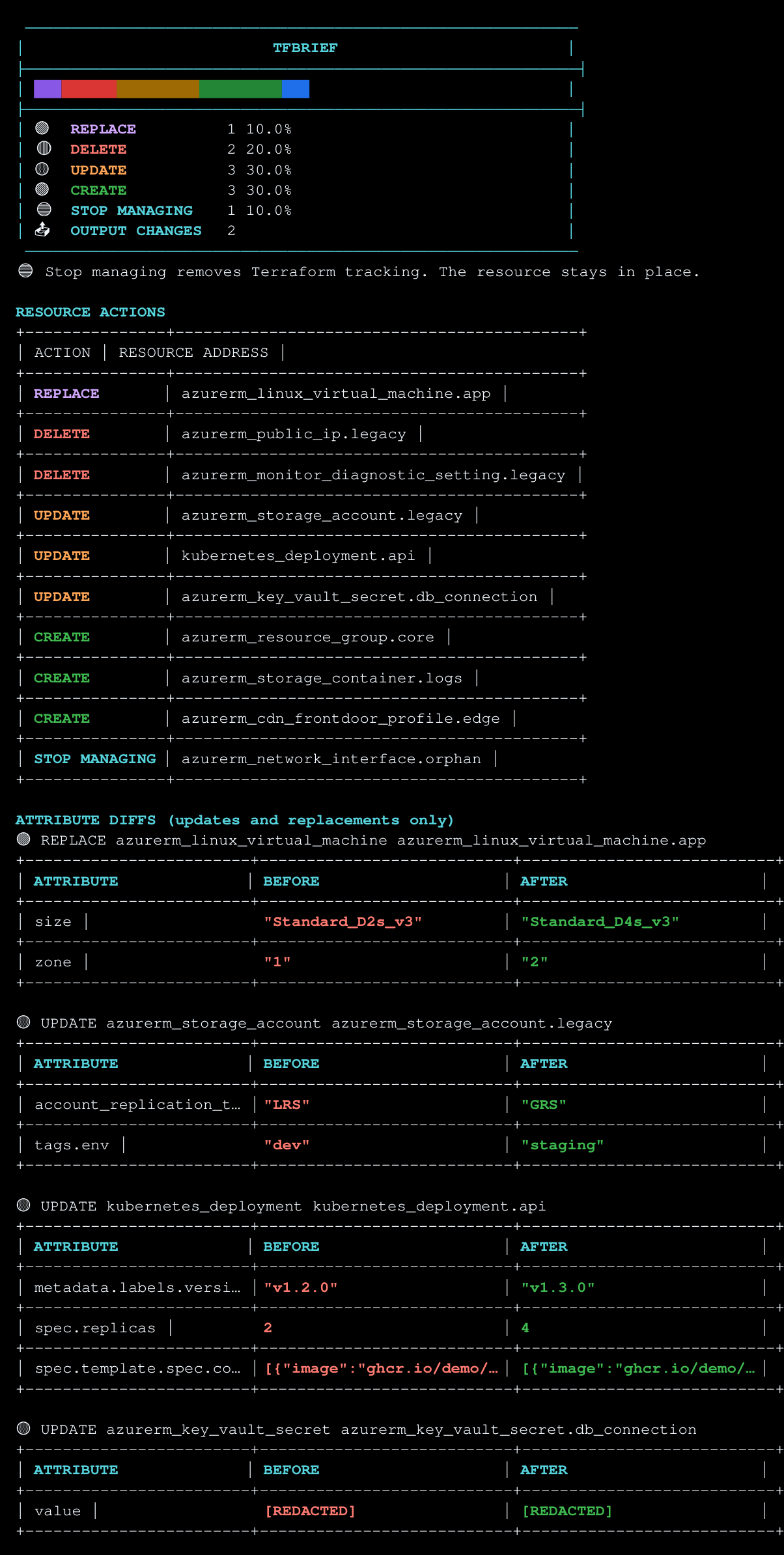
TfBrief is a dependency-free Python package that formats terraform show -json into human-readable CI logs and Markdown for pull-request reviews: summary panels, resource actions, and attribute diffs—no jq scripts and no third-party runtime deps (stdlib only).
- Terraform / OpenTofu plan formatter for pipelines and PR comments
--format markdownforGITHUB_STEP_SUMMARYand issue commentspip install tfbrief— one pipe on stdout; optional--has-changesapply gate
Canonical docs: this README on GitHub main. PyPI copies it on each release (push a v*.*.* tag after merging doc changes).
Install from PyPI: pypi.org/project/tfbrief
Example output
Sample plan: minimal-plan.json.
Why TfBrief?
Hashicorp’s JSON plan is complete but awkward in pull request checks and pipeline logs. TfBrief is a small Python CLI focused on infrastructure-as-code workflows: operators see what will create, update, or delete before apply, without a JSON viewer or custom jq scripts.
Typical fit: Terraform modules in GitHub Actions, GitLab CI, or any job that already runs terraform plan -out=tfplan.
OpenTofu
OpenTofu uses the same JSON plan shape as Terraform. Pipe tofu show -json tfplan into TfBrief the same way as terraform show -json.
Install
pip install tfbrief
Requires Python 3.10+. The tfbrief command is on your PATH after install.
Contributors (editable install from a clone):
pip install -e .
Usage
After terraform plan -out=tfplan, pipe the JSON plan into TfBrief:
terraform show -json tfplan | tfbrief
That prints the summary panel, resource table, and attribute diffs (see example above).
Markdown (pull request summaries)
For PR comments or GITHUB_STEP_SUMMARY, emit Markdown instead of ANSI terminal output:
terraform show -json tfplan | tfbrief --format markdown
Short form: --format=markdown or --format md.
Saving Markdown to a file on Windows: In Windows PowerShell 5.1, > / >> use Unicode (often UTF-16 LE), not the process stdout encoding — PYTHONIOENCODING alone does not fix that. Prefer one of:
Get-Content plan.json | python -m tfbrief --format markdown | Out-File -Encoding utf8 plan-summary.md
# Git Bash or WSL
terraform show -json tfplan | tfbrief --format markdown > plan-summary.md
See about_Character_Encoding. Linux runners (GITHUB_STEP_SUMMARY, >>) use UTF-8 by default.
Markdown in another repo: copy docs/examples/pr-plan-summary.yml into .github/workflows/. The default install is pip install tfbrief from PyPI; optional env vars install from a Git ref for prerelease testing.
Optional: --has-changes (apply gate)
Same JSON input, different output — no formatted report. Stdout is only true or false so scripts can skip apply when the plan is empty:
terraform show -json tfplan | tfbrief --has-changes
# true
Plans with only no-op / read actions (and no output changes) print false. Resource or output changes print true. Invalid JSON prints an error to stderr and exits 1.
Typical pattern — log for humans, gate for apply:
terraform plan -out=tfplan
terraform show -json tfplan | tfbrief
if [ "$(terraform show -json tfplan | tfbrief --has-changes)" = "true" ]; then
  terraform apply tfplan
fi
You do not need --has-changes if you only want readable CI logs or apply manually.
GitHub Actions
Composite action (no hand-rolled pip install):
- run: terraform plan -out=tfplan
- run: terraform show -json tfplan > plan.json

- uses: infroware/tfbrief/.github/actions/tfbrief@v0.1.9
  with:
    plan-path: plan.json

- uses: infroware/tfbrief/.github/actions/tfbrief@v0.1.9
  with:
    plan-path: plan.json
    format: markdown
    append-summary: "true"

- id: gate
  uses: infroware/tfbrief/.github/actions/tfbrief@v0.1.9
  with:
    plan-path: plan.json
    has-changes: "true"

- if: steps.gate.outputs.has-changes == 'true'
  run: terraform apply tfplan
Pin the @v0.1.9 ref to a release tag. Override package: tfbrief==0.1.8 if you need a specific PyPI version.
Shell one-liner:
- uses: actions/setup-python@v5
  with:
    python-version: "3.12"
- run: pip install -q tfbrief && terraform show -json tfplan | tfbrief
Post a Markdown plan summary on pull requests: use docs/examples/pr-plan-summary.yml. It appends to GITHUB_STEP_SUMMARY, updates one PR comment (marker <!-- tfbrief-plan-summary:v1 -->), skips comments on fork PRs (read-only token), and tolerates comment permission errors.
Security
TfBrief redacts values when:
- Terraform marks them in
before_sensitive/after_sensitive, or - The attribute path looks secret-like (
password,token,api_key,client_secret,db_master_password, nested segments, and similar).
Set TFBRIEF_REDACT_PATTERNS to a comma-separated list of extra regexes (attribute path or segment) for custom names, e.g. internal_id,^.+\.vault\..
Redaction is best-effort (naming heuristics miss custom fields). Treat all CI and PR output as sensitive; use Terraform sensitive = true on values that must not appear in logs.
License
MIT — see LICENSE.
1 maintainer

Metadata
1 maintainer
Release files for tfbrief 0.1.9
For a detailed explanation of source distributions (sdists) and built distributions (wheels), please see the package formats documentation.
Source distribution (sdist)
| File | Size | Uploaded | Provenance | Actions |
|---|---|---|---|---|
| tfbrief-0.1.9.tar.gz | 224.6 kB | With provenance | Details for tfbrief-0.1.9.tar.gz |
Built distribution (wheel)
| File | Interpreter | ABI | Platform | Actions Reset |
|---|---|---|---|---|
| tfbrief-0.1.9-py3-none-any.whl | Python 3 | none | any | Details for tfbrief-0.1.9-py3-none-any.whl |
Total release size: 236.3 kB
Release files / tfbrief-0.1.9.tar.gz
| Download URL | tfbrief-0.1.9.tar.gz |
|---|---|
| Size | 224.6 kB |
| Tags | Source |
|
SHA-256 checksum How to use checksums |
56cea0062b6e1761ff355a52ec57d419ae2fea57fa77c68c426ef76b7becdb0e
|
|
BLAKE2b-256 checksum How to use checksums |
23300f26cf2460b67617dca188180ab077f696cee61d62f16ca223ce2cb013b3
|
| Upload date | |
|
Uploaded using Trusted Publishing? What is trusted publishing? |
Yes |
| Uploaded via |
twine/7.0.0 CPython/3.13.16
|
Provenance
Provenance describes where a file came from. On PyPI, provenance is shared via attestations, which provide a verifiable record of the build or publishing details. View details, limitations and caveats.


PyPI Publish Attestation
PyPI verified that this artifact, at this checksum, originated from the publisher listed below.
Signed by GitHub Actions, verified by PyPI on Nov 29, 2026.
Transparency logRelease files / tfbrief-0.1.9-py3-none-any.whl
| Download URL | tfbrief-0.1.9-py3-none-any.whl |
|---|---|
| Size | 11.7 kB |
| Tags | Python 3 |
|
SHA-256 checksum How to use checksums |
69a715aaee3de1a50dfa940931cf952aff03e04059bc79a8ee7a31c727610498
|
|
BLAKE2b-256 checksum How to use checksums |
80c67a681ab082143198ba3571b46e05956548da23de903aad62f0587886594b
|
| Upload date | |
|
Uploaded using Trusted Publishing? What is trusted publishing? |
Yes |
| Uploaded via |
twine/7.0.0 CPython/3.13.16
|
Provenance
Provenance describes where a file came from. On PyPI, provenance is shared via attestations, which provide a verifiable record of the build or publishing details. View details, limitations and caveats.
PyPI Publish Attestation
PyPI verified that this artifact, at this checksum, originated from the publisher listed below.
Signed by GitHub Actions, verified by PyPI on Nov 29, 2026.
Transparency logSecurity for tfbrief 0.1.9
Provenance
Provenance describes where a file came from. On PyPI, provenance is shared via attestations, which provide a verifiable record of the build or publishing details. View details, limitations and caveats.
Full provenance
Both files in this release have been uploaded with provenance metadata.
Attestation for tfbrief-0.1.9.tar.gz
PyPI Publish Attestation
PyPI verified that this artifact, at this checksum, originated from the publisher listed below.
Signed by GitHub Actions, verified by PyPI on Nov 29, 2026.
Transparency logA note on package security
PyPI is a repository for distributing packages, not a service for auditing them. While third-party security researchers and our staff do their best to detect and remove malicious packages, PyPI cannot guarantee the quality, security or suitability of any given package.
To learn more about protecting yourself from malicious actors, visit our package security documentation.














