
Tool to perform dynamic terraform applies w/replacement on TFC using resource name keywords.

Project description
tfc-ws-apply-replace
What does it do?
This script targets a TFC workspace and runs the equivalent of a terraform apply -replace=[] on a dynamic set of resources determined by a provided keyword
Why?
In certain TFC implementations, people will use a tightly controlled organization and workspace to create child organizations and workspaces. This is commonly referred to as the workspace vending machine approach. In this model, the parent workspace is also responsible for managing the child workspace's credentials in the form of sensitive workspace variables. However, setting those variables once and never rotating them introduces some risk. Using this script, you can schedule the rotation of those credentials (or any other type of resource).
Usage
- Set an environment variable
TFC_TOKENequal to a valid TFC token with adequate permissions
usage: tfc-apply-replace [-h] --org ORG --ws WS --keyword KEYWORD [--message MESSAGE] [-a]

Tool to perform dynamic terraform applies w/replacement on TFC using resource name keywords.

optional arguments:
  -h, --help         show this help message and exit
  --org ORG          Name of the org you're targeting (default: None)
  --ws WS            ID of the workspace you're targeting (default: None)
  --keyword KEYWORD  Keyword matching the beginning of the resource name(s) you are trying to find (default: None)
  --message MESSAGE  Message to be displayed in TFC GUI as the reason for the run (default: API Triggered Key Rotation)
  -a, --auto         Whether or not to auto apply the plan (default: False)
Example
My parent workspace creates a child workspace and an IAM user specific to the child workspace. It then generates aws_iam_access_key credentials and assigns them to the child workspace as a sensitive variable:
resource "aws_iam_user" "iam_user" {
  name = "tfc_workspace_${tfe_workspace.workspace.name}"
}

resource "aws_iam_user_policy_attachment" "iam_user_policy_attach" {
  user       = aws_iam_user.iam_user.name
  policy_arn = var.workspace_iam_policy
}

resource "aws_iam_access_key" "workspace_creds" {
  user = aws_iam_user.iam_user.name
}

resource "tfe_variable" "aws_access_key_id" {
  key          = "AWS_ACCESS_KEY_ID"
  category     = "env"
  value        = aws_iam_access_key.workspace_creds.id
  workspace_id = tfe_workspace.workspace.id
}

resource "tfe_variable" "aws_secret_access_key" {
  key          = "AWS_SECRET_ACCESS_KEY"
  category     = "env"
  sensitive    = true
  value        = aws_iam_access_key.workspace_creds.secret
  workspace_id = tfe_workspace.workspace.id
}
If I wanted to replace/rotate the resource aws_iam_access_key (and by relation any resource that depends on it, i.e. the tfe_variable.aws_secret_access_key resource), I would use the resources given name workspace_creds
tfc-apply-replace --org djs-admin --ws ws-Zh2kBGmXrh5hgBxA --keyword workspace_creds
-------------------------------------
TFC Organization Name: some-org
TFC Workspace ID: ws-xxxxxxxxxxxxxxxx
Resource Name FIlter: workspace_creds
Auto Apply: False
-------------------------------------

Found 1 resources whose name(s) start with the keyword:

    module.ws_vending_machine["djs-ec2"].aws_iam_access_key.workspace_creds

Triggering a 'terraform apply -replace=' to rotate the found resources...

Link to run: https://app.terraform.io/app/some-org/workspaces/ws-xxxxxxxxxxxxxxxx/runs/run-xxxxxxxxxxxxxxxx

Status: planning...
Status: cost_estimating...
Status: cost_estimated...

!! Plan is waiting for approval in the GUI, please click the URL provided above !!

Status: confirmed...
Status: applying...
Status: applied...
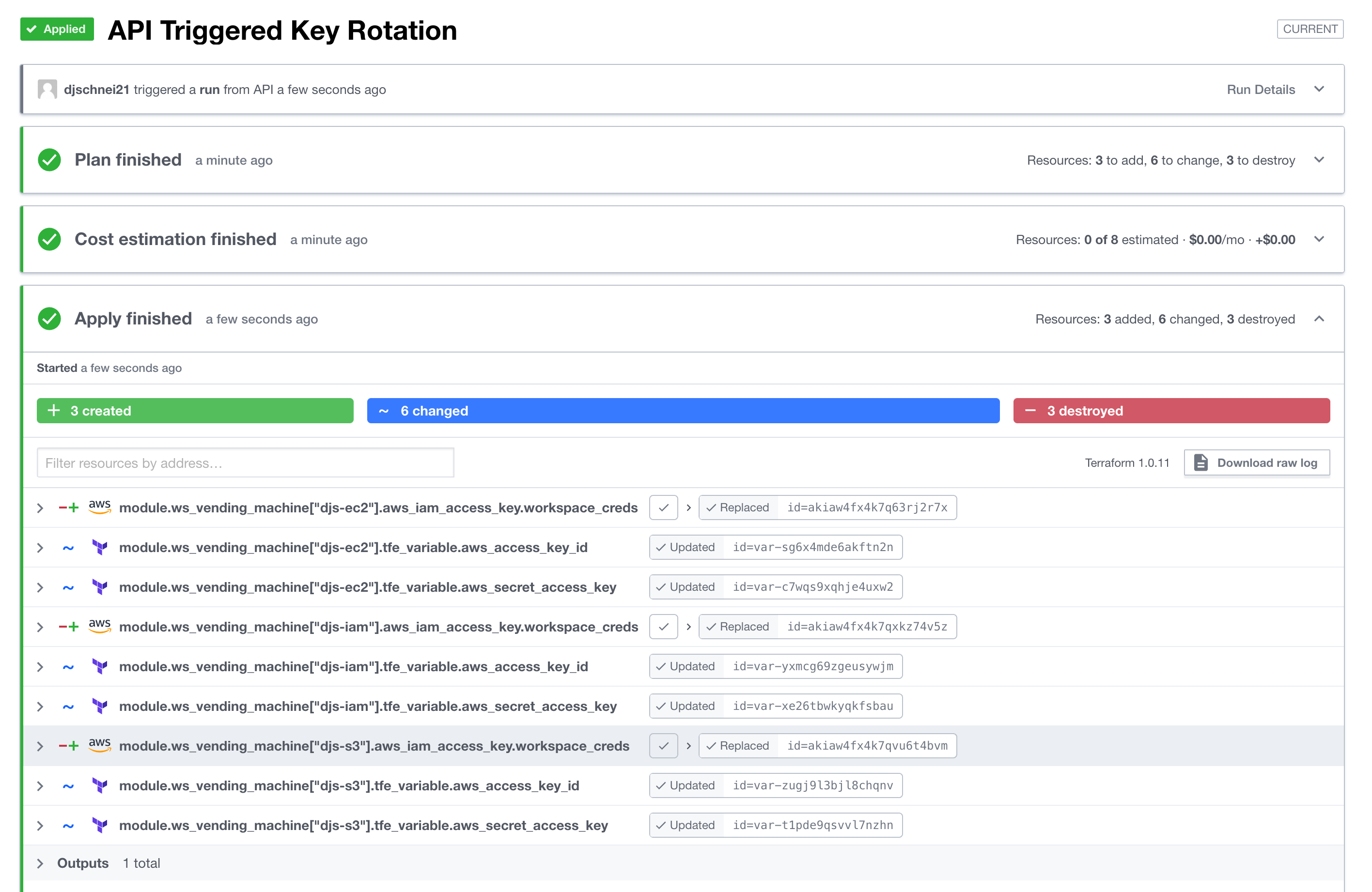
While this workspace manages 23 resources in total, you can see below the script targeted only the resources needed to rotate the downstream workspace's access keys:


Download files
Download the file for your platform. If you're not sure which to choose, learn more about installing packages.
Source Distribution
Built Distribution
Filter files by name, interpreter, ABI, and platform.
If you're not sure about the file name format, learn more about wheel file names.
Copy a direct link to the current filters
File details
Details for the file tfc-apply-replace-1.0.3.tar.gz.
File metadata
- Download URL: tfc-apply-replace-1.0.3.tar.gz
- Upload date:
- Size: 4.8 kB
- Tags: Source
- Uploaded using Trusted Publishing? No
- Uploaded via: twine/3.6.0 importlib_metadata/4.8.2 pkginfo/1.8.1 requests/2.26.0 requests-toolbelt/0.9.1 tqdm/4.62.3 CPython/3.9.9
File hashes
| Algorithm | Hash digest | |
|---|---|---|
| SHA256 |
5ddd587fe1bdfaee06714eb1fd699a507a7a542067e7dff8d282ce521ca6f3db
|
|
| MD5 |
dd0b3d44a0221f2348c7af762776a738
|
|
| BLAKE2b-256 |
3ba3aeac560979e453171ecf5b20e073e2ea08a14fcedd047fdf2c0a2cff95bd
|
File details
Details for the file tfc_apply_replace-1.0.3-py3-none-any.whl.
File metadata
- Download URL: tfc_apply_replace-1.0.3-py3-none-any.whl
- Upload date:
- Size: 5.7 kB
- Tags: Python 3
- Uploaded using Trusted Publishing? No
- Uploaded via: twine/3.6.0 importlib_metadata/4.8.2 pkginfo/1.8.1 requests/2.26.0 requests-toolbelt/0.9.1 tqdm/4.62.3 CPython/3.9.9
File hashes
| Algorithm | Hash digest | |
|---|---|---|
| SHA256 |
2a7876ab5d9bfe58dfefff4e625da7f5c48e4f572a8044c235cb4d7b44dca6a6
|
|
| MD5 |
7d847133372f08110e0bf6c05fc4237f
|
|
| BLAKE2b-256 |
fcbc6bc5b3cc94ff4b5315f3c25ff9110346c853eb66607850727f0ec319bc51
|






