
TFKit - Terraform Intelligence & Analysis Suite





A comprehensive toolkit for analyzing, visualizing, and validating Terraform infrastructure code. TFKit provides deep insights into your Terraform projects with advanced dependency tracking, security scanning, and interactive visualizations.
Overview
TFKit helps infrastructure teams understand, validate, and optimize their Terraform configurations through:
- Quick Scanning: Rapid project analysis with comprehensive metrics
- Validation Suite: Built-in validation with security and compliance checks
- Multi-Format Export: Flexible output formats for integration with other tools
- Interactive Visualizations: Rich graphical representations with multiple themes and layouts
- CI/CD Ready: SARIF output and automation-friendly interfaces
Quick Start
Installation
pip install tfkit-py
Basic Usage
Get started with these essential commands:
# Quick project scan
tfkit scan

# Scan with visualization
tfkit scan --open --theme dark --layout graph

# Validate configurations
tfkit validate --all --strict

# Export analysis results
tfkit export --format json --format yaml
Visualization Layouts
| Graph Layout | Dashboard Layout | Classic Layout |
|---|---|---|
 |
 |
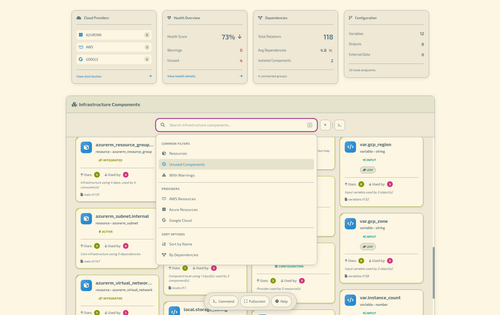 |
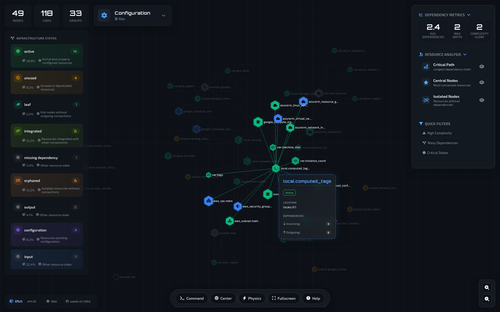
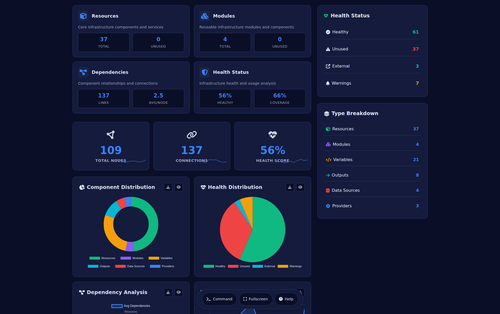
| Force-directed graph showing resource relationships (Github-Dark Theme) | Dashboard with metrics and insights | Traditional hierarchical layout (Solirized-Light Theme) |
Available Themes
- Dark (default) - Dark theme for extended viewing sessions
- Light - Light theme for printed reports
- Cyber - High-contrast theme for presentations
- GitHub Dark - GitHub's dark color scheme
- Monokai - Popular code editor theme
- Solarized Light - Eye-friendly light theme
- Dracula - Popular dark theme
- Atom One Dark - Atom editor's dark theme
- Gruvbox Dark - Retro groove color scheme
- Night Owl - Night-optimized theme
Layout Options
- Classic - Traditional hierarchical tree layout
- Graph - Force-directed graph for complex relationships (default)
- Dashboard - Metrics-focused layout with key insights
Command Reference
Scan Command
Quick analysis for rapid insights into your Terraform project with comprehensive statistics and health assessment.
tfkit scan [PATH] [OPTIONS]
Options:
--output, -o DIR- Output directory for reports--format, -f FORMAT- Output format:table(default),json,yaml,simple--open, -O- Open results in browser--quiet, -q- Minimal output--save, -s FILE- Save scan results to file--theme THEME- Visualization theme (default: dark)--layout LAYOUT- Visualization layout (default: graph)
Examples:
# Scan current directory
tfkit scan

# Scan specific path
tfkit scan /path/to/terraform

# Scan with JSON output
tfkit scan --format json

# Scan and open visualization
tfkit scan --open --theme cyber --layout dashboard

# Save results and open browser
tfkit scan --save scan.json --open

# Quiet mode with simple output
tfkit scan --quiet --format simple
Output:
The scan command provides:
- Project Summary: Total objects, resources, data sources, variables, outputs, providers
- Health Assessment: Overall health score, unused objects, orphaned outputs, incomplete resources
- Resource Types: Breakdown of resource types with counts
- Potential Issues: Unused objects, orphaned outputs, incomplete configurations
- State Distribution: Classification of all Terraform components
Validate Command
Comprehensive validation of Terraform configurations with multiple check types and flexible output formats.
tfkit validate [PATH] [OPTIONS]
Validation Options:
--strict, -s- Enable strict validation mode--check-syntax- Check HCL syntax--check-references- Validate references--check-best-practices- Check against best practices--check-security- Security validation--all, -a- Run all validation checks (recommended)--fail-on-warning- Treat warnings as errors (CI/CD mode)--ignore RULE- Ignore specific validation rules (can use multiple times)
Output Options:
--format, -f FORMAT- Output format:table(default),json,sarif
Examples:
# Basic validation (syntax + references)
tfkit validate

# Full validation suite
tfkit validate --all

# Strict validation with all checks
tfkit validate --all --strict

# Security-focused validation
tfkit validate --check-security --strict

# CI/CD integration with SARIF output
tfkit validate --all --strict --fail-on-warning --format sarif > results.sarif

# Validation with ignored rules
tfkit validate --all --ignore TF020 --ignore TF021

# JSON output for programmatic use
tfkit validate --all --format json
Validation Output:
Results include:
- Summary: Count of errors, warnings, info messages, and passed checks
- Issues Table: Detailed list with severity, category, rule ID, location, resource name, and message
- Suggestions: Actionable recommendations for fixing issues
- Passed Checks: List of successfully validated rules
Severity Levels:
- ❌ ERROR - Critical issues that must be fixed
- ⚠️ WARNING - Issues that should be addressed
- ℹ️ INFO - Informational messages and suggestions
Export Command
Export analysis data in multiple structured formats for integration with other tools and workflows.
tfkit export [PATH] [OPTIONS]
Options:
--format, -f FORMAT- Export formats:json,yaml,csv,xml,toml(can specify multiple)--output-dir, -o DIR- Output directory (default: current directory)--prefix, -p PREFIX- Output filename prefix (default: "tfkit-export")--split-by TYPE- Split exports by category:type,provider,module--include PATTERN- Include specific components (can use multiple times)--exclude PATTERN- Exclude specific components (can use multiple times)--compress, -c- Compress output files into ZIP archive
Examples:
# Export as JSON (default)
tfkit export

# Export multiple formats
tfkit export --format json --format yaml --format csv

# Export to specific directory
tfkit export --format json --output-dir ./exports

# Split exports by provider
tfkit export --format csv --split-by provider

# Export with compression
tfkit export --format json --format yaml --compress

# Custom filename prefix
tfkit export --format json --prefix infrastructure-2024
Exported Data:
The export includes:
- Summary: Resource counts and project metadata
- Health Metrics: Health score and issue counts
- Resource Types: Detailed breakdown of all resource types
- State Distribution: Classification of components
- Issues: Unused objects, orphaned outputs, incomplete configurations
- Providers: List of used providers
Examples Command
Display practical usage examples and common patterns for all TFKit commands.
tfkit examples
Shows real-world examples including:
- Quick scanning workflows
- Validation patterns
- Export strategies
- Complete analysis pipelines
Advanced Usage
Complete Analysis Pipeline
# 1. Quick project scan with health assessment
tfkit scan --save initial-scan.json

# 2. Full validation with all checks
tfkit validate --all --strict

# 3. Generate interactive visualization
tfkit scan --open --theme dark --layout graph

# 4. Export data for external tools
tfkit export --format json --format yaml --compress
Security-Focused Workflow
# Security validation
tfkit validate --check-security --strict --fail-on-warning

# Scan with security assessment
tfkit scan --format json --save security-scan.json

# Generate security report
tfkit scan --open --theme cyber
CI/CD Integration
# Pre-commit validation
tfkit validate --check-syntax --check-references --fail-on-warning

# Full CI validation with SARIF
tfkit validate --all --strict --fail-on-warning --format sarif > results.sarif

# Automated scanning with JSON output
tfkit scan --quiet --format json --save scan-results.json
Multi-Format Export Workflow
# Export all formats with compression
tfkit export --format json --format yaml --format csv --compress

# Split by provider for large projects
tfkit export --format json --split-by provider --output-dir exports/

# Custom export with filtering
tfkit export --format yaml --prefix prod-infra --exclude "*.test.tf"
Output Examples
Scan Results (Table Format)
████████╗███████╗██╗  ██╗██╗████████╗
╚══██╔══╝██╔════╝██║ ██╔╝██║╚══██╔══╝
   ██║   █████╗  █████╔╝ ██║   ██║
   ██║   ██╔══╝  ██╔═██╗ ██║   ██║
   ██║   ██║     ██║  ██╗██║   ██║
   ╚═╝   ╚═╝     ╚═╝  ╚═╝╚═╝   ╚═╝

📊 TERRAFORM PROJECT SUMMARY
┏━━━━━━━━━━━━━━┳━━━━━━━┳━━━━━━━━━━━━━━━━━━━━━━━━┓
┃ Metric       ┃ Count ┃ Details                ┃
┡━━━━━━━━━━━━━━╇━━━━━━━╇━━━━━━━━━━━━━━━━━━━━━━━━┩
│ Total Objects│   24  │ All Terraform components│
│ Resources    │   15  │ 8 unique types         │
│ Data Sources │    3  │ External data references│
│ Variables    │   12  │ 10 used                │
│ Outputs      │    8  │ 2 orphaned             │
│ Providers    │    3  │ aws, null, template    │
└──────────────┴───────┴────────────────────────┘

🏥 HEALTH ASSESSMENT
┏━━━━━━━━━━━━━━━━┳━━━━━━━┳━━━━━━━━━━━━━━━━━━┓
┃ Category       ┃ Count ┃ Status           ┃
┡━━━━━━━━━━━━━━━━╇━━━━━━━╇━━━━━━━━━━━━━━━━━━┩
│ Overall Score  │ 85.0% │ Excellent        │
│ Unused Objects │   2   │ Potential cleanup│
│ Orphaned Outputs│  2   │ Unused outputs   │
│ Incomplete     │   1   │ Missing values   │
└────────────────┴───────┴──────────────────┘
Validation Results (Table Format)
✓ Validating Configuration
   Path: /path/to/terraform
   Mode: STRICT

   🔍 Checking syntax...
   🔗 Validating references...
   📋 Checking best practices...
   🔒 Security validation...

┏━━━━━━━━━━┳━━━━━━━━━━━━┳━━━━━━━━┳━━━━━━━━━━━━━━━━┳━━━━━━━━━━━━━━━┳━━━━━━━━━━━━━━━━━━━━━━━━┓
┃ Severity ┃ Category   ┃ Rule   ┃ Location       ┃ Resource      ┃ Message                ┃
┡━━━━━━━━━━╇━━━━━━━━━━━━╇━━━━━━━━╇━━━━━━━━━━━━━━━━╇━━━━━━━━━━━━━━━╇━━━━━━━━━━━━━━━━━━━━━━━━┩
│ ❌ ERROR │ Security   │ TF101  │ main.tf:15     │               │ Missing security group │
│ ⚠️ WARNING│ References│ TF020  │ variables.tf:8 │ var.region    │ Unused variable       │
└──────────┴────────────┴────────┴────────────────┴───────────────┴────────────────────────┘

Validation Summary
Errors: 1  Warnings: 1  Info: 0  Passed: 45

✗ Validation failed
Scan Results (Simple Format)
TERRAFORM SCAN RESULTS
📦 Total Objects: 24
🔧 Resources: 15 (8 types)
📊 Data Sources: 3
⚙️  Providers: aws, null, template
🏥 Health: 🟢 85.0%
⚠️  Unused: 2 objects
📤 Orphaned: 2 outputs
Global Options
Available for all commands:
--version, -v- Show version and exit--welcome, -w- Show welcome message with quick start guide--debug- Enable debug output for troubleshooting--help, -h- Show command help
Development
Installation from Source
git clone https://github.com/ivasik-k7/tfkit.git
cd tfkit
pip install -e .
Running Tests
pytest tests/ -v
Requirements
- Python 3.8+
- Click 8.0+
- Rich 13.0+
- python-hcl2 (for validation features)
- PyYAML (optional, for YAML export)
License
This project is licensed under the MIT License - see the LICENSE file for details.
Acknowledgments
1 maintainer

Metadata
1 maintainer
Release files for tfkit-py 0.4.57
For a detailed explanation of source distributions (sdists) and built distributions (wheels), please see the package formats documentation.
Source distribution (sdist)
| File | Size | Uploaded | Provenance | Actions |
|---|---|---|---|---|
| tfkit_py-0.4.57.tar.gz | 119.0 kB | With provenance | Details for tfkit_py-0.4.57.tar.gz |
Built distribution (wheel)
| File | Interpreter | ABI | Platform | Actions Reset |
|---|---|---|---|---|
| tfkit_py-0.4.57-py3-none-any.whl | Python 3 | none | any | Details for tfkit_py-0.4.57-py3-none-any.whl |
Total release size: 240.6 kB
Release files / tfkit_py-0.4.57.tar.gz
| Download URL | tfkit_py-0.4.57.tar.gz |
|---|---|
| Size | 119.0 kB |
| Tags | Source |
|
SHA-256 checksum How to use checksums |
71fc7ee50bfaf98d07604ce1ac18230221e2cd73a9dfd227b00ed30d451822e4
|
|
BLAKE2b-256 checksum How to use checksums |
05bfbc653992a10727b8e7634032c7a596e068b98cc2d19a2ef87c227ed7be72
|
| Upload date | |
|
Uploaded using Trusted Publishing? What is trusted publishing? |
Yes |
| Uploaded via |
twine/6.1.0 CPython/3.13.7
|
Provenance
Provenance describes where a file came from. On PyPI, provenance is shared via attestations, which provide a verifiable record of the build or publishing details. View details, limitations and caveats.


PyPI Publish Attestation
PyPI verified that this artifact, at this checksum, originated from the publisher listed below.
Signed by GitHub Actions, verified by PyPI on Nov 3, 2025.
Transparency logRelease files / tfkit_py-0.4.57-py3-none-any.whl
| Download URL | tfkit_py-0.4.57-py3-none-any.whl |
|---|---|
| Size | 121.6 kB |
| Tags | Python 3 |
|
SHA-256 checksum How to use checksums |
0b2b835555d107f495bf66c07dbf4e1a23aa8917cfbc04e47af30c21e3dba8c2
|
|
BLAKE2b-256 checksum How to use checksums |
b639946e9dd9201f39a8c4995addfae934adf5ca40a1272de0245d8cf1a94ac4
|
| Upload date | |
|
Uploaded using Trusted Publishing? What is trusted publishing? |
Yes |
| Uploaded via |
twine/6.1.0 CPython/3.13.7
|
Provenance
Provenance describes where a file came from. On PyPI, provenance is shared via attestations, which provide a verifiable record of the build or publishing details. View details, limitations and caveats.
PyPI Publish Attestation
PyPI verified that this artifact, at this checksum, originated from the publisher listed below.
Signed by GitHub Actions, verified by PyPI on Nov 3, 2025.
Transparency logSecurity for tfkit-py 0.4.57
Provenance
Provenance describes where a file came from. On PyPI, provenance is shared via attestations, which provide a verifiable record of the build or publishing details. View details, limitations and caveats.
Full provenance
All 2 files in this release have been uploaded with provenance metadata.
Attestation for tfkit_py-0.4.57.tar.gz
PyPI Publish Attestation
PyPI verified that this artifact, at this checksum, originated from the publisher listed below.
Signed by GitHub Actions, verified by PyPI on Nov 3, 2025.
Transparency logA note on package security
PyPI is a repository for distributing packages, not a service for auditing them. While third-party security researchers and our staff do their best to detect and remove malicious packages, PyPI cannot guarantee the quality, security or suitability of any given package.
To learn more about protecting yourself from malicious actors, visit our package security documentation.














