
TFR-Scraper
Scrapes TFRs from FAA site https://tfr.faa.gov/ and details for each TFR.
Install
pip install tfr-scraper
Functions
tfr_list() #Returns the basic list of TFRs
#convert_degrees boolean is optinal defaults to true, converts coordinates from dms to dd ("26.02333333N", 097.12833333W") >>  (26.02333333, -97.12833333)
parse_tfr(notam_number, convert_degrees) #Parses a notam number in full format like (1/8339) and will return the details of the tfr.
get_list_and_parse_all(convert_degrees) #Downloads TFR list and parses all combines details with list and returns it.
save_detailed_all(filepath) #Does get_list_and_parse_all() and saves as a json, filepath is optional default is ./detailed_tfrs.json
save_detailed_all_cleaned(filepath) #Does get_list_and_parse_all() but also cleans some broken tfrs and saves as a json, filepath is optional default is ./detailed_tfrs.json
TFR/Shape types
- TFRs have many types wether it be just a circle or a polygon or a TFR can have multiple circles/polygons, this scraper will parse each.
- Below is an example of each and the type of shapes the parser will return in the shapes list for each when the details are parsed
Simple Circle
!
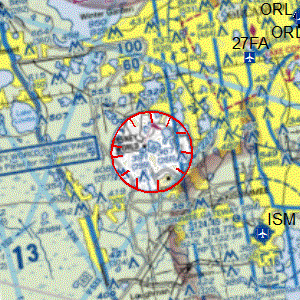
"shapes": [
        {
          "type": "circle",
          "radius": 3,
          "lat": 28.4125,
          "lon": -81.57222222,
          "txtName": "Area",
          "valDistVerUpper": 3000,
          "valDistVerLower": 0,
          "uomDistVerUpper": "FT",
          "uomDistVerLower": "FT"
        }
      ]
Simple Polygon
!
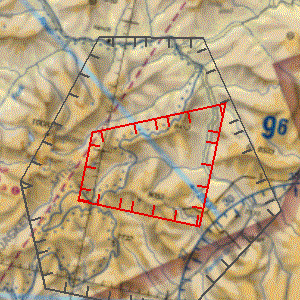
"shapes": [
        {
          "type": "poly",
          "points": [
            [
              45.18833333,
              -114.52583333
            ],
            [
              45.25972222,
              -114.30388889
            ],
            [
              45.1,
              -114.30388889
            ],
            [
              45.1,
              -114.52583333
            ]
          ],
          "txtName": "Hazard Area1",
          "valDistVerUpper": 14500,
          "valDistVerLower": 0,
          "uomDistVerUpper": "FT",
          "uomDistVerLower": "FT"
        }
      ]
Poly Arc
- Any shape with a arc point.
!
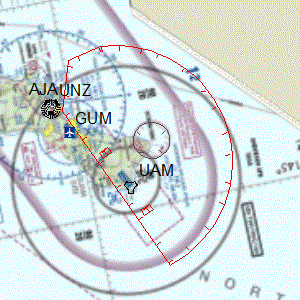
"shapes": [
        {
          "type": "polyarc",
          "points": [
            [
              13.64166667,
              145.13527778
            ],
            [
              13.47666667,
              144.74694444
            ],
            [
              13.51194444,
              144.63722222
            ],
            [
              13.5875,
              144.61944444
            ]
          ],
          "arcRadius": 15.3,
          "arcPoint": [
            13.64166667,
            145.13527778
          ],
          "all_points": [
            [
              13.64166667,
              145.13527778
            ],
            [
              13.47666667,
              144.74694444
            ],
            [
              13.51194444,
              144.63722222
            ],
            [
              13.5875,
              144.61944444
            ],
            [
              13.60962359,
              144.62337227
            ],
            [
              13.63154738,
              144.62777753
            ],
            [
              13.65301205,
              144.63412072
            ],
            #Many more points
          ],
          "txtName": "Area A",
          "valDistVerUpper": 200,
          "valDistVerLower": 2600,
          "uomDistVerUpper": "FL",
          "uomDistVerLower": "FT"
        },
]
- "points" represents only straight line points, can be used with "arcPoint" and "arcRadius" to create full shape
- "all_points" represents all points to create the entire polygon easily.
Poly Exclude
- Any shape, circle or poly that has parts that are excluded from TFR.
- Shape is returned as "all_points" only which represent one polygon excluding parts.
!
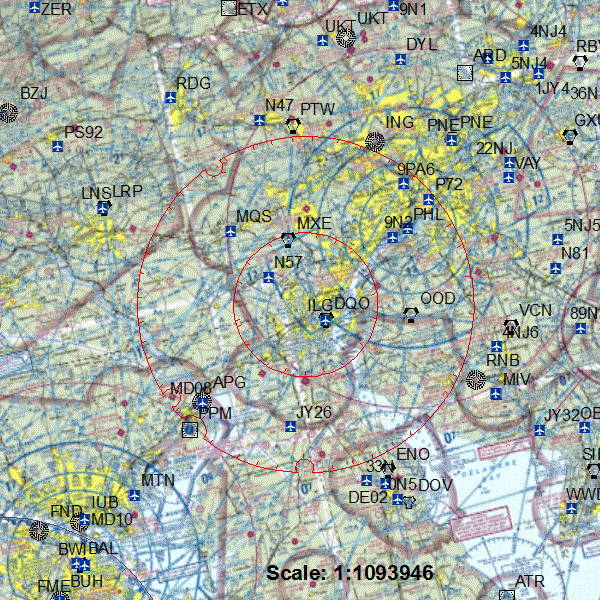
            "shapes": [
        {
          "type": "polyexclude",
          "all_points": [
            [
              40.16161713,
              -75.90540565
            ],
            [
              40.15632213,
              -75.92194558
            ],
            [
              40.13739634,
              -75.96895934
            ],
            [
              40.11538045,
              -76.01361666
            ],
            #Many more points
          ],
          "txtName": "Area A",
          "valDistVerUpper": 17999,
          "valDistVerLower": 0,
          "uomDistVerUpper": "FT",
          "uomDistVerLower": "FT"
        },
            ]
Line Buffer
!

 "shapes": [
                {
                    "type": "linebuffer",
                    "points": [
                        [
                            47.72194444,
                            -91.83277778
                        ],
                        [
                            47.66277778,
                            -91.90222222
                        ],
                        [
                            47.63,
                            -92.02638889
                        ]
                    ],
                    "valBuffer": "2",
                    "codeGeoFeatureType": "LINE",
                    "codeBufferBevel": "ROUNDED",
                    "all_points": [
                        [
                            47.63577472,
                            -92.07492876
                        ],
                      #Many more points
                    ],
                    "txtName": "Hazard Area1",
                    "valDistVerUpper": "5500",
                    "valDistVerLower": "0",
                    "uomDistVerUpper": "FT",
                    "uomDistVerLower": "FT",
                    "codeExclVerUpper": "INCLUDE",
                    "codeExclVerLower": "INCLUDE",
                    "isScheduledTfrArea": "FALSE"
                }
            ]
TFR JSON objects
Single TFR object from list w/o details parsed
    {
    "Date": "08/11/2021",
    "NOTAM": "1/4928",
    "Facility": "ZSE",
    "State": "OR",
    "Type": "HAZARDS",
    "Description": "CANYONVILLE, OR, Wednesday, August 11, 2021 through Wednesday, September 01, 2021 UTC",
    "Zoom": "",
    },
A detailed object when combined with info from list
{
    "Date": "08/11/2021",
    "NOTAM": "1/4928",
    "Facility": "ZSE",
    "State": "OR",
    "Type": "HAZARDS",
    "Description": "CANYONVILLE, OR, Wednesday, August 11, 2021 through Wednesday, September 01, 2021 UTC",
    "Zoom": "",
    "details": {
      "txtDescrPurpose": "TO PROVIDE A SAFE ENVIRONMENT FOR FIRE FIGHTING AVIATION OPS",
      "txtLocalName": "1/4928",
      "dateEffective": "2021-08-11T16:30:00",
      "dateExpire": "2021-09-01T05:00:00",
      "codeTimeZone": "UTC",
      "codeExpirationTimeZone": "UTC",
      "shapes": [
        {
          "type": "poly",
          "points": [
            [
              42.97138889,
              -123.265
            ],
            [
              42.975,
              -123
            ],
            [
              42.86666667,
              -123
            ],
            [
              42.82361111,
              -123.08805556
            ],
            [
              42.75555556,
              -123.0875
            ],
            [
              42.75333333,
              -123.26694444
            ]
          ],
          "txtName": "Hazard Area1",
          "valDistVerUpper": 8500,
          "valDistVerLower": 0,
          "uomDistVerUpper": "FT",
          "uomDistVerLower": "FT"
        }
      ]
    }
  }
Requirements
- html_table_parser.parser https://pypi.org/project/html-table-parser-python3/
- untangle https://pypi.org/project/untangle/
- pandas https://pypi.org/project/pandas/
1 maintainer

Metadata
1 maintainer
Release files for tfr-scraper 0.1.3
For a detailed explanation of source distributions (sdists) and built distributions (wheels), please see the package formats documentation.
Source distribution (sdist)
| File | Size | Uploaded | Provenance | Actions |
|---|---|---|---|---|
| tfr_scraper-0.1.3.tar.gz | 20.5 kB | Without provenance | Details for tfr_scraper-0.1.3.tar.gz |
Release files / tfr_scraper-0.1.3.tar.gz
| Download URL | tfr_scraper-0.1.3.tar.gz |
|---|---|
| Size | 20.5 kB |
| Tags | Source |
|
SHA-256 checksum How to use checksums |
674e5c78e80750e9b6d38075f9585eadb9444714757153a9893ce051625b11ae
|
|
BLAKE2b-256 checksum How to use checksums |
8c226fc45a8415265940a80f5379f88e60fbcfe675f20f16a7c700d408a68bd1
|
| Upload date | |
|
Uploaded using Trusted Publishing? What is trusted publishing? |
No |
| Uploaded via |
twine/5.1.1 CPython/3.11.4
|
Security for tfr-scraper 0.1.3
Provenance
Provenance describes where a file came from. On PyPI, provenance is shared via attestations, which provide a verifiable record of the build or publishing details. View details, limitations and caveats.
No provenance found
None of the files in this release were uploaded with provenance metadata.
A note on package security
PyPI is a repository for distributing packages, not a service for auditing them. While third-party security researchers and our staff do their best to detect and remove malicious packages, PyPI cannot guarantee the quality, security or suitability of any given package.
To learn more about protecting yourself from malicious actors, visit our package security documentation.














