
FAA TFR Scraper

Project description
TFR-Scraper
Scrapes TFRs from FAA site https://tfr.faa.gov/ and details for each TFR.
Install
pip install tfr-scraper
Functions
tfr_list() #Returns the basic list of TFRs
#convert_degrees boolean is optinal defaults to true, converts coordinates from dms to dd ("26.02333333N", 097.12833333W") >>  (26.02333333, -97.12833333)
parse_tfr(notam_number, convert_degrees) #Parses a notam number in full format like (1/8339) and will return the details of the tfr.
get_list_and_parse_all(convert_degrees) #Downloads TFR list and parses all combines details with list and returns it.
save_detailed_all(filepath) #Does get_list_and_parse_all() and saves as a json, filepath is optional default is ./detailed_tfrs.json
TFR/Shape types
- TFRs have many types wether it be just a circle or a polygon or a TFR can have multiple circles/polygons, this scraper will parse each.
- Below is an example of each and the type of shapes the parser will return in the shapes list for each when the details are parsed
Simple Circle
!
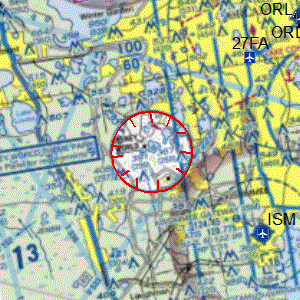
"shapes": [
        {
          "type": "circle",
          "radius": 3,
          "lat": 28.4125,
          "lon": -81.57222222,
          "txtName": "Area",
          "valDistVerUpper": 3000,
          "valDistVerLower": 0,
          "uomDistVerUpper": "FT",
          "uomDistVerLower": "FT"
        }
      ]
Simple Polygon
!
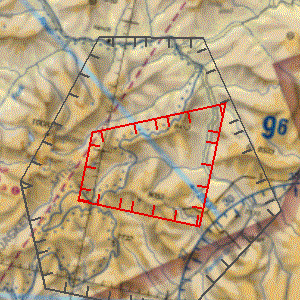
"shapes": [
        {
          "type": "poly",
          "points": [
            [
              45.18833333,
              -114.52583333
            ],
            [
              45.25972222,
              -114.30388889
            ],
            [
              45.1,
              -114.30388889
            ],
            [
              45.1,
              -114.52583333
            ]
          ],
          "txtName": "Hazard Area1",
          "valDistVerUpper": 14500,
          "valDistVerLower": 0,
          "uomDistVerUpper": "FT",
          "uomDistVerLower": "FT"
        }
      ]
Poly Arc
- Any shape with a arc point.
!
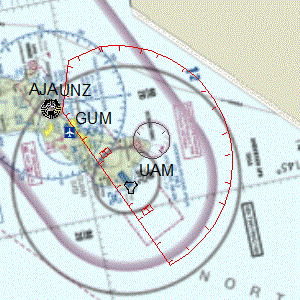
"shapes": [
        {
          "type": "polyarc",
          "points": [
            [
              13.64166667,
              145.13527778
            ],
            [
              13.47666667,
              144.74694444
            ],
            [
              13.51194444,
              144.63722222
            ],
            [
              13.5875,
              144.61944444
            ]
          ],
          "arcRadius": 15.3,
          "arcPoint": [
            13.64166667,
            145.13527778
          ],
          "all_points": [
            [
              13.64166667,
              145.13527778
            ],
            [
              13.47666667,
              144.74694444
            ],
            [
              13.51194444,
              144.63722222
            ],
            [
              13.5875,
              144.61944444
            ],
            [
              13.60962359,
              144.62337227
            ],
            [
              13.63154738,
              144.62777753
            ],
            [
              13.65301205,
              144.63412072
            ],
            #Many more points
          ],
          "txtName": "Area A",
          "valDistVerUpper": 200,
          "valDistVerLower": 2600,
          "uomDistVerUpper": "FL",
          "uomDistVerLower": "FT"
        },
]
- "points" represents only straight line points, can be used with "arcPoint" and "arcRadius" to create full shape
- "all_points" represents all points to create the entire polygon easily.
Poly Exclude
- Any shape, circle or poly that has parts that are excluded from TFR.
- Shape is returned as "all_points" only which represent one polygon excluding parts.
!
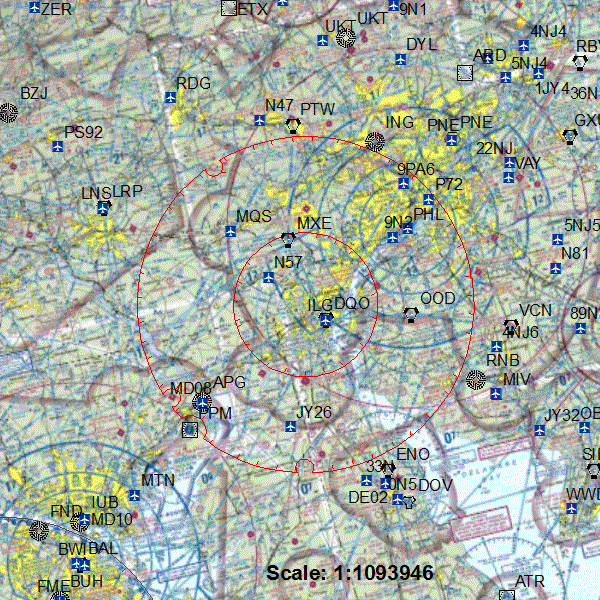
            "shapes": [
        {
          "type": "polyexclude",
          "all_points": [
            [
              40.16161713,
              -75.90540565
            ],
            [
              40.15632213,
              -75.92194558
            ],
            [
              40.13739634,
              -75.96895934
            ],
            [
              40.11538045,
              -76.01361666
            ],
            #Many more points
          ],
          "txtName": "Area A",
          "valDistVerUpper": 17999,
          "valDistVerLower": 0,
          "uomDistVerUpper": "FT",
          "uomDistVerLower": "FT"
        },
            ]
TFR JSON objects
Single TFR object from list w/o details parsed
    {
    "Date": "08/11/2021",
    "NOTAM": "1/4928",
    "Facility": "ZSE",
    "State": "OR",
    "Type": "HAZARDS",
    "Description": "CANYONVILLE, OR, Wednesday, August 11, 2021 through Wednesday, September 01, 2021 UTC",
    "Zoom": "",
    },
A detailed object when combined with info from list
{
    "Date": "08/11/2021",
    "NOTAM": "1/4928",
    "Facility": "ZSE",
    "State": "OR",
    "Type": "HAZARDS",
    "Description": "CANYONVILLE, OR, Wednesday, August 11, 2021 through Wednesday, September 01, 2021 UTC",
    "Zoom": "",
    "details": {
      "txtDescrPurpose": "TO PROVIDE A SAFE ENVIRONMENT FOR FIRE FIGHTING AVIATION OPS",
      "txtLocalName": "1/4928",
      "dateEffective": "2021-08-11T16:30:00",
      "dateExpire": "2021-09-01T05:00:00",
      "codeTimeZone": "UTC",
      "codeExpirationTimeZone": "UTC",
      "shapes": [
        {
          "type": "poly",
          "points": [
            [
              42.97138889,
              -123.265
            ],
            [
              42.975,
              -123
            ],
            [
              42.86666667,
              -123
            ],
            [
              42.82361111,
              -123.08805556
            ],
            [
              42.75555556,
              -123.0875
            ],
            [
              42.75333333,
              -123.26694444
            ]
          ],
          "txtName": "Hazard Area1",
          "valDistVerUpper": 8500,
          "valDistVerLower": 0,
          "uomDistVerUpper": "FT",
          "uomDistVerLower": "FT"
        }
      ]
    }
  }
Requirements
- html_table_parser.parser https://pypi.org/project/html-table-parser-python3/
- untangle https://pypi.org/project/untangle/
- pandas https://pypi.org/project/pandas/
Release history Release notifications | RSS feed


Download files
Download the file for your platform. If you're not sure which to choose, learn more about installing packages.
Source Distribution
tfr_scraper-0.0.6.tar.gz
(18.0 kB
view details)
Built Distribution
Filter files by name, interpreter, ABI, and platform.
If you're not sure about the file name format, learn more about wheel file names.
Copy a direct link to the current filters
File details
Details for the file tfr_scraper-0.0.6.tar.gz.
File metadata
- Download URL: tfr_scraper-0.0.6.tar.gz
- Upload date:
- Size: 18.0 kB
- Tags: Source
- Uploaded using Trusted Publishing? No
- Uploaded via: twine/3.4.2 importlib_metadata/4.6.4 pkginfo/1.7.1 requests/2.26.0 requests-toolbelt/0.9.1 tqdm/4.62.1 CPython/3.9.6
File hashes
| Algorithm | Hash digest | |
|---|---|---|
| SHA256 |
2a19d0a8ce4563dcd38a55783b705b0f2e4a9a4bc70a05e48460839f734115ad
|
|
| MD5 |
3993339e365cce9e5b408f9d39055e25
|
|
| BLAKE2b-256 |
0d6fd9b3a4833bf3f426180c319dff6d054f42f7a4ba1c84071fcd9df416fa9d
|
File details
Details for the file tfr_scraper-0.0.6-py3-none-any.whl.
File metadata
- Download URL: tfr_scraper-0.0.6-py3-none-any.whl
- Upload date:
- Size: 18.1 kB
- Tags: Python 3
- Uploaded using Trusted Publishing? No
- Uploaded via: twine/3.4.2 importlib_metadata/4.6.4 pkginfo/1.7.1 requests/2.26.0 requests-toolbelt/0.9.1 tqdm/4.62.1 CPython/3.9.6
File hashes
| Algorithm | Hash digest | |
|---|---|---|
| SHA256 |
a2739249b71e391c5c9397ff644a75a38befbbce61cdc116bb0de94d7a7d258e
|
|
| MD5 |
75a229f613a28a0e165f7044bc2682d8
|
|
| BLAKE2b-256 |
8cfcc81037c71ae0632af492b2f1b0374ca355cf67fb8cf56f567401059c97c6
|






