

tg-rich-converter







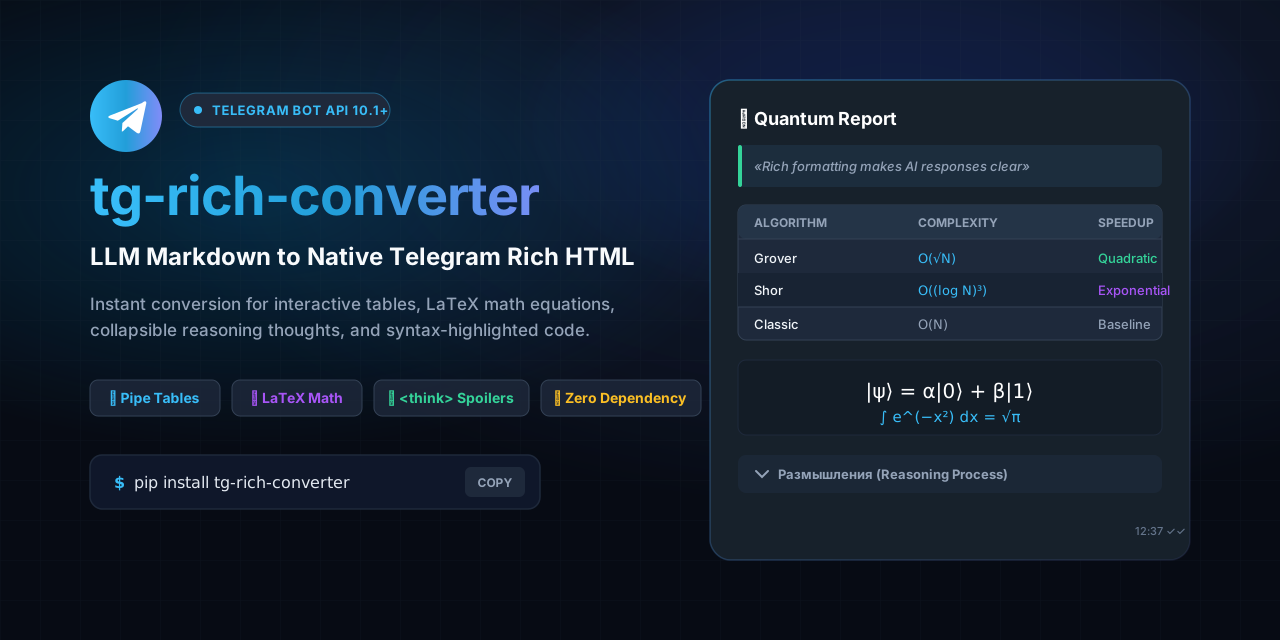
A lightweight, zero-dependency Python library that converts standard LLM Markdown, LaTeX formulas, thinking processes, and tables into native Telegram Bot API 10.1+ Rich HTML (sendRichMessage).
Why tg-rich-converter?
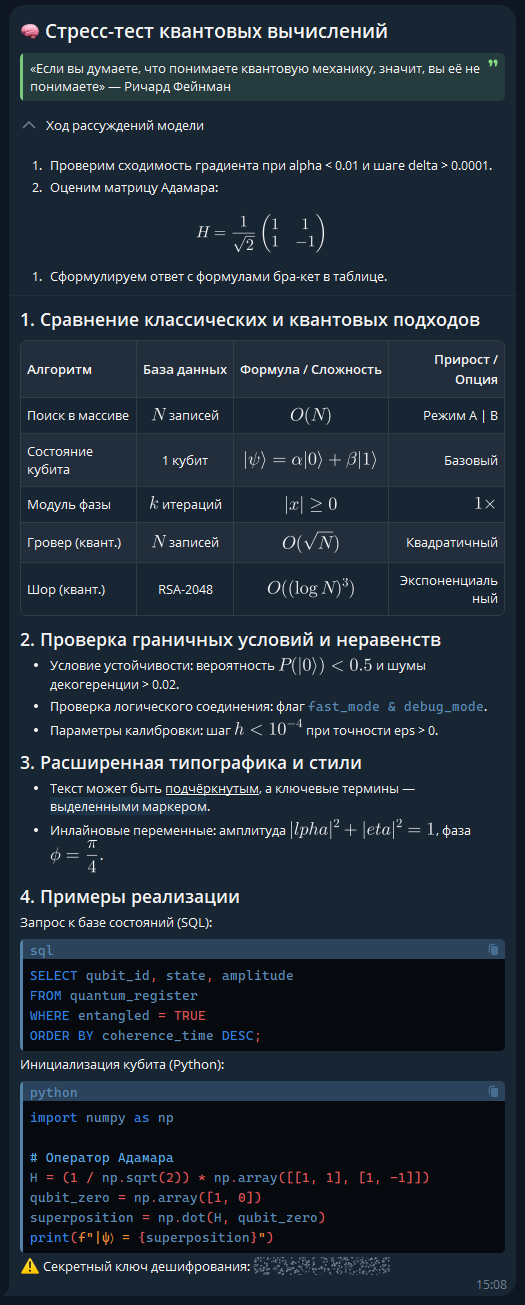
Starting with Telegram Bot API 10.1, Telegram introduced Rich Messages (sendRichMessage) supporting:
- Messages up to 32,768 characters (no more 4,096-character limit!).
- Native interactive tables with borders and striping.
- Native LaTeX math rendering (both inline and display equations).
- Expandable spoiler/details blocks for reasoning models (
DeepSeek-R1,OpenAI o1/o3,Qwen,Gemini). - Native lists and advanced typography (
<ul>,<ol>,<u>,<mark>).
However, LLMs (OpenAI, Anthropic, DeepSeek, Ollama) still output plain Markdown and LaTeX. tg-rich-converter bridges this gap seamlessly in a single function call or via the CLI command line tool.
Features
- 📊 Robust Native Tables: Converts standard Markdown pipe tables into
<table bordered striped>with column alignment (left,center,right). Safely handles formulas with pipes ($|\psi\rangle$,$|x| \ge 0$) and escaped pipes (\|) inside table cells without breaking columns. - 🧮 LaTeX Math: Converts
$$...$$into<tg-math-block>and$x$into<tg-math>. - 🧠 Customizable AI Thinking Blocks: Converts
<think>...</think>tags from reasoning models into expandable<details><summary>Размышления</summary>...</details>blocks with configurable summary titles. - 🛡️ HTML-Safe: Automatically escapes raw
<,>, and&in regular text (e.g. mathematical conditions likex < 5andy > 10), completely preventing Telegram API400 Bad Request: can't parse entitieserrors. - 📋 Native Lists: Converts unordered (
-,*,+) and ordered (1.) lists into native<ul>and<ol>tags, avoiding conflicts between asterisk bullet markers and italics. - 🎨 Rich Typography: Supports bold (
**), italic (*/_), strikethrough (~~), underline (++text++), highlight (==text==), and spoilers (||spoiler||) with snake_case protection. - 💻 Syntax-Highlighted Code: Converts markdown code fences into
<pre><code class="language-...">preserving language classes, indentation, and copy buttons. - ✂️ Smart Message Splitter: Safely splits long texts up to 32,768 (Telegram Rich limit) or 4,096 (Classic limit) characters. Automatically closes and re-opens nested tags with attributes (
<pre><code class="...">,<blockquote>), and protects LaTeX formulas from fragmentation. - 👁️ Local HTML Preview: Instantly generates a standalone
preview.htmlstyled with authentic Telegram Web dark theme and KaTeX client-side math rendering to visually inspect output without launching a bot. - 🚀 Built-in CLI (
tg-rich): Fast command-line utility with TrueColor ANSI logo, preview generator, auto-opening in browser, pipeline support (stdin/stdout), and batch message splitter. - ⚡ Thread-Safe & Zero Dependencies: Pure standard Python (
re,html,argparse). Fully reentrant and async-safe for high-concurrency bot environments.
Installation
pip install tg-rich-converter
Command-Line Interface (CLI)
After installation, the tg-rich command is available in your terminal:
1. Instant Preview in Browser
Convert a markdown file and open the interactive Telegram preview directly in your default browser:
tg-rich prompt_response.md --preview --open
2. Convert to Rich HTML File
tg-rich document.md -o output.html
3. Pipeline / Stdin Mode
cat llm_output.md | tg-rich > telegram_message.html
4. Smart Message Splitting
Split a large document into chunks respecting Telegram character limits:
# Split for Rich Messages (32k limit)
tg-rich big_report.md --split

# Split for Classic Messages (4k limit) into separate files
tg-rich big_report.md --split --limit 4096 -o chunk.html
CLI Options Reference
| Flag | Description | Default |
|---|---|---|
input_file |
Path to markdown file (or - / pipe for stdin) |
- |
-o, --output FILE |
Write converted HTML to file instead of stdout | stdout |
-p, --preview [FILE] |
Generate standalone preview.html with KaTeX & Telegram Dark theme | preview.html |
--open |
Automatically open the preview in default web browser | False |
-s, --split |
Split long message into safe Telegram chunks | False |
-l, --limit INT |
Maximum character length for splitting | 32768 |
-t, --thinking-summary TEXT |
Custom header for <think> reasoning blocks |
Размышления |
-q, --quiet |
Suppress banner and progress messages in stderr | False |
-v, --version |
Display current library version |
Quick Start (Python)
from tg_rich_converter import to_rich

llm_output = """
# Quantum Computing Report

| Algorithm | State | Complexity | Option |
|:----------|:-----:|:----------:|-------:|
| Linear Search | $N$ items | $O(N)$ | Mode A \\| B |
| State Vector  | $|\\psi\\rangle$ | $O(1)$ | Basic |

### Key Formula
$$|\\psi\\rangle = \\alpha |0\\rangle + \\beta |1\\rangle$$

Stability requires delta < 0.05 and alpha > 0.

<think>
Evaluating time complexity and qubit entanglement...
</think>
"""

# Default thinking summary is "Размышления"
rich_html = to_rich(llm_output)

# Or specify a custom summary:
rich_html_en = to_rich(llm_output, thinking_summary="Reasoning Process")
Smart Message Splitting (Long Outputs)
When LLM output exceeds Telegram limits (32,768 chars for Rich Messages or 4,096 chars for standard messages), naive slicing breaks open HTML tags and crashes the bot. Use split_rich_message:
from tg_rich_converter import split_rich_message

# Automatically converts Markdown to Rich HTML and splits into safe chunks
chunks = split_rich_message(
    long_llm_response,
    max_length=32768,      # 32,768 for Rich Messages (default) or 4,096 for Classic
    is_markdown=True,      # Automatically runs to_rich()
    thinking_summary="Reasoning"
)

# Each chunk is guaranteed to be valid HTML with all open tags closed and reopened
for chunk in chunks:
    await bot.send_rich_message(chat_id=chat_id, rich_message={"html": chunk})
Local HTML Preview
Visualize how your message will look in Telegram Desktop/Mobile without running a bot or sending messages:
from tg_rich_converter import save_preview

# Generates preview.html with Telegram dark theme, KaTeX formulas, and interactive spoilers
save_preview(
    llm_output,
    file_path="preview.html",
    title="LLM Telegram Preview"
)
Double click preview.html to open it in your browser!
Framework Integrations
1. aiogram (3.31+)
from aiogram import Bot
from tg_rich_converter import to_rich

bot = Bot(token="YOUR_BOT_TOKEN")

rich_html = to_rich(llm_response)
await bot.send_rich_message(
    chat_id=chat_id,
    rich_message={"html": rich_html}
)
2. pyTelegramBotAPI (telebot 4.36+)
import telebot
from tg_rich_converter import to_rich

bot = telebot.TeleBot("YOUR_BOT_TOKEN")

rich_html = to_rich(llm_response)
bot.send_rich_message(
    chat_id=chat_id,
    rich_message={"html": rich_html}
)
3. Direct HTTP (requests / httpx / urllib)
import requests
from tg_rich_converter import to_rich

rich_html = to_rich(llm_response)

requests.post(
    f"https://api.telegram.org/bot{BOT_TOKEN}/sendRichMessage",
    json={
        "chat_id": chat_id,
        "rich_message": {
            "html": rich_html
        }
    }
)
Testing
Run unit tests locally:
pytest
License
MIT License. Free for commercial and personal use.
1 maintainer

Release files for tg-rich-converter 0.4.1
For a detailed explanation of source distributions (sdists) and built distributions (wheels), please see the package formats documentation.
Source distribution (sdist)
| File | Size | Uploaded | |
|---|---|---|---|
| tg_rich_converter-0.4.1.tar.gz | 127.6 kB | Details |
Built distribution (wheel)
| File | Interpreter | ABI | Platform | Reset |
|---|---|---|---|---|
| tg_rich_converter-0.4.1-py3-none-any.whl | Python 3 | none | any | Details |
Total release size: 148.4 kB
Release files / tg_rich_converter-0.4.1.tar.gz
| Download URL | tg_rich_converter-0.4.1.tar.gz |
|---|---|
| Size | 127.6 kB |
| Tags | Source |
|
SHA-256 checksum How to use checksums |
87e1a3ab410b5fcacef2099357e9236e34de29d7f86292a88e2468de02563aa3
|
|
BLAKE2b-256 checksum How to use checksums |
ce561442c720a51fea389634d4d23c0e79809fb93e0b8fa46425763c03e2fd1e
|
| Upload date | |
|
Uploaded using Trusted Publishing? What is trusted publishing? |
Yes |
| Uploaded via |
twine/7.0.0 CPython/3.13.14
|
Provenance
Provenance describes where a file came from. On PyPI, provenance is shared via attestations, which provide a verifiable record of the build or publishing details. View details, limitations and caveats.


PyPI Publish Attestation
PyPI verified that this artifact, at this checksum, originated from the publisher listed below.
Signed by GitHub Actions, verified by PyPI on Sep 20, 2026.
Transparency logRelease files / tg_rich_converter-0.4.1-py3-none-any.whl
| Download URL | tg_rich_converter-0.4.1-py3-none-any.whl |
|---|---|
| Size | 20.8 kB |
| Tags | Python 3 |
|
SHA-256 checksum How to use checksums |
0e34bb4a48ea0fec3b83aafabce04b43e071ebe1606da7dd748b482242b84e52
|
|
BLAKE2b-256 checksum How to use checksums |
54028593102c5616f4327bf9db4aa308e5bb53debf815d09eae4e00b563f52a6
|
| Upload date | |
|
Uploaded using Trusted Publishing? What is trusted publishing? |
Yes |
| Uploaded via |
twine/7.0.0 CPython/3.13.14
|
Provenance
Provenance describes where a file came from. On PyPI, provenance is shared via attestations, which provide a verifiable record of the build or publishing details. View details, limitations and caveats.
PyPI Publish Attestation
PyPI verified that this artifact, at this checksum, originated from the publisher listed below.
Signed by GitHub Actions, verified by PyPI on Sep 20, 2026.
Transparency log













