
Telegram Odesli Bot
Send a song link in any (supported) music streaming service and get back a message with links in other services.
Add in Telegram: @odesli_bot
It's useful but still work in progress. Some turbulence is expected.






What is it for?
You love to share music with your friends (or be shared with), but you settled in different streaming services? With the help of this bot you can share any song link to the Bot and get all other links back in reply.
Powered by the great Odesli (former Songlink) service.
You can message the bot directly, invite it to group chats or use an inline
mode (type @odesli_bot <URL>). In group chats the bot will react only to
messages with music streaming links (it will also skip messages marked with
special token !skip). You can promote the bot to a group admin and it
will remove original message so that the chat remains tidy.
| Original message | Bot's replay |
|---|---|
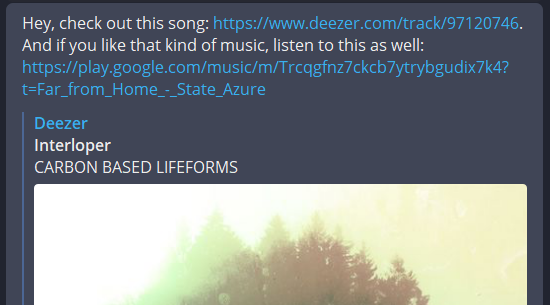 |
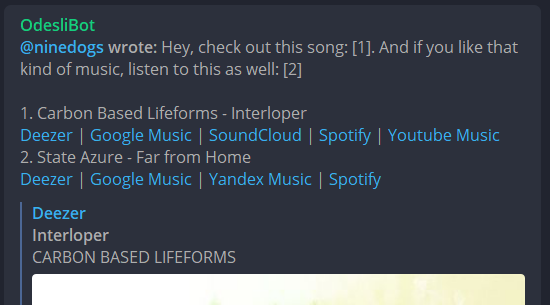 |
Features
- Inline mode
- Inline search mode
- Private chat mode
- Group chat mode
Supported services
Currently, the following services are supported:
- Deezer
- Google Music
- SoundCloud
- Yandex Music
- Spotify
- YouTube Music
- YouTube
- Apple Music
- Tidal
Note that bot doesn't react to YouTube links in group chats. Reasons are here.
Privacy considerations
The bot have to have access to messages in group chats to operate (that is, it operates with disabled privacy mode). It does not store nor transfer messages anywhere. However, the only way to be completely private is to read through source code in this repository and run your copy of the bot (see section below). Or simply create a special group only for music sharing and where no sensitive information will be posted.
Running your own copy
Prerequisites
You need a Telegram bot
token to run
your copy of the bot. Don't worry, it can be obtained easily. Follow the
instructions to create a
new bot (you can set a name and a username to whatever you want). All you
need is a string like 110201543:AAHdqTcvCH1vGWJxfSeofSAs0K5PALDsaw -
this is your new bot token.
Additionally, disable privacy mode for your bot in a dialog with @BotFather: "Group Privacy" - "Turn off" (that is for the bot to be able to read group messages).
Bot from this repository will looks for TG_ODESLI_BOT_TG_API_TOKEN
environment variable on start, thus you must set it either in shell or
via .env file:
$ echo "<your_token>" > .env
$ # OR
$ TG_ODESLI_BOT_TG_API_TOKEN=<your_token> <bot_run_command (see below)>
Ones you obtain a Telegram bot token, you can run bot using either Python (3.10 or 3.11) or Docker.
Run PyPI version
Create virtual environment, install tg-odesli-bot package and run the bot
with tg-odesli-bot command:
$ python -m venv botenv
$ source botenv/bin/activate
$ pip install tg-odesli-bot
$ TG_ODESLI_BOT_TG_API_TOKEN=<your_token> tg-odesli-bot
Run with Docker
Set TG_ODESLI_BOT_TG_API_TOKEN environment variable and run the image
9dogs/tg-odesli-bot (in order to use the .env file, mount it to
/opt/tg-odesli-bot/.env):
$ docker run --rm -it -v /path/to/.env:/opt/tg-odesli-bot/.env 9dogs/tg-odesli-bot
# OR
$ TG_ODESLI_BOT_TG_API_TOKEN=<your_token> docker run -it --rm 9dogs/tg-odesli-bot
Run version from the repository
Clone this repository, install
poetry, copy .env file
into the project's root directory and run the bot:
$ git clone https://github.com/9dogs/tg-odesli-bot.git && cd tg-odesli-bot
# Install dependencies
$ poetry install
# If you have token in .env file
$ cp /path/to/.env ./
$ poetry run tg-odesli-bot
# If you specify token via shell env var
$ TG_ODESLI_BOT_TG_API_TOKEN=<your_token> poetry run tg-odesli-bot
Contributing
Contributions are welcome via GitHub pull requests. The easiest way to bootstrap
development environment is to build builder target of Docker image:
$ git clone https://github.com/9dogs/tg-odesli-bot.git && cd tg-odesli-bot
$ docker build -t 9dogs/tg-odesli-bot:dev --target=builder --build-arg poetry_args= .
Then you can run a shell inside the container:
$ docker run -it --rm -v %cd%:/opt/tg-odesli-bot -v /opt/tg-odesli-bot/.venv 9dogs/tg-odesli-bot:dev bash
(container)$ make lint test
1 maintainer

Metadata
1 maintainer
Release files for tg_odesli_bot 0.4.2
For a detailed explanation of source distributions (sdists) and built distributions (wheels), please see the package formats documentation.
Source distribution (sdist)
| File | Size | Uploaded | |
|---|---|---|---|
| tg_odesli_bot-0.4.2.tar.gz | 28.9 kB | Details |
Built distribution (wheel)
| File | Interpreter | ABI | Platform | Reset |
|---|---|---|---|---|
| tg_odesli_bot-0.4.2-py3-none-any.whl | Python 3 | none | any | Details |
Total release size: 57.0 kB
Release files / tg_odesli_bot-0.4.2.tar.gz
| Download URL | tg_odesli_bot-0.4.2.tar.gz |
|---|---|
| Size | 28.9 kB |
| Tags | Source |
|
SHA-256 checksum How to use checksums |
119200edaaac5c259bd6044814e0b7ebb241805375b57f75bc51a4b0de1f8ba6
|
|
BLAKE2b-256 checksum How to use checksums |
9923376b064c92688729bb35a5de61543cb10935b73b50f189b9f834310725b8
|
| Upload date | |
|
Uploaded using Trusted Publishing? What is trusted publishing? |
No |
| Uploaded via |
poetry/2.4.3 CPython/3.11.16 Linux/6.17.0-1022-azure
|
Release files / tg_odesli_bot-0.4.2-py3-none-any.whl
| Download URL | tg_odesli_bot-0.4.2-py3-none-any.whl |
|---|---|
| Size | 28.1 kB |
| Tags | Python 3 |
|
SHA-256 checksum How to use checksums |
c8254b1748eea2faabf2d9fd5e1f7874ba841646f058dcf6dcdc18394b6a245f
|
|
BLAKE2b-256 checksum How to use checksums |
825a39e64474f65b0eca7aef65bbb808ee5cc882d141367a1ce18d03dde776cf
|
| Upload date | |
|
Uploaded using Trusted Publishing? What is trusted publishing? |
No |
| Uploaded via |
poetry/2.4.3 CPython/3.11.16 Linux/6.17.0-1022-azure
|














