
Tgback-XQt is a Qt frontend for tgback-X

Project description
TGBACK-XQt — a Qt implementation of TGBACK-X
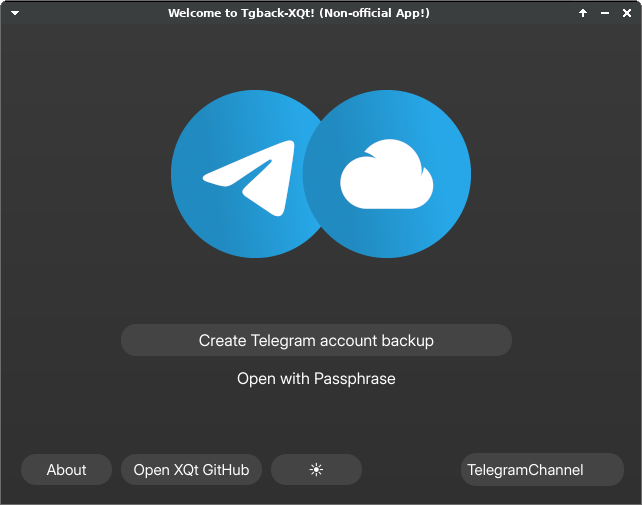
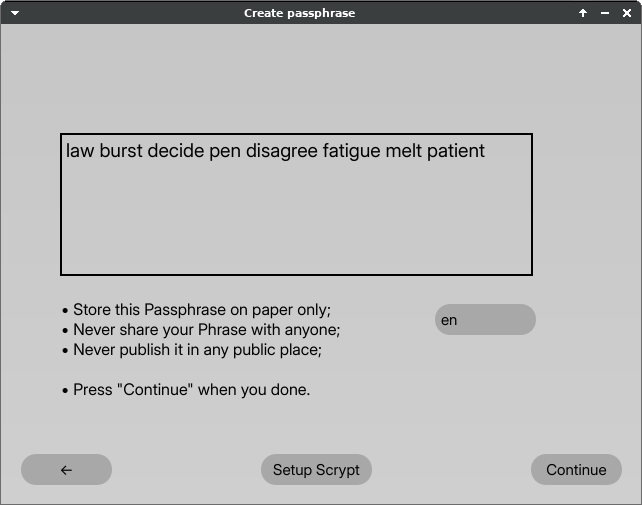
TGBACK-XQt is a GUI frontend to TGBACK-X — a little protocol for making encrypted Telegram account backups. With XQt you can easily generate a special phrase (or use your own password) to get into your account and scan it for login codes—thus, bypass login through your phone in case you don't have access to it anymore.
TGBACK-X (and so XQt) does not make any backup files. Instead, we rely on a Providers to store our encrypted backup. Currently, only one Provider is supported — the TelegramChannel. Experienced enough with Python users may create their own Providers, and we may extend the XQt with them in future.
See TGBACK-X repository.
Quick FAQ
Why does this App ask me about my Phone number, Password and Login code?
The encrypted backup is, in fact, encrypted Telegram session with some additional data to it. Quite obviously, we can't obtain Session without signing into your account.
Does this App share any Data with dev?
No. We use your login credentials only to sign into your account, obtain Session, encrypt it and push to Provider to store. Except encrypted backup going to Provider, Zero data leaves your computer. Check the project's code.
!! WARNING !!
Use only verified builds! Anyone can modify code and make their own executable that will do sketchy, malicious things. You are recommended to build your own executable (See instructions below) from this repository, install only from official sources (e.g PyPI) or use my signed builds either from Releases or My Telegram channel.
Is typing Phrase enough to access my Account?
On backup creation process you will either randomly generate your Phrase (8 words) or type your own Password (use this ONLY if you have real Password Generator which produce secure passwords). In the next step, you will be asked for your Birthday — we will mix this data to your Phrase to produce strong encryption Key data. If you (and only if you) experienced enough user you can also tinker with the Scrypt params — for example, you can change default Salt.
ANYONE who will be able to type your Phrase (or Password), Birthday and Scrypt params will get access to your decrypted backup data — Session, and so your Account. You should treat this data as a Bitcoin phrase and never share it with anyone.
Typically, if you use XQt on a trusted Computer without malwares then it's already safe enough and impossible for attacker to get into your account. You can destroy backup Session at any time either from XQt app itself or via Telegram Settings → Devices → "Click on TGBACK-XQt Session" → Terminate Session if you see some suspicious activity.
The Backup Session should not be active or Online at all, except when You Open in through this App.
How to keep this backup alive for long time?
Telegram Sessions disconnect automatically after some time, specifically, after "Telegram Settings → Devices → If inactive for" time. You need to open your backups periodically (at least once in "If inactive for" time) through XQt App.
Can this App help me restore access to my already lost account?
Unfortunately, I'm not a magician. If you can't Sign-in your account, — you can't create backup. Moreover, active TGBACK-X backup can give you only login code, we do not store your password.
Is there alternative?
You can use my old project — TGBACK. It creates file backups. Or you can just Sign into the Telegram Desktop, set Local password and copy the "tdata" folder.
Installation
To build the TGBACK-X-Qt you will need to have at least Python 3.9.
Windows builds (.EXE)
You can use already created executable builds if you're on Windows.
See Releases GitHub page or navigate to the official TGBACK dev.channel
Build the TGBACK-X-Qt
Install with PIP
You can install latest stable release of the tgback-x-qt from PyPI:
# You can add [build] if you want to install full PySide6
pip install -U tgback-x-qt # tgback-x-qt[build] for devs
Clone & Install
Alternatively, you can clone this repository and build from the source.
This can give you more control over the code:
python -m venv tgback-x-qt-env
cd tgback-x-qt-env && . bin/activate

git clone https://github.com/NotStatilko/tgback-x-qt
pip install ./tgback-x-qt
PyInstaller
python -m venv tgback-x-qt-env
cd tgback-x-qt-env && . bin/activate

pip install pyinstaller

git clone https://github.com/NotStatilko/tgback-x-qt
pip install ./tgback-x-qt

cd tgback-x-qt/pyinstaller
pyinstaller tgback-x-qt.spec

# Run the executable
dist/tgback-x-qt.exe
Please note that You can also set TGBX_NON_ONEFILE env variable to build without packing
into one executable file & feel free to remove the tgback-x-qt-env folder after work was done.
Usage
Just type tgback-x-qt in your Terminal or execute .exe file.
Some additional Environment Variables exist:
$TGBX_DARK_MODE — enable Dark mode if 1, Bright otherwise. None is Auto;
$TGBX_APP_STYLE — pyside6 style, e.g Windows10 or Fusion. Fusion if None;
$TGBX_LAUNCH_CONSOLE — launch console on App start if present in Environment;
$TGBX_API_ID — set your own API_ID (my.telegram.org) [recommended];
$TGBX_API_HASH — set your own API_HASH (my.telegram.org) [recommended];
Bug reports
Feel free to report some problems (I believe there can be many) on the GitHub Issue tab.
Release history Release notifications | RSS feed

Download files
Download the file for your platform. If you're not sure which to choose, learn more about installing packages.
Source Distribution
Built Distribution
Filter files by name, interpreter, ABI, and platform.
If you're not sure about the file name format, learn more about wheel file names.
Copy a direct link to the current filters
File details
Details for the file tgback_x_qt-0.1.tar.gz.
File metadata
- Download URL: tgback_x_qt-0.1.tar.gz
- Upload date:
- Size: 6.1 MB
- Tags: Source
- Uploaded using Trusted Publishing? No
- Uploaded via: twine/4.0.2 CPython/3.11.2
File hashes
| Algorithm | Hash digest | |
|---|---|---|
| SHA256 |
0be5f961a6e4e769feee8c949e5e2b6b6eb794ed4aa04e63d30b79d44e119181
|
|
| MD5 |
a2546afa4ab12cb2ec0f2e2179d6eb8d
|
|
| BLAKE2b-256 |
f1460863144166a8112d7befb4684cab69b899db68015ace4c4936adaed89eb8
|
File details
Details for the file tgback_x_qt-0.1-py3-none-any.whl.
File metadata
- Download URL: tgback_x_qt-0.1-py3-none-any.whl
- Upload date:
- Size: 6.3 MB
- Tags: Python 3
- Uploaded using Trusted Publishing? No
- Uploaded via: twine/4.0.2 CPython/3.11.2
File hashes
| Algorithm | Hash digest | |
|---|---|---|
| SHA256 |
eb4f7c2224853b855fb6b194e12d5320e2f37eeb6c5eb3d3afdaf80c4b1403ae
|
|
| MD5 |
36acbbdc98276c2fa863f04e5aa5305b
|
|
| BLAKE2b-256 |
1e3377e6d8e602296f37021389023d9ac6be151061797a82a45907117324e8d4
|






